Windows 8 JavaScript Apps –
      getting it right

brendan.kowitz@readify.net   http://www.kowitz.net   @brendankowitz
1   • Introduction

    •   WinJs
    •   Testing
2   •   TypeScript
    •   Using C# Libraries
    •   Debugging

3   • Wrapup
Why use WinJS?
• Can still use C# libraries
• Power of CSS3 and HTML5
• WinJS’s bindings to native controls and
  also has many JS-only extensions for Win8
• JavaScript was always ASYNC
• Better than XAML
Introducing “Sorty”
Elo
Getting started with WinJs
• VS2012 (duh)
  – VS 2012 Web Essentials
  – Blend for Visual Studio


• Online: Roadmap for Windows Store apps
  using JavaScript
  – http://is.gd/ClIOax
So it’s like making a web site?…
•   Its HTML5, JS and CSS
•   Can use a large number of existing JS libs
•   You have some browser limitations
•   Watch out for DOM manipulation errors
…but not
• COM Wrapped in JavaScript
• Exception driven development
• You don’t have network latency to load
  resources
• You don’t have traditional page events
• Tombstoning
• You don’t _need_ jQuery
3rd Party JS Controls
• Existing JavaScript plugins _can_
  – Produce problematic HTML
  – Break Windows 8 UX guides
• Stick with shipped controls
• Or build your own
• Use those specifically created via a vendor
  (Telerik etc)
Testing
• C# code can take advantage of built-in
  Visual Studio Testing framework
• JS can use Mocha or other JS testing
  libraries
Testing demo
Using C# Libraries
• Can only reference WinMD libraries
• WinMD libraries can reference portable
  and Windows Store libraries
• Unit testing supported
• WinMD libraries CAN reference other
  Windows Store and Portable Libraries
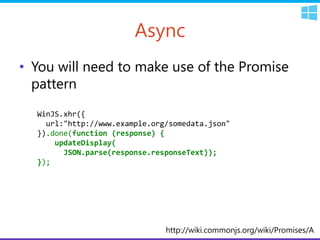
Async
• You will need to make use of the Promise
  pattern
  WinJS.xhr({
    url:"http://www.example.org/somedata.json"
  }).done(function (response) {
      updateDisplay(
        JSON.parse(response.responseText));
  });


                               http://wiki.commonjs.org/wiki/Promises/A
Libraries
• Portable libraries
• WinMD libraries
• Windows Store Libraries
Consuming C# from WinJS
Typescript for WinJs?
• Yes.
• Windows 8 & VS2012
• Download the TypeScript plugin:
  http://go.microsoft.com/fwlink/?LinkID=26
  6563
• VS 2012 Web Essentials:
  http://visualstudiogallery.msdn.microsoft.c
  om/07d54d12-7133-4e15-becb-
  6f451ea3bea6
TypeScript in WinJS
Storage
• Local storage
• Roaming storage
• Offline storage
  – IndexDB
Debugging
• You can debug in JS
• You can debug in C#
• No, you can’t debug across both (yet)
Gotchas
• DEBUGGING. – If using C# Libraries with JS
• WinJS adds crazy inline stuff to the DOM
Getting it together
Discussion
• Do you currently have a WinJS app?
• Would you consider writing a WinJS app?
• Any other questions?
brendan.kowitz@readify.net

Thank you.                     http://www.kowitz.net

                               @brendankowitz


     http://hg.kowitz.net/ddd/2012-Brisbane

Windows 8 javascript apps – getting it right

  • 1.
    Windows 8 JavaScriptApps – getting it right brendan.kowitz@readify.net http://www.kowitz.net @brendankowitz
  • 2.
    1 • Introduction • WinJs • Testing 2 • TypeScript • Using C# Libraries • Debugging 3 • Wrapup
  • 3.
    Why use WinJS? •Can still use C# libraries • Power of CSS3 and HTML5 • WinJS’s bindings to native controls and also has many JS-only extensions for Win8 • JavaScript was always ASYNC • Better than XAML
  • 4.
  • 5.
  • 6.
    Getting started withWinJs • VS2012 (duh) – VS 2012 Web Essentials – Blend for Visual Studio • Online: Roadmap for Windows Store apps using JavaScript – http://is.gd/ClIOax
  • 7.
    So it’s likemaking a web site?… • Its HTML5, JS and CSS • Can use a large number of existing JS libs • You have some browser limitations • Watch out for DOM manipulation errors
  • 8.
    …but not • COMWrapped in JavaScript • Exception driven development • You don’t have network latency to load resources • You don’t have traditional page events • Tombstoning • You don’t _need_ jQuery
  • 9.
    3rd Party JSControls • Existing JavaScript plugins _can_ – Produce problematic HTML – Break Windows 8 UX guides • Stick with shipped controls • Or build your own • Use those specifically created via a vendor (Telerik etc)
  • 10.
    Testing • C# codecan take advantage of built-in Visual Studio Testing framework • JS can use Mocha or other JS testing libraries
  • 11.
  • 12.
    Using C# Libraries •Can only reference WinMD libraries • WinMD libraries can reference portable and Windows Store libraries • Unit testing supported • WinMD libraries CAN reference other Windows Store and Portable Libraries
  • 13.
    Async • You willneed to make use of the Promise pattern WinJS.xhr({ url:"http://www.example.org/somedata.json" }).done(function (response) { updateDisplay( JSON.parse(response.responseText)); }); http://wiki.commonjs.org/wiki/Promises/A
  • 14.
    Libraries • Portable libraries •WinMD libraries • Windows Store Libraries
  • 15.
  • 16.
    Typescript for WinJs? •Yes. • Windows 8 & VS2012 • Download the TypeScript plugin: http://go.microsoft.com/fwlink/?LinkID=26 6563 • VS 2012 Web Essentials: http://visualstudiogallery.msdn.microsoft.c om/07d54d12-7133-4e15-becb- 6f451ea3bea6
  • 17.
  • 18.
    Storage • Local storage •Roaming storage • Offline storage – IndexDB
  • 19.
    Debugging • You candebug in JS • You can debug in C# • No, you can’t debug across both (yet)
  • 20.
    Gotchas • DEBUGGING. –If using C# Libraries with JS • WinJS adds crazy inline stuff to the DOM
  • 21.
  • 22.
    Discussion • Do youcurrently have a WinJS app? • Would you consider writing a WinJS app? • Any other questions?
  • 23.
    brendan.kowitz@readify.net Thank you. http://www.kowitz.net @brendankowitz http://hg.kowitz.net/ddd/2012-Brisbane

Editor's Notes

  • #9 jQuery normalizes browser quirksBut you don’t have multiple browsersSizzle adds CSS selector queriesThis is native in IE10 (and IE9)WinJS has APIs for thisMost animations can be done with CSS3