Universal Application
Development Using WinJS
Alexandre Marreiros
18 – 06 – 2014 Microsoft Lisbon Experience
About
CTO @ Innovagency
Technical Trainer, Speaker & Consultant as Self Employee
Microsoft DevCamp Trainer
Teacher @ EDIT
Software Developer & Architect as Consultant
Tech Writer and Revier as Self Employee
Digital business & UX Consultant
Contacts:
amarreiros@innovagency.com / amarreiros@gmail.com
@alexmarreiros
http://www.linkedin.com/pub/alexandre-marreiros/8/4b8/a21
www.digitalmindignition.com
Alexandre Marreiros
Raise your hand if you’ve built either a
Windows Store or Windows Phone App?
Raise your hand if you’ve built Windows
Store App using WinJS and HTML 5?
Raise your hand if you’ve almost had to
build 2 APPS to grant that you have a
Windows Phone and Windows 8 APP?
Raise your hand if you’ve built “things”
using JavaScript and HTML 5?
Raise your hand if you’ve built WEB?
Agenda
• Universal APPS
• HTML 5 + WinJS Apps (review)
• HTML 5 Universal APPS Project
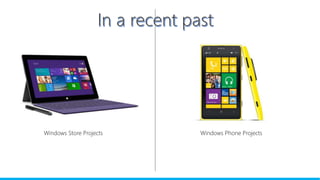
Windows Store Projects Windows Phone Projects
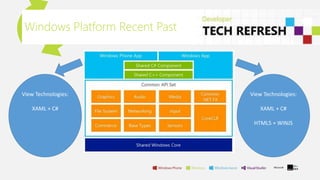
Windows Platform Recent Past
View Technologies:
XAML + C#
HTML5 + WINJS
View Technologies:
XAML + C#
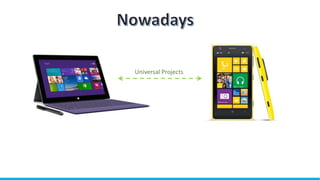
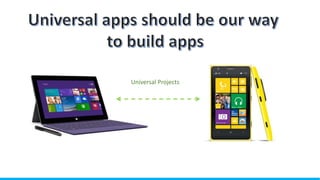
Universal Projects
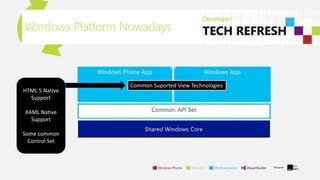
Windows Platform Nowadays
Common Suported View Technologies
HTML 5 Native
Support
XAML Native
Support
Some common
Control Set
Universal Projects
Universal APPS Wins
• Maintenance
• Code Reuse
• Productivity
• User Experience cross platform
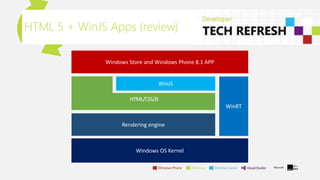
HTML 5 + WinJS Apps (review)
Windows OS Kernel
HTML 5 + WinJS Apps (review)
• Support the standards;
• Allows the reuse of Web Knowledge;
• Support for WEB Libraries (JQUERY, ANGULAR JS, and other’s);
• Reuse of Web Developments
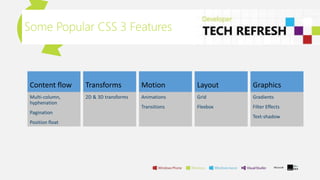
Some Popular CSS 3 Features
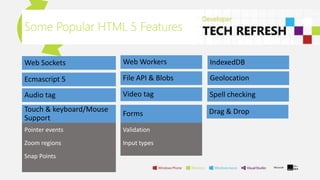
Some Popular HTML 5 Features
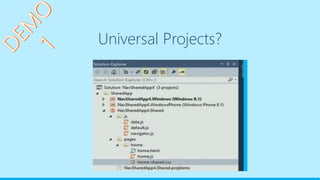
Universal Projects?
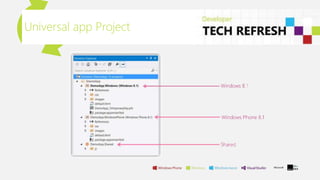
Universal app Project
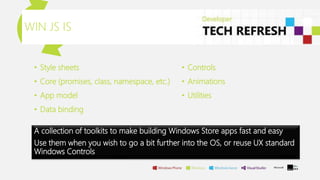
• Style sheets
• Core (promises, class, namespace, etc.)
• App model
• Data binding
WIN JS IS
• Controls
• Animations
• Utilities
A collection of toolkits to make building Windows Store apps fast and easy
Use them when you wish to go a bit further into the OS, or reuse UX standard
Windows Controls
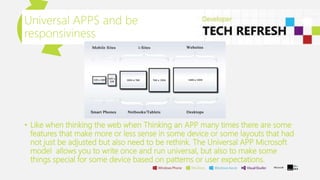
Universal APPS and be
responsiviness
• Like when thinking the web when Thinking an APP many times there are some
features that make more or less sense in some device or some layouts that had
not just be adjusted but also need to be rethink. The Universal APP Microsoft
model allows you to write once and run universal, but also to make some
things special for some device based on patterns or user expectations.
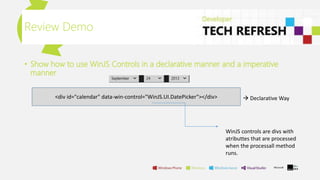
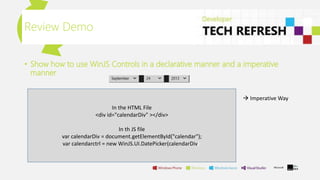
• Show how to use WinJS Controls in a declarative manner and a imperative
manner
Review Demo
<div id="calendar" data-win-control="WinJS.UI.DatePicker"></div>  Declarative Way
WinJS controls are divs with
atributtes that are processed
when the processall method
runs.
• Show how to use WinJS Controls in a declarative manner and a imperative
manner
Review Demo
 Imperative Way
In the HTML File
<div id="calendarDiv" ></div>
In th JS file
var calendarDiv = document.getElementById("calendar");
var calendarctrl = new WinJS.UI.DatePicker(calendarDiv);
Universal Projects?
Universal app Project
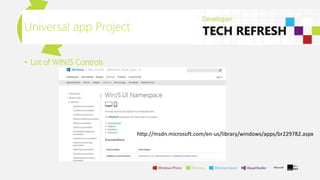
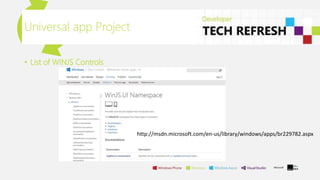
• List of WINJS Controls
http://msdn.microsoft.com/en-us/library/windows/apps/br229782.aspx
WINJS Universal app Project
• The HTML platform on Windows Phone does not support a few HTML
elements that are supported on Windows. These are the context menu,
message dialog, and simple tooltip. Similarly, the file upload and progress ring
controls work, but are not officially supported.
• Adopting WinJS 2.1 in a Windows Phone app should feel seamless and familiar
as previous work done in a Windows Store app with WinJS 2.0. The primary
differences between versions are all about the controls, as befits the deltas
between the Windows Phone and Windows user interfaces. Beyond that, the
core capabilities and utilities of WinJS are identical, streamlining the
development of universal apps for Windows to reach customers across devices.
WINJS Universal app Project
• Unsuported WINJS components in WinJS 2.1
http://msdn.microsoft.com/en-
us/library/windows/apps/dn632432.aspx#unsupported_apis
Universal app Project
• List of WINJS Controls
http://msdn.microsoft.com/en-us/library/windows/apps/br229782.aspx
Universal Projects?
Porting store app to Univ aPP
• Plan well your migration it can be very easy but have to be planed for that
http://msdn.microsoft.com/en-us/library/windows/apps/dn636144.aspx
Recap
• Universal APPS have a simple development model in the case of HTML 5 ntive apps
• Building HTML APPS can be made with the reuse of assets we already have at ou
development
• Media Queries can be helpful to build shared UI
• We have Javascript debugging
• We are going universal but the possibility to minimize visual inconsistency but with the
choice to turn some kind of assets unique for the Phone or the Store app
Conclusions
• Universal apps are a primary way to build apps for all of our platforms in the
future
• We Love standards and KB/Code reuse so resuse your web KB/code
• We can gain a lot going cross platform
• HTML app development is a equal citizen in the native development approach
in Windows Phone 8.1 and Windows 8.1
• You can still use specific development for a device in a universal app
Time to build your Windows apps
KB
• http://typedmvvm.codeplex.com/ Sample application for hands on lab study
• http://code.msdn.microsoft.com/wpapps/Universal-Windows-app-cb3248c3
Build session
• http://typedmvvm.codeplex.com/ Sample application for hands on lab study
• http://channel9.msdn.com/Events/Build/2014/2-506 Whats new the road
ahead
• http://channel9.msdn.com/Events/Build/2014/3-508 HTML 5 from web to apps
• http://channel9.msdn.com/Events/Build/2014/2-540 Universal apps HTML 5
References
Questions
Contacts:
amarreiros@innovagency.com / amarreiros@gmail.com; @alexmarreiros; http://www.linkedin.com/pub/alexandre-
marreiros/8/4b8/a21; www.digitalmindignition.com
Thanks

Universal Apps Development using HTML 5 and WINJS

  • 1.
    Universal Application Development UsingWinJS Alexandre Marreiros 18 – 06 – 2014 Microsoft Lisbon Experience
  • 2.
    About CTO @ Innovagency TechnicalTrainer, Speaker & Consultant as Self Employee Microsoft DevCamp Trainer Teacher @ EDIT Software Developer & Architect as Consultant Tech Writer and Revier as Self Employee Digital business & UX Consultant Contacts: amarreiros@innovagency.com / amarreiros@gmail.com @alexmarreiros http://www.linkedin.com/pub/alexandre-marreiros/8/4b8/a21 www.digitalmindignition.com Alexandre Marreiros
  • 3.
    Raise your handif you’ve built either a Windows Store or Windows Phone App?
  • 4.
    Raise your handif you’ve built Windows Store App using WinJS and HTML 5?
  • 5.
    Raise your handif you’ve almost had to build 2 APPS to grant that you have a Windows Phone and Windows 8 APP?
  • 6.
    Raise your handif you’ve built “things” using JavaScript and HTML 5? Raise your hand if you’ve built WEB?
  • 7.
    Agenda • Universal APPS •HTML 5 + WinJS Apps (review) • HTML 5 Universal APPS Project
  • 8.
    Windows Store ProjectsWindows Phone Projects
  • 9.
    Windows Platform RecentPast View Technologies: XAML + C# HTML5 + WINJS View Technologies: XAML + C#
  • 10.
  • 11.
    Windows Platform Nowadays CommonSuported View Technologies HTML 5 Native Support XAML Native Support Some common Control Set
  • 12.
  • 13.
    Universal APPS Wins •Maintenance • Code Reuse • Productivity • User Experience cross platform
  • 14.
    HTML 5 +WinJS Apps (review) Windows OS Kernel
  • 15.
    HTML 5 +WinJS Apps (review) • Support the standards; • Allows the reuse of Web Knowledge; • Support for WEB Libraries (JQUERY, ANGULAR JS, and other’s); • Reuse of Web Developments
  • 16.
    Some Popular CSS3 Features
  • 17.
  • 18.
  • 19.
  • 20.
  • 21.
    • Style sheets •Core (promises, class, namespace, etc.) • App model • Data binding WIN JS IS • Controls • Animations • Utilities A collection of toolkits to make building Windows Store apps fast and easy Use them when you wish to go a bit further into the OS, or reuse UX standard Windows Controls
  • 22.
    Universal APPS andbe responsiviness • Like when thinking the web when Thinking an APP many times there are some features that make more or less sense in some device or some layouts that had not just be adjusted but also need to be rethink. The Universal APP Microsoft model allows you to write once and run universal, but also to make some things special for some device based on patterns or user expectations.
  • 23.
    • Show howto use WinJS Controls in a declarative manner and a imperative manner Review Demo <div id="calendar" data-win-control="WinJS.UI.DatePicker"></div>  Declarative Way WinJS controls are divs with atributtes that are processed when the processall method runs.
  • 24.
    • Show howto use WinJS Controls in a declarative manner and a imperative manner Review Demo  Imperative Way In the HTML File <div id="calendarDiv" ></div> In th JS file var calendarDiv = document.getElementById("calendar"); var calendarctrl = new WinJS.UI.DatePicker(calendarDiv);
  • 25.
  • 26.
    Universal app Project •List of WINJS Controls http://msdn.microsoft.com/en-us/library/windows/apps/br229782.aspx
  • 27.
    WINJS Universal appProject • The HTML platform on Windows Phone does not support a few HTML elements that are supported on Windows. These are the context menu, message dialog, and simple tooltip. Similarly, the file upload and progress ring controls work, but are not officially supported. • Adopting WinJS 2.1 in a Windows Phone app should feel seamless and familiar as previous work done in a Windows Store app with WinJS 2.0. The primary differences between versions are all about the controls, as befits the deltas between the Windows Phone and Windows user interfaces. Beyond that, the core capabilities and utilities of WinJS are identical, streamlining the development of universal apps for Windows to reach customers across devices.
  • 28.
    WINJS Universal appProject • Unsuported WINJS components in WinJS 2.1 http://msdn.microsoft.com/en- us/library/windows/apps/dn632432.aspx#unsupported_apis
  • 29.
    Universal app Project •List of WINJS Controls http://msdn.microsoft.com/en-us/library/windows/apps/br229782.aspx
  • 30.
  • 31.
    Porting store appto Univ aPP • Plan well your migration it can be very easy but have to be planed for that http://msdn.microsoft.com/en-us/library/windows/apps/dn636144.aspx
  • 32.
    Recap • Universal APPShave a simple development model in the case of HTML 5 ntive apps • Building HTML APPS can be made with the reuse of assets we already have at ou development • Media Queries can be helpful to build shared UI • We have Javascript debugging • We are going universal but the possibility to minimize visual inconsistency but with the choice to turn some kind of assets unique for the Phone or the Store app
  • 33.
    Conclusions • Universal appsare a primary way to build apps for all of our platforms in the future • We Love standards and KB/Code reuse so resuse your web KB/code • We can gain a lot going cross platform • HTML app development is a equal citizen in the native development approach in Windows Phone 8.1 and Windows 8.1 • You can still use specific development for a device in a universal app
  • 34.
    Time to buildyour Windows apps
  • 35.
    KB • http://typedmvvm.codeplex.com/ Sampleapplication for hands on lab study • http://code.msdn.microsoft.com/wpapps/Universal-Windows-app-cb3248c3 Build session • http://typedmvvm.codeplex.com/ Sample application for hands on lab study • http://channel9.msdn.com/Events/Build/2014/2-506 Whats new the road ahead • http://channel9.msdn.com/Events/Build/2014/3-508 HTML 5 from web to apps • http://channel9.msdn.com/Events/Build/2014/2-540 Universal apps HTML 5 References
  • 36.
    Questions Contacts: amarreiros@innovagency.com / amarreiros@gmail.com;@alexmarreiros; http://www.linkedin.com/pub/alexandre- marreiros/8/4b8/a21; www.digitalmindignition.com
  • 37.

Editor's Notes

  • #3 About me and feel free to contact if you have some questions
  • #17 Windows 8 app model gives support for some of the most popular and used CSS 3 Features and make that fluid and beauthifull
  • #22 Explain what WIN JS give us
  • #26 WINJS sample
  • #31 From a Windows 8 app to a universal app
  • #35 Now it’s your turn to star using all this Knowldge to build your apps, for the new OS, and to help you i will give you some study and hands on references...
  • #36 Here you have some references
  • #37 Feel free to ask your questions if you don’t do it now you can always use my contacts, feel free to ask.
  • #38 Thank you all for your time was a pleasure to spend this hour with you diging in to the Windows Universal app development using HTML