Windows Mobile 6 Development Pranav Ainavolu Software Developer Email: pranav.aspx@gmail.com
Agenda Overview of Windows Mobile 6 Devices Look at Windows Mobile 6 development components: Visual Studio Compact Framework Windows Mobile 6 SDKs SQL Compact Windows Mobile 6 Technologies GPS Data Architecture Resources on the Web
Market Overview Mobile software is one of the fastest-growing development arenas. Windows Mobile is among the top players Over 18 million devices shipped in 2008!
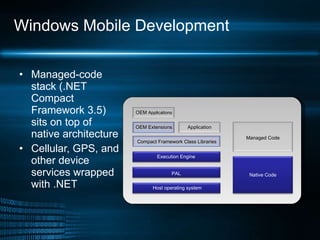
Windows Mobile Development Managed-code stack (.NET Compact Framework 3.5) sits on top of native architecture Cellular, GPS, and other device services wrapped with .NET OEM  Applications OEM Extensions Application Compact Framework Class Libraries Execution Engine PAL Host operating system Native Code Managed Code
.NET Compact Framework and SQL Compact Language support Create solutions in C# or VB.NET Broad feature inclusion: LINQ (to dataset and objects)  Windows Communication Foundation SQL Server Compact 3.5 Royalty-free redist
Windows Mobile 6 SDK Includes .NET Compact Framework 2.0 and 3.5 class libraries. New form templates for Device Emulator Tools  Simulation of cellular networks GPS tracking Input stress Device security management
Device Support – Three Versions Pocket PCs Windows Mobile 6 Professional  Windows Mobile 6 Classic Smartphones Windows Mobile 6 Standard
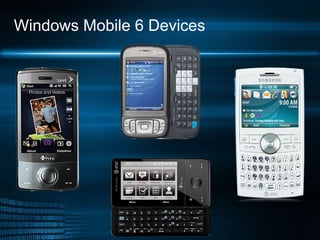
Windows Mobile 6 Devices
 
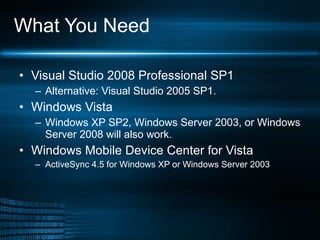
What You Need Visual Studio 2008 Professional SP1 Alternative: Visual Studio 2005 SP1. Windows Vista  Windows XP SP2, Windows Server 2003, or Windows Server 2008 will also work.  Windows Mobile Device Center for Vista ActiveSync 4.5 for Windows XP or Windows Server 2003
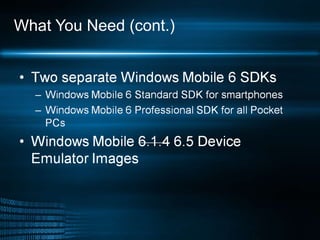
What You Need (cont.)
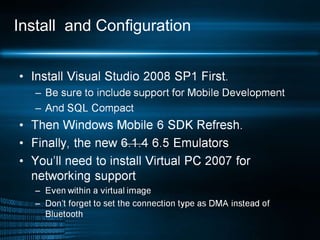
Install  and Configuration
Mobile Device Emulator Target various form factors at various screen resolutions Change display orientation Support hot-key combinations Map serial ports Simulate card storage and network connectivity Implement 3D graphics with Direct3D Mobile.
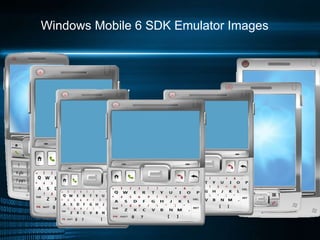
Windows Mobile 6 SDK Emulator Images
Cellular Emulator and Hopper Cellular Emulator allows you to Target both voice and data connectivity scenarios. Explore different wireless network conditions in GSM/GPRS and UMTS networks. Hopper Test Tool Stresses all applications available through menu with random keystrokes, or only your application.
GPS Support Fake GPS: an NMEA .txt file simulates the movement of the device in space.  Note that for Windows Mobile Standard, you can configure GPS using the SDK’s GPSSettings.exe program  Professional and Classic have this utility built in.
Security Tools From your workstation, access a Windows Mobile device remotely or locally to Change Remote API (RAPI) security policy Provision and save security configurations Add development certificates Sign a file or check its signature Revoke an application or certificate
Data Storage and Retrieval SQL Compact 3.5 installs with 5 MB memory LINQ supports objects and datasets but not LINQ to SQL ADO.NET offers SQL Synchronization SQLCeResultsets improve performance over datasets
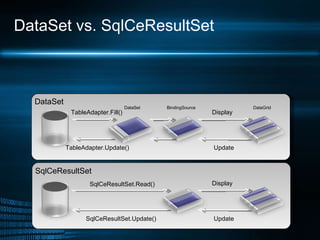
DataSet vs. SqlCeResultSet TableAdapter.Update() TableAdapter.Fill() DataSet DataSet BindingSource Display Update DataGrid SqlCeResultSet Display Update SqlCeResultSet.Read() SqlCeResultSet.Update()
Vista/7 Issues Do NOT install ActiveSync. You need Windows Mobile Device Center for device synchronization. Install Visual Studio 2008 SP1. If the SDK samples do not build, copy them to a different location.
 
Internet Explorer 6 Mobile Jscript v5.7, ported from Internet Explorer 8 for the desktop.  Much better support for AJAX applications. Improved fidelity, text wrap, touch-and-gesture pan support WML, Adobe Flash Lite 3.1 for Flash applications. Easy switch between Mobile and Desktop modes Both can be targeted with User Agent strings.
Request Header Mobile Mode says... User-Agent: Mozilla/4.0 (compatible; MSIE 6.0; Windows CE; IEMobile 8.12; MSIEMobile 6.0) Used to say... User-Agent: Mozilla/4.0 (compatible; MSIE 6.0; Windows CE; IEMobile 7.11) Desktop Mode says... User-Agent: Mozilla/4.0 (compatible; MSIE 6.0; Windows NT 5.1) (Same as Internet Explorer 6 for PC.)
Add-ons and Plug-ins Windows Media Player Adobe FlashLite
Web Resources MSDN http://msdn.microsoft.com/en-us/library/bb158532.aspx Mobile 6 SDK Refresh Download http://www.microsoft.com/downloads/details.aspx?FamilyId=06111A3A-A651-4745-88EF-3D48091A390B&displaylang=en Mobile 6.1.4 Emulator Images http://www.microsoft.com/downloads/ details.aspx?FamilyId =1A7A6B52-F89E-4354-84CE-5D19C204498A&displaylang=en Mobile 6.5 Emulator Images http://www.microsoft.com/downloads/ details.aspx?displaylang = en&FamilyID =20686a1d-97a8-4f80-bc6a-ae010e085a6e   .NET Compact Framework Applications and Libraries on the Web http://www.microsoft.com/downloads/details.aspx?FamilyId=1A7A6B52-F89E-4354-84CE-5D19C204498A&displaylang=en
Web resources 2 Getting started on Windows Mobile 6.5 http://blogs.msdn.com/windowsmobile/archive/2009/06/04/getting-started-with-widgets-on-windows-mobile-6-5.aspx   Windows Mobile developer Briefing http://www.itpro.fi/tallenteet/itpro/mobile_briefing_2008/developer/1/ http://www.itpro.fi/tallenteet/itpro/mobile_briefing_2008/developer/2/ http://www.itpro.fi/tallenteet/itpro/mobile_briefing_2008/developer/3/ MyMobiler http:// www.mymobiler.com /
Thank you!

Windows Mobile 7 Development

  • 1.
    Windows Mobile 6Development Pranav Ainavolu Software Developer Email: pranav.aspx@gmail.com
  • 2.
    Agenda Overview ofWindows Mobile 6 Devices Look at Windows Mobile 6 development components: Visual Studio Compact Framework Windows Mobile 6 SDKs SQL Compact Windows Mobile 6 Technologies GPS Data Architecture Resources on the Web
  • 3.
    Market Overview Mobilesoftware is one of the fastest-growing development arenas. Windows Mobile is among the top players Over 18 million devices shipped in 2008!
  • 4.
    Windows Mobile DevelopmentManaged-code stack (.NET Compact Framework 3.5) sits on top of native architecture Cellular, GPS, and other device services wrapped with .NET OEM Applications OEM Extensions Application Compact Framework Class Libraries Execution Engine PAL Host operating system Native Code Managed Code
  • 5.
    .NET Compact Frameworkand SQL Compact Language support Create solutions in C# or VB.NET Broad feature inclusion: LINQ (to dataset and objects) Windows Communication Foundation SQL Server Compact 3.5 Royalty-free redist
  • 6.
    Windows Mobile 6SDK Includes .NET Compact Framework 2.0 and 3.5 class libraries. New form templates for Device Emulator Tools Simulation of cellular networks GPS tracking Input stress Device security management
  • 7.
    Device Support –Three Versions Pocket PCs Windows Mobile 6 Professional Windows Mobile 6 Classic Smartphones Windows Mobile 6 Standard
  • 8.
  • 9.
  • 10.
    What You NeedVisual Studio 2008 Professional SP1 Alternative: Visual Studio 2005 SP1. Windows Vista Windows XP SP2, Windows Server 2003, or Windows Server 2008 will also work. Windows Mobile Device Center for Vista ActiveSync 4.5 for Windows XP or Windows Server 2003
  • 11.
  • 12.
    Install andConfiguration
  • 13.
    Mobile Device EmulatorTarget various form factors at various screen resolutions Change display orientation Support hot-key combinations Map serial ports Simulate card storage and network connectivity Implement 3D graphics with Direct3D Mobile.
  • 14.
    Windows Mobile 6SDK Emulator Images
  • 15.
    Cellular Emulator andHopper Cellular Emulator allows you to Target both voice and data connectivity scenarios. Explore different wireless network conditions in GSM/GPRS and UMTS networks. Hopper Test Tool Stresses all applications available through menu with random keystrokes, or only your application.
  • 16.
    GPS Support FakeGPS: an NMEA .txt file simulates the movement of the device in space. Note that for Windows Mobile Standard, you can configure GPS using the SDK’s GPSSettings.exe program Professional and Classic have this utility built in.
  • 17.
    Security Tools Fromyour workstation, access a Windows Mobile device remotely or locally to Change Remote API (RAPI) security policy Provision and save security configurations Add development certificates Sign a file or check its signature Revoke an application or certificate
  • 18.
    Data Storage andRetrieval SQL Compact 3.5 installs with 5 MB memory LINQ supports objects and datasets but not LINQ to SQL ADO.NET offers SQL Synchronization SQLCeResultsets improve performance over datasets
  • 19.
    DataSet vs. SqlCeResultSetTableAdapter.Update() TableAdapter.Fill() DataSet DataSet BindingSource Display Update DataGrid SqlCeResultSet Display Update SqlCeResultSet.Read() SqlCeResultSet.Update()
  • 20.
    Vista/7 Issues DoNOT install ActiveSync. You need Windows Mobile Device Center for device synchronization. Install Visual Studio 2008 SP1. If the SDK samples do not build, copy them to a different location.
  • 21.
  • 22.
    Internet Explorer 6Mobile Jscript v5.7, ported from Internet Explorer 8 for the desktop. Much better support for AJAX applications. Improved fidelity, text wrap, touch-and-gesture pan support WML, Adobe Flash Lite 3.1 for Flash applications. Easy switch between Mobile and Desktop modes Both can be targeted with User Agent strings.
  • 23.
    Request Header MobileMode says... User-Agent: Mozilla/4.0 (compatible; MSIE 6.0; Windows CE; IEMobile 8.12; MSIEMobile 6.0) Used to say... User-Agent: Mozilla/4.0 (compatible; MSIE 6.0; Windows CE; IEMobile 7.11) Desktop Mode says... User-Agent: Mozilla/4.0 (compatible; MSIE 6.0; Windows NT 5.1) (Same as Internet Explorer 6 for PC.)
  • 24.
    Add-ons and Plug-insWindows Media Player Adobe FlashLite
  • 25.
    Web Resources MSDNhttp://msdn.microsoft.com/en-us/library/bb158532.aspx Mobile 6 SDK Refresh Download http://www.microsoft.com/downloads/details.aspx?FamilyId=06111A3A-A651-4745-88EF-3D48091A390B&displaylang=en Mobile 6.1.4 Emulator Images http://www.microsoft.com/downloads/ details.aspx?FamilyId =1A7A6B52-F89E-4354-84CE-5D19C204498A&displaylang=en Mobile 6.5 Emulator Images http://www.microsoft.com/downloads/ details.aspx?displaylang = en&FamilyID =20686a1d-97a8-4f80-bc6a-ae010e085a6e .NET Compact Framework Applications and Libraries on the Web http://www.microsoft.com/downloads/details.aspx?FamilyId=1A7A6B52-F89E-4354-84CE-5D19C204498A&displaylang=en
  • 26.
    Web resources 2Getting started on Windows Mobile 6.5 http://blogs.msdn.com/windowsmobile/archive/2009/06/04/getting-started-with-widgets-on-windows-mobile-6-5.aspx Windows Mobile developer Briefing http://www.itpro.fi/tallenteet/itpro/mobile_briefing_2008/developer/1/ http://www.itpro.fi/tallenteet/itpro/mobile_briefing_2008/developer/2/ http://www.itpro.fi/tallenteet/itpro/mobile_briefing_2008/developer/3/ MyMobiler http:// www.mymobiler.com /
  • 27.

Editor's Notes

  • #2 Hello and welcome to an introduction to Windows Mobile 6 development. I’m [name]. We’ve got lots to cover today so let’s get started!
  • #3 Windows Mobile offers unparalleled developer support, full integration with existing .NET technologies, and cutting-edge hardware from manufacturers. Windows Mobile seamlessly extends the workstation environment in terms of security, data modeling, storage, and networking. We’re going to look at everything you need for Windows Mobile 6 development, touch on the new Visual Studio enhancements offered by the Windows Mobile SDKs, delve into GPS and SQL Compact database support, and briefly discuss the field of Windows Mobile 6.1-enabled devices. We follow that up with demos: we’ll examine the makeup of a Mobile Device autodialer application that calls a phone number at a certain time; and then we’ll look at how to optimize an existing ASP.NET Start Kit application for Windows Mobile. Finally, I’ll give you some links to resources on the Web.
  • #4 Mobile Software development is a large market that is only going to get larger. With Windows Mobile development, you have several key advantages: Over 18 million devices shipped in 2008 alone You can use your existing .NET development skills, including new technologies such as LINQ
  • #5 Here’s a snapshot of the code base supporting Windows Mobile 6. The low-level device services are wrapped in Managed Code, and you can access native APIs with P/Invoke, though you should find the essential functions already wrapped by .NET methods and properties. Main point is – you can reuse you existing skills in .NET and Win32 programming.
  • #6 The base of Windows Mobile 6 managed code is the .NET Compact Framework 3.5, which implements more standard .NET Framework features than previous versions, like the CreateDelegate method. This latest version of the .NET Framework for mobile devices also includes LINQ, WCF, and support for runtime tools, such as a Remote Performance Monitor. The database solution is the free SQL Server Compact that has a small memory footprint and several optimizations for handheld devices that we’ll discuss later.
  • #7 The Windows Mobile 6 SDK enables rapid application development on the .NET Compact Framework using Visual Studio. It includes a number of projects you can modify, and emulators for the latest mobile-device form factors. The new SDK simplifies line-of-business development, making it much easier to build an application that works well on various devices in various connectivity environments. I’ll be discussing the Mobile 6 SDK in-depth later.
  • #8 Windows Mobile 6 installations come in three versions. Windows Mobile Professional is the new generation of Windows Mobile for Pocket PC Phone Edition. Windows Mobile 6 Classic is for non-phone Pocket PCs, and used to be called Mobile for Pocket PC. And Windows Mobile 6 Standard is installed on Smartphones and is the successor to Windows Mobile for Smartphones.
  • #9 Windows Mobile 6 devices are supported by the top telecom companies and device manufacturers. Here we see a few emblematic ones currently on the market: the HTC Touch Diamond, the Tilt, the BlackJack II, and the HTC Fuze. Many of the same handhelds are available across carrier plans. These devices have standard features like: Large touch screens/pan and zoom touch. High-Speed Downlink Packet Access (HSDPA) I nternet connectivity. Built in auto-focus cameras, up to 3.2 megapixel. 128 MB or more RAM, generally twice the ROM, and an expansion slot for up to 4 GB of storage. Integrated GPS. Bluetooth. Wi-Fi 802.11 b/g.
  • #11 We will be reiterating these requirements as we go, but here’s a snapshot of everything you need to get started with the latest development tools for Windows Mobile 6. Note there are two Windows Mobile 6 SDK downloads: Standard, for smartphones, and Professional, for Pocket PCs. The Professional SDK supports both Windows Mobile 6 Professional for Pocket PC phones and Windows Mobile 6 Classic for Pocket PCs without a phone.
  • #13 The install order is important for Mobile development. Install Visual Studio 2008 and its latest service pack, including all mobile and SQL Compact support fully before anything else. I would recommend that you run Visual Studio after install to ensure the installation has succeeded. Next, install the latest Windows Mobile 6 SDK Refresh. Finally, the new 6.1.4 Emulators should be installed. To configure networking support, especially when testing IE Mobile 6 or connecting to Web services, you will need to configure the networking support on the emulator. This requires that you a) install Virtual PC 2007 (even inside of a virtual PC instance), and b) set the Active Sync or Mobile Device Center connection from Bluetooth or USB to DMA.
  • #14 The Device Emulator Manager installed with the SDK lets you manage running emulators for the various form factors. You can toggle among them, cradle them, and so on. The emulators have these features: Target various form factors at various screen resolutions Change display orientation Support hot-key combinations Map serial ports Simulate card storage and network connectivity Implement 3D graphics with Direct3D Mobile. There are Windows forms templates matching each emulator the SDK installs into Visual Studio.
  • #15 The Emulator Images for the Windows Mobile 6 Standard and Windows Mobile 6 Professional SDKs cover the gamut of smartphone and Pocket PC form factors and screen resolutions.
  • #16 In addition to the device emulators, the SDK includes the Cellular Emulator 1.0, which simulates a device’s radio module for both development and test. You saw in the Phone The Future demo how we used the Cellular Emulator to make sure the device thought it had a phone signal. But the Cellular Emulator has many more uses than that. You can see how your application performs under various connection scenarios to either a General Packet Radio Service (GPRS) network running from 56 up to 114 kbit/s or a newer Universal Mobile Telecommunications System (UMTS) network that supports 384 kbit/s or higher transfers and can make use of High-Speed Downlink Packet Access (HSDPA), for downlink of up to 7.2 Mbit/s. The Hopper Test Tool is another great SDK tool. It randomly simulates both keypad and touch-screen input on mobile applications. A new feature allows you to keep your application in the foreground so that it is exclusively tested.
  • #17 The National Marine Electronics Association has a combined electrical and data specification called NMEA 0183, or NMEA for short. “Sentences” are transferred from one “listener” or “talker” at a time in simple ASCII. The Fake GPS utility included with the Windows Mobile 6 SDK uses this standard, common to many GPS and maritime systems, to simulate device movement. Two NMEA files are included with the SDK: dixies.txt, which immediately sends a GPS location to the GPS driver, and fakegpsdata.txt, which contains the same data, but does not immediately report a new GPS location to the driver.
  • #18 You can discover or simulate a variety of security-related issues with SDK tools, change the security policy on the device to restrict user privileges in accord with your corporate network policies, manage program and device certificates, and remotely provision the device with programs and utilities, like antivirus programs.
  • #19 SQL Compact 3.5 installs with only 5 MB of device memory; includes LINQ queries on object collections, DataTables, and DataSets; and the new Synchronization Services for ADO.NET 1.0 allows you to easily synchronize a mobile device’s changed database records with a central SQL Server. SQLCeResultsets offer a fast, light-weight alternative to datasets.
  • #20 SqlCeResultSet interacts directly with the database through a pointer, and is therefore much faster than the DataSet, which stores a copy of the data. Here we see the databases represented on the left. In the top diagram, we have an adapter object, what’s called the TableAdapter in Windows Mobile, which uses a query to fill tables in the DataSet. The bottom diagram shows the adapter and DataSet omitted. The SqlCeResultSet is built into the Sql Compact 3.5 data provider itself, which is how it can be so tightly coupled to the database. SqlCeResultSets run faster and require less memory than DataSets, but lack a lot of their features. If you need to build up a custom representation of your underlying database, you’ll have to go with a DataSet.
  • #21 There are a few minor issues you need to keep in mind when developing on Vista. The new Windows Mobile Device Center replaces ActiveSync functionality, and ActiveSync will not run on Vista. You’ll also need the new Visual Studio Service Pack, which updates both Visual Studio and the .NET Framework. The SDK samples may not build at the default download location; if so, try copying them to a different location. It’s a fussy glitch, but that may save you a headache.
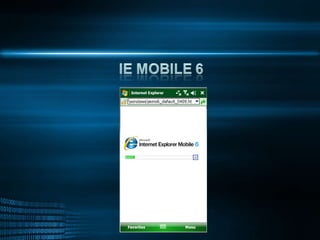
  • #22 Next, we’ll briefly go over Windows Mobile 6. Here’s a screenshot straight from the Device Emulator.
  • #23 Internet Explorer Mobile 6 is actually built on the same engine as IE 8 for desktops. We’ve greatly extended this application. The new Jscript 5.7 implements common JavaScript methods like getElementById, and will improve JavaScript compatibility on all sites, both mobile- and desktop-targeted. IE Mobile 6 takes advantage of the latest hardware’s screen interfaces, Wireless Markup Language, and Flash. As we noted previously, you can easily switch between Mobile and Desktop modes, and with User Agent strings, the device running IE 6 can identify itself to Web servers as either a Mobile or Desktop system. You can preview IE 6 in the Device Emulator we’ve previously discussed, and it will become commercially available on hardware within the next few months.
  • #24 The User Agent string for Mobile mode is an updated version of the old single-mode string. The Desktop mode string is the same one that was passed in IE 6 for the PC.
  • #25 Windows Media Player 11 is supported and has been in previous versions of Windows Mobile. Adobe FlashLite 3.1 plays most Adobe Flash 9 content, but it does not support Action Script 3. FlashLite delivers a desktop experience on your mobile device for YouTube, and features a full-screen toggle.
  • #26 And, finally, here we have the links: all the MSDN documentation, the Mobile 6 SDK Refresh Download, and the Mobile 6.1.4 Emulator images, which extend the emulators included in the SDK. The last link is to a page of third-party applications and class libraries that you can explore to see what other developers have come up with on the platform: everything from GIS survey applications to games. And that concludes our presentation of .NET Mobile 6 development.
  • #27 First post is a very comprehensive intro into widgets, and there is also a good session on Microsoft teched http://www.msteched.com/online/view.aspx?tid=b4251ac3-9654-44c6-ad15-7601c7bc68e4