
ASP.NET 4.5 Web Forms
New features

               Brij Bhushan Mishra
               MVP-ASP.NET/IIS
               http://brijbhushan.net
               @brij_bhushan
   Earlier Version’s Data Control
   Strongly typed data controls
   Model Binding
    ◦   Selecting data
    ◦   Filtering Data
    ◦   Custom value Provider
    ◦   Editing Data
    ◦   Validations
    ◦   Custom validation
   Support for HTML Encoding
   Data controls in earlier versions
       Late bound Eval/Bind methods
       Does not provide navigational support
       Missing Compile time checking
   ASP.NET 4.5 introduces ItemType property with
    Data controls
    ◦ Now define the type of model to your data controls
    ◦ Item will be strongly coupled with model
    ◦ Provides intellisence support, compile time checking and
      navigational support as well

    ◦ There are two new typed variable introduced that is used
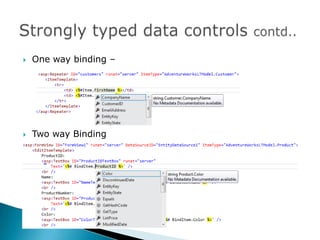
      in Data-binding expressions Item and BindItem.
    ◦ Item is used in one-way data-binding expressions while
      BindItem is used two way binding
   One way binding –


   Two way Binding
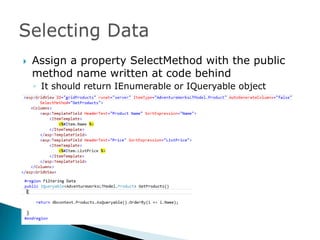
   Assign a property SelectMethod with the public
    method name written at code behind
    ◦ It should return IEnumerable or IQueryable object
   Automatically binds the data to the control
   No need to assign the DataSource property and
    no need to call DataBind method
   Automatically supports Paging and sorting
    ◦ Handled by the SQL server with the help underlying LINQ
      provider
   Can have filtering parameters in Select Method
   Parameters fetch value from the given Value
    providers. Some value providers are
    ◦   Query string
    ◦   Session
    ◦   Cookies
    ◦   Controls
    ◦   Form Values etc


    We can write custom Value Providers as well.
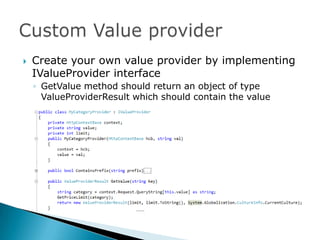
   Create your own value provider by implementing
    IValueProvider interface
    ◦ GetValue method should return an object of type
      ValueProviderResult which should contain the value
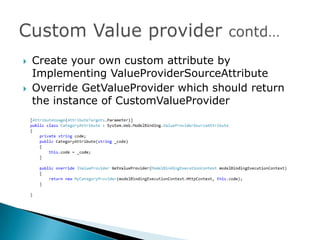
   Create your own custom attribute by
    Implementing ValueProviderSourceAttribute
   Override GetValueProvider which should return
    the instance of CustomValueProvider
   Data controls provide the following Properties to
    support this feature
    ◦ InsertMethod
    ◦ UpdateMethod
    ◦ DeleteMethod
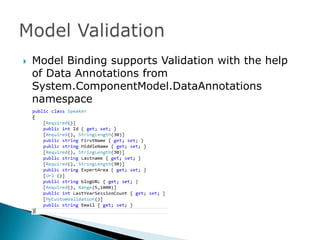
   Model Binding supports Validation with the help
    of Data Annotations from
    System.ComponentModel.DataAnnotations
    namespace
   If your control is model bound on the Type these
    validation rules are fired
   Page object has a new ModelState property
    ◦ ModelState.IsValid returns true if there is no validation
      errors
    ◦ Provide list of all errors
   ASP.NET introduced new Property
    ‘ShowModelStateErrors’ in ValidationSummary
    control.
   Display all the model validation errors
   Can write your custom validation attribute by
    implement ValidationAttribute
   Override IsValid method write the validation logic
    in it.
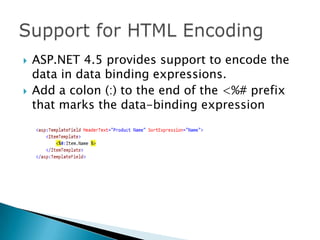
   ASP.NET 4.5 provides support to encode the
    data in data binding expressions.
   Add a colon (:) to the end of the <%# prefix
    that marks the data-binding expression
ASP.NET 4.5 webforms

ASP.NET 4.5 webforms

  • 1.
    ASP.NET 4.5 WebForms New features Brij Bhushan Mishra MVP-ASP.NET/IIS http://brijbhushan.net @brij_bhushan
  • 2.
    Earlier Version’s Data Control  Strongly typed data controls  Model Binding ◦ Selecting data ◦ Filtering Data ◦ Custom value Provider ◦ Editing Data ◦ Validations ◦ Custom validation  Support for HTML Encoding
  • 3.
    Data controls in earlier versions  Late bound Eval/Bind methods  Does not provide navigational support  Missing Compile time checking
  • 4.
    ASP.NET 4.5 introduces ItemType property with Data controls ◦ Now define the type of model to your data controls ◦ Item will be strongly coupled with model ◦ Provides intellisence support, compile time checking and navigational support as well ◦ There are two new typed variable introduced that is used in Data-binding expressions Item and BindItem. ◦ Item is used in one-way data-binding expressions while BindItem is used two way binding
  • 5.
    One way binding –  Two way Binding
  • 6.
    Assign a property SelectMethod with the public method name written at code behind ◦ It should return IEnumerable or IQueryable object
  • 7.
    Automatically binds the data to the control  No need to assign the DataSource property and no need to call DataBind method  Automatically supports Paging and sorting ◦ Handled by the SQL server with the help underlying LINQ provider
  • 8.
    Can have filtering parameters in Select Method  Parameters fetch value from the given Value providers. Some value providers are ◦ Query string ◦ Session ◦ Cookies ◦ Controls ◦ Form Values etc We can write custom Value Providers as well.
  • 9.
    Create your own value provider by implementing IValueProvider interface ◦ GetValue method should return an object of type ValueProviderResult which should contain the value
  • 10.
    Create your own custom attribute by Implementing ValueProviderSourceAttribute  Override GetValueProvider which should return the instance of CustomValueProvider
  • 11.
    Data controls provide the following Properties to support this feature ◦ InsertMethod ◦ UpdateMethod ◦ DeleteMethod
  • 12.
    Model Binding supports Validation with the help of Data Annotations from System.ComponentModel.DataAnnotations namespace
  • 13.
    If your control is model bound on the Type these validation rules are fired  Page object has a new ModelState property ◦ ModelState.IsValid returns true if there is no validation errors ◦ Provide list of all errors
  • 14.
    ASP.NET introduced new Property ‘ShowModelStateErrors’ in ValidationSummary control.  Display all the model validation errors
  • 15.
    Can write your custom validation attribute by implement ValidationAttribute  Override IsValid method write the validation logic in it.
  • 16.
    ASP.NET 4.5 provides support to encode the data in data binding expressions.  Add a colon (:) to the end of the <%# prefix that marks the data-binding expression