Downloaded 118 times
![January 1,
Windows 7 Tricks
2010
10. Understanding System Restore
Using System Restore in previous versions of Windows has been something of a gamble. There's
no way of telling which applications or drivers it might affect - you just have to try it and see.
Windows 7 is different. Right-click Computer, select Properties > System Protection > System
Restore > Next, and choose the restore point you'd like to use. Click the new button to 'Scan for
affected programs' and Windows will tell you which (if any) programs and drivers will be
deleted or recovered by selecting this restore point. (Read our full Windows 7 System Restore
tutorial.)
11. Set the time zone
System administrators will appreciate the new command line tzutil.exe utility, which lets you set
a PC's time zone from scripts. If you wanted to set a PC to Greenwich Mean Time, for instance,
you'd use the command
tzutil /s "gmt standard time"
The command "tzutil /g" displays the current time zone, "tzutil /l" lists all possible time zones,
and "tzutil /?" displays details on how the command works.
12. Calibrate your screen
The colours you see on your screen will vary depending on your monitor, graphics cards settings,
lighting and more, yet most people use the same default Windows colour profile. And that means
a digital photo you think looks perfect might appear very poor to everybody else. Fortunately
Windows 7 now provides a Display Colour Calibration Wizard that helps you properly set up
your brightness, contrast and colour settings, and a ClearType tuner to ensure text is crisp and
sharp. Click Start, type DCCW and press Enter to give it a try.
13. Clean up Live Essentials
Installing Windows Live Essentials will get you the new versions of Mail, Movie Maker, Photo
Gallery and others - great. Unfortunately it also includes other components that may be
unnecessary, but if you like to keep a clean system then these can be quickly removed.
If you left the default "Set your search provider" option selected during installation, for instance,
Windows Live will install Choice Guard, a tool to set your browser home page and search
engine, and prevent other programs from changing them. If this causes problems later, or you
just decide you don't need it, then Choice Guard may be removed by clicking Start, typing
msiexec /x and pressing [Enter].
Windows Live Essentials also adds an ActiveX Control to help upload your files to Windows
Live SkyDrive, as well as the Windows Live Sign-in Assistant, which makes it easier to manage
http://remocutest.blogspot.com/](https://image.slidesharecdn.com/windows7tricks-130306115126-phpapp02/85/Windows-7-tricks-4-320.jpg)


![January 1,
Windows 7 Tricks
2010
Repeat the process for other networks available, and pick a default printer for each one.
And now, as you connect to a new network, Windows 7 will check this list and set the default
printer to the one that you've defined.
20. Explore God Mode
Windows 7 has changed Control Panel a little, but it's still too difficult to locate all the applets
and options that you might need. God Mode, however, while not being particularly godlike, does
offer an easier way to access everything you could want from a single folder.
To try this out, create a new folder and rename it to:
Everything.{ED7BA470-8E54-465E-825C-99712043E01C}
The first part, "Everything" will be the folder name, and can be whatever you want: "Super
Control Panel", "Advanced", "God Mode" if you prefer.
The extension, ED7BA470-8E54-465E-825C-99712043E01C, must be entered exactly as it is
here, though, including the curly brackets. When you press [Enter] this part of the name will
disappear, and double-clicking the new folder will display shortcuts to functions in the Action
Centre, the Network and Sharing Centre, Power options, troubleshooting tools, user accounts and
others - more than 260 options in total.
http://remocutest.blogspot.com/](https://image.slidesharecdn.com/windows7tricks-130306115126-phpapp02/85/Windows-7-tricks-8-320.jpg)



![January 1,
Windows 7 Tricks
2010
down Shift, right-click on your drive and select Open in New Process. The folder will now be
launched in a separate process, and so a crash is less likely to affect anything else.
44. Watch more videos
Windows Media Player 12 is a powerful program, but it still won't play all the audio and video
files you'll find online. Fortunately the first freeware Windows 7 codecs package
[shark007.net/win7codecs.html] has been released, and installing it could get your troublesome
multimedia files playing again.
45. Preview fonts
Open the Fonts window in Windows XP and Vista and you'll see the font names, probably with
icons to tell you whether they're TrueType or OpenType, but that's about it. Windows 7 sees
some useful font-related improvements.
Open the new fonts window and you'll find a little preview for every font, giving you a quick
idea of how they're going to look.
The tedium of scrolling through multiple entries for each family, like Times New Roman, Times
New Roman Bold, Times New Roman Bold Italic and so on, has finally ended. There's now just
a single entry for each font (though you can still see all other members of the family).
And there's a new OpenType font, Gabriola, added to the mix. It's an attractive script font, well
worth a try the next time you need a stylish document that stands out from the crowd.
46. Restore your gadgets
Windows 7 has tightened up its security by refusing to run gadgets if UAC has been turned off,
so limiting the damage malicious unsigned gadgets can do to your system. If you've disabled
UAC, miss your gadgets and are happy to accept the security risk, though, there's an easy
Registry way to get everything back to normal. Run REGEDIT, go to
HKEY_LOCAL_MACHINESOFTWAREMicrosoftWindowsCurrentVersionSidebarSetting
s, create a new DWORD value called AllowElevatedProcess and set it to 1. Your gadgets should
start working again right away.
47. New WordPad formats
By default WordPad will save documents in Rich Text Format, just as before. But browse the
Save As Format list and you'll see you can also save (or open, actually) files in the Office 2007
.docx or OpenDocument .odt formats.
48. Protect your data
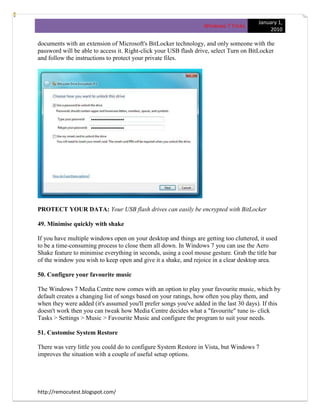
USB flash drives are convenient, portable, and very easy to lose. Which is a problem, especially
if they're carrying sensitive data. Fortunately Windows 7 has the solution: encrypt your
http://remocutest.blogspot.com/](https://image.slidesharecdn.com/windows7tricks-130306115126-phpapp02/85/Windows-7-tricks-15-320.jpg)

![January 1,
Windows 7 Tricks
2010
Multimedia Settings, for instance, and you'll see a new "playing video" setting that can be set to
optimise power savings rather than performance. Browse through the other settings and ensure
they're set up to suit your needs.
57. Write crash dump files
Windows 7 won't create memory.dmp crash files if you've less than 25GB of free hard drive
space, annoying if you've installed the Windows debugging tools and want to diagnose your
crashes. You can turn this feature off, though: browse to
HKEY_LOCAL_MACHINESYSTEMCurrentControlSetControlCrashControl, create a new
DWORD value called AlwaysKeepMemoryDump, set it to 1, and the crash dump file will now
always be saved.
58. Protect your data
If you have confidential files in a particular folder or two, and would like to keep them away
from other network users, then right-click the folder, select Share With > Nobody, and they'll be
made private, for your eyes only (or your user account, anyway).
59. Reorganise the taskbar
Windows 7 taskbar buttons are now movable - feel free to drag, drop and otherwise reorganise
them to suit your needs. And then remember that each button can be launched by holding with
the Windows key and pressing 1 to activate the first, 2 the second and so on, up to 0 for the tenth.
60. Repair your PC
If Windows 7 won't start, you may not need an installation or repair disc any more, as the repair
environment is now usually installed on your hard drive. Press [F8] as your PC starts, and if you
see a "Repair Your Computer" option, choose that to see the full range of Windows 7 recovery
tools.
http://remocutest.blogspot.com/](https://image.slidesharecdn.com/windows7tricks-130306115126-phpapp02/85/Windows-7-tricks-18-320.jpg)


![January 1,
Windows 7 Tricks
2010
82. Search quickly
If you'd like to search for something in an Explorer window then there's no need to use the
mouse. Simply press [F3] to move the focus to the search box, enter your keyword and press
[Enter] to run the search.
http://remocutest.blogspot.com/](https://image.slidesharecdn.com/windows7tricks-130306115126-phpapp02/85/Windows-7-tricks-25-320.jpg)
![January 1,
Windows 7 Tricks
2010
83. Search file contents
There's no obvious way in the Windows interface to search the contents of files that haven't been
indexed, but all you need to do is start your search with the "content:" search filter. So entering
content:Microsoft , for instance, will find all documents (whether they're actually indexed or not)
that contain the word Microsoft.
84. Close in a click
Hover your mouse cursor over a Windows taskbar button will display a preview thumbnail of
that application window. You don't need that app any more? Then middle-click the thumbnail to
close it down.
85. Leave the Homegroup
Homegroups are an easy way to network Windows 7 PCs, but if you don't use the feature then
turning it off can save you a few system resources.
Click Start, type Homegroup, and click "Choose homegroup and sharing options". Click Leave
the Homegroup > Leave the Homegroup > Finish.
Now click Start, type services.msc and press [Enter] to launch the Services Control Panel applet.
Find and double-click both the HomeGroup Listener and HomeGroup Provider service, clicking
Stop and setting Startup Type to Disabled in each case, and the services won't be launched when
you need reboot.
http://remocutest.blogspot.com/](https://image.slidesharecdn.com/windows7tricks-130306115126-phpapp02/85/Windows-7-tricks-26-320.jpg)

Windows 7 provides many useful tricks and tweaks to help users get the most out of the operating system. This document outlines 22 tips, including how to take screenshots of error messages to email for troubleshooting help, burn ISO images, mount and create virtual hard drives, and access a "God Mode" folder to view all Control Panel options in one place. The tips cover a wide range of topics from power management and printing to application troubleshooting and customizing the desktop experience.


