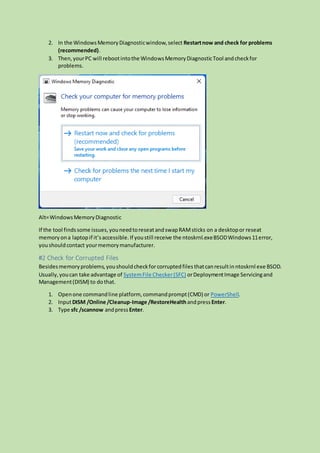
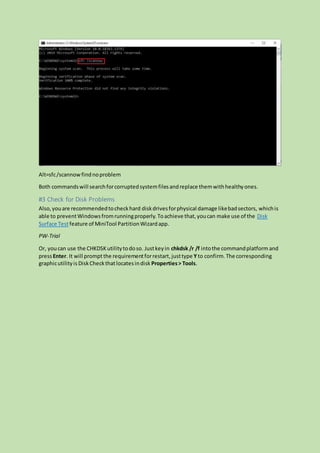
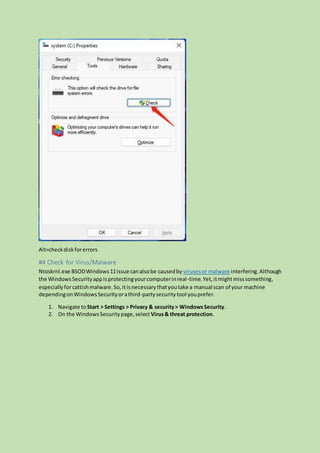
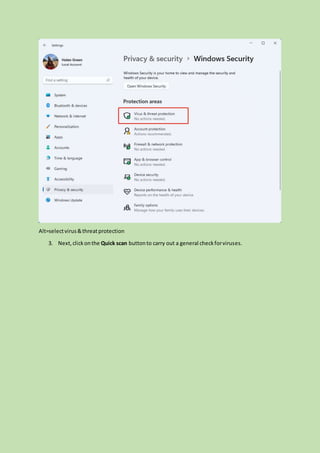
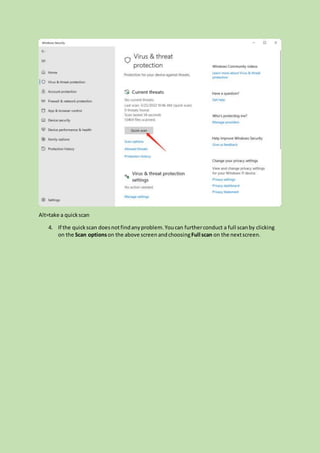
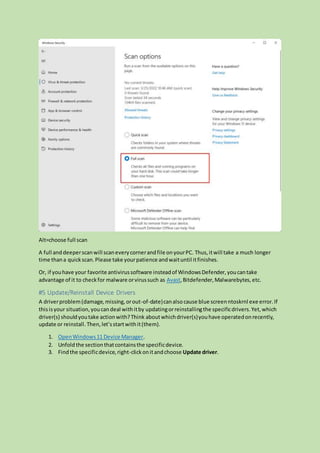
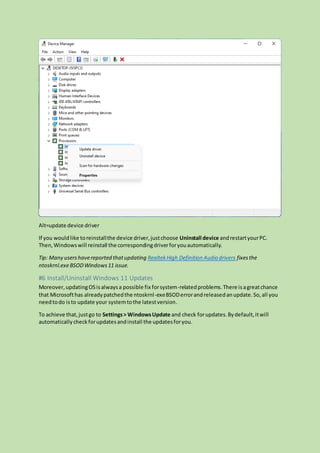
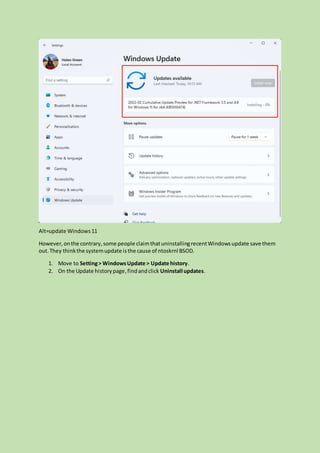
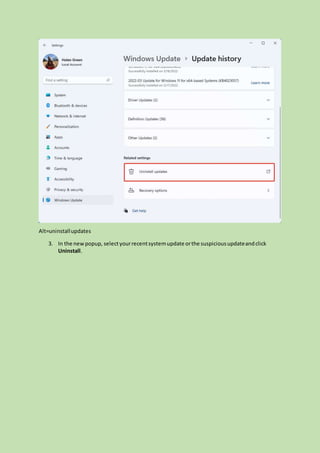
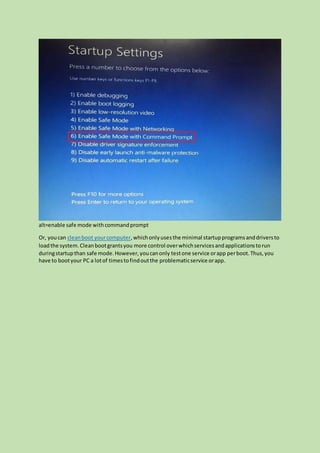
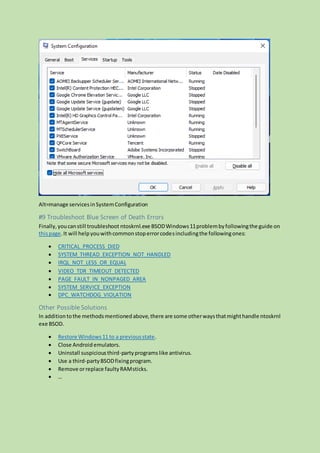
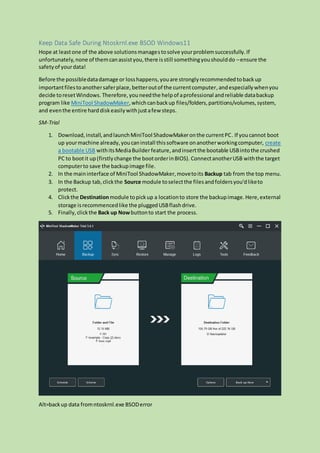
The document provides over nine methods to resolve the ntoskrnl.exe blue screen of death (BSOD) error in Windows 11, explaining that this issue is related to problems with the Windows OS kernel executable file. It includes troubleshooting steps such as checking memory integrity, verifying file corruption, ensuring disk health, scanning for malware, updating drivers, and installing/uninstalling updates. Additionally, it suggests data backup solutions to protect user data in case of system failures due to the BSOD problem.
![Title: [9+ Ways] How to Fix Ntoskrnl.exe BSOD Windows 11 Error?
Keywords: ntoskrnl.exe bsodwindows11, ntoskrnl exe bsod, blue screenntoskrnl exe,ntoskrnl.exe
blue screen, ntoskrnl-exebsod, blue screenof deathntoskrnl.exe, ntoskrnl bsodfix
Description: What’s ntoskrnl.exe blue screen of death? Why does it happen in Windows 11? How to
solve the problem? This article offers more than nine methods.
URL: https://www.minitool.com/backup-tips/ntoskrnl-exe-bsod-windows-11.html
Summary: This article talked about by MiniTool Software Limited mainly provides more than 9
workable methods to deal with ntoskrnl.exe blue screen of death stop code error in Windows 11.
Generally speaking, no matter what situation you are in, you can find a solution here!
Ntoskrnl.exe BSOD Windows 11 refers to a blue screen of death (BSOD) caused by the Windows 11
operating system (OS) kernel executable (ntoskrnl.exe). It means that there is a problem with the file.
Without this file, the system will not run.
A BSOD problem is not a catastrophe. It just forces you to reboot your computer and tries to protect
your OS files from further damage. What you need to do is to troubleshoot the issue starting from the
error message the blue screen gives you. Now, let’s see how to fix Windows 11 ntoskrnl exe blue
screen error.
Tip: Most of the below solutions also apply to Windows10, 8.1,8, 7.
#1 Check for Memory Errors
Firstof all,youshouldcheckthe integrityof your RAMrelyingonWindowsMemoryDiagnostictool
or third-partyprograms.
1. OpenWindows11 MemoryDiagnostic.](https://image.slidesharecdn.com/ntoskrnl-exe-bsod-windows-11-220330075511/85/ntoskrnl-exe-bsod-windows-11-docx-1-320.jpg)
![Title: [9+ Ways] How to Fix Ntoskrnl.exe BSOD Windows 11 Error?
Keywords: ntoskrnl.exe bsodwindows11, ntoskrnl exe bsod, blue screenntoskrnl exe,ntoskrnl.exe
blue screen, ntoskrnl-exebsod, blue screenof deathntoskrnl.exe, ntoskrnl bsodfix
Description: What’s ntoskrnl.exe blue screen of death? Why does it happen in Windows 11? How to
solve the problem? This article offers more than nine methods.
URL: https://www.minitool.com/backup-tips/ntoskrnl-exe-bsod-windows-11.html
Summary: This article talked about by MiniTool Software Limited mainly provides more than 9
workable methods to deal with ntoskrnl.exe blue screen of death stop code error in Windows 11.
Generally speaking, no matter what situation you are in, you can find a solution here!
Ntoskrnl.exe BSOD Windows 11 refers to a blue screen of death (BSOD) caused by the Windows 11
operating system (OS) kernel executable (ntoskrnl.exe). It means that there is a problem with the file.
Without this file, the system will not run.
A BSOD problem is not a catastrophe. It just forces you to reboot your computer and tries to protect
your OS files from further damage. What you need to do is to troubleshoot the issue starting from the
error message the blue screen gives you. Now, let’s see how to fix Windows 11 ntoskrnl exe blue
screen error.
Tip: Most of the below solutions also apply to Windows10, 8.1,8, 7.
#1 Check for Memory Errors
Firstof all,youshouldcheckthe integrityof your RAMrelyingonWindowsMemoryDiagnostictool
or third-partyprograms.
1. OpenWindows11 MemoryDiagnostic.](https://image.slidesharecdn.com/ntoskrnl-exe-bsod-windows-11-220330075511/75/ntoskrnl-exe-bsod-windows-11-docx-1-2048.jpg)