Copyright ©: Lawrence Angrave, Vikram Adve, Caccamo 1
Virtual Memory
Virtual Memory
 All memory addresses within a process are logical addresses and they
are translated into physical addresses at run-time
 Process image is divided in several small pieces (pages) that don’t need
to be continuously allocated
 A process image can be swapped in and out of memory occupying
different regions of main memory during its lifetime
 When OS supports virtual memory, it is not required for a process to
have all its pages loaded in main memory at the time it executes
Virtual Memory
 At any time, the portion of process image that is loaded in main memory
is called the resident set of the process
 If the CPU try to access an address belonging to a page that currently is
not loaded in main memory, it generates a page fault interrupt and:
 The interrupted process changes to blocked state
 The OS issues a disk I/O read request
 The OS tries to dispatch another process while the I/O request is served
 Once the disk completes the page transfer, an I/O interrupt is issued
 The OS handles the I/O interrupt and moves the process with page fault
back to ready state
Virtual Memory
 Since the OS only loads some pages of each process, more processes
can be resident in main memory and be ready for execution
 Virtual memory gives the programmer the impression that he/she is
dealing with a huge main memory (relying on available disk space). The
OS loads automatically and on-demand pages of the running process.
 A process image may be larger than the entire main memory
Virtual Memory &
Multiprogramming
 Eviction of Virtual Pages
 On page fault: Choose VM page to page out
 How to choose which data to page out?
 Allocation of Physical Page Frames
 How to distribute page frames to processes?
Page eviction
 Hopefully, kick out a less-useful page
 Modified (dirty) pages require writing, clean pages don’t
 Goal: kick out the page that’s least useful
 Problem: how do you determine utility?
 Heuristic: temporal and spatial locality exist
 Kick out pages that aren’t likely to be used again
Temporal & spatial locality
 temporal locality:
 if a particular memory location is referenced, then the same
location will likely be referenced again in the near future.
 spatial locality:
 if a particular memory location is referenced at a particular time,
then nearby memory locations will likely be referenced in the near
future.
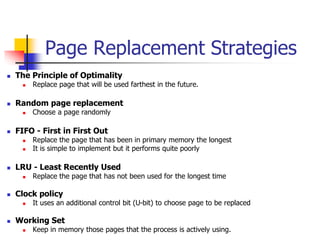
Page Replacement Strategies
 The Principle of Optimality
 Replace page that will be used farthest in the future.
 Random page replacement
 Choose a page randomly
 FIFO - First in First Out
 Replace the page that has been in primary memory the longest
 It is simple to implement but it performs quite poorly
 LRU - Least Recently Used
 Replace the page that has not been used for the longest time
 Clock policy
 It uses an additional control bit (U-bit) to choose page to be replaced
 Working Set
 Keep in memory those pages that the process is actively using.
Principle of Optimality
 Description:
 Assume each page can be labeled with number of references that
will be executed before that page is first referenced.
 Then the optimal page algorithm would choose the page with the
highest label to be removed from the memory.
 Impractical! Why?
 Provides a basis for comparison with other schemes.
 If future references are known
 should not use demand paging
 should use “pre-paging” to overlap paging with computation.
LRU (Least Recently Used)
 Description:
 It replaces the page in memory that has not been
referenced for the longest time
 It works almost as well as optimal policy since it
leverages on principle of locality
 It is difficult to implement
Clock policy
 Description:
 It tries to approximate LRU policy but it imposes less overhead
 It requires an additional U-bit (use bit) for each page
 When a page is first loaded in main memory, its U-bit is set to 1.
each time a page is referenced, its U-bit is set to 1.
 If a page needs to be replaced, the replacement algorithm first
searches for a page that has both U and M bits set to zero. While
scanning is performed, the U-bit of scanned pages is reset to zero
Page size
 Page size is a crucial parameter for performance of virtual
memory
 Quiz: What is the effect of resizing memory pages?
Page size
Page
fault
rate
Page size
P
size of
entire
process
Note that page fault rate
is also affected by the number
of frames allocated to a process
Page size
 Page size is a crucial parameter for performance of virtual memory
 Quiz: What is the effect of resizing memory pages?
 If page size is too small, the page table becomes very large; on the
contrary, large pages cause internal fragmentation of memory
 In general small pages allow to exploit principle of locality; in fact, several
small pages can be loaded for a process, and they will include portions of
process image near recent references
 As size of pages is increased, principle of locality is not well exploited
anymore and page fault rate increases
 When size of pages becomes very big, page fault rate starts to decrease
again since a single page approaches the size of entire process image.
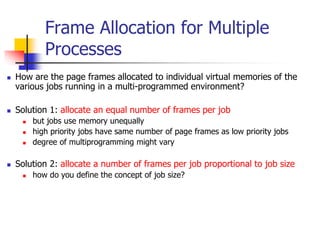
Frame Allocation for Multiple
Processes
 How are the page frames allocated to individual virtual memories of the
various jobs running in a multi-programmed environment?
 Solution 1: allocate an equal number of frames per job
 but jobs use memory unequally
 high priority jobs have same number of page frames as low priority jobs
 degree of multiprogramming might vary
 Solution 2: allocate a number of frames per job proportional to job size
 how do you define the concept of job size?
Frame Allocation for Multiple
Processes
 Why is multi-programming frame allocation so
important?
 If not solved appropriately, it will result in a severe
problem--- Thrashing
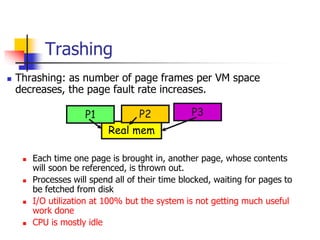
Trashing
 Thrashing: as number of page frames per VM space
decreases, the page fault rate increases.
 Each time one page is brought in, another page, whose contents
will soon be referenced, is thrown out.
 Processes will spend all of their time blocked, waiting for pages to
be fetched from disk
 I/O utilization at 100% but the system is not getting much useful
work done
 CPU is mostly idle
Real mem
P1 P2 P3
Why Trashing
 Computations have locality
 As number of page frames allocated to a process decreases,
the page frames available are not enough to contain the
locality of the process.
 The processes start faulting heavily
 Pages that are read in, are used and immediately paged out.
Level of multiprogramming
 Load control has the important function of deciding how many processes will be
resident in main memory
 Quiz: What are the trade-offs involved?
Level of multiprogramming
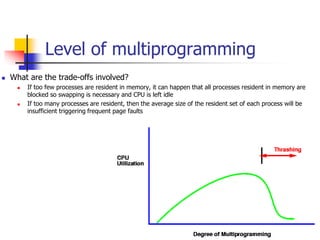
 What are the trade-offs involved?
 If too few processes are resident in memory, it can happen that all processes resident in memory are
blocked so swapping is necessary and CPU is left idle
 If too many processes are resident, then the average size of the resident set of each process will be
insufficient triggering frequent page faults
Page Fault Rate vs. Allocated Frames
N
Total number
of pages in process
W
Working Set size
Trashing
Working set (1968, Denning)
 Main idea
 figure out how much memory a process needs to keep most of its recent
computation in memory with very few page faults
 How?
 The working set model assumes temporal locality
 Recently accessed pages are more likely to be accessed again
 Thus, as the number of page frames increases above some threshold,
the page fault rate will drop dramatically
Working set (1968, Denning)
 What we want to know: collection of pages process must have in order
to avoid thrashing
 This requires knowing the future. And our trick is?
 Intuition of Working Set:
 Pages referenced by process in last  seconds of execution are considered
to comprise its working set
 : the working set parameter
 Usages of working set?
 Cache partitioning: give each application enough space for WS
 Page replacement: preferably discard non-WS pages
 Scheduling: a process is not executed unless its WS is in memory
Working set in details
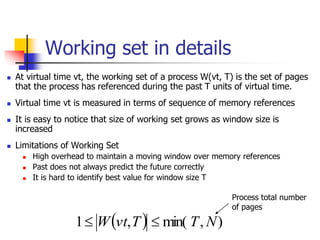
 At virtual time vt, the working set of a process W(vt, T) is the set of pages
that the process has referenced during the past T units of virtual time.
 Virtual time vt is measured in terms of sequence of memory references
 It is easy to notice that size of working set grows as window size is
increased
 Limitations of Working Set
 High overhead to maintain a moving window over memory references
 Past does not always predict the future correctly
 It is hard to identify best value for window size T
  )
,
min(
,
1 N
T
T
vt
W 

Process total number
of pages
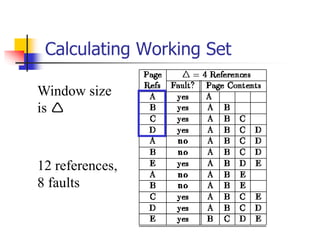
Calculating Working Set
12 references,
8 faults
Window size
is 
Working set in details
 Strategy for sizing the resident set of a process based
on Working set
 Keep track of working set of each process
 Periodically remove from the resident set the pages that
don’t belong to working set anymore
 A process is scheduled for execution only if its working set is
in main memory
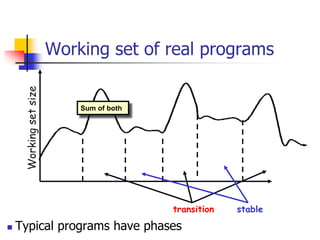
Working set of real programs
 Typical programs have phases
Working
set
size
transition stable
Sum of both
Page Fault Frequency (PFF)
algorithm
 Approximation of pure Working Set
 Assume that working set strategy is valid; hence, properly
sizing the resident set will reduce page fault rate.
 Let’s focus on process fault rate rather than its exact page
references
 If process page fault rate increases beyond a maximum
threshold, then increase its resident set size.
 If page fault rate decreases below a minimum threshold,
then decrease its resident set size
 Without harming the process, OS can free some frames
and allocate them to other processes suffering higher PFF

virtual memory operating system notes.ppt

  • 1.
    Copyright ©: LawrenceAngrave, Vikram Adve, Caccamo 1 Virtual Memory
  • 2.
    Virtual Memory  Allmemory addresses within a process are logical addresses and they are translated into physical addresses at run-time  Process image is divided in several small pieces (pages) that don’t need to be continuously allocated  A process image can be swapped in and out of memory occupying different regions of main memory during its lifetime  When OS supports virtual memory, it is not required for a process to have all its pages loaded in main memory at the time it executes
  • 3.
    Virtual Memory  Atany time, the portion of process image that is loaded in main memory is called the resident set of the process  If the CPU try to access an address belonging to a page that currently is not loaded in main memory, it generates a page fault interrupt and:  The interrupted process changes to blocked state  The OS issues a disk I/O read request  The OS tries to dispatch another process while the I/O request is served  Once the disk completes the page transfer, an I/O interrupt is issued  The OS handles the I/O interrupt and moves the process with page fault back to ready state
  • 4.
    Virtual Memory  Sincethe OS only loads some pages of each process, more processes can be resident in main memory and be ready for execution  Virtual memory gives the programmer the impression that he/she is dealing with a huge main memory (relying on available disk space). The OS loads automatically and on-demand pages of the running process.  A process image may be larger than the entire main memory
  • 5.
    Virtual Memory & Multiprogramming Eviction of Virtual Pages  On page fault: Choose VM page to page out  How to choose which data to page out?  Allocation of Physical Page Frames  How to distribute page frames to processes?
  • 6.
    Page eviction  Hopefully,kick out a less-useful page  Modified (dirty) pages require writing, clean pages don’t  Goal: kick out the page that’s least useful  Problem: how do you determine utility?  Heuristic: temporal and spatial locality exist  Kick out pages that aren’t likely to be used again
  • 7.
    Temporal & spatiallocality  temporal locality:  if a particular memory location is referenced, then the same location will likely be referenced again in the near future.  spatial locality:  if a particular memory location is referenced at a particular time, then nearby memory locations will likely be referenced in the near future.
  • 8.
    Page Replacement Strategies The Principle of Optimality  Replace page that will be used farthest in the future.  Random page replacement  Choose a page randomly  FIFO - First in First Out  Replace the page that has been in primary memory the longest  It is simple to implement but it performs quite poorly  LRU - Least Recently Used  Replace the page that has not been used for the longest time  Clock policy  It uses an additional control bit (U-bit) to choose page to be replaced  Working Set  Keep in memory those pages that the process is actively using.
  • 9.
    Principle of Optimality Description:  Assume each page can be labeled with number of references that will be executed before that page is first referenced.  Then the optimal page algorithm would choose the page with the highest label to be removed from the memory.  Impractical! Why?  Provides a basis for comparison with other schemes.  If future references are known  should not use demand paging  should use “pre-paging” to overlap paging with computation.
  • 10.
    LRU (Least RecentlyUsed)  Description:  It replaces the page in memory that has not been referenced for the longest time  It works almost as well as optimal policy since it leverages on principle of locality  It is difficult to implement
  • 11.
    Clock policy  Description: It tries to approximate LRU policy but it imposes less overhead  It requires an additional U-bit (use bit) for each page  When a page is first loaded in main memory, its U-bit is set to 1. each time a page is referenced, its U-bit is set to 1.  If a page needs to be replaced, the replacement algorithm first searches for a page that has both U and M bits set to zero. While scanning is performed, the U-bit of scanned pages is reset to zero
  • 12.
    Page size  Pagesize is a crucial parameter for performance of virtual memory  Quiz: What is the effect of resizing memory pages?
  • 13.
    Page size Page fault rate Page size P sizeof entire process Note that page fault rate is also affected by the number of frames allocated to a process
  • 14.
    Page size  Pagesize is a crucial parameter for performance of virtual memory  Quiz: What is the effect of resizing memory pages?  If page size is too small, the page table becomes very large; on the contrary, large pages cause internal fragmentation of memory  In general small pages allow to exploit principle of locality; in fact, several small pages can be loaded for a process, and they will include portions of process image near recent references  As size of pages is increased, principle of locality is not well exploited anymore and page fault rate increases  When size of pages becomes very big, page fault rate starts to decrease again since a single page approaches the size of entire process image.
  • 15.
    Frame Allocation forMultiple Processes  How are the page frames allocated to individual virtual memories of the various jobs running in a multi-programmed environment?  Solution 1: allocate an equal number of frames per job  but jobs use memory unequally  high priority jobs have same number of page frames as low priority jobs  degree of multiprogramming might vary  Solution 2: allocate a number of frames per job proportional to job size  how do you define the concept of job size?
  • 16.
    Frame Allocation forMultiple Processes  Why is multi-programming frame allocation so important?  If not solved appropriately, it will result in a severe problem--- Thrashing
  • 17.
    Trashing  Thrashing: asnumber of page frames per VM space decreases, the page fault rate increases.  Each time one page is brought in, another page, whose contents will soon be referenced, is thrown out.  Processes will spend all of their time blocked, waiting for pages to be fetched from disk  I/O utilization at 100% but the system is not getting much useful work done  CPU is mostly idle Real mem P1 P2 P3
  • 18.
    Why Trashing  Computationshave locality  As number of page frames allocated to a process decreases, the page frames available are not enough to contain the locality of the process.  The processes start faulting heavily  Pages that are read in, are used and immediately paged out.
  • 19.
    Level of multiprogramming Load control has the important function of deciding how many processes will be resident in main memory  Quiz: What are the trade-offs involved?
  • 20.
    Level of multiprogramming What are the trade-offs involved?  If too few processes are resident in memory, it can happen that all processes resident in memory are blocked so swapping is necessary and CPU is left idle  If too many processes are resident, then the average size of the resident set of each process will be insufficient triggering frequent page faults
  • 21.
    Page Fault Ratevs. Allocated Frames N Total number of pages in process W Working Set size Trashing
  • 22.
    Working set (1968,Denning)  Main idea  figure out how much memory a process needs to keep most of its recent computation in memory with very few page faults  How?  The working set model assumes temporal locality  Recently accessed pages are more likely to be accessed again  Thus, as the number of page frames increases above some threshold, the page fault rate will drop dramatically
  • 23.
    Working set (1968,Denning)  What we want to know: collection of pages process must have in order to avoid thrashing  This requires knowing the future. And our trick is?  Intuition of Working Set:  Pages referenced by process in last  seconds of execution are considered to comprise its working set  : the working set parameter  Usages of working set?  Cache partitioning: give each application enough space for WS  Page replacement: preferably discard non-WS pages  Scheduling: a process is not executed unless its WS is in memory
  • 24.
    Working set indetails  At virtual time vt, the working set of a process W(vt, T) is the set of pages that the process has referenced during the past T units of virtual time.  Virtual time vt is measured in terms of sequence of memory references  It is easy to notice that size of working set grows as window size is increased  Limitations of Working Set  High overhead to maintain a moving window over memory references  Past does not always predict the future correctly  It is hard to identify best value for window size T   ) , min( , 1 N T T vt W   Process total number of pages
  • 25.
    Calculating Working Set 12references, 8 faults Window size is 
  • 26.
    Working set indetails  Strategy for sizing the resident set of a process based on Working set  Keep track of working set of each process  Periodically remove from the resident set the pages that don’t belong to working set anymore  A process is scheduled for execution only if its working set is in main memory
  • 27.
    Working set ofreal programs  Typical programs have phases Working set size transition stable Sum of both
  • 28.
    Page Fault Frequency(PFF) algorithm  Approximation of pure Working Set  Assume that working set strategy is valid; hence, properly sizing the resident set will reduce page fault rate.  Let’s focus on process fault rate rather than its exact page references  If process page fault rate increases beyond a maximum threshold, then increase its resident set size.  If page fault rate decreases below a minimum threshold, then decrease its resident set size  Without harming the process, OS can free some frames and allocate them to other processes suffering higher PFF