Professional Embroidery + Multidecoration + Digitizing!!!
TRAINING INSTITUTE +
9 YEARS PERFECT EXPERIENCE

NEW BATCH START
IN AUGUST 2013
Starting Tuesday, 20th
11:00am – 01:00pm
06:00pm – 08:00pm
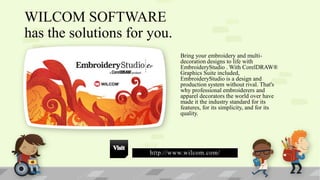
WILCOM SOFTWARE
has the solutions for you.
Bring your embroidery and multidecoration designs to life with
EmbroideryStudio . With CorelDRAW®
Graphics Suite included,
EmbroideryStudio is a design and
production system without rival. That's
why professional embroiderers and
apparel decorators the world over have
made it the industry standard for its
features, for its simplicity, and for its
quality.

http://www.wilcom.com/
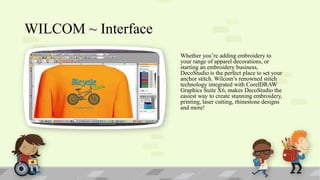
WILCOM ~ Interface
Whether you’re adding embroidery to
your range of apparel decorations, or
starting an embroidery business,
DecoStudio is the perfect place to set your
anchor stitch. Wilcom’s renowned stitch
technology integrated with CorelDRAW
Graphics Suite X6, makes DecoStudio the
easiest way to create stunning embroidery,
printing, laser cutting, rhinestone designs
and more!
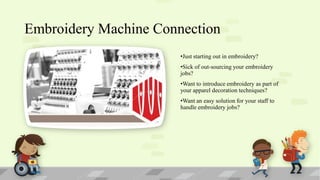
Embroidery Machine Connection
•Just starting out in embroidery?

•Sick of out-sourcing your embroidery
jobs?
•Want to introduce embroidery as part of
your apparel decoration techniques?
•Want an easy solution for your staff to
handle embroidery jobs?
90% Job Placements
Scope & Careers
SCOPE
The scope of tasks that comes
under the realm of embroidery
digitizing has seen a major
surge in the past few years.
From being a service only
accessed by those seeking
mass production of
embroidered designs,
embroidery digitizing is now
being used by individuals as
well in order to make a style
statement in their own unique
way.
Student’s Jobs Placement
Placement Work Shop

90% Placement Assistance*

• “The Institute regularly conducts
placement workshops to prepare
students to face job interviews & tests.
Digitizing school students are taught
skills such as resume embroidery
digitizing skills, and time
management in these workshops so
that they become completely industryready by the time they complete their
course.

• “Digitizing School helps kickstart
your career with major textile
industries in Pakistan & overseas.
Job roles include profiles in Fashion
Embroidery Digitizing.”
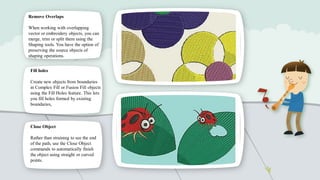
Remove Overlaps
When working with overlapping
vector or embroidery objects, you can
merge, trim or split them using the
Shaping tools. You have the option of
preserving the source objects of
shaping operations.
Fill holes
Create new objects from boundaries
in Complex Fill or Fusion Fill objects
using the Fill Holes feature. This lets
you fill holes formed by existing
boundaries,

Close Object
Rather than straining to see the end
of the path, use the Close Object
commands to automatically finish
the object using straight or curved
points.
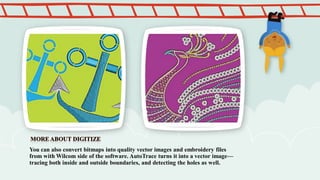
You can also convert bitmaps into quality vector images and embroidery files
from with Wilcom side of the software. AutoTrace turns it into a vector image—
tracing both inside and outside boundaries, and detecting the holes as well.
More about Offsets Advanced
Offsets Advanced gives you more power and
creative options for highlighting and adding
outlines and offset borders to your
customer’s designs. This tool wraps borders
precisely around the shape of any closed
object, group of objects, or the entire design.
In one action, you can create an outline, and
multiple offset borders, each with their own
offset, stitch effect, size and thread color.
Edit each of them individually.
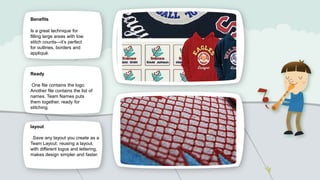
Benefits

Is a great technique for
filling large areas with low
stitch counts—it’s perfect
for outlines, borders and
appliqué.

Ready
One file contains the logo.
Another file contains the list of
names. Team Names puts
them together, ready for
stitching.

layout
.Save any layout you create as a
Team Layout: reusing a layout,
with different logos and lettering,
makes design simpler and faster.
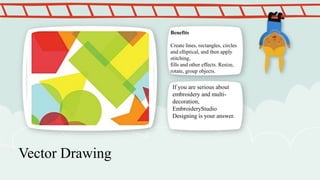
Benefits

Create lines, rectangles, circles
and elliptical, and then apply
stitching,
fills and other effects. Resize,
rotate, group objects.

If you are serious about
embroidery and multidecoration,
EmbroideryStudio
Designing is your answer.

Vector Drawing
More about Motifs
• Motif
• Create and reuse patterns for runs & fills Once you’ve created or digitized a patterned
fill you like—repeated hearts, diamonds and so on—store it away as a Motif and use
it
whenever you want.
• Any pattern you create can be saved as a Motif
• Create repeating, decorative outlines using any Motif set

• 3D Warp works with Motif Fills to create 3D effects
More about Auto Arrangements
• Benefits
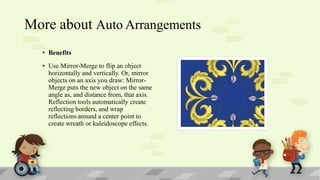
• Use Mirror-Merge to flip an object
horizontally and vertically. Or, mirror
objects on an axis you draw: MirrorMerge puts the new object on the same
angle as, and distance from, that axis.
Reflection tools automatically create
reflecting borders, and wrap
reflections around a center point to
create wreath or kaleidoscope effects.
3D Warps
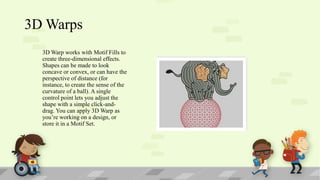
3D Warp works with Motif Fills to
create three-dimensional effects.
Shapes can be made to look
concave or convex, or can have the
perspective of distance (for
instance, to create the sense of the
curvature of a ball). A single
control point lets you adjust the
shape with a simple click-anddrag. You can apply 3D Warp as
you’re working on a design, or
store it in a Motif Set.
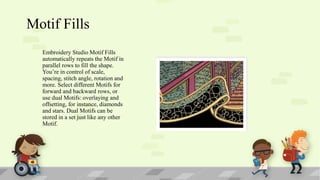
Motif Fills
Embroidery Studio Motif Fills
automatically repeats the Motif in
parallel rows to fill the shape.
You’re in control of scale,
spacing, stitch angle, rotation and
more. Select different Motifs for
forward and backward rows, or
use dual Motifs: overlaying and
offsetting, for instance, diamonds
and stars. Dual Motifs can be
stored in a set just like any other
Motif.
Course
Overview

•
•
•

•
•
•
•
•
•
•
•
•
•
•
•
•
•

Viewing
Color ways
Stitch Types for
Lettering
Text Properties
Underlay
Connectors
Editing Text
Designs
Traveling
Selecting/Viewing
Options
Combining Designs &
Lettering
Sizing Designs
Team Names
Stitch Editing
Manual Functions
Tools
File Menu

•
•
•
•
•
•
•
•
•
•
•
•
•
•
•
•
•
•
•

Sending to Machine
Design Modification
Stitch Types and density
Stitch effects
Digitizing tools
Artwork
Triple Run
Triple Manual Stitch
Input A
Input B
Complex fills
Program Splits
Motifs
Modify Objects Inputs
Converting Objects
Apply Current Properties
Smart Design
Input Tools
Converting Objects

•
•
•
•
•
•
•
•
•
•
•
•
•
•
•
•
•
•

Create/Use Motif Runs
Create/Us Motif Fills
Artistic Effects
Auto Applique
Exporting
Advanced Lettering
Using Styles
Make Properties Current
Applying Properties
Special Effects
Combining Special Effects
User defined Alphabets
Integrated Drawing Tools
Shaping Tools
Converting Objects
Point & Stitch
Auto Trace
Cross Stitch (on request)
Classes Schedule
•3 Months Course
•3 Days Class in a Week
•2 Hours Duration
Classes Schedule
•2 Hours Duration
•3 Days Class in a Week

10:00 - 12:00

Morning

12:00 - 2:00

Afternoon

2:00 - 4:00

Afternoon

4:00 - 6:00

Evening

6:00 - 8:00

Evening

Friday

Off

Sunday

Off

•3 Months Course
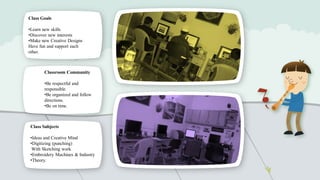
Class Goals
•Learn new skills
•Discover new interests
•Make new Creative Designs
Have fun and support each
other.

Classroom Community
•Be respectful and
responsible.
•Be organized and follow
directions.
•Be on time.

Class Subjects
•Ideas and Creative Mind
•Digitizing (punching)
With Sketching work
•Embroidery Machines & Industry
•Theory.
Join Admission Criteria
• Academic qualifications min S.S.C (Matriculation)

• Operate Computer. (Basic Information)
Get to Know Me
My experience

My background

• I’ve been teaching for 9 years.

• I grew up in Karachi.

• Number of students Passed is 30.

• passed SSC from National High
School and Bachelors from Karachi
university

• We have currently 20 Students.
Contact Us
Center Location
Gulshan Chowrangi, Gulshan-e-Iqbal.
Shabbir Ahmed Usmani Road.
Direct: +92-21-3002231466
Tel: +92-21-34833229
Fax: +92-21-34988509, Skype: rizwanlast
Email: xw2rizwan@gmail.com

Head Office
A110 Block4-A, G.Iqbal
Karachi– 75300

Wilcom students

  • 1.
    Professional Embroidery +Multidecoration + Digitizing!!! TRAINING INSTITUTE + 9 YEARS PERFECT EXPERIENCE NEW BATCH START IN AUGUST 2013 Starting Tuesday, 20th 11:00am – 01:00pm 06:00pm – 08:00pm
  • 2.
    WILCOM SOFTWARE has thesolutions for you. Bring your embroidery and multidecoration designs to life with EmbroideryStudio . With CorelDRAW® Graphics Suite included, EmbroideryStudio is a design and production system without rival. That's why professional embroiderers and apparel decorators the world over have made it the industry standard for its features, for its simplicity, and for its quality. http://www.wilcom.com/
  • 3.
    WILCOM ~ Interface Whetheryou’re adding embroidery to your range of apparel decorations, or starting an embroidery business, DecoStudio is the perfect place to set your anchor stitch. Wilcom’s renowned stitch technology integrated with CorelDRAW Graphics Suite X6, makes DecoStudio the easiest way to create stunning embroidery, printing, laser cutting, rhinestone designs and more!
  • 4.
    Embroidery Machine Connection •Juststarting out in embroidery? •Sick of out-sourcing your embroidery jobs? •Want to introduce embroidery as part of your apparel decoration techniques? •Want an easy solution for your staff to handle embroidery jobs?
  • 5.
  • 6.
    SCOPE The scope oftasks that comes under the realm of embroidery digitizing has seen a major surge in the past few years. From being a service only accessed by those seeking mass production of embroidered designs, embroidery digitizing is now being used by individuals as well in order to make a style statement in their own unique way.
  • 7.
    Student’s Jobs Placement PlacementWork Shop 90% Placement Assistance* • “The Institute regularly conducts placement workshops to prepare students to face job interviews & tests. Digitizing school students are taught skills such as resume embroidery digitizing skills, and time management in these workshops so that they become completely industryready by the time they complete their course. • “Digitizing School helps kickstart your career with major textile industries in Pakistan & overseas. Job roles include profiles in Fashion Embroidery Digitizing.”
  • 8.
    Remove Overlaps When workingwith overlapping vector or embroidery objects, you can merge, trim or split them using the Shaping tools. You have the option of preserving the source objects of shaping operations. Fill holes Create new objects from boundaries in Complex Fill or Fusion Fill objects using the Fill Holes feature. This lets you fill holes formed by existing boundaries, Close Object Rather than straining to see the end of the path, use the Close Object commands to automatically finish the object using straight or curved points.
  • 9.
    You can alsoconvert bitmaps into quality vector images and embroidery files from with Wilcom side of the software. AutoTrace turns it into a vector image— tracing both inside and outside boundaries, and detecting the holes as well.
  • 10.
    More about OffsetsAdvanced Offsets Advanced gives you more power and creative options for highlighting and adding outlines and offset borders to your customer’s designs. This tool wraps borders precisely around the shape of any closed object, group of objects, or the entire design. In one action, you can create an outline, and multiple offset borders, each with their own offset, stitch effect, size and thread color. Edit each of them individually.
  • 11.
    Benefits Is a greattechnique for filling large areas with low stitch counts—it’s perfect for outlines, borders and appliqué. Ready One file contains the logo. Another file contains the list of names. Team Names puts them together, ready for stitching. layout .Save any layout you create as a Team Layout: reusing a layout, with different logos and lettering, makes design simpler and faster.
  • 12.
    Benefits Create lines, rectangles,circles and elliptical, and then apply stitching, fills and other effects. Resize, rotate, group objects. If you are serious about embroidery and multidecoration, EmbroideryStudio Designing is your answer. Vector Drawing
  • 13.
    More about Motifs •Motif • Create and reuse patterns for runs & fills Once you’ve created or digitized a patterned fill you like—repeated hearts, diamonds and so on—store it away as a Motif and use it whenever you want. • Any pattern you create can be saved as a Motif • Create repeating, decorative outlines using any Motif set • 3D Warp works with Motif Fills to create 3D effects
  • 14.
    More about AutoArrangements • Benefits • Use Mirror-Merge to flip an object horizontally and vertically. Or, mirror objects on an axis you draw: MirrorMerge puts the new object on the same angle as, and distance from, that axis. Reflection tools automatically create reflecting borders, and wrap reflections around a center point to create wreath or kaleidoscope effects.
  • 15.
    3D Warps 3D Warpworks with Motif Fills to create three-dimensional effects. Shapes can be made to look concave or convex, or can have the perspective of distance (for instance, to create the sense of the curvature of a ball). A single control point lets you adjust the shape with a simple click-anddrag. You can apply 3D Warp as you’re working on a design, or store it in a Motif Set.
  • 16.
    Motif Fills Embroidery StudioMotif Fills automatically repeats the Motif in parallel rows to fill the shape. You’re in control of scale, spacing, stitch angle, rotation and more. Select different Motifs for forward and backward rows, or use dual Motifs: overlaying and offsetting, for instance, diamonds and stars. Dual Motifs can be stored in a set just like any other Motif.
  • 17.
    Course Overview • • • • • • • • • • • • • • • • • Viewing Color ways Stitch Typesfor Lettering Text Properties Underlay Connectors Editing Text Designs Traveling Selecting/Viewing Options Combining Designs & Lettering Sizing Designs Team Names Stitch Editing Manual Functions Tools File Menu • • • • • • • • • • • • • • • • • • • Sending to Machine Design Modification Stitch Types and density Stitch effects Digitizing tools Artwork Triple Run Triple Manual Stitch Input A Input B Complex fills Program Splits Motifs Modify Objects Inputs Converting Objects Apply Current Properties Smart Design Input Tools Converting Objects • • • • • • • • • • • • • • • • • • Create/Use Motif Runs Create/Us Motif Fills Artistic Effects Auto Applique Exporting Advanced Lettering Using Styles Make Properties Current Applying Properties Special Effects Combining Special Effects User defined Alphabets Integrated Drawing Tools Shaping Tools Converting Objects Point & Stitch Auto Trace Cross Stitch (on request)
  • 18.
    Classes Schedule •3 MonthsCourse •3 Days Class in a Week •2 Hours Duration
  • 19.
    Classes Schedule •2 HoursDuration •3 Days Class in a Week 10:00 - 12:00 Morning 12:00 - 2:00 Afternoon 2:00 - 4:00 Afternoon 4:00 - 6:00 Evening 6:00 - 8:00 Evening Friday Off Sunday Off •3 Months Course
  • 20.
    Class Goals •Learn newskills •Discover new interests •Make new Creative Designs Have fun and support each other. Classroom Community •Be respectful and responsible. •Be organized and follow directions. •Be on time. Class Subjects •Ideas and Creative Mind •Digitizing (punching) With Sketching work •Embroidery Machines & Industry •Theory.
  • 21.
    Join Admission Criteria •Academic qualifications min S.S.C (Matriculation) • Operate Computer. (Basic Information)
  • 22.
    Get to KnowMe My experience My background • I’ve been teaching for 9 years. • I grew up in Karachi. • Number of students Passed is 30. • passed SSC from National High School and Bachelors from Karachi university • We have currently 20 Students.
  • 23.
    Contact Us Center Location GulshanChowrangi, Gulshan-e-Iqbal. Shabbir Ahmed Usmani Road. Direct: +92-21-3002231466 Tel: +92-21-34833229 Fax: +92-21-34988509, Skype: rizwanlast Email: xw2rizwan@gmail.com Head Office A110 Block4-A, G.Iqbal Karachi– 75300