
Wi-Fi Password Recovery
What is Wi-Fi Password Recovery?
• What is Wi-Fi password recovery? This is an
excellent way to recover your forgotten or lost
Wi-Fi password easily and quickly.
• It provides 5 types of password recovery ways.
You don’t have to worry about data loss because
it is able to crack Wi-Fi password (WPA-
PSK/WPA2-PSK passwords)offline.
Which Wi-Fi Password Recovery?
• How to use Wi-Fi Password Recovery? There are
several Wi-Fi password recovery tools in the
Internet. All of them are good tools and you can
take easy to use one of them. Here the example
is SmartKey Wi-Fi Password Recovery.
• SmartKey Wi-Fi Password Recovery works
quickly and save time with GPU acceleration
technology. This is the biggest advantage than
other similar tools.
How to Use Wi-Fi Password Recovery?
• How to use Wi-Fi password recovery tool? In the
following steps, I will take SmartKey Wi-Fi
Password Recovery as an example to show you
the rough process.
• To get more details, you can Google Search the
official website or visit it directly:
• http://www.recoverlostpassword.com/products
/how-to-recover-wifi-password.html
Step 1 to Use Wi-Fi Password Recovery
• Step 1: Download and install SmartKey Wi-Fi
Password Recovery to your computer.
Step 2 to Use Wi-Fi Password Recovery
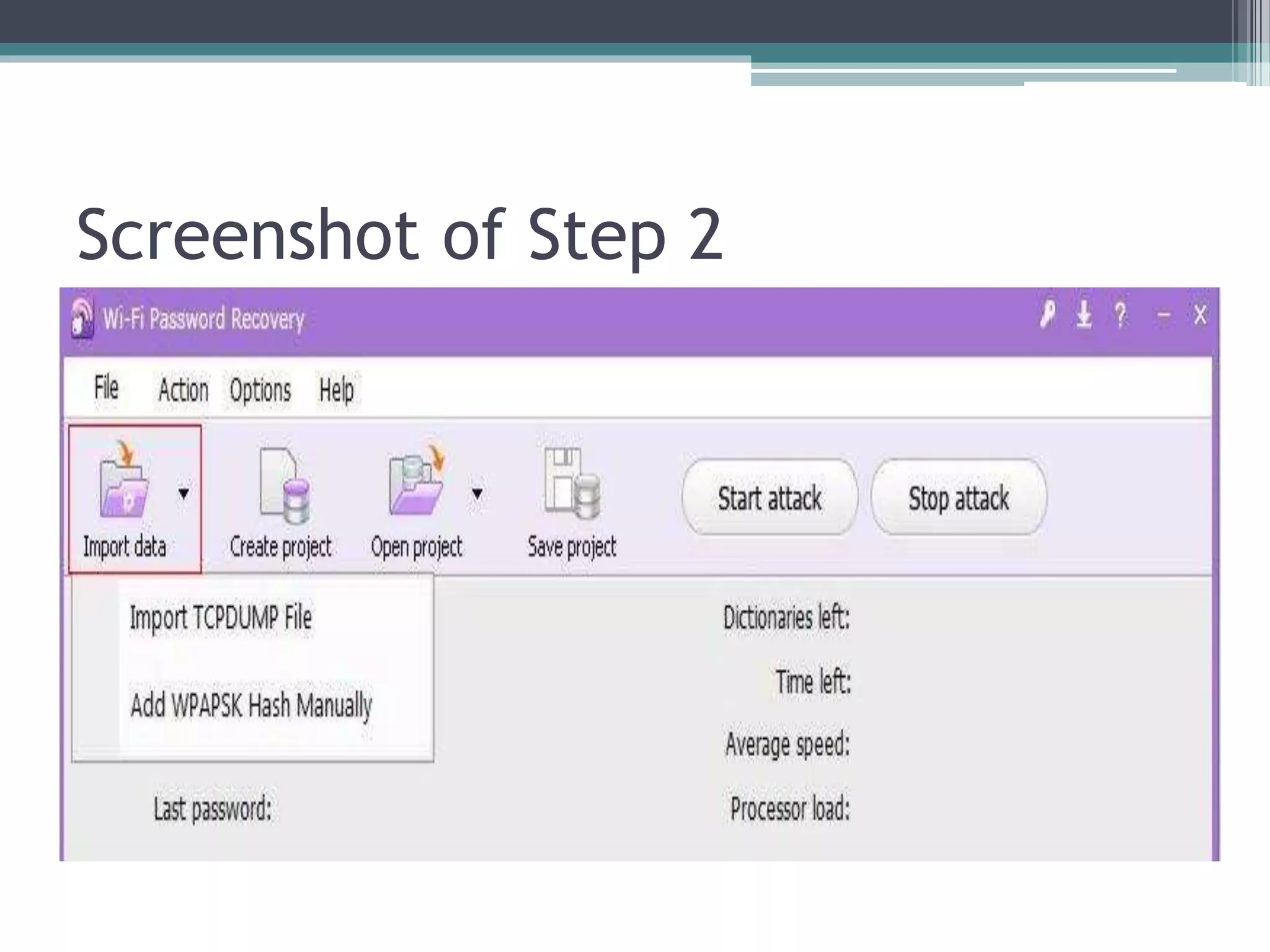
• Step 2: Insert Data of Wireless Network.
▫ You can click the "Import Data“ and then there are
two ways you can select to load Wi-Fi data.
▫ Way 1: Insert TCPDUMP file.
▫ Way 2: Add WPAPSK Hash with you own hands.
PS: If the loaded files are incorrect or not required,
you can also click the "Create Project" to create
a new project. And then to override the old data.
Screenshot of Step 2
Step 3 to Use Wi-Fi Password Recovery
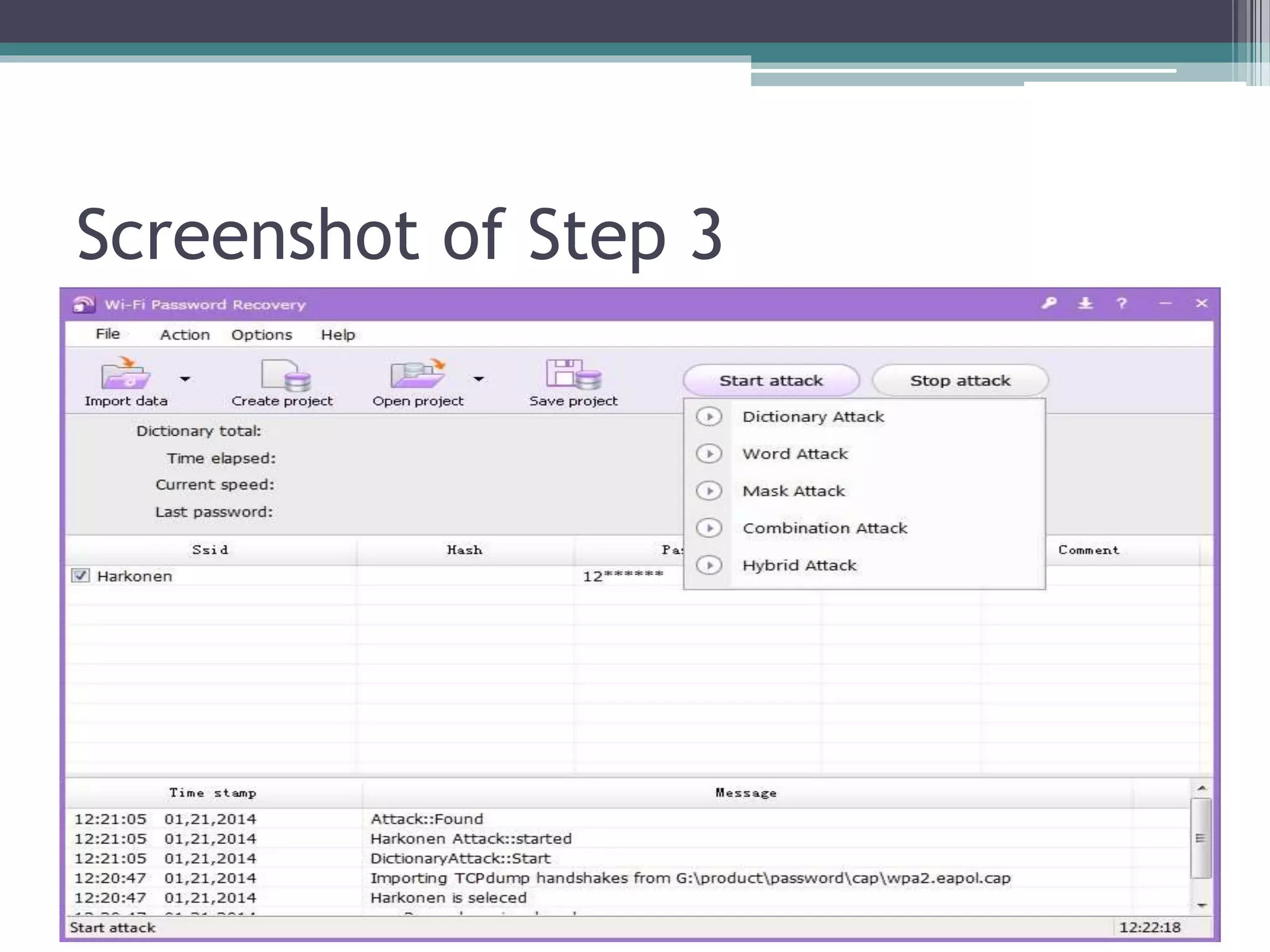
• Step 3: Click the "Start Attack" button and
choose an attack type.
• PS: There are 5 attack types in this step:
Dictionary Attack, Word Attack, Mask Attack,
Combination Attack and Hybrid Attack. You can
choose one to hack Wi-Fi password easily.
Screenshot of Step 3
Step 4 to Use Wi-Fi Password Recovery
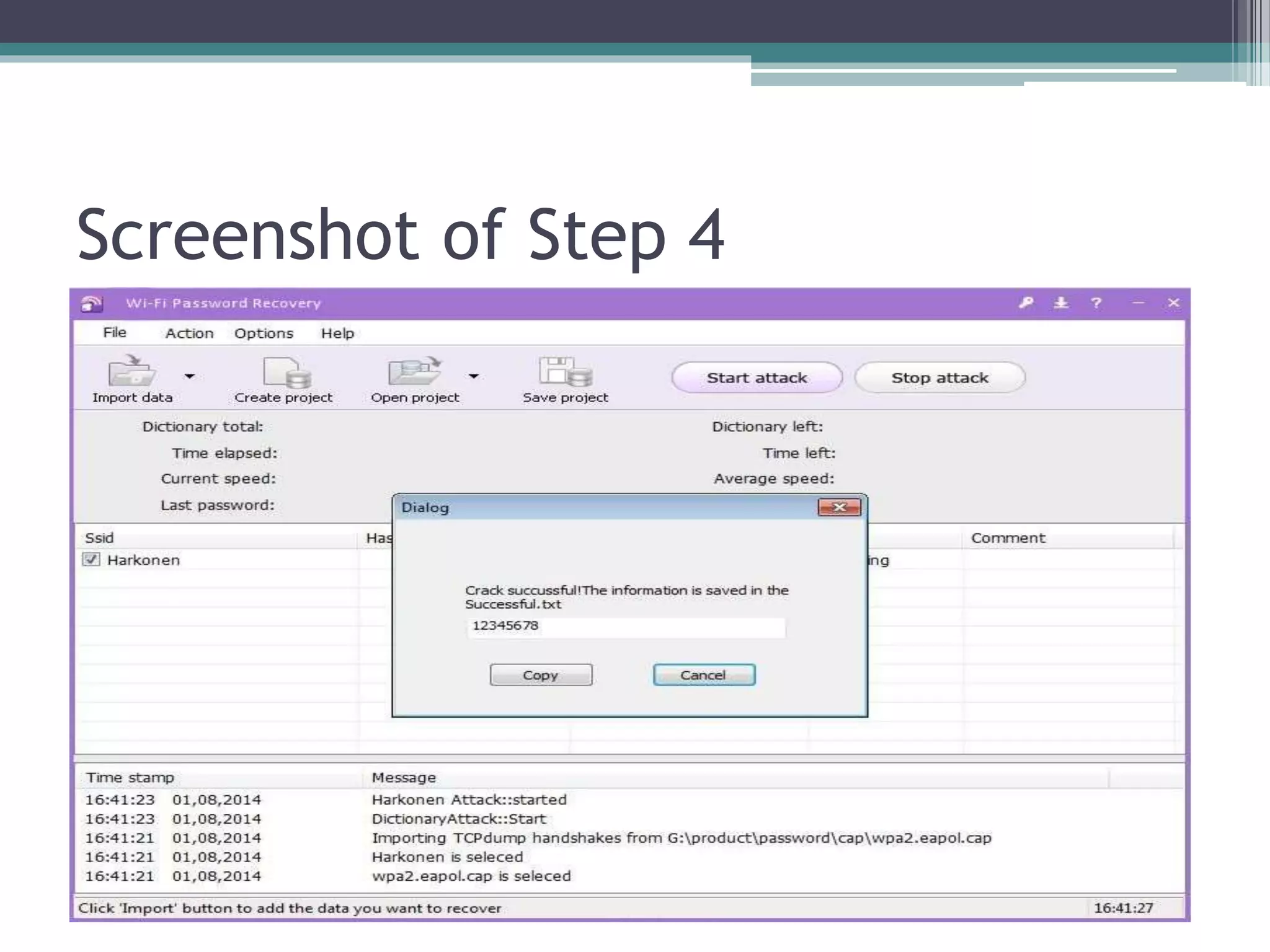
• Step 4: Recover lost Wi-Fi password successfully
and show it in a txt file.
• After the above steps, this Wi-Fi password
cracker will find out your Wi-Fi password in a
while. Then pop up a window to tell what it is. At
the same time, the password will be saved in a
file named Successful.txt.
Screenshot of Step 4
Summary
• That’s all about Wi-Fi password recovery and
how to use SmartKey Wi-Fi password recovery
tool. You may also click the following sites and
visit more information about it:
Thank you

Wifi Password Recovery - Recover Lost or Forgotten Wi-Fi Password

  • 1.
  • 2.
    What is Wi-FiPassword Recovery? • What is Wi-Fi password recovery? This is an excellent way to recover your forgotten or lost Wi-Fi password easily and quickly. • It provides 5 types of password recovery ways. You don’t have to worry about data loss because it is able to crack Wi-Fi password (WPA- PSK/WPA2-PSK passwords)offline.
  • 3.
    Which Wi-Fi PasswordRecovery? • How to use Wi-Fi Password Recovery? There are several Wi-Fi password recovery tools in the Internet. All of them are good tools and you can take easy to use one of them. Here the example is SmartKey Wi-Fi Password Recovery. • SmartKey Wi-Fi Password Recovery works quickly and save time with GPU acceleration technology. This is the biggest advantage than other similar tools.
  • 4.
    How to UseWi-Fi Password Recovery? • How to use Wi-Fi password recovery tool? In the following steps, I will take SmartKey Wi-Fi Password Recovery as an example to show you the rough process. • To get more details, you can Google Search the official website or visit it directly: • http://www.recoverlostpassword.com/products /how-to-recover-wifi-password.html
  • 5.
    Step 1 toUse Wi-Fi Password Recovery • Step 1: Download and install SmartKey Wi-Fi Password Recovery to your computer.
  • 6.
    Step 2 toUse Wi-Fi Password Recovery • Step 2: Insert Data of Wireless Network. ▫ You can click the "Import Data“ and then there are two ways you can select to load Wi-Fi data. ▫ Way 1: Insert TCPDUMP file. ▫ Way 2: Add WPAPSK Hash with you own hands. PS: If the loaded files are incorrect or not required, you can also click the "Create Project" to create a new project. And then to override the old data.
  • 7.
  • 8.
    Step 3 toUse Wi-Fi Password Recovery • Step 3: Click the "Start Attack" button and choose an attack type. • PS: There are 5 attack types in this step: Dictionary Attack, Word Attack, Mask Attack, Combination Attack and Hybrid Attack. You can choose one to hack Wi-Fi password easily.
  • 9.
  • 10.
    Step 4 toUse Wi-Fi Password Recovery • Step 4: Recover lost Wi-Fi password successfully and show it in a txt file. • After the above steps, this Wi-Fi password cracker will find out your Wi-Fi password in a while. Then pop up a window to tell what it is. At the same time, the password will be saved in a file named Successful.txt.
  • 11.
  • 12.
    Summary • That’s allabout Wi-Fi password recovery and how to use SmartKey Wi-Fi password recovery tool. You may also click the following sites and visit more information about it:
  • 13.