Getting Started with
Playwright: A
Beginner-Friendly
Introduction & Setup Guide
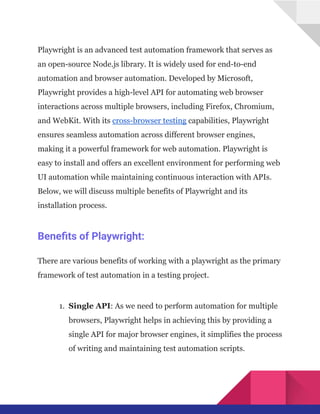
Playwright is an advanced test automation framework that serves as
an open-source Node.js library. It is widely used for end-to-end
automation and browser automation. Developed by Microsoft,
Playwright provides a high-level API for automating web browser
interactions across multiple browsers, including Firefox, Chromium,
and WebKit. With its cross-browser testing capabilities, Playwright
ensures seamless automation across different browser engines,
making it a powerful framework for web automation. Playwright is
easy to install and offers an excellent environment for performing web
UI automation while maintaining continuous interaction with APIs.
Below, we will discuss multiple benefits of Playwright and its
installation process.
Benefits of Playwright:
There are various benefits of working with a playwright as the primary
framework of test automation in a testing project.
1.​ Single API: As we need to perform automation for multiple
browsers, Playwright helps in achieving this by providing a
single API for major browser engines, it simplifies the process
of writing and maintaining test automation scripts.
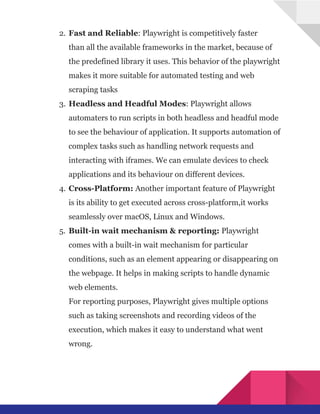
2.​Fast and Reliable: Playwright is competitively faster
than all the available frameworks in the market, because of
the predefined library it uses. This behavior of the playwright
makes it more suitable for automated testing and web
scraping tasks
3.​Headless and Headful Modes: Playwright allows
automaters to run scripts in both headless and headful mode
to see the behaviour of application. It supports automation of
complex tasks such as handling network requests and
interacting with iframes. We can emulate devices to check
applications and its behaviour on different devices.
4.​Cross-Platform: Another important feature of Playwright
is its ability to get executed across cross-platform,it works
seamlessly over macOS, Linux and Windows.
5.​ Built-in wait mechanism & reporting: Playwright
comes with a built-in wait mechanism for particular
conditions, such as an element appearing or disappearing on
the webpage. It helps in making scripts to handle dynamic
web elements.​
For reporting purposes, Playwright gives multiple options
such as taking screenshots and recording videos of the
execution, which makes it easy to understand what went
wrong.
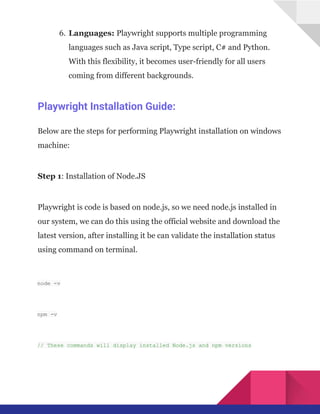
6.​Languages: Playwright supports multiple programming
languages such as Java script, Type script, C# and Python.
With this flexibility, it becomes user-friendly for all users
coming from different backgrounds.
Playwright Installation Guide:
Below are the steps for performing Playwright installation on windows
machine:
Step 1: Installation of Node.JS
Playwright is code is based on node.js, so we need node.js installed in
our system, we can do this using the official website and download the
latest version, after installing it be can validate the installation status
using command on terminal.
node -v
npm -v
// These commands will display installed Node.js and npm versions
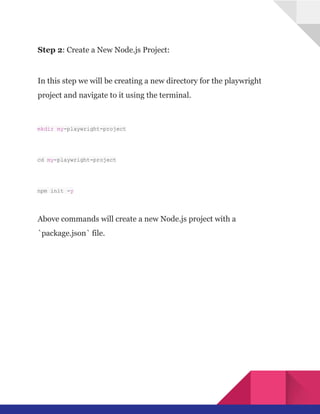
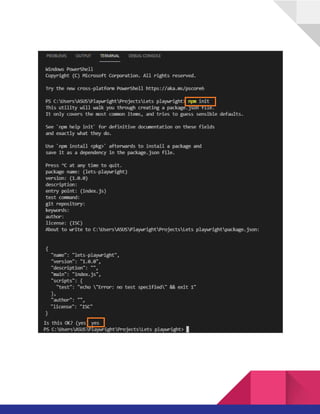
Step 2: Create a New Node.js Project:
In this step we will be creating a new directory for the playwright
project and navigate to it using the terminal.
mkdir my-playwright-project
cd my-playwright-project
npm init -y
Above commands will create a new Node.js project with a
`package.json` file.
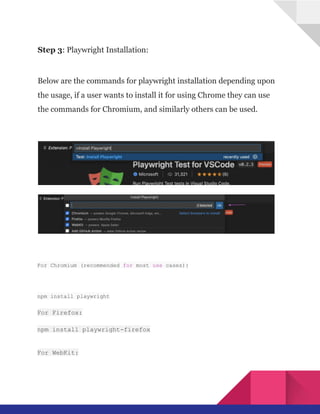
Step 3: Playwright Installation:
Below are the commands for playwright installation depending upon
the usage, if a user wants to install it for using Chrome they can use
the commands for Chromium, and similarly others can be used.
For Chromium (recommended for most use cases):
npm install playwright
For Firefox:
npm install playwright-firefox
For WebKit:
npm install playwright-webkit
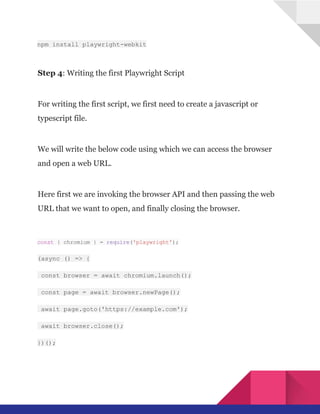
Step 4: Writing the first Playwright Script
For writing the first script, we first need to create a javascript or
typescript file.
We will write the below code using which we can access the browser
and open a web URL.
Here first we are invoking the browser API and then passing the web
URL that we want to open, and finally closing the browser.
const { chromium } = require('playwright');
(async () => {
const browser = await chromium.launch();
const page = await browser.newPage();
await page.goto('https://example.com');
await browser.close();
})();
Step 5: Running Playwright Script:
Using the below command we can execute the script which we wrote to
open a web URL on a web browser and finally close the same.
node your-script.js
Which one to choose between Playwright &
Cypress?
This is one of the most common questions that comes into the picture
while selecting a framework for creating a test automation framework.
we will try to answer this in brief in this article.
Users should use Playwright when they want to perform cross-browser
testing, interaction with multiple pages, if they are trying to
accommodate network interaction and if they want to use multiple
programming languages across the test automation. For performing
comprehensive test automation playwright is the best choice.
Whereas Cypress should be used when a user wants to work
primarily with Chrome browser and the preferred scripting language is
Java script. Cypress is more suitable for end-to-end automation and
real-time reloading and debugging.
Integration of Playwright with CI/CD tools:
Integration of Playwright project with CI/CD tool is very important, it
ensures that automated tests will start executing automatically
whenever there is a change in the codebase, which overall helps in
improving the quality of the product as we will get continued feedback.
To perform this first we need to choose a good CI/CD tool such as
Jenkins or Github, then we will set up the environment and install the
required dependencies. Then we will have version-controlling tools
such as Github, which will help in having an updated codebase, then
we will be creating test configurations and finally test execution will
happen from the updated branch.
Is Playwright the Future of Browser Automation?
We always try to find an answer to the question that- Is Playwright
Future of Browser Automation? The absolute answer is that it depends
on the growth of Automation testing in the industry. For a very long
time, WebDriver Tools have been present in the market to solve all the
problems related to it.
Choosing between Playwright and Cypress is subjective to the
situation or problem they will be used for as both have their own
advantages and limitations associated.
As Playwright is fairly new to the market, support related to the issues
which are arising while writing automation is very less, support pages,
websites and groups are not that active as compared to other test
automation communities.
However, each of the automation frameworks supports CI/CD for a
software project with due accuracy. Playwright has an advantage for
automating complex web applications but has limited coverage. On the
contrary, Selenium offers wide scalability and coverage along with
strong community support for test automation issues.
Limitations of Playwright:
Playwright test automation framework is a very powerful test
automation framework but it has few limitations which are listed
below.
1.​ Limited browser support.
2.​Limited community and documentation.
3.​Performance limitations with large-scale applications.
4.​Integration limitations with some existing tools.
We should understand the fact that these limitations don’t make a
playwright a bad choice for test automation. Instead, these are just
observations that the user should consider while finalizing the
framework for test automation requirements specific to the project
and web application.
Conclusion:
Playwright is a powerful and versatile end-to-end testing framework
that can be used to automate web applications across all major
browsers. It is easy to install and use, and it provides a rich API for
interacting with web pages. Playwright is a valuable tool for any
developer who needs to write automated tests for their web
applications.
Although Playwright has not yet captured the market on a larger scale,
its features and capabilities make it a strong contender in the web
automation landscape. As it continues to gain traction and popularity,
it is expected to become a more widely used tool for developers
seeking a robust solution for automating web testing and interaction.
Source: For more details, refer to TestGrid.

Getting Started with Playwright: A Beginner-Friendly Introduction & Setup Guide

  • 1.
    Getting Started with Playwright:A Beginner-Friendly Introduction & Setup Guide
  • 2.
    Playwright is anadvanced test automation framework that serves as an open-source Node.js library. It is widely used for end-to-end automation and browser automation. Developed by Microsoft, Playwright provides a high-level API for automating web browser interactions across multiple browsers, including Firefox, Chromium, and WebKit. With its cross-browser testing capabilities, Playwright ensures seamless automation across different browser engines, making it a powerful framework for web automation. Playwright is easy to install and offers an excellent environment for performing web UI automation while maintaining continuous interaction with APIs. Below, we will discuss multiple benefits of Playwright and its installation process. Benefits of Playwright: There are various benefits of working with a playwright as the primary framework of test automation in a testing project. 1.​ Single API: As we need to perform automation for multiple browsers, Playwright helps in achieving this by providing a single API for major browser engines, it simplifies the process of writing and maintaining test automation scripts.
  • 3.
    2.​Fast and Reliable:Playwright is competitively faster than all the available frameworks in the market, because of the predefined library it uses. This behavior of the playwright makes it more suitable for automated testing and web scraping tasks 3.​Headless and Headful Modes: Playwright allows automaters to run scripts in both headless and headful mode to see the behaviour of application. It supports automation of complex tasks such as handling network requests and interacting with iframes. We can emulate devices to check applications and its behaviour on different devices. 4.​Cross-Platform: Another important feature of Playwright is its ability to get executed across cross-platform,it works seamlessly over macOS, Linux and Windows. 5.​ Built-in wait mechanism & reporting: Playwright comes with a built-in wait mechanism for particular conditions, such as an element appearing or disappearing on the webpage. It helps in making scripts to handle dynamic web elements.​ For reporting purposes, Playwright gives multiple options such as taking screenshots and recording videos of the execution, which makes it easy to understand what went wrong.
  • 4.
    6.​Languages: Playwright supportsmultiple programming languages such as Java script, Type script, C# and Python. With this flexibility, it becomes user-friendly for all users coming from different backgrounds. Playwright Installation Guide: Below are the steps for performing Playwright installation on windows machine: Step 1: Installation of Node.JS Playwright is code is based on node.js, so we need node.js installed in our system, we can do this using the official website and download the latest version, after installing it be can validate the installation status using command on terminal. node -v npm -v // These commands will display installed Node.js and npm versions
  • 5.
    Step 2: Createa New Node.js Project: In this step we will be creating a new directory for the playwright project and navigate to it using the terminal. mkdir my-playwright-project cd my-playwright-project npm init -y Above commands will create a new Node.js project with a `package.json` file.
  • 7.
    Step 3: PlaywrightInstallation: Below are the commands for playwright installation depending upon the usage, if a user wants to install it for using Chrome they can use the commands for Chromium, and similarly others can be used. For Chromium (recommended for most use cases): npm install playwright For Firefox: npm install playwright-firefox For WebKit:
  • 8.
    npm install playwright-webkit Step4: Writing the first Playwright Script For writing the first script, we first need to create a javascript or typescript file. We will write the below code using which we can access the browser and open a web URL. Here first we are invoking the browser API and then passing the web URL that we want to open, and finally closing the browser. const { chromium } = require('playwright'); (async () => { const browser = await chromium.launch(); const page = await browser.newPage(); await page.goto('https://example.com'); await browser.close(); })();
  • 9.
    Step 5: RunningPlaywright Script: Using the below command we can execute the script which we wrote to open a web URL on a web browser and finally close the same. node your-script.js Which one to choose between Playwright & Cypress? This is one of the most common questions that comes into the picture while selecting a framework for creating a test automation framework. we will try to answer this in brief in this article. Users should use Playwright when they want to perform cross-browser testing, interaction with multiple pages, if they are trying to accommodate network interaction and if they want to use multiple programming languages across the test automation. For performing comprehensive test automation playwright is the best choice.
  • 10.
    Whereas Cypress shouldbe used when a user wants to work primarily with Chrome browser and the preferred scripting language is Java script. Cypress is more suitable for end-to-end automation and real-time reloading and debugging. Integration of Playwright with CI/CD tools: Integration of Playwright project with CI/CD tool is very important, it ensures that automated tests will start executing automatically whenever there is a change in the codebase, which overall helps in improving the quality of the product as we will get continued feedback. To perform this first we need to choose a good CI/CD tool such as Jenkins or Github, then we will set up the environment and install the required dependencies. Then we will have version-controlling tools such as Github, which will help in having an updated codebase, then we will be creating test configurations and finally test execution will happen from the updated branch.
  • 11.
    Is Playwright theFuture of Browser Automation? We always try to find an answer to the question that- Is Playwright Future of Browser Automation? The absolute answer is that it depends on the growth of Automation testing in the industry. For a very long time, WebDriver Tools have been present in the market to solve all the problems related to it. Choosing between Playwright and Cypress is subjective to the situation or problem they will be used for as both have their own advantages and limitations associated. As Playwright is fairly new to the market, support related to the issues which are arising while writing automation is very less, support pages, websites and groups are not that active as compared to other test automation communities. However, each of the automation frameworks supports CI/CD for a software project with due accuracy. Playwright has an advantage for automating complex web applications but has limited coverage. On the contrary, Selenium offers wide scalability and coverage along with strong community support for test automation issues.
  • 12.
    Limitations of Playwright: Playwrighttest automation framework is a very powerful test automation framework but it has few limitations which are listed below. 1.​ Limited browser support. 2.​Limited community and documentation. 3.​Performance limitations with large-scale applications. 4.​Integration limitations with some existing tools. We should understand the fact that these limitations don’t make a playwright a bad choice for test automation. Instead, these are just observations that the user should consider while finalizing the framework for test automation requirements specific to the project and web application. Conclusion: Playwright is a powerful and versatile end-to-end testing framework that can be used to automate web applications across all major browsers. It is easy to install and use, and it provides a rich API for
  • 13.
    interacting with webpages. Playwright is a valuable tool for any developer who needs to write automated tests for their web applications. Although Playwright has not yet captured the market on a larger scale, its features and capabilities make it a strong contender in the web automation landscape. As it continues to gain traction and popularity, it is expected to become a more widely used tool for developers seeking a robust solution for automating web testing and interaction. Source: For more details, refer to TestGrid.