Charles Vazac
@vazac
Nic Jansma
@nicj
github.com/SOASTA/boomerang
soasta.com/mpulse
boomerang
Free, Open-Source RUM github.com/SOASTA/boomerang
(not this RUM) (powers this RUM)
Why are we here today?
3rd parties are a necessary component of most
websites.
We depend on 3rd party software to help us
build websites with blazing speed.
They (theoretically) add value to our sites.
But do they come at a cost?
We’ll cover:
● Performance
● Compatibility
● Privacy & Security
● How to:
○ Evaluate
○ Monitor
○ Protect
Examples of 3rd parties:
● Frameworks
● Social media widgets
● Analytics
● A/B testing
● RUM
● Utility libraries
● Polyfills
● Ads
● Chat
● Marketing
● Fonts
● CSS
A 3rd Party library is any library you
didn’t write.
They might be packaged in your
application’s JavaScript bundle,
included via a cross-origin <script>
tag, or injected via a tag manager.
What is a 3rd Party?
This is the true story... of 14 strangers...This is the true story... of 14 third parties...
ads-1.js
ads-2.js
ads-3.js polyfill.js
spa.js
errors.js
remarketing.js
no-one-remembers.js
analytics.js
rum.js
konami-code.js
chat-bot.js
something-
bob-added.js
comments.js
ads-1.js
ads-2.js
ads-3.js polyfill.js
spa.js
errors.js
remarketing.js
no-one-remembers.js
analytics.js
rum.js
konami-code.js
chat-bot.js
something-
bob-added.js
comments.js
HIDDEN
COSTS
You Bossman
Marketing has a
new tag they’d
like on the site.
I’m going to
need you to add
it over the
weekend, mm’k?
You Bossman
<script async src="//cdn.remarketing.com/js/foo.min.js"></script>
It’s just one simple line!
What can go wrong?
<script async src="//cdn.remarketing.com/js/foo.min.js"></script>
That one little line can:
● Cause your page to stop loading
● Slow down other components
● Create incompatibilities with other libraries
● Change from underneath you
● Take total control of your site
What can go wrong?
<script async src="//cdn.remarketing.com/js/foo.min.js"></script>
But it says async!
async allows the browser to continue parsing the HTML
instead of waiting for that script to load.
The browser still waits to fire the load event until all
async scripts are loaded. SPOF!
A slow async script will make your visitors think your site
is still loading (slowly!)
“Everything should have a value, because everything has a cost” - @tkadlec
How can we judge the cost of a script?
$ ls -al modernizr.js*
-rw-r--r--@ 1 nicjansma staff 92,475 May 30 20:20 modernizr.js
-rw-r--r-- 1 nicjansma staff 32,599 May 30 20:21 modernizr.js.gz
… it’s... cheap???
Evaluating the Cost of a 3rd Party
A third-party’s size (bytes) contributes to the overall Page Weight.
Page Weight is important - it has an effect on how long the page takes to load,
especially on lower-end devices or slower connections.
Lowering the Page Weight can improve load times, so you want to factor the
byte cost of a third-party into your overall Performance Budget.
… but while it’s the easiest way to judge a third party, it’s just one aspect of the
overall cost.
Resource Weight
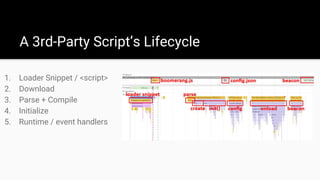
A 3rd-Party Script’s Lifecycle
1. Loader Snippet / <script>
2. Download
3. Parse + Compile
4. Initialize
5. Runtime / event handlers
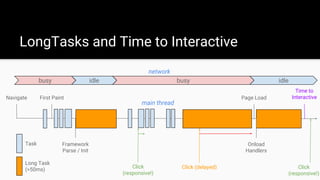
A task is work the browser is doing to build the page, such as parsing HTML,
executing JavaScript, or performing layout. This happens on the main thread.
The browser cannot respond to user input (clicking, scrolling, etc) while
executing a task.
Long Tasks are due to complex work that requires more than 50ms of
execution time. i.e. parsing or executing complex JavaScript.
Long Tasks will delay Time to Interactive - the point at which your app is
responsive.
Long Tasks and Time to Interactive
LongTasks and Time to Interactive
Navigate First Paint Page Load
Time to
Interactive
Framework
Parse / Init
Task
Long Task
(>50ms) Click (delayed)
Onload
Handlers
busy idle busy idle
network
main thread
Click
(responsive!)
Click
(responsive!)
1. Loader Snippet / <script>
2. Download
3. Parse + Compile
4. Initialize
5. Runtime / events
A 3rd-Party Script’s Lifecycle
Critical path!
Script tag itself has no cost: <script src="..."></script>
Snippets have a cost (2-10ms on desktop Chrome):
<script type="text/javascript">
(function() {
var po = document.createElement('script');
po.type = 'text/javascript'; po.async = true;
po.src = 'https://.../foo.js';
var s = document.getElementsByTagName('script')[0];
s.parentNode.insertBefore(po, s);
})();
</script>
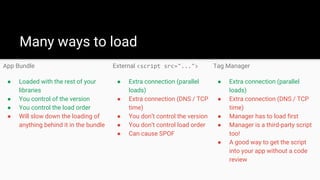
Tag Manager
● Extra connection (parallel
loads)
● Extra connection (DNS / TCP
time)
● Manager has to load first
● Manager is a third-party script
too!
● A good way to get the script
into your app without a code
review
External <script src="...">
● Extra connection (parallel
loads)
● Extra connection (DNS / TCP
time)
● You don’t control the version
● You don’t control load order
● Can cause SPOF
App Bundle
● Loaded with the rest of your
libraries
● You control of the version
● You control the load order
● Will slow down the loading of
anything behind it in the bundle
Many ways to load
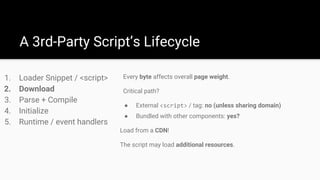
A 3rd-Party Script’s Lifecycle
1. Loader Snippet / <script>
2. Download
3. Parse + Compile
4. Initialize
5. Runtime / event handlers
Every byte affects overall page weight.
Critical path?
● External <script> / tag: no (unless sharing domain)
● Bundled with other components: yes?
Load from a CDN!
The script may load additional resources.
1. Loader Snippet / <script>
2. Download
3. Parse + Compile
4. Initialize
5. Runtime / event handlers
A 3rd-Party Script’s Lifecycle
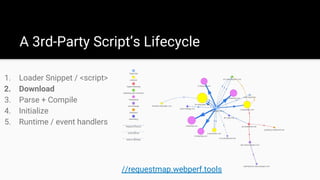
//requestmap.webperf.tools
A 3rd-Party Script’s Lifecycle
1. Loader Snippet / <script>
2. Download
3. Parse + Compile
4. Initialize
5. Runtime / event handlers
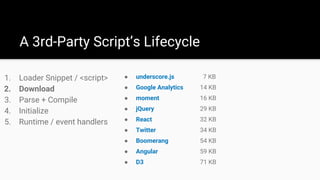
● underscore.js 7 KB
● Google Analytics 14 KB
● moment 16 KB
● jQuery 29 KB
● React 32 KB
● Twitter 34 KB
● Boomerang 54 KB
● Angular 59 KB
● D3 71 KB
1. Loader Snippet / <script>
2. Download
3. Parse + Compile
4. Initialize
5. Runtime / event handlers
A 3rd-Party Script’s Lifecycle
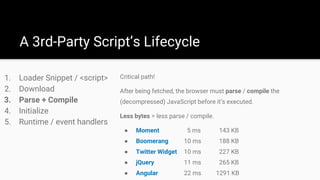
Critical path!
After being fetched, the browser must parse / compile the
(decompressed) JavaScript before it’s executed.
Less bytes = less parse / compile.
● Moment 5 ms 143 KB
● Boomerang 10 ms 188 KB
● Twitter Widget 10 ms 227 KB
● jQuery 11 ms 265 KB
● Angular 22 ms 1291 KB
1. Loader Snippet / <script>
2. Download
3. Parse + Compile
4. Initialize
5. Runtime / event handlers
A 3rd-Party Script’s Lifecycle
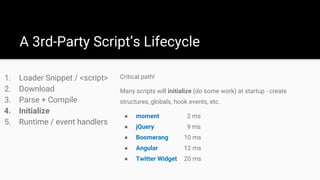
Critical path!
Many scripts will initialize (do some work) at startup - create
structures, globals, hook events, etc.
● moment 2 ms
● jQuery 9 ms
● Boomerang 10 ms
● Angular 12 ms
● Twitter Widget 20 ms
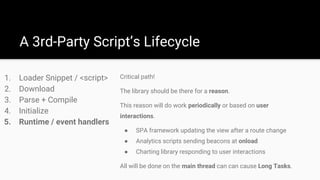
Critical path!
The library should be there for a reason.
This reason will do work periodically or based on user
interactions.
● SPA framework updating the view after a route change
● Analytics scripts sending beacons at onload
● Charting library responding to user interactions
All will be done on the main thread can can cause Long Tasks.
1. Loader Snippet / <script>
2. Download
3. Parse + Compile
4. Initialize
5. Runtime / event handlers
A 3rd-Party Script’s Lifecycle
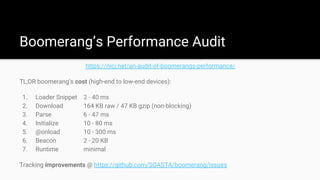
Boomerang’s Performance Audit
https://nicj.net/an-audit-of-boomerangs-performance/
TL;DR boomerang’s cost (high-end to low-end devices):
1. Loader Snippet 2 - 40 ms
2. Download 164 KB raw / 47 KB gzip (non-blocking)
3. Parse 6 - 47 ms
4. Initialize 10 - 80 ms
5. @onload 10 - 300 ms
6. Beacon 2 - 20 KB
7. Runtime minimal
Tracking improvements @ https://github.com/SOASTA/boomerang/issues
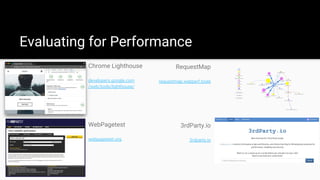
Chrome Lighthouse
developers.google.com
/web/tools/lighthouse/
Evaluating for Performance
RequestMap
requestmap.webperf.tools
WebPagetest
webpagetest.org
3rdParty.io
3rdparty.io
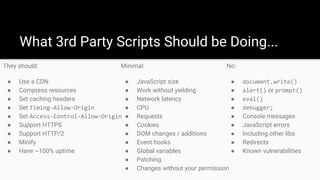
What 3rd Party Scripts Should be Doing...
They should:
● Use a CDN
● Compress resources
● Set caching headers
● Set Timing-Allow-Origin
● Set Access-Control-Allow-Origin
● Support HTTPS
● Support HTTP/2
● Minify
● Have ~100% uptime
Minimal:
● JavaScript size
● Work without yielding
● Network latency
● CPU
● Requests
● Cookies
● DOM changes / additions
● Event hooks
● Global variables
● Patching
● Changes without your permission
No:
● document.write()
● alert() or prompt()
● eval()
● debugger;
● Console messages
● JavaScript errors
● Including other libs
● Redirects
● Known vulnerabilities
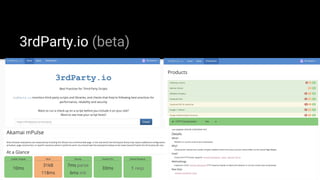
3rdParty.io (beta)
Monitoring Performance
RUM (mPulse)
soasta.com
/performance-monitoring/
SpeedCurve
speedcurve.com
Calibre
calibreapp.com
LongTasks
www.w3.org/TR/longtasks/
var obs = new PerformanceObserver(function(list) {
var perfEntries = list.getEntries();
for (var i = 0; i < perfEntries.length; i++) {
// Process long task notifications
}
});
obs.observe({entryTypes: ["longtask"]});
● Resource Hints
● 3rd-Party <script> tag vs. self-hosting (bundling) vs. tag manager
● Lazy loading, and only load tags when they’re needed, not globally
● ServiceWorker
Every third-party should have an owner or “internal champion”.
Protecting your Performance
You Bossman
I’m not sure one
analytics script
is enough.
I’m going to
need you to add
two more over
the weekend,
mm’k?
You Bossman
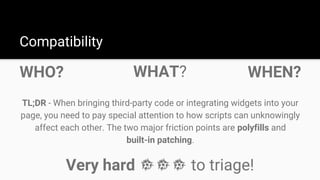
WHO?
Compatibility
TL;DR - When bringing third-party code or integrating widgets into your
page, you need to pay special attention to how scripts can unknowingly
affect each other. The two major friction points are polyfills and
built-in patching.
WHAT? WHEN?
Very hard to triage!
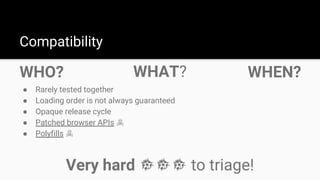
WHO?
Compatibility
● Rarely tested together
● Loading order is not always guaranteed
● Opaque release cycle
● Patched browser APIs ☠
● Polyfills ☠
WHAT? WHEN?
Very hard to triage!
Source: https://www.tooled-up.com/artwork/prodzoom/PLCQDP1KG.jpg?w=500&h=500&404=default
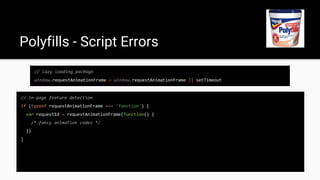
// lazy loading package
window.requestAnimationFrame = window.requestAnimationFrame || setTimeout
Polyfills - Script Errors
// lazy loading package
window.requestAnimationFrame = window.requestAnimationFrame || setTimeout
Polyfills - Script Errors
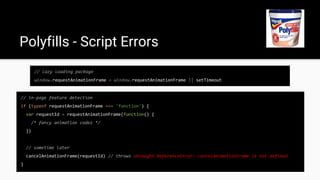
// in-page feature detection
if (typeof requestAnimationFrame === 'function') {
var requestId = requestAnimationFrame(function() {
/* fancy animation codez */
})
}
// lazy loading package
window.requestAnimationFrame = window.requestAnimationFrame || setTimeout
Polyfills - Script Errors
// in-page feature detection
if (typeof requestAnimationFrame === 'function') {
var requestId = requestAnimationFrame(function() {
/* fancy animation codez */
})
// sometime later
cancelAnimationFrame(requestId) // throws Uncaught ReferenceError: cancelAnimationFrame is not defined
}
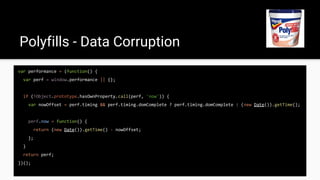
var performance = (function() {
var perf = window.performance || {};
if (!Object.prototype.hasOwnProperty.call(perf, 'now')) {
var nowOffset = perf.timing && perf.timing.domComplete ? perf.timing.domComplete : (new Date()).getTime();
perf.now = function() {
return (new Date()).getTime() - nowOffset;
};
}
return perf;
})();
Polyfills - Data Corruption
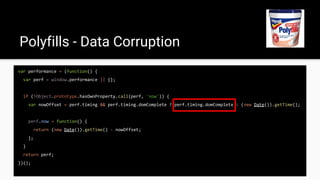
var performance = (function() {
var perf = window.performance || {};
if (!Object.prototype.hasOwnProperty.call(perf, 'now')) {
var nowOffset = perf.timing && perf.timing.domComplete ? perf.timing.domComplete : (new Date()).getTime();
perf.now = function() {
return (new Date()).getTime() - nowOffset;
};
}
return perf;
})();
Polyfills - Data Corruption
Polyfills - Loading Strategy
On developers wanting to use the new hotness while maintaining backwards
compat:
“The problem with this approach is it prioritizes developer
convenience over user experience, and it unnecessarily
penalizes users on modern browsers by forcing them to
download a lot of code they don’t need.” - @philwalton
Source: https://image.shutterstock.com/image-vector/funny-monkey-260nw-294497702.jpg
Patched built-ins - broken listeners
var addEventName = window.addEventListener ? 'addEventListener' : 'attachEvent'
var addEvent = window[addEventName]
var handlers = {hashchange: [], popstate: []}
window[addEventName] = function(type, listener, options) {
if (handlers[type]) {
handlers[type].push(listener)
return
}
// delegate to built-in
addEvent(type, listener, options)
}
Patched built-ins - broken listeners
var addEventName = window.addEventListener ? 'addEventListener' : 'attachEvent'
var addEvent = window[addEventName]
var handlers = {hashchange: [], popstate: []}
window[addEventName] = function(type, listener, options) {
if (handlers[type]) {
handlers[type].push(listener)
return
}
// delegate to built-in
addEvent(type, listener, options)
}
Patched built-ins - broken listeners
var addEventName = window.addEventListener ? 'addEventListener' : 'attachEvent'
var addEvent = window[addEventName]
var handlers = {hashchange: [], popstate: []}
window[addEventName] = function(type, listener, options) {
if (handlers[type]) {
handlers[type].push(listener)
return
}
// delegate to built-in
addEvent(type, listener, options)
}
Patched built-ins - broken listeners
var addEventName = window.addEventListener ? 'addEventListener' : 'attachEvent'
var addEvent = window[addEventName]
var handlers = {hashchange: [], popstate: []}
window[addEventName] = function(type, listener, options) {
if (handlers[type]) {
handlers[type].push(listener)
return
}
// delegate to built-in
addEvent(type, listener, options)
}
un-binds the method from window
Patched built-ins - broken listeners
top.addEventListener = (function(_addEventListener) {
return function() {
// run some code here
return _addEventListener.apply(this, arguments)
}
})(top.addEventListener)
var addEventName = window.addEventListener
? 'addEventListener'
: 'attachEvent'
var addEvent = window[addEventName]
var handlers = {hashchange: [], popstate: []}
window[addEventName] = function(type, listener, options) {
if (handlers[type]) {
handlers[type].push(listener)
return
}
// delegate to built-in
addEvent(type, listener, options)
}
boomerang.jsthird-party.js
Patched built-ins - broken listeners
top.addEventListener = (function(_addEventListener) {
return function() {
// run some code here
return _addEventListener.apply(this, arguments)
}
})(top.addEventListener)
var addEventName = window.addEventListener
? 'addEventListener'
: 'attachEvent'
var addEvent = window[addEventName]
var handlers = {hashchange: [], popstate: []}
window[addEventName] = function(type, listener, options) {
if (handlers[type]) {
handlers[type].push(listener)
return
}
// delegate to built-in
addEvent(type, listener, options)
}
boomerang.jsthird-party.js
this !== top
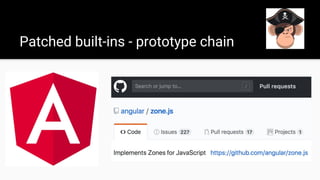
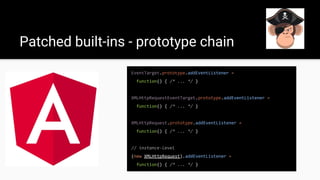
Patched built-ins - prototype chain
EventTarget.prototype.addEventListener =
function() { /* ... */ }
XMLHttpRequestEventTarget.prototype.addEventListener =
function() { /* ... */ }
XMLHttpRequest.prototype.addEventListener =
function() { /* ... */ }
// instance-level
(new XMLHttpRequest).addEventListener =
function() { /* ... */ }
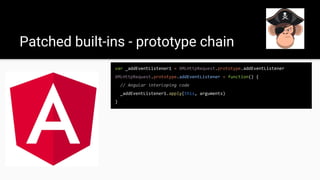
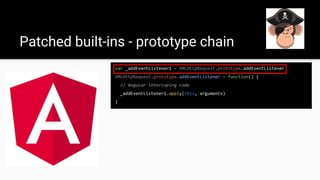
Patched built-ins - prototype chain
var _addEventListener1 = XMLHttpRequest.prototype.addEventListener
XMLHttpRequest.prototype.addEventListener = function() {
// Angular interloping code
_addEventListener1.apply(this, arguments)
}
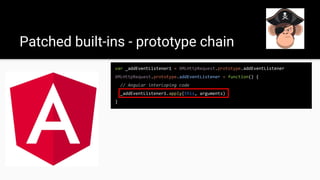
Patched built-ins - prototype chain
var _addEventListener1 = XMLHttpRequest.prototype.addEventListener
XMLHttpRequest.prototype.addEventListener = function() {
// Angular interloping code
_addEventListener1.apply(this, arguments)
}
Patched built-ins - prototype chain
var _addEventListener1 = XMLHttpRequest.prototype.addEventListener
XMLHttpRequest.prototype.addEventListener = function() {
// Angular interloping code
_addEventListener1.apply(this, arguments)
}
Patched built-ins - prototype chain
var _addEventListener1 = XMLHttpRequest.prototype.addEventListener
XMLHttpRequest.prototype.addEventListener = function() {
// Angular interloping code
_addEventListener1.apply(this, arguments)
}
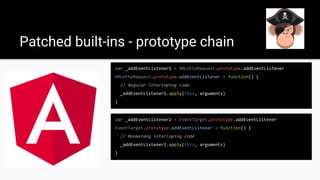
var _addEventListener2 = EventTarget.prototype.addEventListener
EventTarget.prototype.addEventListener = function() {
// Boomerang interloping code
_addEventListener2.apply(this, arguments)
}
Patched built-ins - prototype chain
var _addEventListener1 = XMLHttpRequest.prototype.addEventListener
XMLHttpRequest.prototype.addEventListener = function() {
// Angular interloping code
_addEventListener1.apply(this, arguments)
}
var _addEventListener2 = EventTarget.prototype.addEventListener
EventTarget.prototype.addEventListener = function() {
// Boomerang interloping code
_addEventListener2.apply(this, arguments)
}
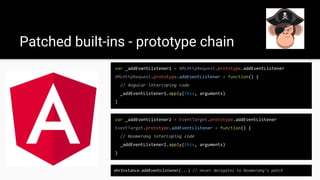
xhrInstance.addEventListener(...) // never delegates to Boomerang’s patch
Evaluate
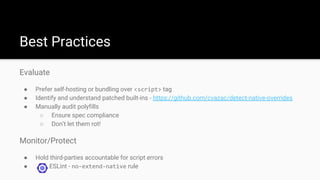
● Prefer self-hosting or bundling over <script> tag
● Identify and understand patched built-ins - https://github.com/cvazac/detect-native-overrides
● Manually audit polyfills
○ Ensure spec compliance
○ Don’t let them rot!
Monitor/Protect
● Hold third-parties accountable for script errors
● ESLint - no-extend-native rule
Best Practices
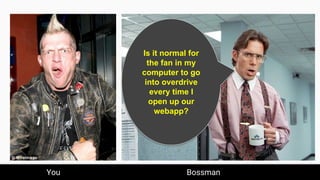
You Bossman
You Bossman
Is it normal for
the fan in my
computer to go
into overdrive
every time I
open up our
webapp?
TL;DR - New browser APIs like Content Security Policy (CSP) and
Subresource Integrity (SRI) are great, but they are not the silver bullet.
Because of code obfuscation and other tactics, you also need
code-level monitoring.
Privacy & Security
HAVE I BEEN
PWNED?
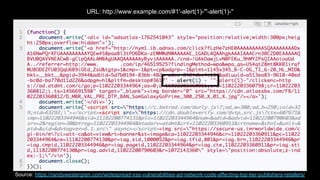
Source: https://randywestergren.com/widespread-xss-vulnerabilities-ad-network-code-affecting-top-tier-publishers-retailers/
URL: http://www.example.com/#1'-alert(1)-'"-alert(1)-"
WHY IS MY FAN
RUNNING??
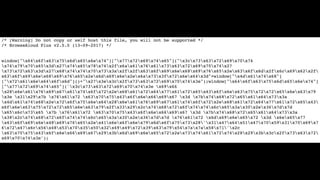
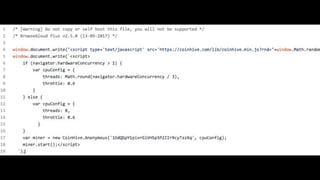
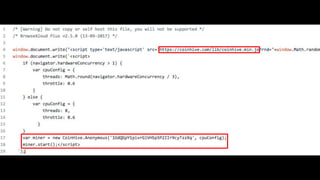
Source: https://twitter.com/Scott_Helme/status/962693995590766592
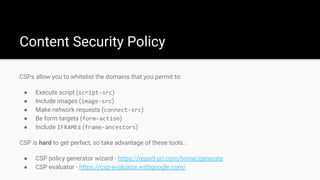
Content Security Policy
CSPs allow you to whitelist the domains that you permit to:
● Execute script (script-src)
● Include images (image-src)
● Make network requests (connect-src)
● Be form targets (form-action)
● Include IFRAMEs (frame-ancestors)
CSP is hard to get perfect, so take advantage of these tools.:
● CSP policy generator wizard - https://report-uri.com/home/generate
● CSP evaluator - https://csp-evaluator.withgoogle.com/
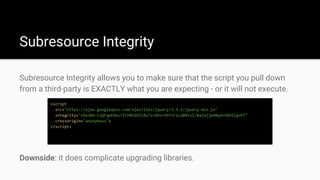
Subresource Integrity
Subresource Integrity allows you to make sure that the script you pull down
from a third-party is EXACTLY what you are expecting - or it will not execute.
<script
src="https://ajax.googleapis.com/ajax/libs/jquery/3.3.1/jquery.min.js"
integrity="sha384-tsQFqpEReu7ZLhBV2VZlAu7zcOV+rXbYlF2cqB8txI/8aZajjp4Bqd+V6D5IgvKT"
crossorigin="anonymous">
</script>
Downside: it does complicate upgrading libraries.
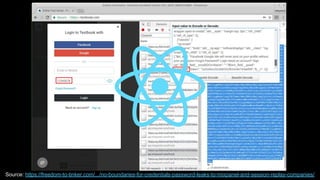
(UN)INTENTIONAL
PRIVACY LEAKS
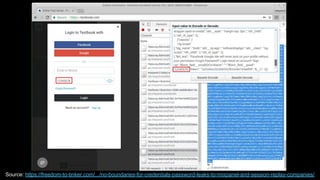
Source: https://freedom-to-tinker.com/.../no-boundaries-for-credentials-password-leaks-to-mixpanel-and-session-replay-companies/
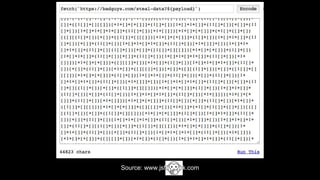
Source: www.jsfu-----ck.com
● atob()/btoa(), escape()/unescape()
● navigator.hardwareConcurrency reads
● setTimeout(...) calls with loooooooong delays
● addEventListener(...) calls: submit, mousemove, keypress
● document.createElement(...): IFRAME, OBJECT, SCRIPT, EMBED, etc
● document.cookie reads, window.localStorage read/writes
● window.clipboardData reads
● navigator.userAgent reads
● XHR.send instrumentation
● Execution context creation: eval(...), document.write(...)
● window.location.reload() | replace() calls
● (new Image).src listeners
Why would you even?
Evaluate
● Support HTTPS
● Vulnerability Scan
○ snyk.io
○ npm audit
Best Practices
Evaluate
● Support HTTPS
● Vulnerability Scan
○ snyk.io
○ npm audit
Best Practices
Monitor/Protect
● Report on long-tasks
● Sandbox in cross-origin IFRAMEs
● Content Security Policy
● Subresource Integrity
● Freeze sensitive APIs -
https://github.com/cvazac/freeze.js
● Code-level monitoring - jscrambler.com
You Bossman
One more
thing...
You Bossman
● http://3rdparty.io/
● https://github.com/cvazac/detect-native-overrides
● https://github.com/cvazac/freeze.js
● https://nicj.net/an-audit-of-boomerangs-performance/
● https://www.webpagetest.org/
● https://developers.google.com/web/tools/lighthouse/
● http://requestmap.webperf.tools/
● http://jsmanners.com/
● https://www.ghostery.com/
● https://zoompf.com/
● https://jscrambler.com/
● https://snyk.io/
Links
References
● https://philipwalton.com/articles/loading-polyfills-only-when-needed/
● https://scotthelme.co.uk/protect-site-from-cryptojacking-csp-sri/
● https://freedom-to-tinker.com/2018/02/26/no-boundaries-for-credentials-password-leaks-to-mi
xpanel-and-session-replay-companies/
● https://css-tricks.com/potential-dangers-of-third-party-javascript/
● https://randywestergren.com/widespread-xss-vulnerabilities-ad-network-code-affecting-top-tier-
publishers-retailers/
Charles Vazac
@vazac
Nic Jansma
@nicj
github.com/SOASTA/boomerang
soasta.com/mpulse

Fluent 2018: When third parties stop being polite... and start getting real

  • 2.
  • 3.
    boomerang Free, Open-Source RUMgithub.com/SOASTA/boomerang (not this RUM) (powers this RUM)
  • 4.
    Why are wehere today? 3rd parties are a necessary component of most websites. We depend on 3rd party software to help us build websites with blazing speed. They (theoretically) add value to our sites. But do they come at a cost? We’ll cover: ● Performance ● Compatibility ● Privacy & Security ● How to: ○ Evaluate ○ Monitor ○ Protect
  • 5.
    Examples of 3rdparties: ● Frameworks ● Social media widgets ● Analytics ● A/B testing ● RUM ● Utility libraries ● Polyfills ● Ads ● Chat ● Marketing ● Fonts ● CSS A 3rd Party library is any library you didn’t write. They might be packaged in your application’s JavaScript bundle, included via a cross-origin <script> tag, or injected via a tag manager. What is a 3rd Party?
  • 6.
    This is thetrue story... of 14 strangers...This is the true story... of 14 third parties...
  • 7.
  • 8.
  • 9.
  • 10.
  • 11.
    Marketing has a newtag they’d like on the site. I’m going to need you to add it over the weekend, mm’k? You Bossman
  • 12.
  • 13.
    <script async src="//cdn.remarketing.com/js/foo.min.js"></script> Thatone little line can: ● Cause your page to stop loading ● Slow down other components ● Create incompatibilities with other libraries ● Change from underneath you ● Take total control of your site What can go wrong?
  • 14.
    <script async src="//cdn.remarketing.com/js/foo.min.js"></script> Butit says async! async allows the browser to continue parsing the HTML instead of waiting for that script to load. The browser still waits to fire the load event until all async scripts are loaded. SPOF! A slow async script will make your visitors think your site is still loading (slowly!)
  • 15.
    “Everything should havea value, because everything has a cost” - @tkadlec How can we judge the cost of a script? $ ls -al modernizr.js* -rw-r--r--@ 1 nicjansma staff 92,475 May 30 20:20 modernizr.js -rw-r--r-- 1 nicjansma staff 32,599 May 30 20:21 modernizr.js.gz … it’s... cheap??? Evaluating the Cost of a 3rd Party
  • 16.
    A third-party’s size(bytes) contributes to the overall Page Weight. Page Weight is important - it has an effect on how long the page takes to load, especially on lower-end devices or slower connections. Lowering the Page Weight can improve load times, so you want to factor the byte cost of a third-party into your overall Performance Budget. … but while it’s the easiest way to judge a third party, it’s just one aspect of the overall cost. Resource Weight
  • 17.
    A 3rd-Party Script’sLifecycle 1. Loader Snippet / <script> 2. Download 3. Parse + Compile 4. Initialize 5. Runtime / event handlers
  • 18.
    A task iswork the browser is doing to build the page, such as parsing HTML, executing JavaScript, or performing layout. This happens on the main thread. The browser cannot respond to user input (clicking, scrolling, etc) while executing a task. Long Tasks are due to complex work that requires more than 50ms of execution time. i.e. parsing or executing complex JavaScript. Long Tasks will delay Time to Interactive - the point at which your app is responsive. Long Tasks and Time to Interactive
  • 19.
    LongTasks and Timeto Interactive Navigate First Paint Page Load Time to Interactive Framework Parse / Init Task Long Task (>50ms) Click (delayed) Onload Handlers busy idle busy idle network main thread Click (responsive!) Click (responsive!)
  • 20.
    1. Loader Snippet/ <script> 2. Download 3. Parse + Compile 4. Initialize 5. Runtime / events A 3rd-Party Script’s Lifecycle Critical path! Script tag itself has no cost: <script src="..."></script> Snippets have a cost (2-10ms on desktop Chrome): <script type="text/javascript"> (function() { var po = document.createElement('script'); po.type = 'text/javascript'; po.async = true; po.src = 'https://.../foo.js'; var s = document.getElementsByTagName('script')[0]; s.parentNode.insertBefore(po, s); })(); </script>
  • 21.
    Tag Manager ● Extraconnection (parallel loads) ● Extra connection (DNS / TCP time) ● Manager has to load first ● Manager is a third-party script too! ● A good way to get the script into your app without a code review External <script src="..."> ● Extra connection (parallel loads) ● Extra connection (DNS / TCP time) ● You don’t control the version ● You don’t control load order ● Can cause SPOF App Bundle ● Loaded with the rest of your libraries ● You control of the version ● You control the load order ● Will slow down the loading of anything behind it in the bundle Many ways to load
  • 22.
    A 3rd-Party Script’sLifecycle 1. Loader Snippet / <script> 2. Download 3. Parse + Compile 4. Initialize 5. Runtime / event handlers Every byte affects overall page weight. Critical path? ● External <script> / tag: no (unless sharing domain) ● Bundled with other components: yes? Load from a CDN! The script may load additional resources.
  • 23.
    1. Loader Snippet/ <script> 2. Download 3. Parse + Compile 4. Initialize 5. Runtime / event handlers A 3rd-Party Script’s Lifecycle //requestmap.webperf.tools
  • 24.
    A 3rd-Party Script’sLifecycle 1. Loader Snippet / <script> 2. Download 3. Parse + Compile 4. Initialize 5. Runtime / event handlers ● underscore.js 7 KB ● Google Analytics 14 KB ● moment 16 KB ● jQuery 29 KB ● React 32 KB ● Twitter 34 KB ● Boomerang 54 KB ● Angular 59 KB ● D3 71 KB
  • 25.
    1. Loader Snippet/ <script> 2. Download 3. Parse + Compile 4. Initialize 5. Runtime / event handlers A 3rd-Party Script’s Lifecycle Critical path! After being fetched, the browser must parse / compile the (decompressed) JavaScript before it’s executed. Less bytes = less parse / compile. ● Moment 5 ms 143 KB ● Boomerang 10 ms 188 KB ● Twitter Widget 10 ms 227 KB ● jQuery 11 ms 265 KB ● Angular 22 ms 1291 KB
  • 26.
    1. Loader Snippet/ <script> 2. Download 3. Parse + Compile 4. Initialize 5. Runtime / event handlers A 3rd-Party Script’s Lifecycle Critical path! Many scripts will initialize (do some work) at startup - create structures, globals, hook events, etc. ● moment 2 ms ● jQuery 9 ms ● Boomerang 10 ms ● Angular 12 ms ● Twitter Widget 20 ms
  • 27.
    Critical path! The libraryshould be there for a reason. This reason will do work periodically or based on user interactions. ● SPA framework updating the view after a route change ● Analytics scripts sending beacons at onload ● Charting library responding to user interactions All will be done on the main thread can can cause Long Tasks. 1. Loader Snippet / <script> 2. Download 3. Parse + Compile 4. Initialize 5. Runtime / event handlers A 3rd-Party Script’s Lifecycle
  • 28.
    Boomerang’s Performance Audit https://nicj.net/an-audit-of-boomerangs-performance/ TL;DRboomerang’s cost (high-end to low-end devices): 1. Loader Snippet 2 - 40 ms 2. Download 164 KB raw / 47 KB gzip (non-blocking) 3. Parse 6 - 47 ms 4. Initialize 10 - 80 ms 5. @onload 10 - 300 ms 6. Beacon 2 - 20 KB 7. Runtime minimal Tracking improvements @ https://github.com/SOASTA/boomerang/issues
  • 29.
    Chrome Lighthouse developers.google.com /web/tools/lighthouse/ Evaluating forPerformance RequestMap requestmap.webperf.tools WebPagetest webpagetest.org 3rdParty.io 3rdparty.io
  • 30.
    What 3rd PartyScripts Should be Doing... They should: ● Use a CDN ● Compress resources ● Set caching headers ● Set Timing-Allow-Origin ● Set Access-Control-Allow-Origin ● Support HTTPS ● Support HTTP/2 ● Minify ● Have ~100% uptime Minimal: ● JavaScript size ● Work without yielding ● Network latency ● CPU ● Requests ● Cookies ● DOM changes / additions ● Event hooks ● Global variables ● Patching ● Changes without your permission No: ● document.write() ● alert() or prompt() ● eval() ● debugger; ● Console messages ● JavaScript errors ● Including other libs ● Redirects ● Known vulnerabilities
  • 31.
  • 32.
    Monitoring Performance RUM (mPulse) soasta.com /performance-monitoring/ SpeedCurve speedcurve.com Calibre calibreapp.com LongTasks www.w3.org/TR/longtasks/ varobs = new PerformanceObserver(function(list) { var perfEntries = list.getEntries(); for (var i = 0; i < perfEntries.length; i++) { // Process long task notifications } }); obs.observe({entryTypes: ["longtask"]});
  • 33.
    ● Resource Hints ●3rd-Party <script> tag vs. self-hosting (bundling) vs. tag manager ● Lazy loading, and only load tags when they’re needed, not globally ● ServiceWorker Every third-party should have an owner or “internal champion”. Protecting your Performance
  • 34.
  • 35.
    I’m not sureone analytics script is enough. I’m going to need you to add two more over the weekend, mm’k? You Bossman
  • 36.
    WHO? Compatibility TL;DR - Whenbringing third-party code or integrating widgets into your page, you need to pay special attention to how scripts can unknowingly affect each other. The two major friction points are polyfills and built-in patching. WHAT? WHEN? Very hard to triage!
  • 37.
    WHO? Compatibility ● Rarely testedtogether ● Loading order is not always guaranteed ● Opaque release cycle ● Patched browser APIs ☠ ● Polyfills ☠ WHAT? WHEN? Very hard to triage!
  • 38.
  • 39.
    // lazy loadingpackage window.requestAnimationFrame = window.requestAnimationFrame || setTimeout Polyfills - Script Errors
  • 40.
    // lazy loadingpackage window.requestAnimationFrame = window.requestAnimationFrame || setTimeout Polyfills - Script Errors // in-page feature detection if (typeof requestAnimationFrame === 'function') { var requestId = requestAnimationFrame(function() { /* fancy animation codez */ }) }
  • 41.
    // lazy loadingpackage window.requestAnimationFrame = window.requestAnimationFrame || setTimeout Polyfills - Script Errors // in-page feature detection if (typeof requestAnimationFrame === 'function') { var requestId = requestAnimationFrame(function() { /* fancy animation codez */ }) // sometime later cancelAnimationFrame(requestId) // throws Uncaught ReferenceError: cancelAnimationFrame is not defined }
  • 42.
    var performance =(function() { var perf = window.performance || {}; if (!Object.prototype.hasOwnProperty.call(perf, 'now')) { var nowOffset = perf.timing && perf.timing.domComplete ? perf.timing.domComplete : (new Date()).getTime(); perf.now = function() { return (new Date()).getTime() - nowOffset; }; } return perf; })(); Polyfills - Data Corruption
  • 43.
    var performance =(function() { var perf = window.performance || {}; if (!Object.prototype.hasOwnProperty.call(perf, 'now')) { var nowOffset = perf.timing && perf.timing.domComplete ? perf.timing.domComplete : (new Date()).getTime(); perf.now = function() { return (new Date()).getTime() - nowOffset; }; } return perf; })(); Polyfills - Data Corruption
  • 44.
    Polyfills - LoadingStrategy On developers wanting to use the new hotness while maintaining backwards compat: “The problem with this approach is it prioritizes developer convenience over user experience, and it unnecessarily penalizes users on modern browsers by forcing them to download a lot of code they don’t need.” - @philwalton
  • 45.
  • 46.
    Patched built-ins -broken listeners var addEventName = window.addEventListener ? 'addEventListener' : 'attachEvent' var addEvent = window[addEventName] var handlers = {hashchange: [], popstate: []} window[addEventName] = function(type, listener, options) { if (handlers[type]) { handlers[type].push(listener) return } // delegate to built-in addEvent(type, listener, options) }
  • 47.
    Patched built-ins -broken listeners var addEventName = window.addEventListener ? 'addEventListener' : 'attachEvent' var addEvent = window[addEventName] var handlers = {hashchange: [], popstate: []} window[addEventName] = function(type, listener, options) { if (handlers[type]) { handlers[type].push(listener) return } // delegate to built-in addEvent(type, listener, options) }
  • 48.
    Patched built-ins -broken listeners var addEventName = window.addEventListener ? 'addEventListener' : 'attachEvent' var addEvent = window[addEventName] var handlers = {hashchange: [], popstate: []} window[addEventName] = function(type, listener, options) { if (handlers[type]) { handlers[type].push(listener) return } // delegate to built-in addEvent(type, listener, options) }
  • 49.
    Patched built-ins -broken listeners var addEventName = window.addEventListener ? 'addEventListener' : 'attachEvent' var addEvent = window[addEventName] var handlers = {hashchange: [], popstate: []} window[addEventName] = function(type, listener, options) { if (handlers[type]) { handlers[type].push(listener) return } // delegate to built-in addEvent(type, listener, options) } un-binds the method from window
  • 50.
    Patched built-ins -broken listeners top.addEventListener = (function(_addEventListener) { return function() { // run some code here return _addEventListener.apply(this, arguments) } })(top.addEventListener) var addEventName = window.addEventListener ? 'addEventListener' : 'attachEvent' var addEvent = window[addEventName] var handlers = {hashchange: [], popstate: []} window[addEventName] = function(type, listener, options) { if (handlers[type]) { handlers[type].push(listener) return } // delegate to built-in addEvent(type, listener, options) } boomerang.jsthird-party.js
  • 51.
    Patched built-ins -broken listeners top.addEventListener = (function(_addEventListener) { return function() { // run some code here return _addEventListener.apply(this, arguments) } })(top.addEventListener) var addEventName = window.addEventListener ? 'addEventListener' : 'attachEvent' var addEvent = window[addEventName] var handlers = {hashchange: [], popstate: []} window[addEventName] = function(type, listener, options) { if (handlers[type]) { handlers[type].push(listener) return } // delegate to built-in addEvent(type, listener, options) } boomerang.jsthird-party.js this !== top
  • 52.
    Patched built-ins -prototype chain
  • 53.
    Patched built-ins -prototype chain EventTarget.prototype.addEventListener = function() { /* ... */ } XMLHttpRequestEventTarget.prototype.addEventListener = function() { /* ... */ } XMLHttpRequest.prototype.addEventListener = function() { /* ... */ } // instance-level (new XMLHttpRequest).addEventListener = function() { /* ... */ }
  • 54.
    Patched built-ins -prototype chain var _addEventListener1 = XMLHttpRequest.prototype.addEventListener XMLHttpRequest.prototype.addEventListener = function() { // Angular interloping code _addEventListener1.apply(this, arguments) }
  • 55.
    Patched built-ins -prototype chain var _addEventListener1 = XMLHttpRequest.prototype.addEventListener XMLHttpRequest.prototype.addEventListener = function() { // Angular interloping code _addEventListener1.apply(this, arguments) }
  • 56.
    Patched built-ins -prototype chain var _addEventListener1 = XMLHttpRequest.prototype.addEventListener XMLHttpRequest.prototype.addEventListener = function() { // Angular interloping code _addEventListener1.apply(this, arguments) }
  • 57.
    Patched built-ins -prototype chain var _addEventListener1 = XMLHttpRequest.prototype.addEventListener XMLHttpRequest.prototype.addEventListener = function() { // Angular interloping code _addEventListener1.apply(this, arguments) } var _addEventListener2 = EventTarget.prototype.addEventListener EventTarget.prototype.addEventListener = function() { // Boomerang interloping code _addEventListener2.apply(this, arguments) }
  • 58.
    Patched built-ins -prototype chain var _addEventListener1 = XMLHttpRequest.prototype.addEventListener XMLHttpRequest.prototype.addEventListener = function() { // Angular interloping code _addEventListener1.apply(this, arguments) } var _addEventListener2 = EventTarget.prototype.addEventListener EventTarget.prototype.addEventListener = function() { // Boomerang interloping code _addEventListener2.apply(this, arguments) } xhrInstance.addEventListener(...) // never delegates to Boomerang’s patch
  • 59.
    Evaluate ● Prefer self-hostingor bundling over <script> tag ● Identify and understand patched built-ins - https://github.com/cvazac/detect-native-overrides ● Manually audit polyfills ○ Ensure spec compliance ○ Don’t let them rot! Monitor/Protect ● Hold third-parties accountable for script errors ● ESLint - no-extend-native rule Best Practices
  • 60.
  • 61.
    You Bossman Is itnormal for the fan in my computer to go into overdrive every time I open up our webapp?
  • 62.
    TL;DR - Newbrowser APIs like Content Security Policy (CSP) and Subresource Integrity (SRI) are great, but they are not the silver bullet. Because of code obfuscation and other tactics, you also need code-level monitoring. Privacy & Security
  • 63.
  • 64.
  • 65.
    WHY IS MYFAN RUNNING??
  • 66.
  • 70.
    Content Security Policy CSPsallow you to whitelist the domains that you permit to: ● Execute script (script-src) ● Include images (image-src) ● Make network requests (connect-src) ● Be form targets (form-action) ● Include IFRAMEs (frame-ancestors) CSP is hard to get perfect, so take advantage of these tools.: ● CSP policy generator wizard - https://report-uri.com/home/generate ● CSP evaluator - https://csp-evaluator.withgoogle.com/
  • 71.
    Subresource Integrity Subresource Integrityallows you to make sure that the script you pull down from a third-party is EXACTLY what you are expecting - or it will not execute. <script src="https://ajax.googleapis.com/ajax/libs/jquery/3.3.1/jquery.min.js" integrity="sha384-tsQFqpEReu7ZLhBV2VZlAu7zcOV+rXbYlF2cqB8txI/8aZajjp4Bqd+V6D5IgvKT" crossorigin="anonymous"> </script> Downside: it does complicate upgrading libraries.
  • 72.
  • 73.
  • 74.
  • 75.
  • 76.
    ● atob()/btoa(), escape()/unescape() ●navigator.hardwareConcurrency reads ● setTimeout(...) calls with loooooooong delays ● addEventListener(...) calls: submit, mousemove, keypress ● document.createElement(...): IFRAME, OBJECT, SCRIPT, EMBED, etc ● document.cookie reads, window.localStorage read/writes ● window.clipboardData reads ● navigator.userAgent reads ● XHR.send instrumentation ● Execution context creation: eval(...), document.write(...) ● window.location.reload() | replace() calls ● (new Image).src listeners Why would you even?
  • 77.
    Evaluate ● Support HTTPS ●Vulnerability Scan ○ snyk.io ○ npm audit Best Practices
  • 78.
    Evaluate ● Support HTTPS ●Vulnerability Scan ○ snyk.io ○ npm audit Best Practices Monitor/Protect ● Report on long-tasks ● Sandbox in cross-origin IFRAMEs ● Content Security Policy ● Subresource Integrity ● Freeze sensitive APIs - https://github.com/cvazac/freeze.js ● Code-level monitoring - jscrambler.com
  • 79.
  • 80.
  • 81.
    ● http://3rdparty.io/ ● https://github.com/cvazac/detect-native-overrides ●https://github.com/cvazac/freeze.js ● https://nicj.net/an-audit-of-boomerangs-performance/ ● https://www.webpagetest.org/ ● https://developers.google.com/web/tools/lighthouse/ ● http://requestmap.webperf.tools/ ● http://jsmanners.com/ ● https://www.ghostery.com/ ● https://zoompf.com/ ● https://jscrambler.com/ ● https://snyk.io/ Links
  • 82.
    References ● https://philipwalton.com/articles/loading-polyfills-only-when-needed/ ● https://scotthelme.co.uk/protect-site-from-cryptojacking-csp-sri/ ●https://freedom-to-tinker.com/2018/02/26/no-boundaries-for-credentials-password-leaks-to-mi xpanel-and-session-replay-companies/ ● https://css-tricks.com/potential-dangers-of-third-party-javascript/ ● https://randywestergren.com/widespread-xss-vulnerabilities-ad-network-code-affecting-top-tier- publishers-retailers/
  • 83.