© 2020 Akamai1
How The Washington Post
is Using Akamai APIs to Grow
Arc Publishing
FEATURING
Akamai-as-Code
with The
Washington Post
© 2020 Akamai2
© 2020 Akamai3
Agenda
Introduction to Arc Publishing1
Demos3
Q&A4
Interactive Quiz5
Akamai-as-Code2
© 2020 Akamai4
Speakers
Yair Greenbaum
Engagement Manager
Akamai Technologies
Ian Baker
Technical Director
The Washington Post
© 2020 Akamai5
More than
sites using
1000
Arc
Launch in
less than
90
days
Headless
built for
world-class
storytellers
CMS
© 2020 Akamai6
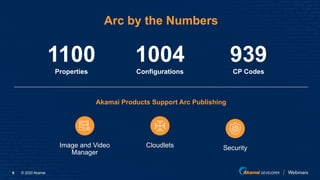
Arc by the Numbers
Properties
1100
Configurations
1004
CP Codes
939
Akamai Products Support Arc Publishing
Image and Video
Manager
SecurityCloudlets
© 2020 Akamai7
© 2020 Akamai8
Managing Several Configs at Once
How we scaled our business without increasing the workload.
We launch
3-5 new
customers
every week
We launch 100+
sites per month
We make
changes to
100+ configs
daily
© 2020 Akamai9
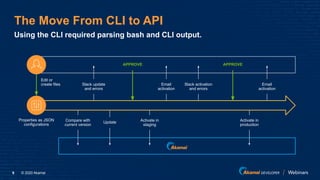
The Move From CLI to API
Using the CLI required parsing bash and CLI output.
Properties as JSON
configurations
Edit or
create files
Compare with
current version
Email
activation
Slack activation
and errors
Email
activation
Update
Slack update
and errors
Activate in
staging
Activate in
production
APPROVEAPPROVE
© 2020 Akamai10
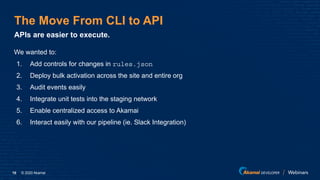
The Move From CLI to API
We wanted to:
1. Add controls for changes in rules.json
2. Deploy bulk activation across the site and entire org
3. Audit events easily
4. Integrate unit tests into the staging network
5. Enable centralized access to Akamai
6. Interact easily with our pipeline (ie. Slack Integration)
APIs are easier to execute.
© 2020 Akamai11
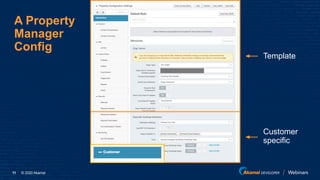
A Property
Manager
Config
Template
Customer
specific
© 2020 Akamai12
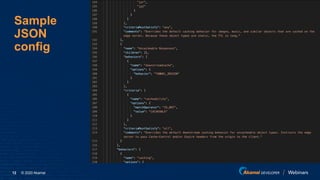
Sample
JSON
config
© 2020 Akamai13
Akamai-as-Code
© 2020 Akamai14
Akamai for DevOps
Enabling users to work inside
their DevOps environments,
at their speed, at their scale.
© 2020 Akamai15
DevOps Simplifies Developer Workflows
What is DevOps?
DevOps brings development and
operations together, automating the
software delivery pipeline.
Why DevOps?
DevOps empower engineers to
ship code at a higher velocity to better
serve customers and give businesses
a competitive edge.
© 2020 Akamai16
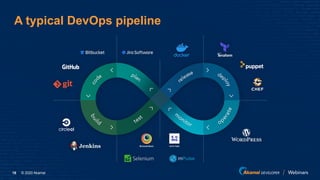
A typical DevOps pipeline
© 2020 Akamai17
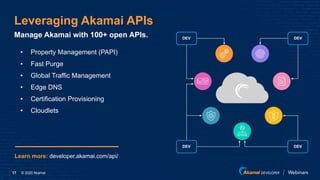
Leveraging Akamai APIs
Manage Akamai with 100+ open APIs.
• Property Management (PAPI)
• Fast Purge
• Global Traffic Management
• Edge DNS
• Certification Provisioning
• Cloudlets
DEV
DEV DEV
DEV
Learn more: developer.akamai.com/api/
© 2020 Akamai18
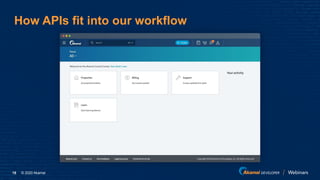
How APIs fit into our workflow
© 2020 Akamai19
Demos
© 2020 Akamai20
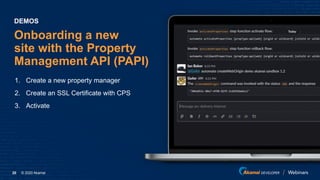
Onboarding a new
site with the Property
Management API (PAPI)
1. Create a new property manager
2. Create an SSL Certificate with CPS
3. Activate
DEMOS
© 2020 Akamai21
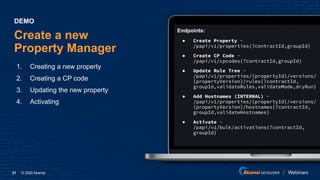
Create a new
Property Manager
1. Creating a new property
2. Creating a CP code
3. Updating the new property
4. Activating
DEMO
Endpoints:
● Create Property -
/papi/v1/properties{?contractId,groupId}
● Create CP Code -
/papi/v1/cpcodes{?contractId,groupId}
● Update Rule Tree -
/papi/v1/properties/{propertyId}/versions/
{propertyVersion}/rules{?contractId,
groupId,validateRules,validateMode,dryRun}
● Add Hostnames (INTERNAL) -
/papi/v1/properties/{propertyId}/versions/
{propertyVersion}/hostnames{?contractId,
groupId,validateHostnames}
● Activate -
/papi/v1/bulk/activations{?contractId,
groupId}
© 2020 Akamai22
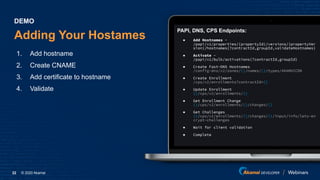
Adding Your Hostames
1. Add hostname
2. Create CNAME
3. Add certificate to hostname
4. Validate
DEMO
PAPI, DNS, CPS Endpoints:
● Add Hostnames -
/papi/v1/properties/{propertyId}/versions/{propertyVer
sion}/hostnames{?contractId,groupId,validateHostnames}
● Activate -
/papi/v1/bulk/activations{?contractId,groupId}
● Create Fast-DNS Hostnames
/config-dns/v2/zones/{}/names/{}/types/AKAMAICDN
● Create Enrollment
/cps/v2/enrollments?contractId={}
● Update Enrollment
{}/cps/v2/enrollments/{}
● Get Enrollment Change
{}/cps/v2/enrollments/{}/changes/{}
● Get Challenges
{}/cps/v2/enrollments/{}/changes/{}/input/info/lets-en
crypt-challenges
● Wait for client validation
● Complete
© 2020 Akamai23
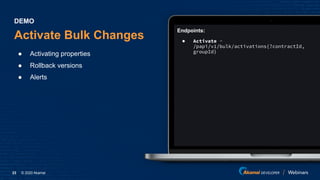
Endpoints:
● Activate -
/papi/v1/bulk/activations{?contractId,
groupId}
Activate Bulk Changes
● Activating properties
● Rollback versions
● Alerts
DEMO
© 2020 Akamai24
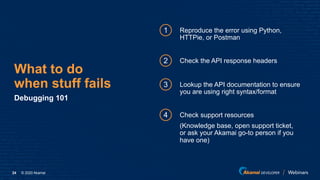
What to do
when stuff fails
Debugging 101
1
2
Reproduce the error using Python,
HTTPie, or Postman
Check the API response headers
3 Lookup the API documentation to ensure
you are using right syntax/format
4 Check support resources
(Knowledge base, open support ticket,
or ask your Akamai go-to person if you
have one)
© 2020 Akamai25
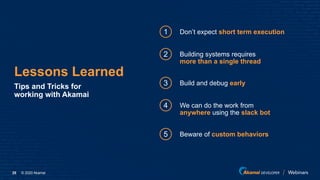
Lessons Learned
Tips and Tricks for
working with Akamai
1
2
Don’t expect short term execution
Building systems requires
more than a single thread
3 Build and debug early
4 We can do the work from
anywhere using the slack bot
5 Beware of custom behaviors
© 2020 Akamai26
Let’s recap
Webinar ResourcesSummary Visit Arc Publishing
arcpublishing.com
© 2020 Akamai27
© 2020 Akamai28
Useful Links
● developer.akamai.com
● youtube.com/AkamaiDeveloper
● developer.akamai.com/akamai-code-washington-post
● developer.akamai.com/blog/washington-post-akamai-as-code

Akamai-as-Code with The Washington Post

  • 1.
    © 2020 Akamai1 HowThe Washington Post is Using Akamai APIs to Grow Arc Publishing FEATURING Akamai-as-Code with The Washington Post
  • 2.
  • 3.
    © 2020 Akamai3 Agenda Introductionto Arc Publishing1 Demos3 Q&A4 Interactive Quiz5 Akamai-as-Code2
  • 4.
    © 2020 Akamai4 Speakers YairGreenbaum Engagement Manager Akamai Technologies Ian Baker Technical Director The Washington Post
  • 5.
    © 2020 Akamai5 Morethan sites using 1000 Arc Launch in less than 90 days Headless built for world-class storytellers CMS
  • 6.
    © 2020 Akamai6 Arcby the Numbers Properties 1100 Configurations 1004 CP Codes 939 Akamai Products Support Arc Publishing Image and Video Manager SecurityCloudlets
  • 7.
  • 8.
    © 2020 Akamai8 ManagingSeveral Configs at Once How we scaled our business without increasing the workload. We launch 3-5 new customers every week We launch 100+ sites per month We make changes to 100+ configs daily
  • 9.
    © 2020 Akamai9 TheMove From CLI to API Using the CLI required parsing bash and CLI output. Properties as JSON configurations Edit or create files Compare with current version Email activation Slack activation and errors Email activation Update Slack update and errors Activate in staging Activate in production APPROVEAPPROVE
  • 10.
    © 2020 Akamai10 TheMove From CLI to API We wanted to: 1. Add controls for changes in rules.json 2. Deploy bulk activation across the site and entire org 3. Audit events easily 4. Integrate unit tests into the staging network 5. Enable centralized access to Akamai 6. Interact easily with our pipeline (ie. Slack Integration) APIs are easier to execute.
  • 11.
    © 2020 Akamai11 AProperty Manager Config Template Customer specific
  • 12.
  • 13.
  • 14.
    © 2020 Akamai14 Akamaifor DevOps Enabling users to work inside their DevOps environments, at their speed, at their scale.
  • 15.
    © 2020 Akamai15 DevOpsSimplifies Developer Workflows What is DevOps? DevOps brings development and operations together, automating the software delivery pipeline. Why DevOps? DevOps empower engineers to ship code at a higher velocity to better serve customers and give businesses a competitive edge.
  • 16.
    © 2020 Akamai16 Atypical DevOps pipeline
  • 17.
    © 2020 Akamai17 LeveragingAkamai APIs Manage Akamai with 100+ open APIs. • Property Management (PAPI) • Fast Purge • Global Traffic Management • Edge DNS • Certification Provisioning • Cloudlets DEV DEV DEV DEV Learn more: developer.akamai.com/api/
  • 18.
    © 2020 Akamai18 HowAPIs fit into our workflow
  • 19.
  • 20.
    © 2020 Akamai20 Onboardinga new site with the Property Management API (PAPI) 1. Create a new property manager 2. Create an SSL Certificate with CPS 3. Activate DEMOS
  • 21.
    © 2020 Akamai21 Createa new Property Manager 1. Creating a new property 2. Creating a CP code 3. Updating the new property 4. Activating DEMO Endpoints: ● Create Property - /papi/v1/properties{?contractId,groupId} ● Create CP Code - /papi/v1/cpcodes{?contractId,groupId} ● Update Rule Tree - /papi/v1/properties/{propertyId}/versions/ {propertyVersion}/rules{?contractId, groupId,validateRules,validateMode,dryRun} ● Add Hostnames (INTERNAL) - /papi/v1/properties/{propertyId}/versions/ {propertyVersion}/hostnames{?contractId, groupId,validateHostnames} ● Activate - /papi/v1/bulk/activations{?contractId, groupId}
  • 22.
    © 2020 Akamai22 AddingYour Hostames 1. Add hostname 2. Create CNAME 3. Add certificate to hostname 4. Validate DEMO PAPI, DNS, CPS Endpoints: ● Add Hostnames - /papi/v1/properties/{propertyId}/versions/{propertyVer sion}/hostnames{?contractId,groupId,validateHostnames} ● Activate - /papi/v1/bulk/activations{?contractId,groupId} ● Create Fast-DNS Hostnames /config-dns/v2/zones/{}/names/{}/types/AKAMAICDN ● Create Enrollment /cps/v2/enrollments?contractId={} ● Update Enrollment {}/cps/v2/enrollments/{} ● Get Enrollment Change {}/cps/v2/enrollments/{}/changes/{} ● Get Challenges {}/cps/v2/enrollments/{}/changes/{}/input/info/lets-en crypt-challenges ● Wait for client validation ● Complete
  • 23.
    © 2020 Akamai23 Endpoints: ●Activate - /papi/v1/bulk/activations{?contractId, groupId} Activate Bulk Changes ● Activating properties ● Rollback versions ● Alerts DEMO
  • 24.
    © 2020 Akamai24 Whatto do when stuff fails Debugging 101 1 2 Reproduce the error using Python, HTTPie, or Postman Check the API response headers 3 Lookup the API documentation to ensure you are using right syntax/format 4 Check support resources (Knowledge base, open support ticket, or ask your Akamai go-to person if you have one)
  • 25.
    © 2020 Akamai25 LessonsLearned Tips and Tricks for working with Akamai 1 2 Don’t expect short term execution Building systems requires more than a single thread 3 Build and debug early 4 We can do the work from anywhere using the slack bot 5 Beware of custom behaviors
  • 26.
    © 2020 Akamai26 Let’srecap Webinar ResourcesSummary Visit Arc Publishing arcpublishing.com
  • 27.
  • 28.
    © 2020 Akamai28 UsefulLinks ● developer.akamai.com ● youtube.com/AkamaiDeveloper ● developer.akamai.com/akamai-code-washington-post ● developer.akamai.com/blog/washington-post-akamai-as-code