What's new in selenium 4
Presented by : Ankur Thakur
QA Consultant
Lack of etiquette and manners is a huge turn off.
KnolX Etiquettes
Punctuality
Respect Knolx session timings,
you are requested not to join
sessions after a 5 minutes
threshold post the session start
time.
Feedback
Make sure to submit a
constructive feedback for all
sessions as it is very helpful for
the presenter.
Mute
Please keep your window on
mute.
Avoid Disturbance
Avoid leaving your window
unmuted after asking a question
Our Agenda
01 Small introduction : Selenium
03
Selenium 3 Vs. Selenium 4 Architecture
04
Selenium Vs. Cypress
05
New features in Selenium 4
Demo
02
What is selenium?
● Selenium is a free (open-source) automated testing framework used to
validate web applications.
● It can be used across different browsers and platforms.
● We can use multiple programming languages like Java, C#, Python etc to
write Selenium Test Scripts.
● It can be integrated with tools such as TestNG, JUnit and also with Maven
and Jenkins for achieving CI/CD.
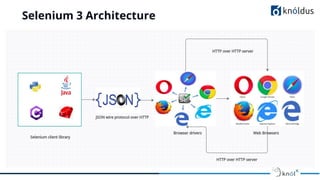
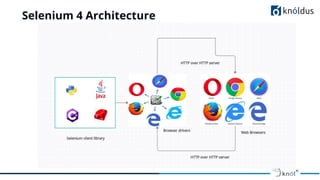
Selenium 3 Vs. Selenium 4 Architecture
Selenium 3 Architecture
Selenium 4 Architecture
Selenium Vs. Cypress
● Selenium uses multiple programming languages like Java, C#, Python etc
to write Test Scripts.
● Cypress is a purely JavaScript-based front end testing tool built for the
modern web.
● Selenium supports Chrome, IE, Safari, Edge, Firefox, Opera web browsers.
● Cypress supports Chrome, Edge, Firefox(beta), Electron web browsers.
● Selenium supports multiple frameworks based on specific programming
languages. (For e.g: JUnit for Java, Cucumber for JavaScript, etc.)
● Cypress only supports Supports only Mocha JS.
Selenium Vs. Cypress
● Setting up Selenium is a bit challenging as it requires downloading
browser-specific drivers and needs to be updated if we update our
browsers.
● Setting up Cypress is simple. No dependencies or additional driver
downloads are required.
New features in Selenium 4
● Relative Locators
● Handling Multiple windows and Tabs
● Partial screenshots
● Capturing Height and Width of WebElement (UX validation)
● Chrome DevTools
● W3C WebDriver Protocol
Relative Locators
● Locators are used to uniquely identify web elements on a webpage.
● Locators are difficult to maintain.
● Relative locators are easy to use and implement.
● The main advantage of relative locators is finding elements which are
difficult to locate i.e elements with no unique attributes which helps us
to uniquely identify them.
● Ex-
driver.findElement(withTagName("textBox").above(locatorOfSubmitBut
ton))
Types of Relative Locators
● above() - Used to locate an element just above the specified element
● below() - Used to locate the an element just below the specified
element
● toLeftOf() - Used to locate the an element located on the left of a
specified element
● toRightOf() - Used to locate the an element located on the right of a
specified element
● near() - By default, it is used to locate an element at 50 pixels distant
from a specified element.
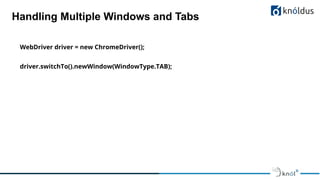
Handling Multiple Windows and Tabs
● Handling and opening new tabs or windows is now possible in
selenium.
● We can open new tabs, open links according to our requirement and
switch between them as well.
● This can be done with the newWindow() method.
● This helps us in certain situations where we need to automate multiple
tabs or multiple windows in a single test case.
Handling Multiple Windows and Tabs
WebDriver driver = new ChromeDriver();
driver.switchTo().newWindow(WindowType.TAB);
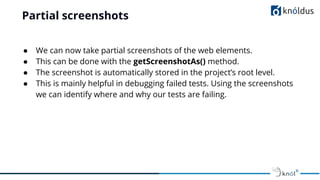
Partial screenshots
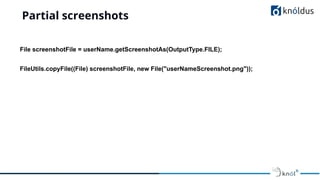
● We can now take partial screenshots of the web elements.
● This can be done with the getScreenshotAs() method.
● The screenshot is automatically stored in the project’s root level.
● This is mainly helpful in debugging failed tests. Using the screenshots
we can identify where and why our tests are failing.
Partial screenshots
File screenshotFile = userName.getScreenshotAs(OutputType.FILE);
FileUtils.copyFile((File) screenshotFile, new File("userNameScreenshot.png"));
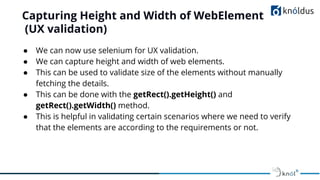
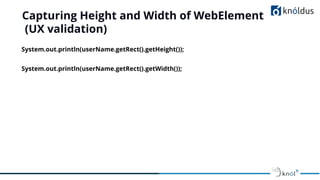
Capturing Height and Width of WebElement
(UX validation)
● We can now use selenium for UX validation.
● We can capture height and width of web elements.
● This can be used to validate size of the elements without manually
fetching the details.
● This can be done with the getRect().getHeight() and
getRect().getWidth() method.
● This is helpful in validating certain scenarios where we need to verify
that the elements are according to the requirements or not.
Capturing Height and Width of WebElement
(UX validation)
System.out.println(userName.getRect().getHeight());
System.out.println(userName.getRect().getWidth());
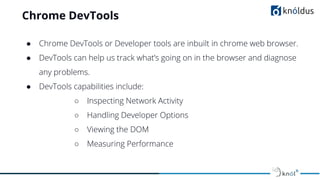
Chrome DevTools
● Chrome DevTools or Developer tools are inbuilt in chrome web browser.
● DevTools can help us track what’s going on in the browser and diagnose
any problems.
● DevTools capabilities include:
○ Inspecting Network Activity
○ Handling Developer Options
○ Viewing the DOM
○ Measuring Performance
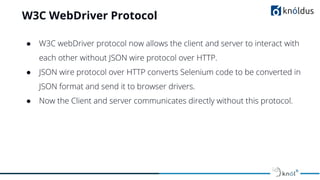
W3C WebDriver Protocol
● W3C webDriver protocol now allows the client and server to interact with
each other without JSON wire protocol over HTTP.
● JSON wire protocol over HTTP converts Selenium code to be converted in
JSON format and send it to browser drivers.
● Now the Client and server communicates directly without this protocol.
Demo
Q&A
Thank You

What's new in selenium 4

  • 1.
    What's new inselenium 4 Presented by : Ankur Thakur QA Consultant
  • 2.
    Lack of etiquetteand manners is a huge turn off. KnolX Etiquettes Punctuality Respect Knolx session timings, you are requested not to join sessions after a 5 minutes threshold post the session start time. Feedback Make sure to submit a constructive feedback for all sessions as it is very helpful for the presenter. Mute Please keep your window on mute. Avoid Disturbance Avoid leaving your window unmuted after asking a question
  • 3.
    Our Agenda 01 Smallintroduction : Selenium 03 Selenium 3 Vs. Selenium 4 Architecture 04 Selenium Vs. Cypress 05 New features in Selenium 4 Demo 02
  • 4.
    What is selenium? ●Selenium is a free (open-source) automated testing framework used to validate web applications. ● It can be used across different browsers and platforms. ● We can use multiple programming languages like Java, C#, Python etc to write Selenium Test Scripts. ● It can be integrated with tools such as TestNG, JUnit and also with Maven and Jenkins for achieving CI/CD.
  • 5.
    Selenium 3 Vs.Selenium 4 Architecture
  • 6.
  • 7.
  • 8.
    Selenium Vs. Cypress ●Selenium uses multiple programming languages like Java, C#, Python etc to write Test Scripts. ● Cypress is a purely JavaScript-based front end testing tool built for the modern web. ● Selenium supports Chrome, IE, Safari, Edge, Firefox, Opera web browsers. ● Cypress supports Chrome, Edge, Firefox(beta), Electron web browsers. ● Selenium supports multiple frameworks based on specific programming languages. (For e.g: JUnit for Java, Cucumber for JavaScript, etc.) ● Cypress only supports Supports only Mocha JS.
  • 9.
    Selenium Vs. Cypress ●Setting up Selenium is a bit challenging as it requires downloading browser-specific drivers and needs to be updated if we update our browsers. ● Setting up Cypress is simple. No dependencies or additional driver downloads are required.
  • 10.
    New features inSelenium 4 ● Relative Locators ● Handling Multiple windows and Tabs ● Partial screenshots ● Capturing Height and Width of WebElement (UX validation) ● Chrome DevTools ● W3C WebDriver Protocol
  • 11.
    Relative Locators ● Locatorsare used to uniquely identify web elements on a webpage. ● Locators are difficult to maintain. ● Relative locators are easy to use and implement. ● The main advantage of relative locators is finding elements which are difficult to locate i.e elements with no unique attributes which helps us to uniquely identify them. ● Ex- driver.findElement(withTagName("textBox").above(locatorOfSubmitBut ton))
  • 12.
    Types of RelativeLocators ● above() - Used to locate an element just above the specified element ● below() - Used to locate the an element just below the specified element ● toLeftOf() - Used to locate the an element located on the left of a specified element ● toRightOf() - Used to locate the an element located on the right of a specified element ● near() - By default, it is used to locate an element at 50 pixels distant from a specified element.
  • 13.
    Handling Multiple Windowsand Tabs ● Handling and opening new tabs or windows is now possible in selenium. ● We can open new tabs, open links according to our requirement and switch between them as well. ● This can be done with the newWindow() method. ● This helps us in certain situations where we need to automate multiple tabs or multiple windows in a single test case.
  • 14.
    Handling Multiple Windowsand Tabs WebDriver driver = new ChromeDriver(); driver.switchTo().newWindow(WindowType.TAB);
  • 15.
    Partial screenshots ● Wecan now take partial screenshots of the web elements. ● This can be done with the getScreenshotAs() method. ● The screenshot is automatically stored in the project’s root level. ● This is mainly helpful in debugging failed tests. Using the screenshots we can identify where and why our tests are failing.
  • 16.
    Partial screenshots File screenshotFile= userName.getScreenshotAs(OutputType.FILE); FileUtils.copyFile((File) screenshotFile, new File("userNameScreenshot.png"));
  • 17.
    Capturing Height andWidth of WebElement (UX validation) ● We can now use selenium for UX validation. ● We can capture height and width of web elements. ● This can be used to validate size of the elements without manually fetching the details. ● This can be done with the getRect().getHeight() and getRect().getWidth() method. ● This is helpful in validating certain scenarios where we need to verify that the elements are according to the requirements or not.
  • 18.
    Capturing Height andWidth of WebElement (UX validation) System.out.println(userName.getRect().getHeight()); System.out.println(userName.getRect().getWidth());
  • 19.
    Chrome DevTools ● ChromeDevTools or Developer tools are inbuilt in chrome web browser. ● DevTools can help us track what’s going on in the browser and diagnose any problems. ● DevTools capabilities include: ○ Inspecting Network Activity ○ Handling Developer Options ○ Viewing the DOM ○ Measuring Performance
  • 20.
    W3C WebDriver Protocol ●W3C webDriver protocol now allows the client and server to interact with each other without JSON wire protocol over HTTP. ● JSON wire protocol over HTTP converts Selenium code to be converted in JSON format and send it to browser drivers. ● Now the Client and server communicates directly without this protocol.
  • 21.
  • 22.
  • 23.