ROBUSTA
Unified Kubernetes Monitoring,
Observability and Operations.
Presented By:
GAURAV SHUKLA
SOFTWARE CONSULTANT
Lack of etiquette and manners is a huge turn off.
KnolX Etiquettes
 Punctuality
Join the session 5 minutes prior to the session start time. We start on
time and conclude on time!
 Feedback
Make sure to submit a constructive feedback for all sessions as it is very
helpful for the presenter.
 Silent Mode
Keep your mobile devices in silent mode, feel free to move out of session
in case you need to attend an urgent call.
 Avoid Disturbance
Avoid unwanted chit chat during the session.
Agenda
1. What is Robusta
 Architecture
 Core Components
 How it works?
 Playbooks
 Main Features
2. Getting Started with Robusta
3. Demo
What is Robusta?
 Robusta is an open source platform for multi-cluster Kubernetes monitoring, troubleshooting and
automation.
 Open source monitoring tool for Kubernetes, which extends Prometheus.
Using Automation rules, Robusta automatically fetches the data you need to investigate and
attaches it your alerts.
Eg: When alerts fire on pods, fetch Pod logs.
When Jobs fail, show data from the last run
 Robusta is commonly used alongside Prometheus but other tools are supported too.
 By listening to all the events in your cluster, Robusta can describe why alerts fired, what
happened and what we can do about it.
Supported Clusters: Supports major Kubernetes distributions (AKS, EKS, GKE etc) other than
Minikube.
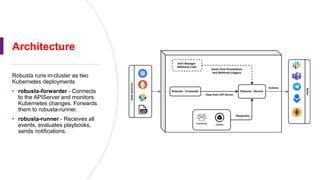
Architecture
Robusta runs in-cluster as two
Kubernetes deployments
• robusta-forwarder - Connects
to the APIServer and monitors
Kubernetes changes. Forwards
them to robusta-runner.
• robusta-runner - Receives all
events, evaluates playbooks,
sends notifications.
 Robusta Forwarder:
o A lightweight component deployed within your Kubernetes cluster.
o It connects with the Kubernetes API server to monitor events (pod changes, deployments)
o It efficiently forwards pertinent events to the Robusta runner.
 Robusta Runner:
o The central orchestrator and brain of the Robusta system.
o Processes received events from the forwarder(s).
o Evaluates configured playbooks (automation rules) against incoming events.
o If playbooks are triggered, executes the relevant actions (remediation, notifications, etc.).
Core Components:
How it works?
Conceptually, Robusta does three things:
 Listens passively to various sources: Robusta monitors Kubernetes events, Prometheus
alerts, and other sources to stay informed about your cluster's current state.
 Actively collects observability data: When noteworthy events occur, Robusta actively gathers
and correlates information such as logs, graphs, and thread dumps, All according to the
playbooks defined in Robusta.
 Sends notifications: Based on your preferences, Robusta notifies in sinks like Slack, MSTeams,
and PagerDuty.
Open source vs SaaS:
There are several ways to use Robusta:
Robusta OSS: send data to external destinations like slack etc. No UI.
Robusta OSS + SaaS UI: The full experience.
Robusta OSS + Self-hosted UI: The on-prem experience.
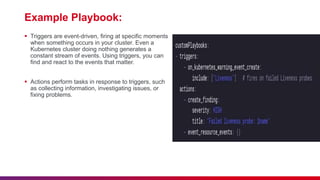
What is Playbook?
 A playbook is an automation rule for detecting, investigating, or fixing problems in your cluster.
 In Robusta, rules are called playbooks. Every playbook consists of a trigger (e.g. a Crashing Pod,
a Prometheus Alert, or some other condition) and one or more actions. Actions can enrich alerts,
silence them, or remediate problems.
 Every playbook consists of a condition (trigger) and instructions (actions) defining the response.
 Playbooks behave like pipelines:
• Events come into Robusta and are checked against triggers.
• When there is a match, a trigger fires
• The relevant playbook runs
• All playbook actions execute, receiving the event as context.
• If notifications were generated by the playbook, they are sent to sinks.
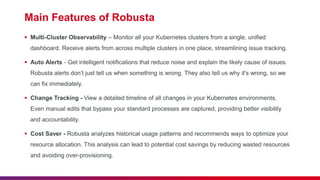
Example Playbook:
 Triggers are event-driven, firing at specific moments
when something occurs in your cluster. Even a
Kubernetes cluster doing nothing generates a
constant stream of events. Using triggers, you can
find and react to the events that matter.
 Actions perform tasks in response to triggers, such
as collecting information, investigating issues, or
fixing problems.
Main Features of Robusta
 Multi-Cluster Observability – Monitor all your Kubernetes clusters from a single, unified
dashboard. Receive alerts from across multiple clusters in one place, streamlining issue tracking.
 Auto Alerts - Get intelligent notifications that reduce noise and explain the likely cause of issues.
Robusta alerts don’t just tell us when something is wrong. They also tell us why it's wrong, so we
can fix immediately.
 Change Tracking - View a detailed timeline of all changes in your Kubernetes environments.
Even manual edits that bypass your standard processes are captured, providing better visibility
and accountability.
 Cost Saver - Robusta analyzes historical usage patterns and recommends ways to optimize your
resource allocation. This analysis can lead to potential cost savings by reducing wasted resources
and avoiding over-provisioning.
DEMO
Getting Started with Robusta
Thank you

Robusta -Tool Presentation (DevOps).pptx

  • 1.
    ROBUSTA Unified Kubernetes Monitoring, Observabilityand Operations. Presented By: GAURAV SHUKLA SOFTWARE CONSULTANT
  • 2.
    Lack of etiquetteand manners is a huge turn off. KnolX Etiquettes  Punctuality Join the session 5 minutes prior to the session start time. We start on time and conclude on time!  Feedback Make sure to submit a constructive feedback for all sessions as it is very helpful for the presenter.  Silent Mode Keep your mobile devices in silent mode, feel free to move out of session in case you need to attend an urgent call.  Avoid Disturbance Avoid unwanted chit chat during the session.
  • 3.
    Agenda 1. What isRobusta  Architecture  Core Components  How it works?  Playbooks  Main Features 2. Getting Started with Robusta 3. Demo
  • 4.
    What is Robusta? Robusta is an open source platform for multi-cluster Kubernetes monitoring, troubleshooting and automation.  Open source monitoring tool for Kubernetes, which extends Prometheus. Using Automation rules, Robusta automatically fetches the data you need to investigate and attaches it your alerts. Eg: When alerts fire on pods, fetch Pod logs. When Jobs fail, show data from the last run  Robusta is commonly used alongside Prometheus but other tools are supported too.  By listening to all the events in your cluster, Robusta can describe why alerts fired, what happened and what we can do about it. Supported Clusters: Supports major Kubernetes distributions (AKS, EKS, GKE etc) other than Minikube.
  • 5.
    Architecture Robusta runs in-clusteras two Kubernetes deployments • robusta-forwarder - Connects to the APIServer and monitors Kubernetes changes. Forwards them to robusta-runner. • robusta-runner - Receives all events, evaluates playbooks, sends notifications.
  • 6.
     Robusta Forwarder: oA lightweight component deployed within your Kubernetes cluster. o It connects with the Kubernetes API server to monitor events (pod changes, deployments) o It efficiently forwards pertinent events to the Robusta runner.  Robusta Runner: o The central orchestrator and brain of the Robusta system. o Processes received events from the forwarder(s). o Evaluates configured playbooks (automation rules) against incoming events. o If playbooks are triggered, executes the relevant actions (remediation, notifications, etc.). Core Components:
  • 7.
    How it works? Conceptually,Robusta does three things:  Listens passively to various sources: Robusta monitors Kubernetes events, Prometheus alerts, and other sources to stay informed about your cluster's current state.  Actively collects observability data: When noteworthy events occur, Robusta actively gathers and correlates information such as logs, graphs, and thread dumps, All according to the playbooks defined in Robusta.  Sends notifications: Based on your preferences, Robusta notifies in sinks like Slack, MSTeams, and PagerDuty. Open source vs SaaS: There are several ways to use Robusta: Robusta OSS: send data to external destinations like slack etc. No UI. Robusta OSS + SaaS UI: The full experience. Robusta OSS + Self-hosted UI: The on-prem experience.
  • 8.
    What is Playbook? A playbook is an automation rule for detecting, investigating, or fixing problems in your cluster.  In Robusta, rules are called playbooks. Every playbook consists of a trigger (e.g. a Crashing Pod, a Prometheus Alert, or some other condition) and one or more actions. Actions can enrich alerts, silence them, or remediate problems.  Every playbook consists of a condition (trigger) and instructions (actions) defining the response.  Playbooks behave like pipelines: • Events come into Robusta and are checked against triggers. • When there is a match, a trigger fires • The relevant playbook runs • All playbook actions execute, receiving the event as context. • If notifications were generated by the playbook, they are sent to sinks.
  • 9.
    Example Playbook:  Triggersare event-driven, firing at specific moments when something occurs in your cluster. Even a Kubernetes cluster doing nothing generates a constant stream of events. Using triggers, you can find and react to the events that matter.  Actions perform tasks in response to triggers, such as collecting information, investigating issues, or fixing problems.
  • 10.
    Main Features ofRobusta  Multi-Cluster Observability – Monitor all your Kubernetes clusters from a single, unified dashboard. Receive alerts from across multiple clusters in one place, streamlining issue tracking.  Auto Alerts - Get intelligent notifications that reduce noise and explain the likely cause of issues. Robusta alerts don’t just tell us when something is wrong. They also tell us why it's wrong, so we can fix immediately.  Change Tracking - View a detailed timeline of all changes in your Kubernetes environments. Even manual edits that bypass your standard processes are captured, providing better visibility and accountability.  Cost Saver - Robusta analyzes historical usage patterns and recommends ways to optimize your resource allocation. This analysis can lead to potential cost savings by reducing wasted resources and avoiding over-provisioning.
  • 11.
  • 12.