Android
Declarative UI blooms:
Jetpack Compose
What’s new in Android:
Wonyoung Choi (Toru) He/Him
Staff Mobile Engineer
“Why Compose?”
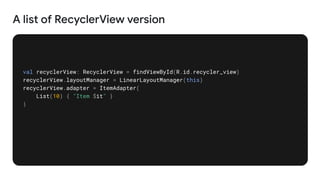
A list of RecyclerView version
val recyclerView: RecyclerView = findViewById(R.id.recycler_view)
recyclerView.layoutManager = LinearLayoutManager(this)
recyclerView.adapter = ItemAdapter(
List(10) { "Item $it" }
)
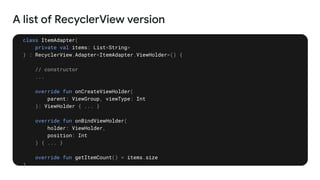
A list of RecyclerView version
class ItemAdapter(
private val items: List<String>
) : RecyclerView.Adapter<ItemAdapter.ViewHolder>() {
// constructor
...
override fun onCreateViewHolder(
parent: ViewGroup, viewType: Int
): ViewHolder { ... }
override fun onBindViewHolder(
holder: ViewHolder,
position: Int
) { ... }
override fun getItemCount() = items.size
}
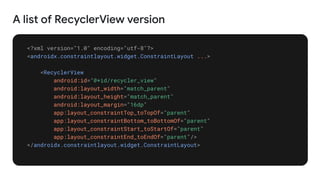
A list of RecyclerView version
<?xml version="1.0" encoding="utf-8"?>
<androidx.constraintlayout.widget.ConstraintLayout ...>
<RecyclerView
android:id="@+id/recycler_view"
android:layout_width="match_parent"
android:layout_height="match_parent"
android:layout_margin="16dp"
app:layout_constraintTop_toTopOf="parent"
app:layout_constraintBottom_toBottomOf="parent"
app:layout_constraintStart_toStartOf="parent"
app:layout_constraintEnd_toEndOf="parent"/>
</androidx.constraintlayout.widget.ConstraintLayout>
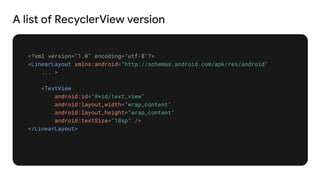
A list of RecyclerView version
<?xml version="1.0" encoding="utf-8"?>
<LinearLayout xmlns:android="http://schemas.android.com/apk/res/android"
... >
<TextView
android:id="@+id/text_view"
android:layout_width="wrap_content"
android:layout_height="wrap_content"
android:textSize="18sp" />
</LinearLayout>
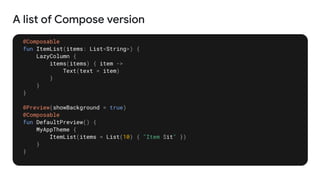
A list of Compose version
@Composable
fun ItemList(items: List<String>) {
LazyColumn {
items(items) { item ->
Text(text = item)
}
}
}
@Preview(showBackground = true)
@Composable
fun DefaultPreview() {
MyAppTheme {
ItemList(items = List(10) { "Item $it" })
}
}
“Compose allowed us to
rapidly iterate and ship the
new products in a fraction of
the time.”
SoundCloud
40%
Of top apps benefit from
Compose, and it continues to grow.
What’s new in
Jetpack Compose
Section 1
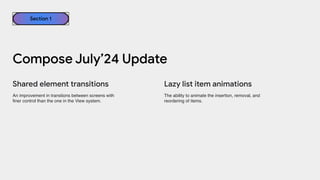
The ability to animate the insertion, removal, and
reordering of items.
Shared element transitions Lazy list item animations
Compose July’24 Update
Section 1
An improvement in transtions between screens with
finer control than the one in the View system.
Compose as many items that can fit and provide
the context of rendered items, based on the given a
max number of lines.
Text
Contextual Flow Layout
Compose July’24 Update
Section 1
Supports inline links and basic HTML formatting via
a new extension.
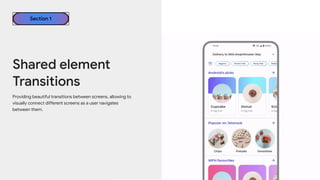
Shared element
Transitions
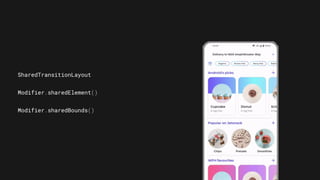
Providing beautiful transitions between screens, allowing to
visually connect different screens as a user navigates
between them.
Section 1
SharedTransitionLayout
Modifier.sharedElement()
Modifier.sharedBounds()
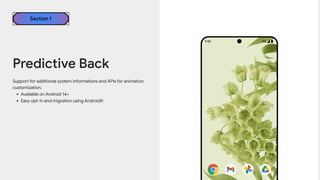
Support for additional system informations and APIs for animation
customization.
• Available on Android 14+
• Easy opt-in and migration using AndroidX
Section 1
Predictive Back
• implementation
“androidx.activity:activity:1.6.0-alpha05”
• android:enableOnBackInvokedCallback="true"
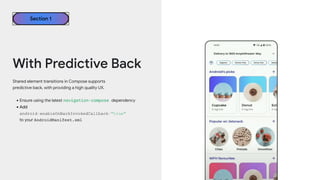
Shared element transitions in Compose supports
predictive back, with providing a high quality UX.
•Ensure using the latest navigation-compose dependency
•Add
android:enableOnBackInvokedCallback="true"
to your AndroidManifest.xml
Section 1
With Predictive Back
Section 1
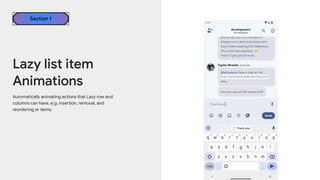
Lazy list item
Animations
Automatically animating actions that Lazy row and
columns can have, e.g. insertion, removal, and
reordering or items.
MessageItem(
Modifier.animateItem()
)
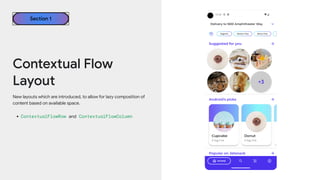
New layouts which are introduced, to allow for lazy composition of
content based on available space.
• ContextualFlowRow and ContextualFlowColumn
Contextual Flow
Layout
Section 1
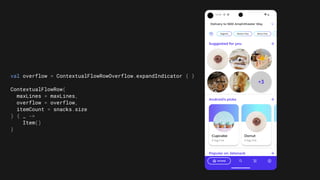
val overflow = ContextualFlowRowOverflow.expandIndicator { }
ContextualFlowRow(
maxLines = maxLines,
overflow = overflow,
itemCount = snacks.size
) { _ ->
Item()
}
@OptIn(ExperimentalLayoutApi::class)
@Composable
private fun SuggestedSnacks(
snacks: List<Snack>,
onSnackClick: (Snack) -> Unit,
modifier: Modifier = Modifier
) {
var maxLines by remember { mutableIntStateOf(1) }
ContextualFlowRow(
maxLines = maxLines,
overflow = ContextualFlowRowOverflow.expandIndicator {
val remainingItems = totalItemCount - shownItemCount
MyOverflowIndicator(
remainingItems = remainingItems,
modifier = Modifier
.clickable {
// Expand the max lines on click
maxLines += 1
}
)
},
itemCount = snacks.size
) { index ->
val snack = snacks[index]
SnackItem(snack, onSnackClick)
}
}
Section 1
Text
• Finally support inline links and basic HTML formatting
via the new extension.
• This converts items above to AnnotatedString.
AnnotatedString.fromHtml()
Performance in
Jetpack Compose
Section 2
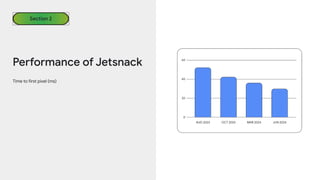
Time to first pixel (ms)
Performance of Jetsnack
Section 2
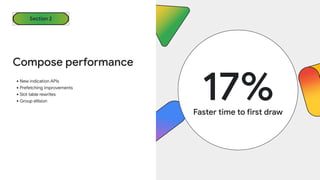
•New indication APIs
•Prefetching improvements
•Slot table rewrites
•Group ellision
Compose performance
17%
Faster time to first draw
Section 2
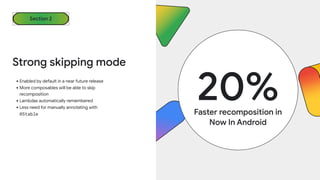
•Enabled by default in a near future release
•More composables will be able to skip
recomposition
•Lambdas automatically remembered
•Less need for manually annotating with
@Stable
Strong skipping mode
20%
Faster recomposition in
Now In Android
Section 2
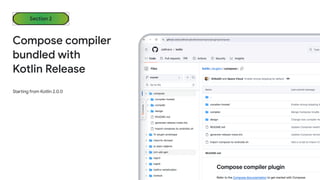
Starting from Kotlin 2.0.0
Compose compiler
bundled with
Kotlin Release
Section 2
libs.versions.toml
[versions]
kotlin = "2.0.0"
[plugins]
compose = {
id = "org.jetbrains.kotlin.plugin.compose",
version.ref = "kotlin"
}
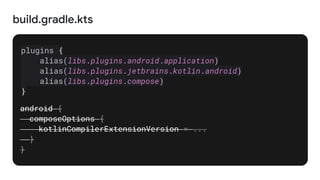
build.gradle.kts
plugins {
alias(libs.plugins.android.application)
alias(libs.plugins.jetbrains.kotlin.android)
alias(libs.plugins.compose)
}
android {
composeOptions {
kotlinCompilerExtensionVersion = ...
}
}
Stablize experimental APIs, remove experimental annotations
•Pager, AnchoredDraggable, SegmentedButton,
•SwipeToDismissBox, Slide, and more.
Stable APIs
Section 2
Scaling across screens with
Jetpack Compose
Section 3
Think adaptive
Section 3
New 3 scaffolds to be adapted to the different window sizes
from phones to foldables to tablets and more.
•NavigationSuiteScaffold
•ListDetailPaneScaffold
•SupportingPaneScaffold
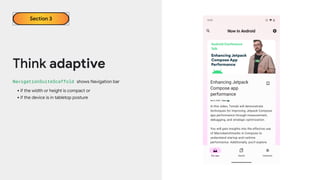
Think adaptive
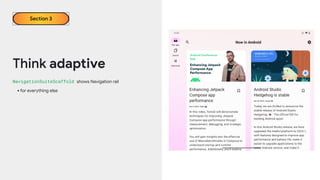
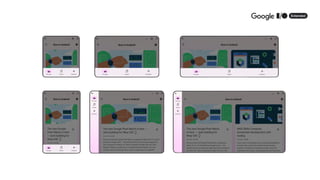
NavigationSuiteScaffold shows Navigation bar
•if the width or height is compact or
•if the device is in tabletop posture
Section 3
Think adaptive
NavigationSuiteScaffold shows Navigation rail
•for everything else
Section 3
Think adaptive
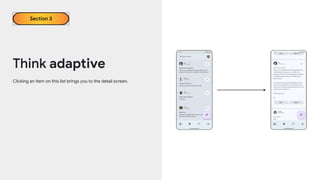
Clicking an item on this list brings you to the detail screen.
Section 3
Think adaptive
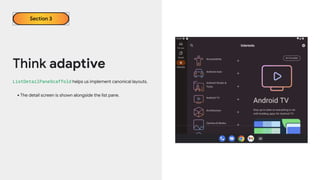
ListDetailPaneScaffold helps us implement canonical layouts.
•The detail screen is shown alongside the list pane.
Section 3
Think adaptive
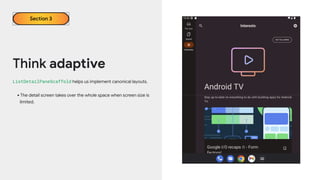
ListDetailPaneScaffold helps us implement canonical layouts.
•The detail screen takes over the whole space when screen size is
limited.
Section 3
Think adaptive
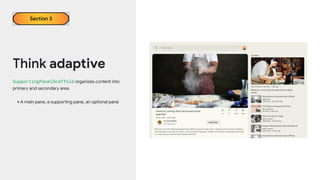
SupportingPanelScaffold organizes content into
primary and secondary area.
•A main pane, a supporting pane, an optional pane
Section 3
Compose for TV
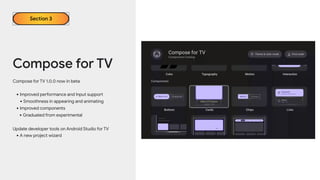
Compose for TV 1.0.0 now in beta
•Improved performance and Input support
•Smoothness in appearing and animating
•Improved components
•Graduated from experimental
Update developer tools on Android Studio for TV
•A new project wizard
Section 3
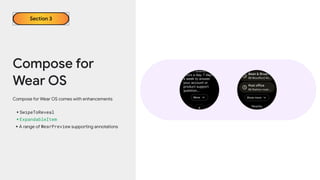
Compose for
Wear OS
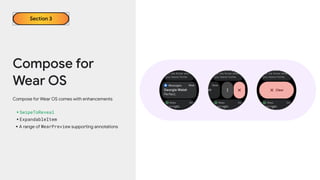
Compose for Wear OS comes with enhancements
•SwipeToReveal
•ExpandableItem
•A range of WearPreview supporting annotations
Section 3
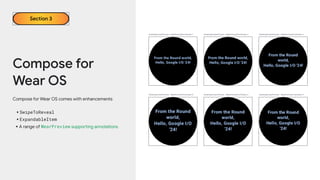
Compose for
Wear OS
Compose for Wear OS comes with enhancements
•SwipeToReveal
•ExpandableItem
•A range of WearPreview supporting annotations
Section 3
Compose for
Wear OS
Compose for Wear OS comes with enhancements
•SwipeToReveal
•ExpandableItem
•A range of WearPreview supporting annotations
Section 3
A widget is a piece of your application UI that can be
rendered remotely outside your Android Application.
What is a widget?
Section 3
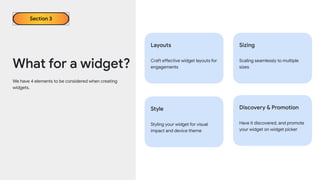
We have 4 elements to be considered when creating
widgets.
What for a widget?
Section 3
Layouts
Craft effective widget layouts for
engagements
Sizing
Scaling seamlessly to multiple
sizes
Style
Styling your widget for visual
impact and device theme
Discovery & Promotion
Have it discovered, and promote
your widget on widget picker
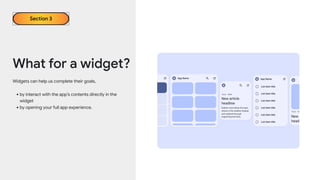
Widgets can help us complete their goals,
•by interact with the app’s contents directly in the
widget
•by opening your full app experience.
What for a widget?
Section 3
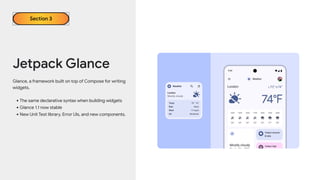
Glance, a framework built on top of Compose for writing
widgets.
•The same declarative syntax when building widgets
•Glance 1.1 now stable
•New Unit Test library, Error UIs, and new components.
Jetpack Glance
Section 3
Jetpack Glance
Section 3
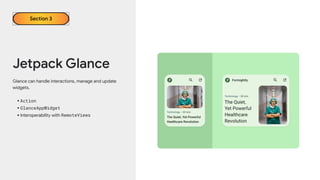
Glance can handle interactions, manage and update
widgets.
•Action
•GlanceAppWidget
•Interoperability with RemoteViews
Jetpack Libraries and
Compose
Section 4
Section 4
Type safe navigation
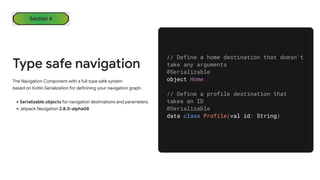
The Navigation Component with a full type safe system
based on Kotlin Serialization for definining your navigation graph.
•Serializable objects for navigation destinations and parameters.
•Jetpack Navigation 2.8.0-alpha08
// Define a home destination that doesn't
take any arguments
@Serializable
object Home
// Define a profile destination that
takes an ID
@Serializable
data class Profile(val id: String)
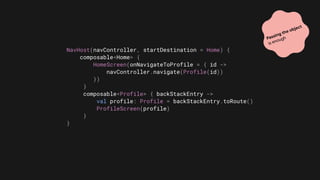
NavHost(navController, startDestination = Home) {
composable<Home> {
HomeScreen(onNavigateToProfile = { id ->
navController.navigate(Profile(id))
})
}
composable<Profile> { backStackEntry ->
val profile: Profile = backStackEntry.toRoute()
ProfileScreen(profile)
}
}
Passing the object
is enough
Section 4
CameraX Compose
A new Compose-specific CameraX artifact
camera-viewfinder-compose
•Viewfinder to display a camera preview for user’s behaviours
•Correctly handles camera and surface lifecycles.
•Enables complex interactions in the camera coordinate system.
Image generated by a generative AI system
Conclusion
Section 5
https://developer.android.com/develop/ui/compose
“Why not Compose?”

What's new in android: jetpack compose 2024

  • 1.
    Android Declarative UI blooms: JetpackCompose What’s new in Android: Wonyoung Choi (Toru) He/Him Staff Mobile Engineer
  • 2.
  • 3.
    A list ofRecyclerView version val recyclerView: RecyclerView = findViewById(R.id.recycler_view) recyclerView.layoutManager = LinearLayoutManager(this) recyclerView.adapter = ItemAdapter( List(10) { "Item $it" } )
  • 4.
    A list ofRecyclerView version class ItemAdapter( private val items: List<String> ) : RecyclerView.Adapter<ItemAdapter.ViewHolder>() { // constructor ... override fun onCreateViewHolder( parent: ViewGroup, viewType: Int ): ViewHolder { ... } override fun onBindViewHolder( holder: ViewHolder, position: Int ) { ... } override fun getItemCount() = items.size }
  • 5.
    A list ofRecyclerView version <?xml version="1.0" encoding="utf-8"?> <androidx.constraintlayout.widget.ConstraintLayout ...> <RecyclerView android:id="@+id/recycler_view" android:layout_width="match_parent" android:layout_height="match_parent" android:layout_margin="16dp" app:layout_constraintTop_toTopOf="parent" app:layout_constraintBottom_toBottomOf="parent" app:layout_constraintStart_toStartOf="parent" app:layout_constraintEnd_toEndOf="parent"/> </androidx.constraintlayout.widget.ConstraintLayout>
  • 6.
    A list ofRecyclerView version <?xml version="1.0" encoding="utf-8"?> <LinearLayout xmlns:android="http://schemas.android.com/apk/res/android" ... > <TextView android:id="@+id/text_view" android:layout_width="wrap_content" android:layout_height="wrap_content" android:textSize="18sp" /> </LinearLayout>
  • 7.
    A list ofCompose version @Composable fun ItemList(items: List<String>) { LazyColumn { items(items) { item -> Text(text = item) } } } @Preview(showBackground = true) @Composable fun DefaultPreview() { MyAppTheme { ItemList(items = List(10) { "Item $it" }) } }
  • 8.
    “Compose allowed usto rapidly iterate and ship the new products in a fraction of the time.” SoundCloud
  • 9.
    40% Of top appsbenefit from Compose, and it continues to grow.
  • 10.
    What’s new in JetpackCompose Section 1
  • 11.
    The ability toanimate the insertion, removal, and reordering of items. Shared element transitions Lazy list item animations Compose July’24 Update Section 1 An improvement in transtions between screens with finer control than the one in the View system.
  • 12.
    Compose as manyitems that can fit and provide the context of rendered items, based on the given a max number of lines. Text Contextual Flow Layout Compose July’24 Update Section 1 Supports inline links and basic HTML formatting via a new extension.
  • 13.
    Shared element Transitions Providing beautifultransitions between screens, allowing to visually connect different screens as a user navigates between them. Section 1
  • 14.
  • 15.
    Support for additionalsystem informations and APIs for animation customization. • Available on Android 14+ • Easy opt-in and migration using AndroidX Section 1 Predictive Back
  • 16.
  • 17.
    Shared element transitionsin Compose supports predictive back, with providing a high quality UX. •Ensure using the latest navigation-compose dependency •Add android:enableOnBackInvokedCallback="true" to your AndroidManifest.xml Section 1 With Predictive Back
  • 18.
    Section 1 Lazy listitem Animations Automatically animating actions that Lazy row and columns can have, e.g. insertion, removal, and reordering or items.
  • 19.
  • 20.
    New layouts whichare introduced, to allow for lazy composition of content based on available space. • ContextualFlowRow and ContextualFlowColumn Contextual Flow Layout Section 1
  • 21.
    val overflow =ContextualFlowRowOverflow.expandIndicator { } ContextualFlowRow( maxLines = maxLines, overflow = overflow, itemCount = snacks.size ) { _ -> Item() }
  • 22.
    @OptIn(ExperimentalLayoutApi::class) @Composable private fun SuggestedSnacks( snacks:List<Snack>, onSnackClick: (Snack) -> Unit, modifier: Modifier = Modifier ) { var maxLines by remember { mutableIntStateOf(1) } ContextualFlowRow( maxLines = maxLines, overflow = ContextualFlowRowOverflow.expandIndicator { val remainingItems = totalItemCount - shownItemCount MyOverflowIndicator( remainingItems = remainingItems, modifier = Modifier .clickable { // Expand the max lines on click maxLines += 1 } ) }, itemCount = snacks.size ) { index -> val snack = snacks[index] SnackItem(snack, onSnackClick) } }
  • 23.
    Section 1 Text • Finallysupport inline links and basic HTML formatting via the new extension. • This converts items above to AnnotatedString.
  • 24.
  • 25.
  • 26.
    Time to firstpixel (ms) Performance of Jetsnack Section 2
  • 27.
    •New indication APIs •Prefetchingimprovements •Slot table rewrites •Group ellision Compose performance 17% Faster time to first draw Section 2
  • 28.
    •Enabled by defaultin a near future release •More composables will be able to skip recomposition •Lambdas automatically remembered •Less need for manually annotating with @Stable Strong skipping mode 20% Faster recomposition in Now In Android Section 2
  • 29.
    Starting from Kotlin2.0.0 Compose compiler bundled with Kotlin Release Section 2
  • 30.
    libs.versions.toml [versions] kotlin = "2.0.0" [plugins] compose= { id = "org.jetbrains.kotlin.plugin.compose", version.ref = "kotlin" }
  • 31.
  • 32.
    Stablize experimental APIs,remove experimental annotations •Pager, AnchoredDraggable, SegmentedButton, •SwipeToDismissBox, Slide, and more. Stable APIs Section 2
  • 33.
    Scaling across screenswith Jetpack Compose Section 3
  • 34.
    Think adaptive Section 3 New3 scaffolds to be adapted to the different window sizes from phones to foldables to tablets and more. •NavigationSuiteScaffold •ListDetailPaneScaffold •SupportingPaneScaffold
  • 35.
    Think adaptive NavigationSuiteScaffold showsNavigation bar •if the width or height is compact or •if the device is in tabletop posture Section 3
  • 36.
    Think adaptive NavigationSuiteScaffold showsNavigation rail •for everything else Section 3
  • 38.
    Think adaptive Clicking anitem on this list brings you to the detail screen. Section 3
  • 39.
    Think adaptive ListDetailPaneScaffold helpsus implement canonical layouts. •The detail screen is shown alongside the list pane. Section 3
  • 40.
    Think adaptive ListDetailPaneScaffold helpsus implement canonical layouts. •The detail screen takes over the whole space when screen size is limited. Section 3
  • 42.
    Think adaptive SupportingPanelScaffold organizescontent into primary and secondary area. •A main pane, a supporting pane, an optional pane Section 3
  • 43.
    Compose for TV Composefor TV 1.0.0 now in beta •Improved performance and Input support •Smoothness in appearing and animating •Improved components •Graduated from experimental Update developer tools on Android Studio for TV •A new project wizard Section 3
  • 44.
    Compose for Wear OS Composefor Wear OS comes with enhancements •SwipeToReveal •ExpandableItem •A range of WearPreview supporting annotations Section 3
  • 45.
    Compose for Wear OS Composefor Wear OS comes with enhancements •SwipeToReveal •ExpandableItem •A range of WearPreview supporting annotations Section 3
  • 46.
    Compose for Wear OS Composefor Wear OS comes with enhancements •SwipeToReveal •ExpandableItem •A range of WearPreview supporting annotations Section 3
  • 47.
    A widget isa piece of your application UI that can be rendered remotely outside your Android Application. What is a widget? Section 3
  • 48.
    We have 4elements to be considered when creating widgets. What for a widget? Section 3 Layouts Craft effective widget layouts for engagements Sizing Scaling seamlessly to multiple sizes Style Styling your widget for visual impact and device theme Discovery & Promotion Have it discovered, and promote your widget on widget picker
  • 49.
    Widgets can helpus complete their goals, •by interact with the app’s contents directly in the widget •by opening your full app experience. What for a widget? Section 3
  • 50.
    Glance, a frameworkbuilt on top of Compose for writing widgets. •The same declarative syntax when building widgets •Glance 1.1 now stable •New Unit Test library, Error UIs, and new components. Jetpack Glance Section 3
  • 51.
    Jetpack Glance Section 3 Glancecan handle interactions, manage and update widgets. •Action •GlanceAppWidget •Interoperability with RemoteViews
  • 52.
  • 53.
    Section 4 Type safenavigation The Navigation Component with a full type safe system based on Kotlin Serialization for definining your navigation graph. •Serializable objects for navigation destinations and parameters. •Jetpack Navigation 2.8.0-alpha08 // Define a home destination that doesn't take any arguments @Serializable object Home // Define a profile destination that takes an ID @Serializable data class Profile(val id: String)
  • 54.
    NavHost(navController, startDestination =Home) { composable<Home> { HomeScreen(onNavigateToProfile = { id -> navController.navigate(Profile(id)) }) } composable<Profile> { backStackEntry -> val profile: Profile = backStackEntry.toRoute() ProfileScreen(profile) } } Passing the object is enough
  • 55.
    Section 4 CameraX Compose Anew Compose-specific CameraX artifact camera-viewfinder-compose •Viewfinder to display a camera preview for user’s behaviours •Correctly handles camera and surface lifecycles. •Enables complex interactions in the camera coordinate system. Image generated by a generative AI system
  • 56.
  • 57.
  • 58.