Lecture#3
Applications of Information and Communication Technologies
Search Engine
What is a search engine?
• A search engine is an advanced software system designed to facilitate the discovery and
retrieval of information across the World Wide Web.
• It serves as a gateway to the vast amounts of data available online, helping users quickly
locate relevant information by processing their search queries and delivering a curated list
of results.
• A search engine is a coordinated set of programs that searches for and identifies items in a
database that match specified criteria.
• They use algorithms to index and rank web pages based on relevance to a user’s query,
providing a list of results for users to explore.
Applications of Information and Communication Technologies
How does a Search Engine work?
1. Crawling
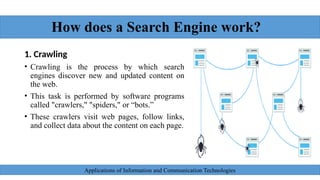
• Crawling is the process by which search
engines discover new and updated content on
the web.
• This task is performed by software programs
called "crawlers," "spiders," or “bots.”
• These crawlers visit web pages, follow links,
and collect data about the content on each page.
Applications of Information and Communication Technologies
How does a Search Engine work?
How It Works:
• Discovery:
Crawlers start by visiting a list of known web pages (often called seeds). From these
pages, they follow hyperlinks to discover other pages.
• Data Collection:
As the crawler visits each web page, it reads and analyzes the content, metadata, and
HTML structure. It also identifies links to other pages, which are added to the list of
pages to be crawled.
• Frequency:
Crawlers continuously revisit pages to detect any changes, ensuring that the search
engine's index remains up-to-date. Highly dynamic or popular sites may be crawled
more frequently.
Applications of Information and Communication Technologies
How does a Search Engine work?
2. Indexing
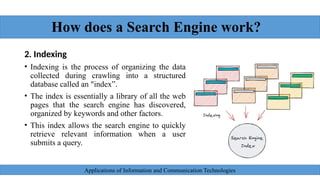
• Indexing is the process of organizing the data
collected during crawling into a structured
database called an "index”.
• The index is essentially a library of all the web
pages that the search engine has discovered,
organized by keywords and other factors.
• This index allows the search engine to quickly
retrieve relevant information when a user
submits a query.
Applications of Information and Communication Technologies
How does a Search Engine work?
How It Works:
• Content Analysis:
The content of each crawled page is parsed and analyzed to identify key elements such as
text, keywords, metadata (like title tags and meta descriptions), and other relevant data
(e.g., images, videos).
• Data Storage:
The analyzed information is stored in the search engine’s index, which is a massive,
distributed database designed for fast retrieval. The index is organized in a way that allows
for efficient searching based on various criteria, such as keywords, phrases, and topics.
• Ranking Signals:
The indexing process also involves assessing the relevance and quality of the content based
on factors like keyword usage, page structure, internal and external links, and the content's
freshness.
Applications of Information and Communication Technologies
How does a Search Engine work?
3. Query Processing
Query processing is the phase where the search engine interprets and processes the
user’s search query to understand what information they are seeking.
How It Works:
• Query Understanding:
The search engine analyzes the query to determine its intent. It considers factors like the
context of the words, the user’s location, previous searches, and language preferences. For
instance, if someone searches for "apple," the engine tries to discern whether they are
looking for information about the fruit or the technology company.
• Search Intent:
Understanding search intent is crucial. Queries can be informational (seeking knowledge),
navigational (looking for a specific website), or transactional (intending to make a
purchase). The search engine tailors its results based on the perceived intent.
Applications of Information and Communication Technologies
How does a Search Engine work?
4. Ranking and Retrieval
Ranking and retrieval involve the search engine determining the order in which
results are presented to the user based on their relevance and quality.
How It Works:
• Algorithmic Evaluation:
The search engine uses complex algorithms that consider hundreds of ranking
factors to determine the order of search results. Key factors include keyword
relevance, page authority (often measured by the quality and number of
backlinks), content quality, user experience (e.g., page load speed, mobile-
friendliness), and engagement metrics (like click-through rates).
Applications of Information and Communication Technologies
How does a Search Engine work?
• Ranking Factors:
• Relevance: How closely the content of the page matches the user’s query.
• Authority: The credibility of the page, often influenced by the number and
quality of external links pointing to it.
• Freshness: How recent or up-to-date the content is, which is crucial for time-
sensitive searches.
• User Experience: How well the page is designed to meet the user's needs,
including mobile compatibility, security (e.g., HTTPS), and page load speed.
• Personalization:
Results may be personalized based on the user’s search history, location, and
preferences, aiming to deliver the most relevant results.
Applications of Information and Communication Technologies
How does a Search Engine work?
5. Results Presentation
The search engine displays the results of the query on a Search Engine Results Page (SERP),
arranged in order of relevance and quality.
How It Works:
• Snippet Generation:
Each result is typically presented with a title, a URL, and a snippet of text that highlights the most
relevant part of the content. This snippet is often extracted from the meta description or the relevant
section of the page content.
• Rich Results:
In addition to standard text links, SERPs may include rich results or "enhanced results" such as images,
videos, news articles, maps, shopping links, and featured snippets (a highlighted answer to a query).
• Ads and Sponsored Results:
Paid advertisements or sponsored results often appear at the top or bottom of the SERP. These are
distinct from organic results and are marked as ads.
Applications of Information and Communication Technologies
Use of Search Engine
Search engines have so many usages and some of them are:
Information Retrieval:
• Search engines provide quick access to general knowledge, news, and
academic research.
• They help users find reliable information on virtually any topic.
Navigation:
• Users can access websites and local services easily by searching for keywords
or specific sites.
• This simplifies finding businesses, restaurants, and other services nearby.
Applications of Information and Communication Technologies
Use of Search Engine
Shopping:
• Search engines allow for easy comparison of products, prices, and reviews.
• They help users find and purchase items from various online retailers.
Problem Solving:
• Users can troubleshoot technical issues and find DIY guides through search
engines.
• They provide solutions and step-by-step instructions for a wide range of
tasks.
Entertainment:
• Search engines are used to find movies, music, events, and other
entertainment options.
• They provide links to streaming services, reviews, and event details.
Applications of Information and Communication Technologies
Use of Search Engine
Communication:
• Users can locate contact information for businesses and individuals.
• Search engines also help find social media profiles and professional networks.
Professional Networking and Career Development:
•Search engines are used to find job listings, company reviews, and salary
information.
•They also provide access to online courses and resources for skill development.
Location and Directions:
•Integrated map services help users find directions, explore routes, and estimate
travel times.
•They provide information on local attractions, transport schedules, and area-
specific news.
Applications of Information and Communication Technologies
Importance of Search Engines
• Information Access:
Search engines provide users with quick and easy access to vast
amounts of information on virtually any topic.
• Navigation:
They help users navigate the web by providing links to relevant
websites and resources.
• Business Visibility:
For businesses and content creators, search engines are crucial for
driving traffic to their websites.
Applications of Information and Communication Technologies
Importance of Search Engines
• Content Discovery:
They facilitate the discovery of new content, including articles, videos, and
blogs, by indexing and ranking web pages based on relevance and quality.
• Enhanced Research Capabilities:
Search engines support academic and professional research by providing
access to scholarly articles, research papers, and specialized databases.
• E-commerce and Shopping:
They play a key role in the online shopping experience by helping users find
products, compare prices, and read reviews.
Applications of Information and Communication Technologies
Importance of Search Engines
• Social Connectivity:
Search engines help users find social media profiles, forums, and
communities, facilitating online social interactions and networking.
They make it easier to connect with others and engage in discussions
relevant to personal or professional interests.
• Educational Resources:
They provide access to a wide range of educational materials, including
online courses, tutorials, and instructional videos. Users can acquire
new skills, knowledge, and qualifications through the educational
resources available via search engines.
Applications of Information and Communication Technologies
Effective use of Search Engines
To efficiently explore the World Wide Web using popular search engines like Google,
Bing, and others, consider employing the following strategies and techniques:
1. Advanced Search Operators
Advanced search operators are special characters or words that enhance the precision
of your search queries.
Examples:
• Quotation Marks (""): Search for an exact phrase. E.g., "artificial intelligence“
• Minus Sign (-): Exclude specific terms from search results. E.g., apple –fruit
• Site Search (site:): Search within a specific website. E.g., site: edu
• File Type (filetype:): Find files of a particular type. E.g., filetype: pdf cybersecurity
Applications of Information and Communication Technologies
Effective use of Search Engines
2. Utilizing Filters and Tools
Search engines offer filters and tools to narrow down search results based
on various criteria.
Examples:
• Date Range: Refine results to a specific time frame. E.g., in Google, use
"Tools" to select a date range.
• Location: Find results relevant to a particular geographic area. E.g.,
Google Local Search for nearby services.
• Category Filters: Narrow results to categories like images, news, videos,
etc. E.g., Google Images for photos or Bing News for current events.
Applications of Information and Communication Technologies
Effective use of Search Engines
4. Query Refinement
Adjusting search queries to be more specific or relevant.
Techniques:
Be Specific: Use detailed and specific keywords. E.g., instead of
restaurant, use best Italian restaurant in New York City.
Ask Questions: Frame queries as questions. E.g., How to fix a leaky
faucet?
Use Synonyms: Try different words or phrases with similar meanings.
E.g., sustainable energy versus renewable energy.
Applications of Information and Communication Technologies
Effective use of Search Engines
5. Leveraging Search Suggestions
Search engines provide suggestions based on popular queries or
previous searches.
Techniques:
• Autocomplete: Use the search bar suggestions to find relevant
searches and refine your query.
• Related Searches: Explore searches related to your original query,
often listed at the bottom of search results pages.
Applications of Information and Communication Technologies
Effective use of Search Engines
6. Evaluating and Selecting Sources
Assessing the credibility and relevance of search results.
Techniques:
• Check Source Reliability: Prefer authoritative and reputable sources
(e.g., academic journals, official websites).
• Look for Reviews and Ratings: Evaluate content or services based on
user reviews and ratings.
• Cross-Reference Information: Verify information across multiple
sources to ensure accuracy.
Applications of Information and Communication Technologies
Effective use of Search Engines
7. Using Search Engine Features
Take advantage of built-in features and tools provided by search
engines.
Examples:
• Google Scholar: For academic papers and research.
• Google Trends: To analyze search trends and popularity over time.
Applications of Information and Communication Technologies
Formal Communication Tools and
Etiquettes
1. Gmail
• Professional Interface: Gmail's clean, user-friendly design enhances
productivity by offering a straightforward layout that simplifies email
management.
• Advanced Organization Tools: Includes labels for categorizing
emails, filters for automating email sorting, and folders for structured
email management.
• Integration: Seamlessly integrates with Google Workspace tools,
including Google Drive for file sharing and Google Calendar for
scheduling.
Applications of Information and Communication Technologies
Formal Communication Tools and
Etiquettes
Etiquettes:
• Clear and Specific Subject Lines:
Use concise and descriptive subject lines to convey the purpose of the email clearly. For example,
"Request for Project Update" is better than a vague subject like "Update."
• Professional Tone:
Maintain a respectful and formal tone throughout the email. Avoid using slang or overly casual
language.
• Proper Formatting:
Structure emails with clear paragraphs and bullet points where applicable. Avoid excessive formatting
such as multiple fonts and colors.
• Timely Responses:
Aim to reply to emails within 24 hours, or as soon as possible, to demonstrate responsiveness and
respect for the sender’s time.
Applications of Information and Communication Technologies
Formal Communication Tools and
Etiquettes
2. Microsoft Outlook
• Integrated Suite:
Combines email with calendar, contacts, and task management, offering a
comprehensive tool for professional communication.
• Organizational Features:
Includes features such as categories, focused inbox, and rules to help manage
and prioritize email effectively.
• Integration:
Works seamlessly with Microsoft Office applications and other productivity
tools within the Microsoft 365 ecosystem.
Applications of Information and Communication Technologies
Formal Communication Tools and
Etiquettes
Etiquettes:
• Formal Greetings:
Begin emails with formal greetings such as “Dear [Name]” or “Hello [Name],” tailored to the level of
formality required.
• Structured Content:
Organize email content into a clear introduction, body, and conclusion. Use bullet points or numbered
lists for clarity when discussing multiple points.
• Proofreading:
Always review emails for spelling, grammar, and clarity before sending. Errors can detract from the
professionalism of the communication.
• Professional Signature:
Include a standardized email signature with your name, title, company, and contact details to maintain
professionalism in all communications.
Applications of Information and Communication Technologies
Formal Communication Tools and
Etiquettes
General Formal Communication Etiquettes
• Clarity and Precision:
Use straightforward language and avoid ambiguity to ensure the message is
understood as intended. Be specific about requests and deadlines.
• Attachment Management:
Ensure attachments are relevant and appropriately named. Mention the
attachments in the email body to inform recipients about their content and
purpose.
• Respectful Language:
Always use polite and respectful language. Address the recipient appropriately
based on their role and your relationship with them.
Applications of Information and Communication Technologies
Formal Communication Tools and
Etiquettes
• Email Timing:
Send emails during business hours unless urgent. Avoid sending emails
late at night or on weekends unless it’s critical.
• Follow-Up:
If you don’t receive a response within a reasonable time frame, follow
up politely to ensure your initial email was received and addressed.
• Confidentiality:
Be cautious with sensitive information. Ensure that confidential details
are only shared with appropriate individuals and that emails are secured.
Applications of Information and Communication Technologies
What is Search Engine -  Lecture#3 AICT.pptx

What is Search Engine - Lecture#3 AICT.pptx

  • 2.
    Lecture#3 Applications of Informationand Communication Technologies
  • 3.
    Search Engine What isa search engine? • A search engine is an advanced software system designed to facilitate the discovery and retrieval of information across the World Wide Web. • It serves as a gateway to the vast amounts of data available online, helping users quickly locate relevant information by processing their search queries and delivering a curated list of results. • A search engine is a coordinated set of programs that searches for and identifies items in a database that match specified criteria. • They use algorithms to index and rank web pages based on relevance to a user’s query, providing a list of results for users to explore. Applications of Information and Communication Technologies
  • 4.
    How does aSearch Engine work? 1. Crawling • Crawling is the process by which search engines discover new and updated content on the web. • This task is performed by software programs called "crawlers," "spiders," or “bots.” • These crawlers visit web pages, follow links, and collect data about the content on each page. Applications of Information and Communication Technologies
  • 5.
    How does aSearch Engine work? How It Works: • Discovery: Crawlers start by visiting a list of known web pages (often called seeds). From these pages, they follow hyperlinks to discover other pages. • Data Collection: As the crawler visits each web page, it reads and analyzes the content, metadata, and HTML structure. It also identifies links to other pages, which are added to the list of pages to be crawled. • Frequency: Crawlers continuously revisit pages to detect any changes, ensuring that the search engine's index remains up-to-date. Highly dynamic or popular sites may be crawled more frequently. Applications of Information and Communication Technologies
  • 6.
    How does aSearch Engine work? 2. Indexing • Indexing is the process of organizing the data collected during crawling into a structured database called an "index”. • The index is essentially a library of all the web pages that the search engine has discovered, organized by keywords and other factors. • This index allows the search engine to quickly retrieve relevant information when a user submits a query. Applications of Information and Communication Technologies
  • 7.
    How does aSearch Engine work? How It Works: • Content Analysis: The content of each crawled page is parsed and analyzed to identify key elements such as text, keywords, metadata (like title tags and meta descriptions), and other relevant data (e.g., images, videos). • Data Storage: The analyzed information is stored in the search engine’s index, which is a massive, distributed database designed for fast retrieval. The index is organized in a way that allows for efficient searching based on various criteria, such as keywords, phrases, and topics. • Ranking Signals: The indexing process also involves assessing the relevance and quality of the content based on factors like keyword usage, page structure, internal and external links, and the content's freshness. Applications of Information and Communication Technologies
  • 8.
    How does aSearch Engine work? 3. Query Processing Query processing is the phase where the search engine interprets and processes the user’s search query to understand what information they are seeking. How It Works: • Query Understanding: The search engine analyzes the query to determine its intent. It considers factors like the context of the words, the user’s location, previous searches, and language preferences. For instance, if someone searches for "apple," the engine tries to discern whether they are looking for information about the fruit or the technology company. • Search Intent: Understanding search intent is crucial. Queries can be informational (seeking knowledge), navigational (looking for a specific website), or transactional (intending to make a purchase). The search engine tailors its results based on the perceived intent. Applications of Information and Communication Technologies
  • 9.
    How does aSearch Engine work? 4. Ranking and Retrieval Ranking and retrieval involve the search engine determining the order in which results are presented to the user based on their relevance and quality. How It Works: • Algorithmic Evaluation: The search engine uses complex algorithms that consider hundreds of ranking factors to determine the order of search results. Key factors include keyword relevance, page authority (often measured by the quality and number of backlinks), content quality, user experience (e.g., page load speed, mobile- friendliness), and engagement metrics (like click-through rates). Applications of Information and Communication Technologies
  • 10.
    How does aSearch Engine work? • Ranking Factors: • Relevance: How closely the content of the page matches the user’s query. • Authority: The credibility of the page, often influenced by the number and quality of external links pointing to it. • Freshness: How recent or up-to-date the content is, which is crucial for time- sensitive searches. • User Experience: How well the page is designed to meet the user's needs, including mobile compatibility, security (e.g., HTTPS), and page load speed. • Personalization: Results may be personalized based on the user’s search history, location, and preferences, aiming to deliver the most relevant results. Applications of Information and Communication Technologies
  • 11.
    How does aSearch Engine work? 5. Results Presentation The search engine displays the results of the query on a Search Engine Results Page (SERP), arranged in order of relevance and quality. How It Works: • Snippet Generation: Each result is typically presented with a title, a URL, and a snippet of text that highlights the most relevant part of the content. This snippet is often extracted from the meta description or the relevant section of the page content. • Rich Results: In addition to standard text links, SERPs may include rich results or "enhanced results" such as images, videos, news articles, maps, shopping links, and featured snippets (a highlighted answer to a query). • Ads and Sponsored Results: Paid advertisements or sponsored results often appear at the top or bottom of the SERP. These are distinct from organic results and are marked as ads. Applications of Information and Communication Technologies
  • 12.
    Use of SearchEngine Search engines have so many usages and some of them are: Information Retrieval: • Search engines provide quick access to general knowledge, news, and academic research. • They help users find reliable information on virtually any topic. Navigation: • Users can access websites and local services easily by searching for keywords or specific sites. • This simplifies finding businesses, restaurants, and other services nearby. Applications of Information and Communication Technologies
  • 13.
    Use of SearchEngine Shopping: • Search engines allow for easy comparison of products, prices, and reviews. • They help users find and purchase items from various online retailers. Problem Solving: • Users can troubleshoot technical issues and find DIY guides through search engines. • They provide solutions and step-by-step instructions for a wide range of tasks. Entertainment: • Search engines are used to find movies, music, events, and other entertainment options. • They provide links to streaming services, reviews, and event details. Applications of Information and Communication Technologies
  • 14.
    Use of SearchEngine Communication: • Users can locate contact information for businesses and individuals. • Search engines also help find social media profiles and professional networks. Professional Networking and Career Development: •Search engines are used to find job listings, company reviews, and salary information. •They also provide access to online courses and resources for skill development. Location and Directions: •Integrated map services help users find directions, explore routes, and estimate travel times. •They provide information on local attractions, transport schedules, and area- specific news. Applications of Information and Communication Technologies
  • 15.
    Importance of SearchEngines • Information Access: Search engines provide users with quick and easy access to vast amounts of information on virtually any topic. • Navigation: They help users navigate the web by providing links to relevant websites and resources. • Business Visibility: For businesses and content creators, search engines are crucial for driving traffic to their websites. Applications of Information and Communication Technologies
  • 16.
    Importance of SearchEngines • Content Discovery: They facilitate the discovery of new content, including articles, videos, and blogs, by indexing and ranking web pages based on relevance and quality. • Enhanced Research Capabilities: Search engines support academic and professional research by providing access to scholarly articles, research papers, and specialized databases. • E-commerce and Shopping: They play a key role in the online shopping experience by helping users find products, compare prices, and read reviews. Applications of Information and Communication Technologies
  • 17.
    Importance of SearchEngines • Social Connectivity: Search engines help users find social media profiles, forums, and communities, facilitating online social interactions and networking. They make it easier to connect with others and engage in discussions relevant to personal or professional interests. • Educational Resources: They provide access to a wide range of educational materials, including online courses, tutorials, and instructional videos. Users can acquire new skills, knowledge, and qualifications through the educational resources available via search engines. Applications of Information and Communication Technologies
  • 18.
    Effective use ofSearch Engines To efficiently explore the World Wide Web using popular search engines like Google, Bing, and others, consider employing the following strategies and techniques: 1. Advanced Search Operators Advanced search operators are special characters or words that enhance the precision of your search queries. Examples: • Quotation Marks (""): Search for an exact phrase. E.g., "artificial intelligence“ • Minus Sign (-): Exclude specific terms from search results. E.g., apple –fruit • Site Search (site:): Search within a specific website. E.g., site: edu • File Type (filetype:): Find files of a particular type. E.g., filetype: pdf cybersecurity Applications of Information and Communication Technologies
  • 19.
    Effective use ofSearch Engines 2. Utilizing Filters and Tools Search engines offer filters and tools to narrow down search results based on various criteria. Examples: • Date Range: Refine results to a specific time frame. E.g., in Google, use "Tools" to select a date range. • Location: Find results relevant to a particular geographic area. E.g., Google Local Search for nearby services. • Category Filters: Narrow results to categories like images, news, videos, etc. E.g., Google Images for photos or Bing News for current events. Applications of Information and Communication Technologies
  • 20.
    Effective use ofSearch Engines 4. Query Refinement Adjusting search queries to be more specific or relevant. Techniques: Be Specific: Use detailed and specific keywords. E.g., instead of restaurant, use best Italian restaurant in New York City. Ask Questions: Frame queries as questions. E.g., How to fix a leaky faucet? Use Synonyms: Try different words or phrases with similar meanings. E.g., sustainable energy versus renewable energy. Applications of Information and Communication Technologies
  • 21.
    Effective use ofSearch Engines 5. Leveraging Search Suggestions Search engines provide suggestions based on popular queries or previous searches. Techniques: • Autocomplete: Use the search bar suggestions to find relevant searches and refine your query. • Related Searches: Explore searches related to your original query, often listed at the bottom of search results pages. Applications of Information and Communication Technologies
  • 22.
    Effective use ofSearch Engines 6. Evaluating and Selecting Sources Assessing the credibility and relevance of search results. Techniques: • Check Source Reliability: Prefer authoritative and reputable sources (e.g., academic journals, official websites). • Look for Reviews and Ratings: Evaluate content or services based on user reviews and ratings. • Cross-Reference Information: Verify information across multiple sources to ensure accuracy. Applications of Information and Communication Technologies
  • 23.
    Effective use ofSearch Engines 7. Using Search Engine Features Take advantage of built-in features and tools provided by search engines. Examples: • Google Scholar: For academic papers and research. • Google Trends: To analyze search trends and popularity over time. Applications of Information and Communication Technologies
  • 24.
    Formal Communication Toolsand Etiquettes 1. Gmail • Professional Interface: Gmail's clean, user-friendly design enhances productivity by offering a straightforward layout that simplifies email management. • Advanced Organization Tools: Includes labels for categorizing emails, filters for automating email sorting, and folders for structured email management. • Integration: Seamlessly integrates with Google Workspace tools, including Google Drive for file sharing and Google Calendar for scheduling. Applications of Information and Communication Technologies
  • 25.
    Formal Communication Toolsand Etiquettes Etiquettes: • Clear and Specific Subject Lines: Use concise and descriptive subject lines to convey the purpose of the email clearly. For example, "Request for Project Update" is better than a vague subject like "Update." • Professional Tone: Maintain a respectful and formal tone throughout the email. Avoid using slang or overly casual language. • Proper Formatting: Structure emails with clear paragraphs and bullet points where applicable. Avoid excessive formatting such as multiple fonts and colors. • Timely Responses: Aim to reply to emails within 24 hours, or as soon as possible, to demonstrate responsiveness and respect for the sender’s time. Applications of Information and Communication Technologies
  • 26.
    Formal Communication Toolsand Etiquettes 2. Microsoft Outlook • Integrated Suite: Combines email with calendar, contacts, and task management, offering a comprehensive tool for professional communication. • Organizational Features: Includes features such as categories, focused inbox, and rules to help manage and prioritize email effectively. • Integration: Works seamlessly with Microsoft Office applications and other productivity tools within the Microsoft 365 ecosystem. Applications of Information and Communication Technologies
  • 27.
    Formal Communication Toolsand Etiquettes Etiquettes: • Formal Greetings: Begin emails with formal greetings such as “Dear [Name]” or “Hello [Name],” tailored to the level of formality required. • Structured Content: Organize email content into a clear introduction, body, and conclusion. Use bullet points or numbered lists for clarity when discussing multiple points. • Proofreading: Always review emails for spelling, grammar, and clarity before sending. Errors can detract from the professionalism of the communication. • Professional Signature: Include a standardized email signature with your name, title, company, and contact details to maintain professionalism in all communications. Applications of Information and Communication Technologies
  • 28.
    Formal Communication Toolsand Etiquettes General Formal Communication Etiquettes • Clarity and Precision: Use straightforward language and avoid ambiguity to ensure the message is understood as intended. Be specific about requests and deadlines. • Attachment Management: Ensure attachments are relevant and appropriately named. Mention the attachments in the email body to inform recipients about their content and purpose. • Respectful Language: Always use polite and respectful language. Address the recipient appropriately based on their role and your relationship with them. Applications of Information and Communication Technologies
  • 29.
    Formal Communication Toolsand Etiquettes • Email Timing: Send emails during business hours unless urgent. Avoid sending emails late at night or on weekends unless it’s critical. • Follow-Up: If you don’t receive a response within a reasonable time frame, follow up politely to ensure your initial email was received and addressed. • Confidentiality: Be cautious with sensitive information. Ensure that confidential details are only shared with appropriate individuals and that emails are secured. Applications of Information and Communication Technologies