What is Protocol?
When a computer communicates with each other, there is a common set of rules
and conditions that each computer has to follow. In otherwords, protocols
determine how data are transmitted between computing devices and over
networks.
Protocol Testing
Protocol Testing is a method of checking communication protocols in the
domains of Switching, Wireless, VoIP, Routing, etc. The primary goal of protocol
testing is to check the structure of packets which are sent over a network using
protocol testing tools. Routers and switches are used during the test to form
parts of devices and products under testing.
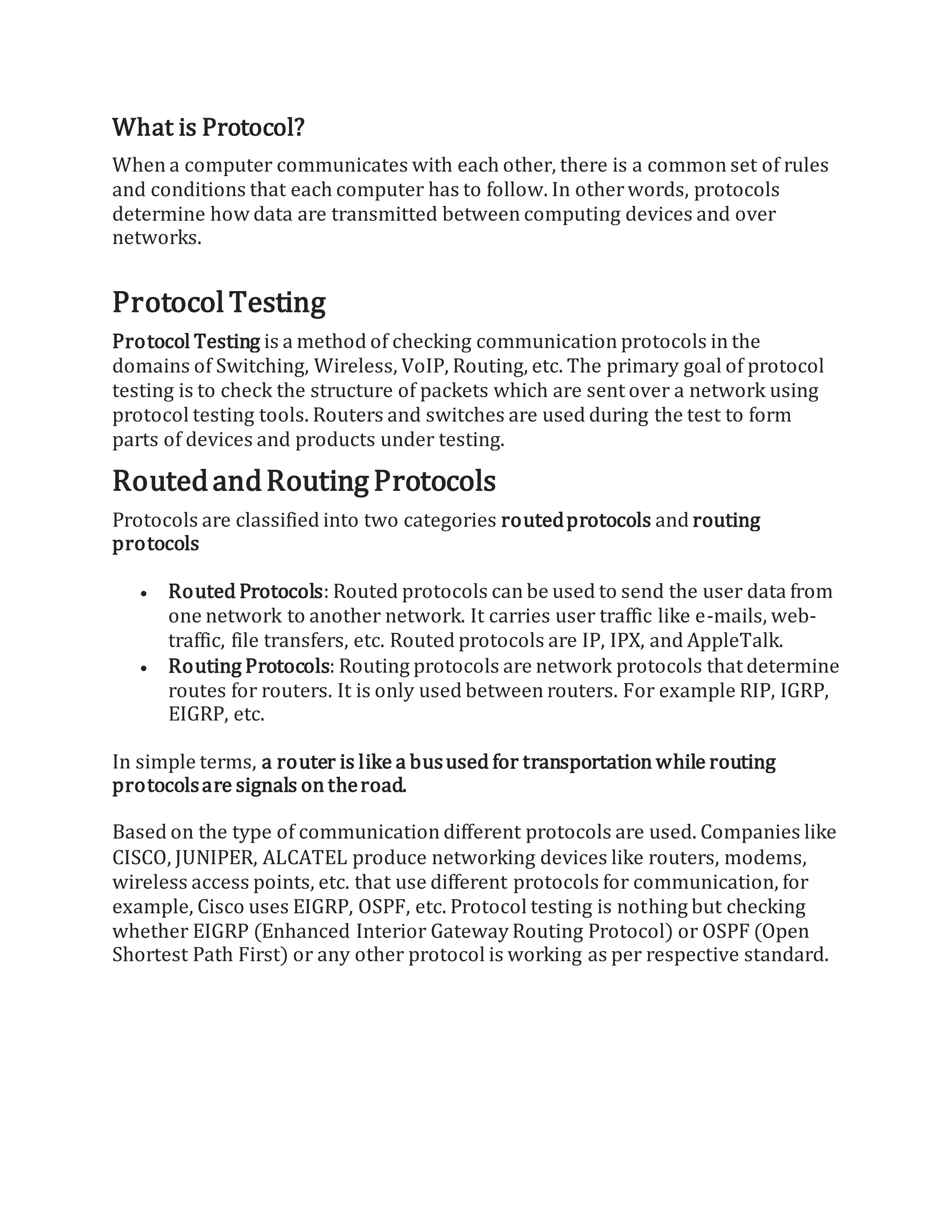
RoutedandRouting Protocols
Protocols are classified into two categories routedprotocols and routing
protocols
 Routed Protocols: Routed protocols can be used to send the user data from
one network to another network. It carries user traffic like e-mails, web-
traffic, file transfers, etc. Routed protocols are IP, IPX, and AppleTalk.
 Routing Protocols: Routing protocols are network protocols that determine
routes for routers. It is only used between routers. For example RIP, IGRP,
EIGRP, etc.
In simple terms, a router is like a busused for transportation while routing
protocolsare signals on theroad.
Based on the type of communication different protocols are used. Companies like
CISCO, JUNIPER, ALCATEL produce networking devices like routers, modems,
wireless access points, etc. that use different protocols for communication, for
example, Cisco uses EIGRP, OSPF, etc. Protocol testing is nothing but checking
whether EIGRP (Enhanced Interior Gateway Routing Protocol) or OSPF (Open
Shortest Path First) or any other protocol is working as per respective standard.
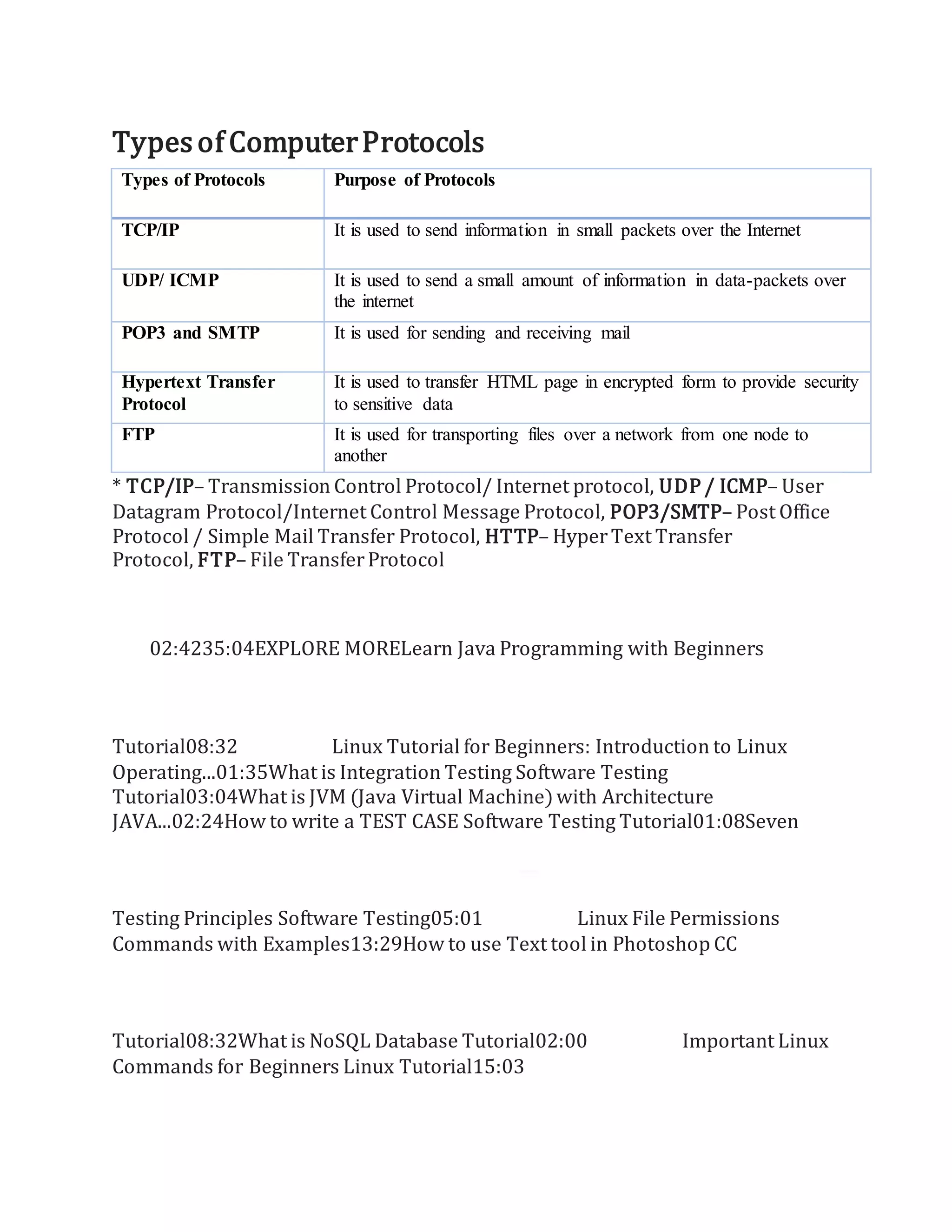
Typesof ComputerProtocols
Types of Protocols Purpose of Protocols
TCP/IP It is used to send information in small packets over the Internet
UDP/ ICMP It is used to send a small amount of information in data-packets over
the internet
POP3 and SMTP It is used for sending and receiving mail
Hypertext Transfer
Protocol
It is used to transfer HTML page in encrypted form to provide security
to sensitive data
FTP It is used for transporting files over a network from one node to
another
* TCP/IP– Transmission Control Protocol/ Internet protocol, UDP / ICMP– User
Datagram Protocol/Internet Control Message Protocol, POP3/SMTP– Post Office
Protocol / Simple Mail Transfer Protocol, HTTP– HyperText Transfer
Protocol, FTP– File TransferProtocol
02:4235:04EXPLORE MORELearn Java Programming with Beginners
Tutorial08:32 Linux Tutorial for Beginners: Introduction to Linux
Operating...01:35What is Integration Testing Software Testing
Tutorial03:04What is JVM (Java Virtual Machine)with Architecture
JAVA...02:24How to write a TEST CASE Software Testing Tutorial01:08Seven
Testing Principles Software Testing05:01 Linux File Permissions
Commands with Examples13:29How to use Text tool in Photoshop CC
Tutorial08:32What is NoSQL Database Tutorial02:00 Important Linux
Commands for Beginners Linux Tutorial15:03
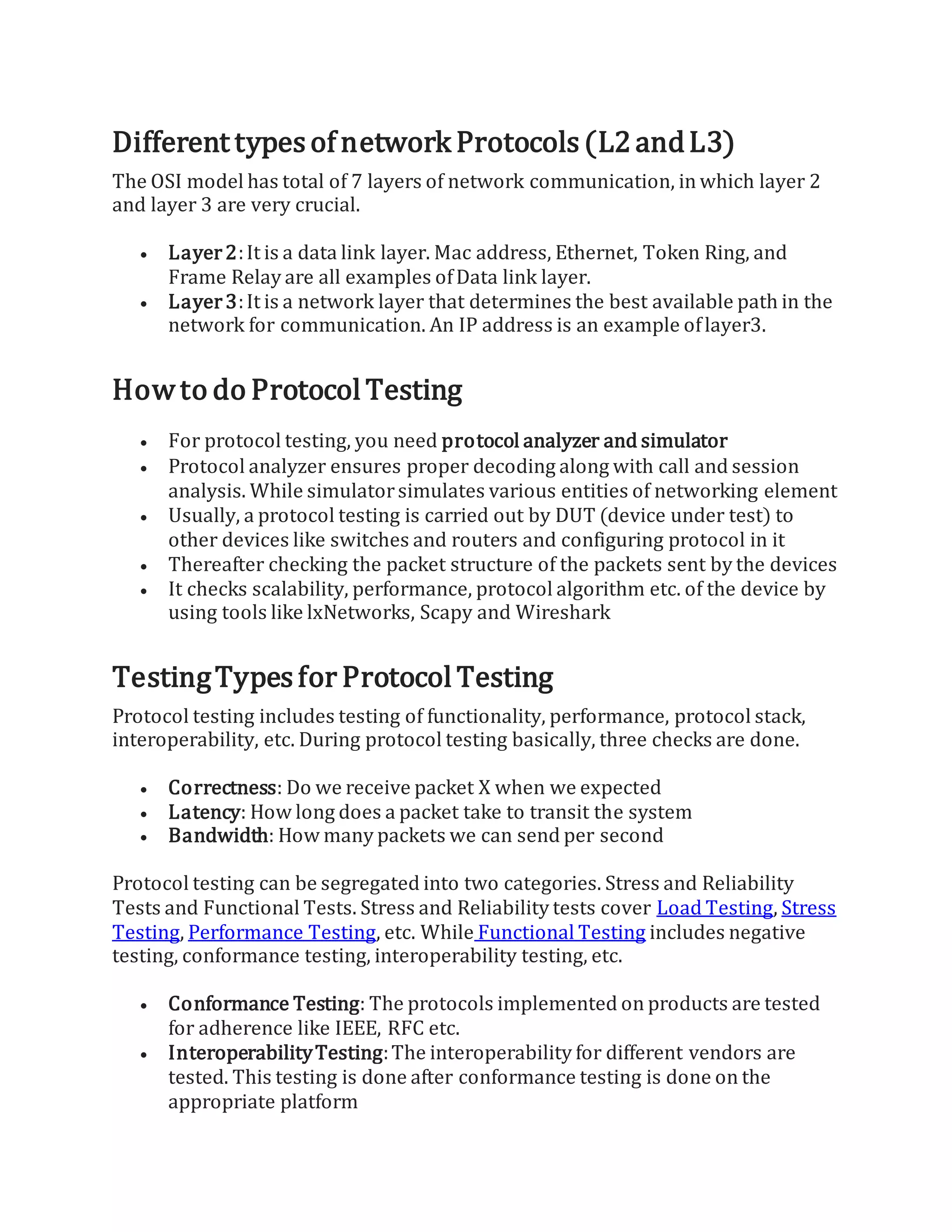
Different typesof network Protocols(L2andL3)
The OSI model has total of 7 layers of network communication, in which layer 2
and layer 3 are very crucial.
 Layer2:It is a data link layer. Mac address, Ethernet, Token Ring, and
Frame Relay are all examples ofData link layer.
 Layer3:It is a network layer that determines the best available path in the
network for communication. An IP address is an example oflayer3.
Howto do Protocol Testing
 For protocol testing, you need protocol analyzer and simulator
 Protocol analyzer ensures proper decoding along with call and session
analysis. While simulatorsimulates various entities of networking element
 Usually, a protocol testing is carried out by DUT (device under test) to
other devices like switches and routers and configuring protocol in it
 Thereafter checking the packet structure of the packets sent by the devices
 It checks scalability, performance, protocol algorithm etc. of the device by
using tools like lxNetworks, Scapy and Wireshark
TestingTypesfor Protocol Testing
Protocol testing includes testing of functionality, performance, protocol stack,
interoperability, etc. During protocol testing basically, three checks are done.
 Correctness: Do we receive packet X when we expected
 Latency: How long does a packet take to transit the system
 Bandwidth: How many packets we can send per second
Protocol testing can be segregated into two categories. Stress and Reliability
Tests and Functional Tests. Stress and Reliability tests cover Load Testing, Stress
Testing, Performance Testing, etc. While Functional Testing includes negative
testing, conformance testing, interoperability testing, etc.
 Conformance Testing: The protocols implemented on products are tested
for adherence like IEEE, RFC etc.
 InteroperabilityTesting:The interoperability for different vendors are
tested. This testing is done after conformance testing is done on the
appropriate platform
 NetworkfeatureTesting:The features ofnetworking products are tested
for functionality with reference to the design document. Forexample,
features can be port-security on a switch, ACL on a router etc.
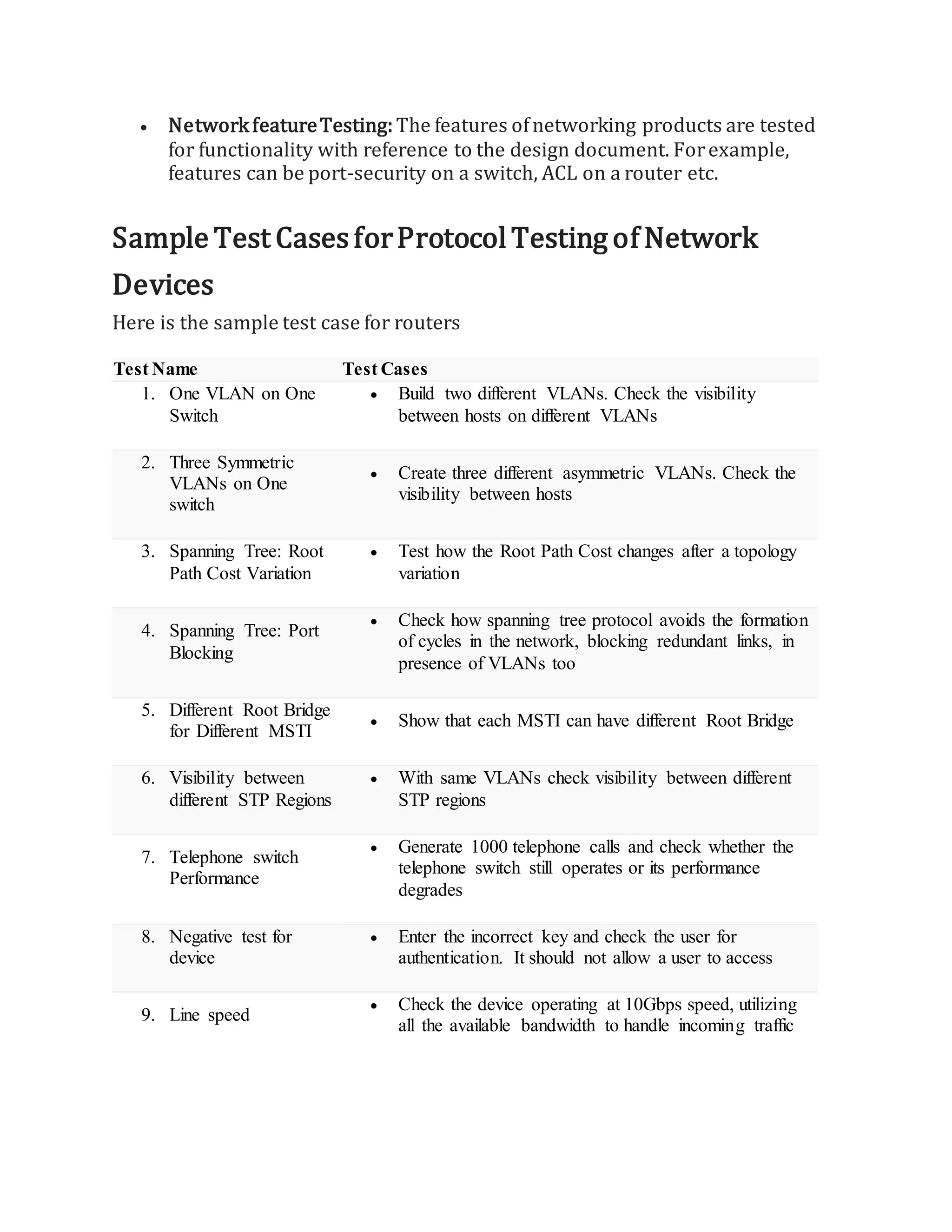
Sample Test CasesforProtocol Testing of Network
Devices
Here is the sample test case for routers
Test Name Test Cases
1. One VLAN on One
Switch
 Build two different VLANs. Check the visibility
between hosts on different VLANs
2. Three Symmetric
VLANs on One
switch
 Create three different asymmetric VLANs. Check the
visibility between hosts
3. Spanning Tree: Root
Path Cost Variation
 Test how the Root Path Cost changes after a topology
variation
4. Spanning Tree: Port
Blocking
 Check how spanning tree protocol avoids the formation
of cycles in the network, blocking redundant links, in
presence of VLANs too
5. Different Root Bridge
for Different MSTI
 Show that each MSTI can have different Root Bridge
6. Visibility between
different STP Regions
 With same VLANs check visibility between different
STP regions
7. Telephone switch
Performance
 Generate 1000 telephone calls and check whether the
telephone switch still operates or its performance
degrades
8. Negative test for
device
 Enter the incorrect key and check the user for
authentication. It should not allow a user to access
9. Line speed
 Check the device operating at 10Gbps speed, utilizing
all the available bandwidth to handle incoming traffic
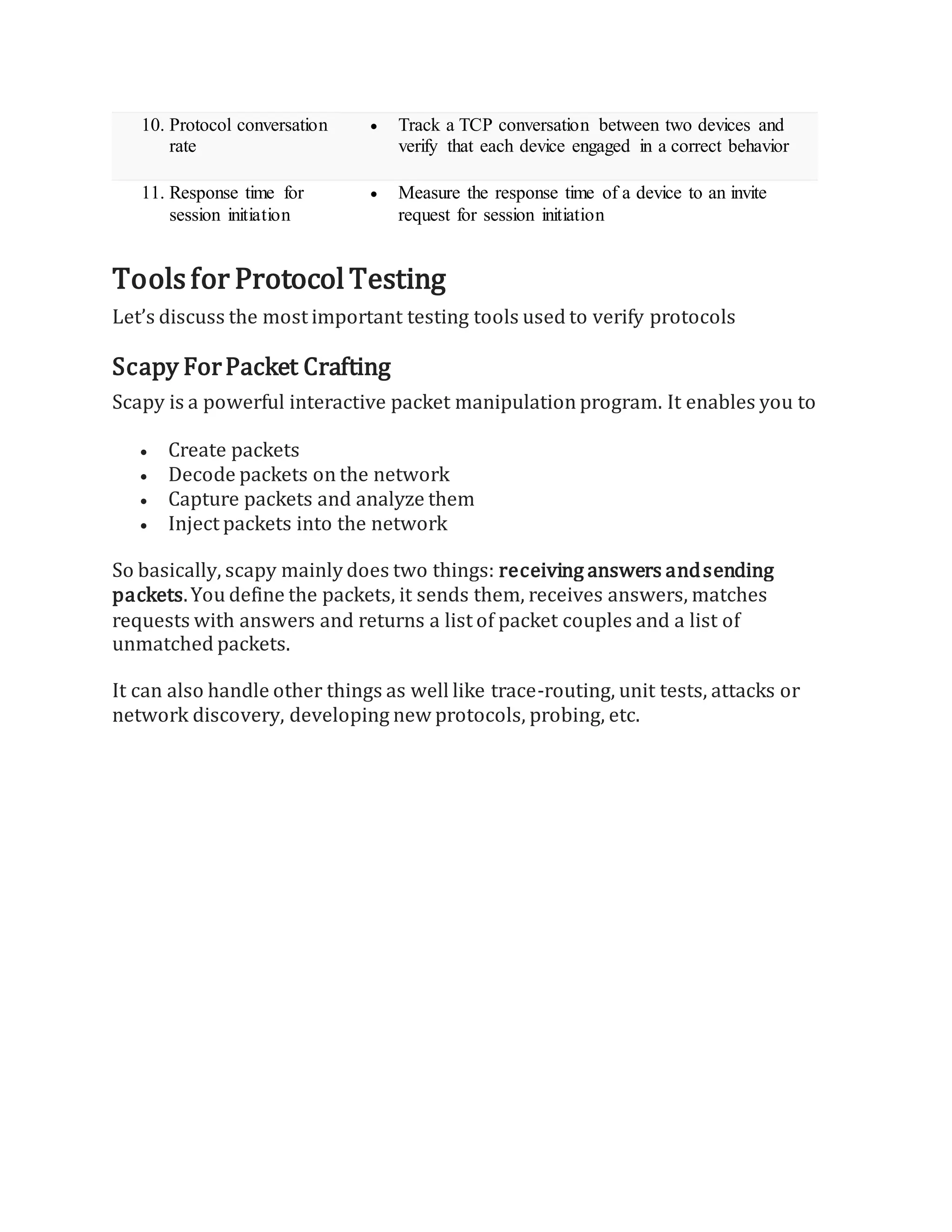
10. Protocol conversation
rate
 Track a TCP conversation between two devices and
verify that each device engaged in a correct behavior
11. Response time for
session initiation
 Measure the response time of a device to an invite
request for session initiation
Toolsfor Protocol Testing
Let’s discuss the most important testing tools used to verify protocols
Scapy ForPacket Crafting
Scapy is a powerful interactive packet manipulation program. It enables you to
 Create packets
 Decode packets on the network
 Capture packets and analyze them
 Inject packets into the network
So basically, scapy mainly does two things: receiving answers andsending
packets.You define the packets, it sends them, receives answers, matches
requests with answers and returns a list of packet couples and a list of
unmatched packets.
It can also handle other things as well like trace-routing, unit tests, attacks or
network discovery, developing new protocols, probing, etc.

What is Protocol.docx

  • 1.
    What is Protocol? Whena computer communicates with each other, there is a common set of rules and conditions that each computer has to follow. In otherwords, protocols determine how data are transmitted between computing devices and over networks. Protocol Testing Protocol Testing is a method of checking communication protocols in the domains of Switching, Wireless, VoIP, Routing, etc. The primary goal of protocol testing is to check the structure of packets which are sent over a network using protocol testing tools. Routers and switches are used during the test to form parts of devices and products under testing. RoutedandRouting Protocols Protocols are classified into two categories routedprotocols and routing protocols  Routed Protocols: Routed protocols can be used to send the user data from one network to another network. It carries user traffic like e-mails, web- traffic, file transfers, etc. Routed protocols are IP, IPX, and AppleTalk.  Routing Protocols: Routing protocols are network protocols that determine routes for routers. It is only used between routers. For example RIP, IGRP, EIGRP, etc. In simple terms, a router is like a busused for transportation while routing protocolsare signals on theroad. Based on the type of communication different protocols are used. Companies like CISCO, JUNIPER, ALCATEL produce networking devices like routers, modems, wireless access points, etc. that use different protocols for communication, for example, Cisco uses EIGRP, OSPF, etc. Protocol testing is nothing but checking whether EIGRP (Enhanced Interior Gateway Routing Protocol) or OSPF (Open Shortest Path First) or any other protocol is working as per respective standard.
  • 2.
    Typesof ComputerProtocols Types ofProtocols Purpose of Protocols TCP/IP It is used to send information in small packets over the Internet UDP/ ICMP It is used to send a small amount of information in data-packets over the internet POP3 and SMTP It is used for sending and receiving mail Hypertext Transfer Protocol It is used to transfer HTML page in encrypted form to provide security to sensitive data FTP It is used for transporting files over a network from one node to another * TCP/IP– Transmission Control Protocol/ Internet protocol, UDP / ICMP– User Datagram Protocol/Internet Control Message Protocol, POP3/SMTP– Post Office Protocol / Simple Mail Transfer Protocol, HTTP– HyperText Transfer Protocol, FTP– File TransferProtocol 02:4235:04EXPLORE MORELearn Java Programming with Beginners Tutorial08:32 Linux Tutorial for Beginners: Introduction to Linux Operating...01:35What is Integration Testing Software Testing Tutorial03:04What is JVM (Java Virtual Machine)with Architecture JAVA...02:24How to write a TEST CASE Software Testing Tutorial01:08Seven Testing Principles Software Testing05:01 Linux File Permissions Commands with Examples13:29How to use Text tool in Photoshop CC Tutorial08:32What is NoSQL Database Tutorial02:00 Important Linux Commands for Beginners Linux Tutorial15:03
  • 3.
    Different typesof networkProtocols(L2andL3) The OSI model has total of 7 layers of network communication, in which layer 2 and layer 3 are very crucial.  Layer2:It is a data link layer. Mac address, Ethernet, Token Ring, and Frame Relay are all examples ofData link layer.  Layer3:It is a network layer that determines the best available path in the network for communication. An IP address is an example oflayer3. Howto do Protocol Testing  For protocol testing, you need protocol analyzer and simulator  Protocol analyzer ensures proper decoding along with call and session analysis. While simulatorsimulates various entities of networking element  Usually, a protocol testing is carried out by DUT (device under test) to other devices like switches and routers and configuring protocol in it  Thereafter checking the packet structure of the packets sent by the devices  It checks scalability, performance, protocol algorithm etc. of the device by using tools like lxNetworks, Scapy and Wireshark TestingTypesfor Protocol Testing Protocol testing includes testing of functionality, performance, protocol stack, interoperability, etc. During protocol testing basically, three checks are done.  Correctness: Do we receive packet X when we expected  Latency: How long does a packet take to transit the system  Bandwidth: How many packets we can send per second Protocol testing can be segregated into two categories. Stress and Reliability Tests and Functional Tests. Stress and Reliability tests cover Load Testing, Stress Testing, Performance Testing, etc. While Functional Testing includes negative testing, conformance testing, interoperability testing, etc.  Conformance Testing: The protocols implemented on products are tested for adherence like IEEE, RFC etc.  InteroperabilityTesting:The interoperability for different vendors are tested. This testing is done after conformance testing is done on the appropriate platform
  • 4.
     NetworkfeatureTesting:The featuresofnetworking products are tested for functionality with reference to the design document. Forexample, features can be port-security on a switch, ACL on a router etc. Sample Test CasesforProtocol Testing of Network Devices Here is the sample test case for routers Test Name Test Cases 1. One VLAN on One Switch  Build two different VLANs. Check the visibility between hosts on different VLANs 2. Three Symmetric VLANs on One switch  Create three different asymmetric VLANs. Check the visibility between hosts 3. Spanning Tree: Root Path Cost Variation  Test how the Root Path Cost changes after a topology variation 4. Spanning Tree: Port Blocking  Check how spanning tree protocol avoids the formation of cycles in the network, blocking redundant links, in presence of VLANs too 5. Different Root Bridge for Different MSTI  Show that each MSTI can have different Root Bridge 6. Visibility between different STP Regions  With same VLANs check visibility between different STP regions 7. Telephone switch Performance  Generate 1000 telephone calls and check whether the telephone switch still operates or its performance degrades 8. Negative test for device  Enter the incorrect key and check the user for authentication. It should not allow a user to access 9. Line speed  Check the device operating at 10Gbps speed, utilizing all the available bandwidth to handle incoming traffic
  • 5.
    10. Protocol conversation rate Track a TCP conversation between two devices and verify that each device engaged in a correct behavior 11. Response time for session initiation  Measure the response time of a device to an invite request for session initiation Toolsfor Protocol Testing Let’s discuss the most important testing tools used to verify protocols Scapy ForPacket Crafting Scapy is a powerful interactive packet manipulation program. It enables you to  Create packets  Decode packets on the network  Capture packets and analyze them  Inject packets into the network So basically, scapy mainly does two things: receiving answers andsending packets.You define the packets, it sends them, receives answers, matches requests with answers and returns a list of packet couples and a list of unmatched packets. It can also handle other things as well like trace-routing, unit tests, attacks or network discovery, developing new protocols, probing, etc.