My ShelvesMy ListsMy NetworksBPL Catalogue Staff Training 3BPL Apr. 25 2011
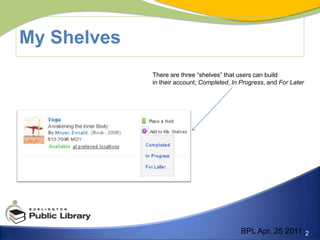
My ShelvesThere are three “shelves” that users can build in their account; Completed, In Progress, and For LaterBPL Apr. 25 2011
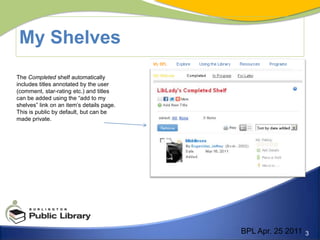
My Shelves	The Completed shelf automatically includes titles annotated by the user (comment, star-rating etc.) and titles can be added using the “add to my shelves” link on an item’s details page. This is public by default, but can be made private.BPL Apr. 25 2011
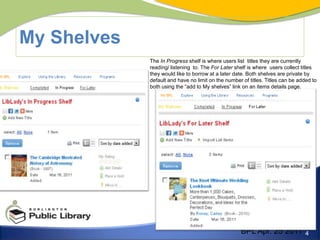
My ShelvesThe In Progress shelf is where users list  titles they are currently reading/ listening  to. The For Later shelf is where  users collect titles they would like to borrow at a later date. Both shelves are private by default and have no limit on the number of titles. Titles can be added to both using the “add to My shelves” link on an items details page. BPL Apr. 25 2011
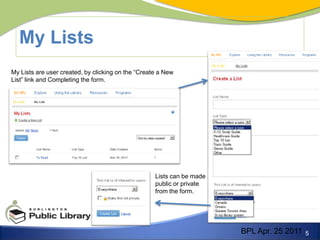
My ListsMy Lists are user created, by clicking on the “Create a New List” link and Completing the form.Lists can be made public or private from the form.BPL Apr. 25 2011
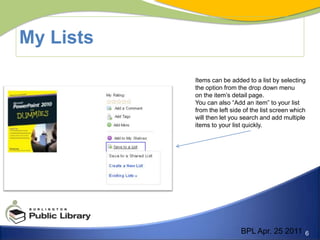
My ListsItems can be added to a list by selectingthe option from the drop down menu on the item’s detail page.You can also “Add an item” to your list from the left side of the list screen which will then let you search and add multiple items to your list quickly.BPL Apr. 25 2011
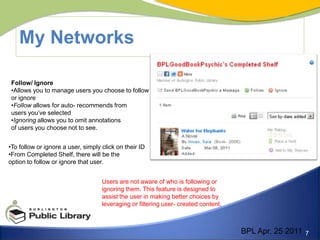
My NetworksFollow/ IgnoreAllows you to manage users you choose to follow or ignore
Follow allows for auto- recommends from users you’ve selectedIgnoring allows you to omit annotations of users you choose not to see.To follow or ignore a user, simply click on their ID

Week 3

  • 1.
    My ShelvesMy ListsMyNetworksBPL Catalogue Staff Training 3BPL Apr. 25 2011
  • 2.
    My ShelvesThere arethree “shelves” that users can build in their account; Completed, In Progress, and For LaterBPL Apr. 25 2011
  • 3.
    My Shelves The Completedshelf automatically includes titles annotated by the user (comment, star-rating etc.) and titles can be added using the “add to my shelves” link on an item’s details page. This is public by default, but can be made private.BPL Apr. 25 2011
  • 4.
    My ShelvesThe InProgress shelf is where users list titles they are currently reading/ listening to. The For Later shelf is where users collect titles they would like to borrow at a later date. Both shelves are private by default and have no limit on the number of titles. Titles can be added to both using the “add to My shelves” link on an items details page. BPL Apr. 25 2011
  • 5.
    My ListsMy Listsare user created, by clicking on the “Create a New List” link and Completing the form.Lists can be made public or private from the form.BPL Apr. 25 2011
  • 6.
    My ListsItems canbe added to a list by selectingthe option from the drop down menu on the item’s detail page.You can also “Add an item” to your list from the left side of the list screen which will then let you search and add multiple items to your list quickly.BPL Apr. 25 2011
  • 7.
    My NetworksFollow/ IgnoreAllowsyou to manage users you choose to follow or ignore
  • 8.
    Follow allows forauto- recommends from users you’ve selectedIgnoring allows you to omit annotations of users you choose not to see.To follow or ignore a user, simply click on their ID