Logging OnRegisteringAccount SettingsBPL Catalogue Staff Training 1BPL Apr. 12 2011
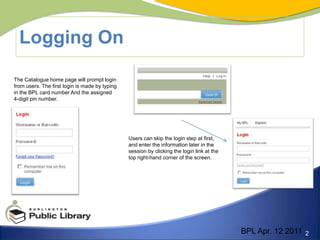
Logging OnThe Catalogue home page will prompt login from users. The first login is made by typing in the BPL card number And the assigned 4-digit pin number. Users can skip the login step at first, and enter the information later in thesession by clicking the login link at the top right-hand corner of the screen. BPL Apr. 12 2011
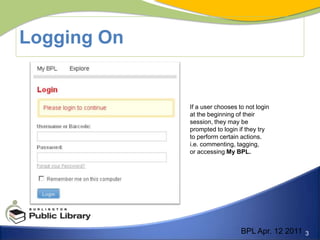
Logging OnIf a user chooses to not login at the beginning of their session, they may be prompted to login if they try to perform certain actions.i.e. commenting, tagging, or accessing My BPL. BPL Apr. 12 2011
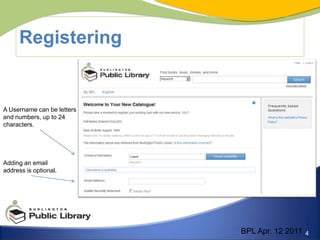
Registering A Username can be lettersand numbers, up to 24 characters.Adding an email address is optional. BPL Apr. 12 2011
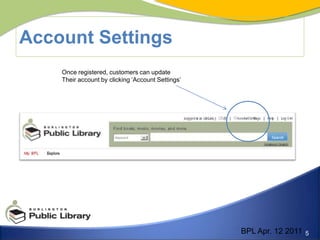
Account SettingsOnce registered, customers can updateTheir account by clicking ‘Account Settings’BPL Apr. 12 2011
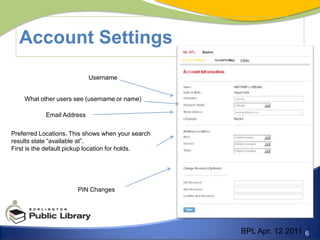
Account SettingsUsernameWhat other users see (username or name)Email Address Preferred Locations. This shows when your searchresults state “available at”. First is the default pickup location for holds.PIN ChangesBPL Apr. 12 2011
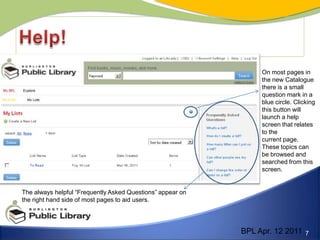
Help!On most pages inthe new Catalogue there is a small question mark in a blue circle. Clicking this button will launch a help screen that relates to thecurrent page. These topics can be browsed and searched from this screen.The always helpful “Frequently Asked Questions” appear onthe right hand side of most pages to aid users.BPL Apr. 12 2011

Week 1

  • 1.
    Logging OnRegisteringAccount SettingsBPLCatalogue Staff Training 1BPL Apr. 12 2011
  • 2.
    Logging OnThe Cataloguehome page will prompt login from users. The first login is made by typing in the BPL card number And the assigned 4-digit pin number. Users can skip the login step at first, and enter the information later in thesession by clicking the login link at the top right-hand corner of the screen. BPL Apr. 12 2011
  • 3.
    Logging OnIf auser chooses to not login at the beginning of their session, they may be prompted to login if they try to perform certain actions.i.e. commenting, tagging, or accessing My BPL. BPL Apr. 12 2011
  • 4.
    Registering A Usernamecan be lettersand numbers, up to 24 characters.Adding an email address is optional. BPL Apr. 12 2011
  • 5.
    Account SettingsOnce registered,customers can updateTheir account by clicking ‘Account Settings’BPL Apr. 12 2011
  • 6.
    Account SettingsUsernameWhat otherusers see (username or name)Email Address Preferred Locations. This shows when your searchresults state “available at”. First is the default pickup location for holds.PIN ChangesBPL Apr. 12 2011
  • 7.
    Help!On most pagesinthe new Catalogue there is a small question mark in a blue circle. Clicking this button will launch a help screen that relates to thecurrent page. These topics can be browsed and searched from this screen.The always helpful “Frequently Asked Questions” appear onthe right hand side of most pages to aid users.BPL Apr. 12 2011