1. Enabling eLearning website
★ Modern learning environments
Developing a collaborative learning environment in partnership with students
A new video from South New Brighton School. Teachers describe how they started
team teaching and constructed a collaborative space from a traditional classroom with
their students.
More information about Modern learning environments »
★ Teaching as inquiry
Want to add an e-learning component into your teacher inquiry? The teaching as inquiry
page
● explains different inquiry frameworks – including Halbert and Kaser's spirals
of inquiry
● describes a process for adding an e-learning focus to your inquiry
● has several school stories with teachers describing their inquiries.
★ Professional
learning
Enabling e-Learning community free webinars
Register now for these free webinars in Term 2.
BYOD at Wairakei School
: 3:45 - 4:45, 30 Apr 2015
e-Learning leader, Kate Friedwald talks about the purpose, process, and potential for
trialing BYOD at Wairakei School.
Resourcing e-Learning
: 3:45 - 4:45, 10 Jun 2015
Join NAPP participants and guest presenters as we explore the why and how of
effectively resourcing e-learning.
Enabling e-Learning calendar of events
– Find out what's on to support your professional learning.
Latest e-Learning roundup
– Keep up-to-date with what's happening in the Virtual Learning Network. Join in the
discussions and build your professional learning network.
2. VLN: Best apps to support literacy & numeracy
24 Apr 2015
Can someone tell me the names of some good reading/writing & numeracy apps I can use
with my high learning needs students please? These students are working at or below
level 1 of the curriculum and range in age from 6 to 10 years old.
Replies (10) (Click on ‘Replies’ to read what others have said and shared)
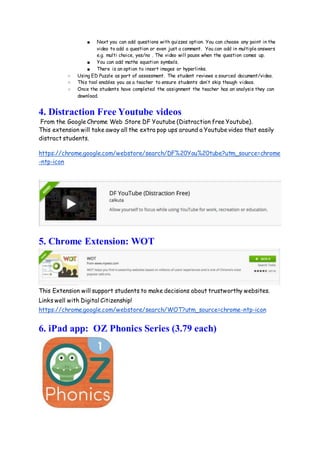
3. Google Chrome Web App: EDpuzzle
● Get EDpuzzle from the Chrome Web Store or https://edpuzzle.com/
○ Harness many platforms of videos for educational purpose.
○ You can create your own video and attach questions to it.
○ You can ask a range of open ended and closed ended questions. You see the responses and
summary. You can give specific feedback to the questions.
○ A tool to find out prior knowledge or review learning
○ If you choose to use audio track over a video it will take the original audio off the video.
■ Choose a video
■ use cropping to select from the video what you want
■ Add audio notes (pauses the video for the duration of your note)
■ Next you can add questions with quizzes option. You can choose any point in the
video to add a question or even just a comment. You can add in multiple answers
e.g. multi choice, yes/no . The video will pause when the question comes up.
■ You can add maths equation symbols.
■ There is an option to insert images or hyperlinks.
○ Using ED Puzzle as part of assessment. The student reviews a sourced document/video.
○ This tool enables you as a teacher to ensure students don’t skip though videos.
○ Once the students have completed the assignment the teacher has an analysis they can
download.
4. Distraction Free Youtube videos
From the Google Chrome Web Store DF Youtube (Distraction free Youtube).
This extension will take away all the extra pop ups around a Youtube video that easily
distract students.
https://chrome.google.com/webstore/search/DF%20You%20tube?utm_source=chrome
-ntp-icon
5. Chrome Extension: WOT
This Extension will support students to make decisions about trustworthy websites.
Links well with Digital Citizenship!
https://chrome.google.com/webstore/search/WOT?utm_source=chrome-ntp-icon
6. iPad app: OZ Phonics Series (3.79 each)
There are four in the series: Phonics and Phonemic Awareness, Intro to Reading,
CVC CCVC and Consonant Blends. Great because they have a kiwi accent. Yay!
https://itunes.apple.com/nz/app/oz-phonics-1-phonemic-
awareness/id580335894?mt=8
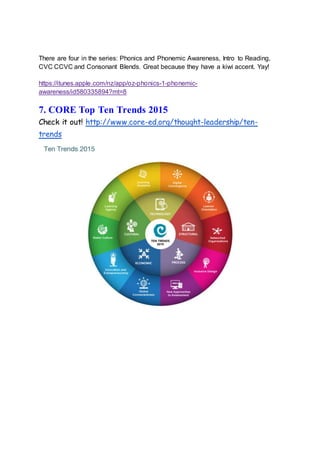
7. CORE Top Ten Trends 2015
Check it out! http://www.core-ed.org/thought-leadership/ten-
trends

Week 2 term 2

  • 1.
    1. Enabling eLearningwebsite ★ Modern learning environments Developing a collaborative learning environment in partnership with students A new video from South New Brighton School. Teachers describe how they started team teaching and constructed a collaborative space from a traditional classroom with their students. More information about Modern learning environments » ★ Teaching as inquiry Want to add an e-learning component into your teacher inquiry? The teaching as inquiry page ● explains different inquiry frameworks – including Halbert and Kaser's spirals of inquiry ● describes a process for adding an e-learning focus to your inquiry ● has several school stories with teachers describing their inquiries. ★ Professional learning Enabling e-Learning community free webinars Register now for these free webinars in Term 2. BYOD at Wairakei School : 3:45 - 4:45, 30 Apr 2015 e-Learning leader, Kate Friedwald talks about the purpose, process, and potential for trialing BYOD at Wairakei School. Resourcing e-Learning : 3:45 - 4:45, 10 Jun 2015
  • 2.
    Join NAPP participantsand guest presenters as we explore the why and how of effectively resourcing e-learning. Enabling e-Learning calendar of events – Find out what's on to support your professional learning. Latest e-Learning roundup – Keep up-to-date with what's happening in the Virtual Learning Network. Join in the discussions and build your professional learning network. 2. VLN: Best apps to support literacy & numeracy 24 Apr 2015 Can someone tell me the names of some good reading/writing & numeracy apps I can use with my high learning needs students please? These students are working at or below level 1 of the curriculum and range in age from 6 to 10 years old. Replies (10) (Click on ‘Replies’ to read what others have said and shared) 3. Google Chrome Web App: EDpuzzle ● Get EDpuzzle from the Chrome Web Store or https://edpuzzle.com/ ○ Harness many platforms of videos for educational purpose. ○ You can create your own video and attach questions to it. ○ You can ask a range of open ended and closed ended questions. You see the responses and summary. You can give specific feedback to the questions. ○ A tool to find out prior knowledge or review learning ○ If you choose to use audio track over a video it will take the original audio off the video. ■ Choose a video ■ use cropping to select from the video what you want ■ Add audio notes (pauses the video for the duration of your note)
  • 3.
    ■ Next youcan add questions with quizzes option. You can choose any point in the video to add a question or even just a comment. You can add in multiple answers e.g. multi choice, yes/no . The video will pause when the question comes up. ■ You can add maths equation symbols. ■ There is an option to insert images or hyperlinks. ○ Using ED Puzzle as part of assessment. The student reviews a sourced document/video. ○ This tool enables you as a teacher to ensure students don’t skip though videos. ○ Once the students have completed the assignment the teacher has an analysis they can download. 4. Distraction Free Youtube videos From the Google Chrome Web Store DF Youtube (Distraction free Youtube). This extension will take away all the extra pop ups around a Youtube video that easily distract students. https://chrome.google.com/webstore/search/DF%20You%20tube?utm_source=chrome -ntp-icon 5. Chrome Extension: WOT This Extension will support students to make decisions about trustworthy websites. Links well with Digital Citizenship! https://chrome.google.com/webstore/search/WOT?utm_source=chrome-ntp-icon 6. iPad app: OZ Phonics Series (3.79 each)
  • 4.
    There are fourin the series: Phonics and Phonemic Awareness, Intro to Reading, CVC CCVC and Consonant Blends. Great because they have a kiwi accent. Yay! https://itunes.apple.com/nz/app/oz-phonics-1-phonemic- awareness/id580335894?mt=8 7. CORE Top Ten Trends 2015 Check it out! http://www.core-ed.org/thought-leadership/ten- trends