Web Technology
Contents
1- What is web technology
2-Introduction to HTML
a) What is HTML
b) HTML page Structure
c) HTML Headings
d) Different Tags
3- Introduction to XML
a)
4- Introduction to CSS
5- Introduction to Programming Languages
6- Types of Programming Languages
7- Introduction to Web Servers
8- Introduction to Databases
9- Introduction to MySQL
10- MS Access
11- Pharmacy drug database
What is Web Technology
The mechanism of communication between various computers
through different languages and multimedia packages is
known as web technology.
• Mark-up languages, such as HTML, CSS, XML, CGI, and HTTP (Front-end or Client-side
technologies)
• Programming languages and technologies that help create applications for the web. Some of
these are Perl, C#, Java, Visual Basic, and .NET (Back-end or Server-side technologies)
• Web server and server technologies that enable request handling on a network, where
different users have to share the same resources and communicate with each other
• Databases, which are extremely important for data and information storage on a computer
network
• Business applications that are customized for specific execution of tasks on a network
• There are several programming languages and technologies for the Web. Some of the most
popular websites, ranging from Google to YouTube and from Amazon to twitter are built
using these server-side technologies. The latter include ASP.NET, C, C++, Java, JavaScript,
PERL, Python, PHP, Ruby, and more.
What is HTML
• Language for designing and describing web pages.
• Hyper Text Markup Language
• It is not programming language, it is markup language.
• A markup language is a set of markup tags
• It is not a Case sensitive language.
• HTML is the standard markup language for creating Web pages.
• HTML stands for Hyper Text Markup Language
• HTML describes the structure of a Web page
• HTML consists of a series of elements
• HTML elements tell the browser how to display the content
• HTML elements are represented by tags
• HTML tags label pieces of content such as "heading", "paragraph", "table",
and so on
• Browsers do not display the HTML tags, but use them to render the
content of the page
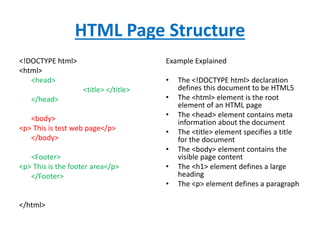
HTML Page Structure
<!DOCTYPE html>
<html>
<head>
<title> </title>
</head>
<body>
<p> This is test web page</p>
</body>
<Footer>
<p> This is the footer area</p>
</Footer>
</html>
Example Explained
• The <!DOCTYPE html> declaration
defines this document to be HTML5
• The <html> element is the root
element of an HTML page
• The <head> element contains meta
information about the document
• The <title> element specifies a title
for the document
• The <body> element contains the
visible page content
• The <h1> element defines a large
heading
• The <p> element defines a paragraph
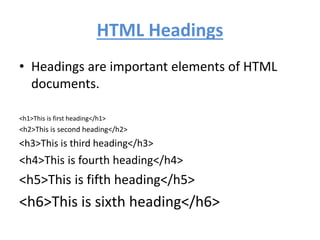
HTML Headings
• Headings are important elements of HTML
documents.
<h1>This is first heading</h1>
<h2>This is second heading</h2>
<h3>This is third heading</h3>
<h4>This is fourth heading</h4>
<h5>This is fifth heading</h5>
<h6>This is sixth heading</h6>
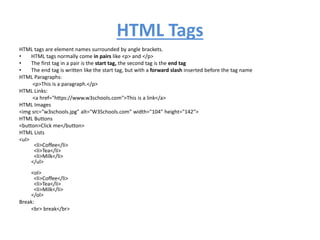
HTML Tags
HTML tags are element names surrounded by angle brackets.
• HTML tags normally come in pairs like <p> and </p>
• The first tag in a pair is the start tag, the second tag is the end tag
• The end tag is written like the start tag, but with a forward slash inserted before the tag name
HTML Paragraphs:
<p>This is a paragraph.</p>
HTML Links:
<a href="https://www.w3schools.com">This is a link</a>
HTML Images
<img src="w3schools.jpg" alt="W3Schools.com" width="104" height="142">
HTML Buttons
<button>Click me</button>
HTML Lists
<ul>
<li>Coffee</li>
<li>Tea</li>
<li>Milk</li>
</ul>
<ol>
<li>Coffee</li>
<li>Tea</li>
<li>Milk</li>
</ol>
Break:
<br> break</br>

Web Technology.pptx

  • 1.
  • 2.
    Contents 1- What isweb technology 2-Introduction to HTML a) What is HTML b) HTML page Structure c) HTML Headings d) Different Tags 3- Introduction to XML a) 4- Introduction to CSS 5- Introduction to Programming Languages 6- Types of Programming Languages 7- Introduction to Web Servers 8- Introduction to Databases 9- Introduction to MySQL 10- MS Access 11- Pharmacy drug database
  • 3.
    What is WebTechnology The mechanism of communication between various computers through different languages and multimedia packages is known as web technology. • Mark-up languages, such as HTML, CSS, XML, CGI, and HTTP (Front-end or Client-side technologies) • Programming languages and technologies that help create applications for the web. Some of these are Perl, C#, Java, Visual Basic, and .NET (Back-end or Server-side technologies) • Web server and server technologies that enable request handling on a network, where different users have to share the same resources and communicate with each other • Databases, which are extremely important for data and information storage on a computer network • Business applications that are customized for specific execution of tasks on a network • There are several programming languages and technologies for the Web. Some of the most popular websites, ranging from Google to YouTube and from Amazon to twitter are built using these server-side technologies. The latter include ASP.NET, C, C++, Java, JavaScript, PERL, Python, PHP, Ruby, and more.
  • 4.
    What is HTML •Language for designing and describing web pages. • Hyper Text Markup Language • It is not programming language, it is markup language. • A markup language is a set of markup tags • It is not a Case sensitive language. • HTML is the standard markup language for creating Web pages. • HTML stands for Hyper Text Markup Language • HTML describes the structure of a Web page • HTML consists of a series of elements • HTML elements tell the browser how to display the content • HTML elements are represented by tags • HTML tags label pieces of content such as "heading", "paragraph", "table", and so on • Browsers do not display the HTML tags, but use them to render the content of the page
  • 5.
    HTML Page Structure <!DOCTYPEhtml> <html> <head> <title> </title> </head> <body> <p> This is test web page</p> </body> <Footer> <p> This is the footer area</p> </Footer> </html> Example Explained • The <!DOCTYPE html> declaration defines this document to be HTML5 • The <html> element is the root element of an HTML page • The <head> element contains meta information about the document • The <title> element specifies a title for the document • The <body> element contains the visible page content • The <h1> element defines a large heading • The <p> element defines a paragraph
  • 6.
    HTML Headings • Headingsare important elements of HTML documents. <h1>This is first heading</h1> <h2>This is second heading</h2> <h3>This is third heading</h3> <h4>This is fourth heading</h4> <h5>This is fifth heading</h5> <h6>This is sixth heading</h6>
  • 7.
    HTML Tags HTML tagsare element names surrounded by angle brackets. • HTML tags normally come in pairs like <p> and </p> • The first tag in a pair is the start tag, the second tag is the end tag • The end tag is written like the start tag, but with a forward slash inserted before the tag name HTML Paragraphs: <p>This is a paragraph.</p> HTML Links: <a href="https://www.w3schools.com">This is a link</a> HTML Images <img src="w3schools.jpg" alt="W3Schools.com" width="104" height="142"> HTML Buttons <button>Click me</button> HTML Lists <ul> <li>Coffee</li> <li>Tea</li> <li>Milk</li> </ul> <ol> <li>Coffee</li> <li>Tea</li> <li>Milk</li> </ol> Break: <br> break</br>