1	

Web Search Engine Metrics
for Measuring User
Satisfaction
[Section 7 of 7: Presentation]
Ali Dasdan, eBay
Kostas Tsioutsiouliklis, Yahoo!
Emre Velipasaoglu, Yahoo!
With contributions from Prasad Kantamneni, Yahoo!
27 Apr 2010
(Update in Aug 2015: The authors work in different companies now.)
2	

Tutorial
@
19th International
World Wide Web
Conference
http://www2010.org/
April 26-30, 2010
© Dasdan, Tsioutsiouliklis, Velipasaoglu, 2009-2010.
Disclaimers
•  This talk presents the opinions of the
authors. It does not necessarily reflect
the views of our employers.
•  This talk does not imply that these
metrics are used by our employers, or
should they be used, they may not be
used in the way described in this talk.
•  The examples are just that – examples.
Please do not generalize them to the
level of comparing search engines.
3
4	

4	

Presentation Metrics
Section 7/7
of
WWW’10 Tutorial on Web Search Engine Metrics
by
A. Dasdan, K. Tsioutsiouliklis, E. Velipasaoglu
© Dasdan, Tsioutsiouliklis, Velipasaoglu, 2009-2010.
Outline
•  Presentation aspects and issues
•  Presentation metrics - overview
–  Explicit and implicit
•  Presentation metrics – details
–  Online user studies
–  Eye-tracking studies
–  Speed
•  Case Studies
–  Introducing small changes
–  Introducing large changes
•  Conclusion
5
© Dasdan, Tsioutsiouliklis, Velipasaoglu, 2009-2010.
6	

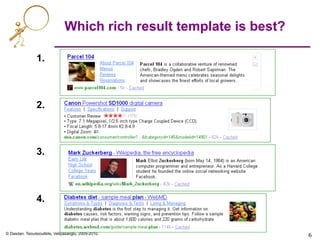
1.
2.
3.
4.
6	

Which rich result template is best?
© Dasdan, Tsioutsiouliklis, Velipasaoglu, 2009-2010.
7	

7	

Example: query [obama] on Yahoo!
7
© Dasdan, Tsioutsiouliklis, Velipasaoglu, 2009-2010.
8	

8	

No more 10 blue links!
8
Assistance
layer
News
shortcut
Web results
Image results
Left rail
North ad
East ads
© Dasdan, Tsioutsiouliklis, Velipasaoglu, 2009-2010.
9	

9	

Presentation modules on Yahoo!
•  Shortcuts •  Search suggestions / Search Assist
•  Quick links
•  Indentation
•  Rich results
© Dasdan, Tsioutsiouliklis, Velipasaoglu, 2009-2010.
10	

Presentation questions
•  How to present information
–  Heterogeneous data, from multiple sources
–  Module-level and whole-page optimization
•  How to measure success
–  How do we determine value of new features?
–  What should we optimize for?
© Dasdan, Tsioutsiouliklis, Velipasaoglu, 2009-2010.
11	

Presentation aspects and issues
•  What kind of information should be displayed
•  How much variation can there be in a UI without being
overwhelming
•  Where should information be displayed - layout
•  How do Presentation elements impact perception, and usage
–  Font size and type, colors, design elements, Interaction design
•  How do we generalize the findings to other countries
•  How to plan changes in an interface
•  How to tune a UI given that user expectations are evolving
[KO’09], [MK’08], [HLZF’06], [ABD’06], [ABDR’06]
© Dasdan, Tsioutsiouliklis, Velipasaoglu, 2009-2010.
12	

12	

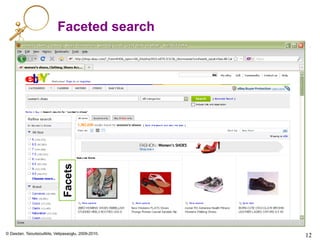
Faceted search
Facets
© Dasdan, Tsioutsiouliklis, Velipasaoglu, 2009-2010.
13	

13	

Clustered search: Clusters
[H’09]
Product clusters
© Dasdan, Tsioutsiouliklis, Velipasaoglu, 2009-2010.
14	

14	

Clustered search: Expansion
[H’09]
© Dasdan, Tsioutsiouliklis, Velipasaoglu, 2009-2010.
15	

15	

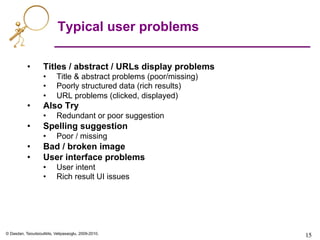
Typical user problems
•  Titles / abstract / URLs display problems
•  Title & abstract problems (poor/missing)
•  Poorly structured data (rich results)
•  URL problems (clicked, displayed)
•  Also Try
•  Redundant or poor suggestion
•  Spelling suggestion
•  Poor / missing
•  Bad / broken image
•  User interface problems
•  User intent
•  Rich result UI issues
© Dasdan, Tsioutsiouliklis, Velipasaoglu, 2009-2010.
16	

16	

Bad quicklinks examples:
[amc theatre], [nobel prize]
[CKP’09], [CKP’08]
© Dasdan, Tsioutsiouliklis, Velipasaoglu, 2009-2010.
17	

17	

Bad rich result examples:
[droids], [hells canyon], [flickr]
© Dasdan, Tsioutsiouliklis, Velipasaoglu, 2009-2010.
18	

18	

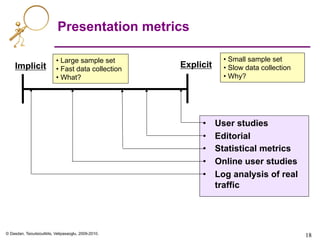
Presentation metrics
Implicit Explicit
• Small sample set
• Slow data collection
• Why?
• Large sample set
• Fast data collection
• What?
•  User studies
•  Editorial
•  Statistical metrics
•  Online user studies
•  Log analysis of real
traffic
© Dasdan, Tsioutsiouliklis, Velipasaoglu, 2009-2010.
19	

Presentation metrics
•  User studies
–  In-home
•  Early ideation
–  Generative studies
•  Participatory, paper printouts
–  Usability
•  Prototypes
–  Eye tracking studies
•  Mental models
–  Focus groups
•  Editorial
–  Comparative
•  Preferential or judgment values between contender configurations
–  Perceived vs. actual
•  How well does presentation convey the content of the landing page?
© Dasdan, Tsioutsiouliklis, Velipasaoglu, 2009-2010.
20	

Presentation metrics
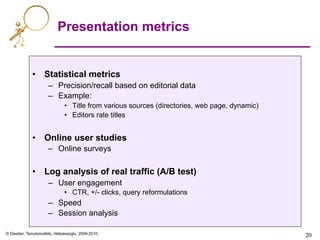
•  Statistical metrics
–  Precision/recall based on editorial data
–  Example:
•  Title from various sources (directories, web page, dynamic)
•  Editors rate titles
•  Online user studies
–  Online surveys
•  Log analysis of real traffic (A/B test)
–  User engagement
•  CTR, +/- clicks, query reformulations
–  Speed
–  Session analysis
© Dasdan, Tsioutsiouliklis, Velipasaoglu, 2009-2010.
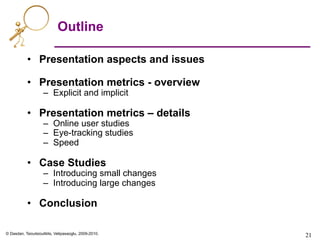
Outline
•  Presentation aspects and issues
•  Presentation metrics - overview
–  Explicit and implicit
•  Presentation metrics – details
–  Online user studies
–  Eye-tracking studies
–  Speed
•  Case Studies
–  Introducing small changes
–  Introducing large changes
•  Conclusion
21
© Dasdan, Tsioutsiouliklis, Velipasaoglu, 2009-2010.
22	

Online user studies
•  Goal:
–  To measure product experience
•  Various types
–  General surveys of a product
–  Task-specific exercises
–  Commercial products: userzoom.com, keynote.com
•  Two dimensions of product experience:
1.  Measured user experience
•  Example:
–  User given a set of tasks.
–  What is the task completion success rate?
2.  Perceived user experience
•  Many sub-dimensions
–  Ease of use
–  Performance (e.g. response times)
–  User-friendliness (e.g. fun, not user-engaging)
•  Example:
–  User given a set of tasks.
–  How easily (in her opinion) did user complete tasks?
[A’09]
© Dasdan, Tsioutsiouliklis, Velipasaoglu, 2009-2010.
23	

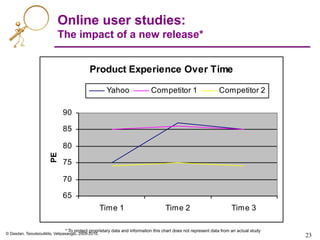
Online user studies:
The impact of a new release*
Product Experience Over Time
65
70
75
80
85
90
Time 1 Time 2 Time 3
PEM
Yahoo Competitor 1 Competitor 2
* To protect proprietary data and information this chart does not represent data from an actual study
© Dasdan, Tsioutsiouliklis, Velipasaoglu, 2009-2010.
24	

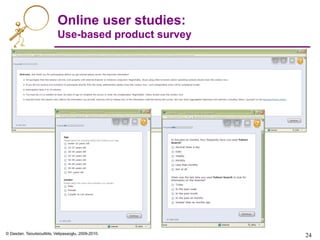
Online user studies:
Use-based product survey
© Dasdan, Tsioutsiouliklis, Velipasaoglu, 2009-2010.
25	

Online user studies:
Use-based product survey
Performance
Satisfaction
Learnability
© Dasdan, Tsioutsiouliklis, Velipasaoglu, 2009-2010.
26	

26	

Eye tracking studies
Reading (Yahoo! Finance) Scanning (Yahoo! Finance)
© Dasdan, Tsioutsiouliklis, Velipasaoglu, 2009-2010.
27	

27	

Heat maps
Highest density of
clicks concentrated
in hottest zone.
[E’05]
© Dasdan, Tsioutsiouliklis, Velipasaoglu, 2009-2010.
28	

28	

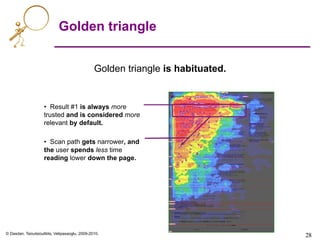
Golden triangle
Golden triangle is habituated.
•  Result #1 is always more
trusted and is considered more
relevant by default.
•  Scan path gets narrower, and
the user spends less time
reading lower down the page.
© Dasdan, Tsioutsiouliklis, Velipasaoglu, 2009-2010.
29	

29	

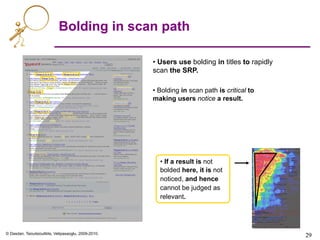
Bolding in scan path
• Users use bolding in titles to rapidly
scan the SRP.
• Bolding in scan path is critical to
making users notice a result.
• If a result is not
bolded here, it is not
noticed, and hence
cannot be judged as
relevant.
© Dasdan, Tsioutsiouliklis, Velipasaoglu, 2009-2010.
Speed
•  Presentation is not just the visual aspects of a page
•  Speed is also very important
–  Among top ten core principles at Google [G’01]
•  What is speed?
–  Time-to-load, interaction with page, dynamic aspects
•  Slow response times have direct impact on bottom
line
–  Shopzilla [V’09]: A 5 second speed up (from 7 to 2 seconds)
resulted in:
•  +25% page views
•  +7-12% revenue
•  -50% hardware
© Dasdan, Tsioutsiouliklis, Velipasaoglu, 2009-2010.
Speed: Metrics
•  Metrics for measuring impact of speed:
–  A/B testing
•  Use buckets with different configurations (test vs. baseline)
over small percentages of users
•  Compare metrics such as distinct queries per user, query
refinements, revenue per user, any clicks, satisfaction, time to
click, and more
–  Multivariate testing
•  Same as A/B testing, but multiple (ideally independent)
variables at the same time
–  Issues
•  Local minima
•  Trade-off decisions between variables often hard to make
© Dasdan, Tsioutsiouliklis, Velipasaoglu, 2009-2010.
Speed: Conclusions
Steve Souders, Velocity and the bottom line [V’09]
•  Impact
–  Bing: 2sec slowdown resulted in -1.8% queries/user and -4.3%
revenue/user.
–  Google Search: 400ms delay resulted in -0.59% change in
searches/user.
•  Even after delay was removed there were -0.21% fewer searches.
–  AOL: Page views per visit drop off with load time increases. 7.5 top
decile, 6 for 3rd decile, 5 for bottom decile.
–  Google Search: A 500ms increase in load time (from 400ms to
900ms) resulted in a 25% dropoff in first result page.
•  A 2% slowdown of search results resulted in 2% drop in searches/user.
•  Perception of speed
–  Total time-to-load vs. partial time-to-load (gradual page load)
•  Easy ways to increase speed
–  E.g. serve non-cookie content from a different server, put all
images into a single sprite
© Dasdan, Tsioutsiouliklis, Velipasaoglu, 2009-2010.
Key problems
•  What is the best way to manage user attention?
–  Seeing vs. noticing
–  When do we cross from being helpful to being overwhelming
(volume)?
–  How many different types of formats can coexist (diversity)?
•  How can presentation support user intent?
•  How can presentation be used to communicate
genre and topic?
33
© Dasdan, Tsioutsiouliklis, Velipasaoglu, 2009-2010.
Reference review on presentation
metrics
•  Enquiro Eye Tracking Reports I & II [E’05]
–  Original eye-tracking studies showing golden triangle for SERP
•  C. Clarke, et. al, The influence of caption features on
clickthrough patterns in web search [CADW’07]
•  D.E. Rose, et. al, Summary attributes and perceived search
quality, WWW’07 [ROK’07] .
–  Studies showing the effects of fixations and presentation patterns
•  M. Hearst (2009), Search User Interfaces [H’09]
–  Exhaustive review of user interfaces
•  Steve Souders, Velocity and the bottom line [V’09]
–  Rich collection of studies on impact of speed
34
© Dasdan, Tsioutsiouliklis, Velipasaoglu, 2009-2010.
35	

35	

References
•  [A’09] W. Albert (2009), Unmoderated usability testing: experience from the field, Usability
Professionals Association Conference Panel.
•  [ABD’06] E. Agichtein, E. Brill, and S.T. Dumais (2006), Improving web search ranking by
incorporating user behavior, SIGIR’06.
•  [ABDR’06] E. Agichtein, E. Brill, S.T. Dumais, and R. Ragno (2006). Learning user interaction
models for predicting web search preferences, SIGIR’06.
•  [AK’08] P. Anick, Peter and R.G. Kantamneni (2008), A longitudinal study of real-time search
assistance adoption, SIGIR’08.
•  [CADW’07] C. Clarke, E. Agichtein, S. Dumais, and R. White (2007), The influence of caption
features on clickthrough patterns in web search, SIGIR’07.
•  [CKP’08] D. Chakrabarti, R. Kumar, and K. Punera (2008), Generating succinct titles for web URLs,
KDD’08.
•  [CKP’09] D. Chakrabarti, R. Kumar, and K. Punera (2009), Quicklink selection for navigational query
results, WWW’09.
•  [E’05] Enquiro Eye Tracking Reports I & II (2005), http://www.enquiroresearch.com/.
•  [G’01] http://www.google.com/corporate/tenthings.html
•  [H’09] M. Hearst (2009), Search user interfaces, Cambridge University Press.
–  http://searchuserinterfaces.com/
•  [HLZF’06] E. Hovy, C. Lin, L. Zhou, and J. Fukumoto (2006), Automated summarization evaluation
with basic elements, LREC’06.
•  [KO’09] T. Kanungo and D. Orr (2009), Predicting readability of short web summaries, WSDM’09.
•  [MK’08] D. Metzler and T. Kanungo (2008), Machine learned sentence selection strategies for
query-biased summarization, SIGIR’08.
•  [ROK’07] D.E. Rose, D. Orr, and R.G.P. Kantamneni (2007), Summary attributes and perceived
search quality, WWW’07.
•  [V’09] http://radar.oreilly.com/2009/07/velocity-making-your-site-fast.html

Web search-metrics-tutorial-www2010-section-7of7-presentation

  • 1.
    1 Web Search EngineMetrics for Measuring User Satisfaction [Section 7 of 7: Presentation] Ali Dasdan, eBay Kostas Tsioutsiouliklis, Yahoo! Emre Velipasaoglu, Yahoo! With contributions from Prasad Kantamneni, Yahoo! 27 Apr 2010 (Update in Aug 2015: The authors work in different companies now.)
  • 2.
    2 Tutorial @ 19th International World WideWeb Conference http://www2010.org/ April 26-30, 2010
  • 3.
    © Dasdan, Tsioutsiouliklis,Velipasaoglu, 2009-2010. Disclaimers •  This talk presents the opinions of the authors. It does not necessarily reflect the views of our employers. •  This talk does not imply that these metrics are used by our employers, or should they be used, they may not be used in the way described in this talk. •  The examples are just that – examples. Please do not generalize them to the level of comparing search engines. 3
  • 4.
    4 4 Presentation Metrics Section 7/7 of WWW’10Tutorial on Web Search Engine Metrics by A. Dasdan, K. Tsioutsiouliklis, E. Velipasaoglu
  • 5.
    © Dasdan, Tsioutsiouliklis,Velipasaoglu, 2009-2010. Outline •  Presentation aspects and issues •  Presentation metrics - overview –  Explicit and implicit •  Presentation metrics – details –  Online user studies –  Eye-tracking studies –  Speed •  Case Studies –  Introducing small changes –  Introducing large changes •  Conclusion 5
  • 6.
    © Dasdan, Tsioutsiouliklis,Velipasaoglu, 2009-2010. 6 1. 2. 3. 4. 6 Which rich result template is best?
  • 7.
    © Dasdan, Tsioutsiouliklis,Velipasaoglu, 2009-2010. 7 7 Example: query [obama] on Yahoo! 7
  • 8.
    © Dasdan, Tsioutsiouliklis,Velipasaoglu, 2009-2010. 8 8 No more 10 blue links! 8 Assistance layer News shortcut Web results Image results Left rail North ad East ads
  • 9.
    © Dasdan, Tsioutsiouliklis,Velipasaoglu, 2009-2010. 9 9 Presentation modules on Yahoo! •  Shortcuts •  Search suggestions / Search Assist •  Quick links •  Indentation •  Rich results
  • 10.
    © Dasdan, Tsioutsiouliklis,Velipasaoglu, 2009-2010. 10 Presentation questions •  How to present information –  Heterogeneous data, from multiple sources –  Module-level and whole-page optimization •  How to measure success –  How do we determine value of new features? –  What should we optimize for?
  • 11.
    © Dasdan, Tsioutsiouliklis,Velipasaoglu, 2009-2010. 11 Presentation aspects and issues •  What kind of information should be displayed •  How much variation can there be in a UI without being overwhelming •  Where should information be displayed - layout •  How do Presentation elements impact perception, and usage –  Font size and type, colors, design elements, Interaction design •  How do we generalize the findings to other countries •  How to plan changes in an interface •  How to tune a UI given that user expectations are evolving [KO’09], [MK’08], [HLZF’06], [ABD’06], [ABDR’06]
  • 12.
    © Dasdan, Tsioutsiouliklis,Velipasaoglu, 2009-2010. 12 12 Faceted search Facets
  • 13.
    © Dasdan, Tsioutsiouliklis,Velipasaoglu, 2009-2010. 13 13 Clustered search: Clusters [H’09] Product clusters
  • 14.
    © Dasdan, Tsioutsiouliklis,Velipasaoglu, 2009-2010. 14 14 Clustered search: Expansion [H’09]
  • 15.
    © Dasdan, Tsioutsiouliklis,Velipasaoglu, 2009-2010. 15 15 Typical user problems •  Titles / abstract / URLs display problems •  Title & abstract problems (poor/missing) •  Poorly structured data (rich results) •  URL problems (clicked, displayed) •  Also Try •  Redundant or poor suggestion •  Spelling suggestion •  Poor / missing •  Bad / broken image •  User interface problems •  User intent •  Rich result UI issues
  • 16.
    © Dasdan, Tsioutsiouliklis,Velipasaoglu, 2009-2010. 16 16 Bad quicklinks examples: [amc theatre], [nobel prize] [CKP’09], [CKP’08]
  • 17.
    © Dasdan, Tsioutsiouliklis,Velipasaoglu, 2009-2010. 17 17 Bad rich result examples: [droids], [hells canyon], [flickr]
  • 18.
    © Dasdan, Tsioutsiouliklis,Velipasaoglu, 2009-2010. 18 18 Presentation metrics Implicit Explicit • Small sample set • Slow data collection • Why? • Large sample set • Fast data collection • What? •  User studies •  Editorial •  Statistical metrics •  Online user studies •  Log analysis of real traffic
  • 19.
    © Dasdan, Tsioutsiouliklis,Velipasaoglu, 2009-2010. 19 Presentation metrics •  User studies –  In-home •  Early ideation –  Generative studies •  Participatory, paper printouts –  Usability •  Prototypes –  Eye tracking studies •  Mental models –  Focus groups •  Editorial –  Comparative •  Preferential or judgment values between contender configurations –  Perceived vs. actual •  How well does presentation convey the content of the landing page?
  • 20.
    © Dasdan, Tsioutsiouliklis,Velipasaoglu, 2009-2010. 20 Presentation metrics •  Statistical metrics –  Precision/recall based on editorial data –  Example: •  Title from various sources (directories, web page, dynamic) •  Editors rate titles •  Online user studies –  Online surveys •  Log analysis of real traffic (A/B test) –  User engagement •  CTR, +/- clicks, query reformulations –  Speed –  Session analysis
  • 21.
    © Dasdan, Tsioutsiouliklis,Velipasaoglu, 2009-2010. Outline •  Presentation aspects and issues •  Presentation metrics - overview –  Explicit and implicit •  Presentation metrics – details –  Online user studies –  Eye-tracking studies –  Speed •  Case Studies –  Introducing small changes –  Introducing large changes •  Conclusion 21
  • 22.
    © Dasdan, Tsioutsiouliklis,Velipasaoglu, 2009-2010. 22 Online user studies •  Goal: –  To measure product experience •  Various types –  General surveys of a product –  Task-specific exercises –  Commercial products: userzoom.com, keynote.com •  Two dimensions of product experience: 1.  Measured user experience •  Example: –  User given a set of tasks. –  What is the task completion success rate? 2.  Perceived user experience •  Many sub-dimensions –  Ease of use –  Performance (e.g. response times) –  User-friendliness (e.g. fun, not user-engaging) •  Example: –  User given a set of tasks. –  How easily (in her opinion) did user complete tasks? [A’09]
  • 23.
    © Dasdan, Tsioutsiouliklis,Velipasaoglu, 2009-2010. 23 Online user studies: The impact of a new release* Product Experience Over Time 65 70 75 80 85 90 Time 1 Time 2 Time 3 PEM Yahoo Competitor 1 Competitor 2 * To protect proprietary data and information this chart does not represent data from an actual study
  • 24.
    © Dasdan, Tsioutsiouliklis,Velipasaoglu, 2009-2010. 24 Online user studies: Use-based product survey
  • 25.
    © Dasdan, Tsioutsiouliklis,Velipasaoglu, 2009-2010. 25 Online user studies: Use-based product survey Performance Satisfaction Learnability
  • 26.
    © Dasdan, Tsioutsiouliklis,Velipasaoglu, 2009-2010. 26 26 Eye tracking studies Reading (Yahoo! Finance) Scanning (Yahoo! Finance)
  • 27.
    © Dasdan, Tsioutsiouliklis,Velipasaoglu, 2009-2010. 27 27 Heat maps Highest density of clicks concentrated in hottest zone. [E’05]
  • 28.
    © Dasdan, Tsioutsiouliklis,Velipasaoglu, 2009-2010. 28 28 Golden triangle Golden triangle is habituated. •  Result #1 is always more trusted and is considered more relevant by default. •  Scan path gets narrower, and the user spends less time reading lower down the page.
  • 29.
    © Dasdan, Tsioutsiouliklis,Velipasaoglu, 2009-2010. 29 29 Bolding in scan path • Users use bolding in titles to rapidly scan the SRP. • Bolding in scan path is critical to making users notice a result. • If a result is not bolded here, it is not noticed, and hence cannot be judged as relevant.
  • 30.
    © Dasdan, Tsioutsiouliklis,Velipasaoglu, 2009-2010. Speed •  Presentation is not just the visual aspects of a page •  Speed is also very important –  Among top ten core principles at Google [G’01] •  What is speed? –  Time-to-load, interaction with page, dynamic aspects •  Slow response times have direct impact on bottom line –  Shopzilla [V’09]: A 5 second speed up (from 7 to 2 seconds) resulted in: •  +25% page views •  +7-12% revenue •  -50% hardware
  • 31.
    © Dasdan, Tsioutsiouliklis,Velipasaoglu, 2009-2010. Speed: Metrics •  Metrics for measuring impact of speed: –  A/B testing •  Use buckets with different configurations (test vs. baseline) over small percentages of users •  Compare metrics such as distinct queries per user, query refinements, revenue per user, any clicks, satisfaction, time to click, and more –  Multivariate testing •  Same as A/B testing, but multiple (ideally independent) variables at the same time –  Issues •  Local minima •  Trade-off decisions between variables often hard to make
  • 32.
    © Dasdan, Tsioutsiouliklis,Velipasaoglu, 2009-2010. Speed: Conclusions Steve Souders, Velocity and the bottom line [V’09] •  Impact –  Bing: 2sec slowdown resulted in -1.8% queries/user and -4.3% revenue/user. –  Google Search: 400ms delay resulted in -0.59% change in searches/user. •  Even after delay was removed there were -0.21% fewer searches. –  AOL: Page views per visit drop off with load time increases. 7.5 top decile, 6 for 3rd decile, 5 for bottom decile. –  Google Search: A 500ms increase in load time (from 400ms to 900ms) resulted in a 25% dropoff in first result page. •  A 2% slowdown of search results resulted in 2% drop in searches/user. •  Perception of speed –  Total time-to-load vs. partial time-to-load (gradual page load) •  Easy ways to increase speed –  E.g. serve non-cookie content from a different server, put all images into a single sprite
  • 33.
    © Dasdan, Tsioutsiouliklis,Velipasaoglu, 2009-2010. Key problems •  What is the best way to manage user attention? –  Seeing vs. noticing –  When do we cross from being helpful to being overwhelming (volume)? –  How many different types of formats can coexist (diversity)? •  How can presentation support user intent? •  How can presentation be used to communicate genre and topic? 33
  • 34.
    © Dasdan, Tsioutsiouliklis,Velipasaoglu, 2009-2010. Reference review on presentation metrics •  Enquiro Eye Tracking Reports I & II [E’05] –  Original eye-tracking studies showing golden triangle for SERP •  C. Clarke, et. al, The influence of caption features on clickthrough patterns in web search [CADW’07] •  D.E. Rose, et. al, Summary attributes and perceived search quality, WWW’07 [ROK’07] . –  Studies showing the effects of fixations and presentation patterns •  M. Hearst (2009), Search User Interfaces [H’09] –  Exhaustive review of user interfaces •  Steve Souders, Velocity and the bottom line [V’09] –  Rich collection of studies on impact of speed 34
  • 35.
    © Dasdan, Tsioutsiouliklis,Velipasaoglu, 2009-2010. 35 35 References •  [A’09] W. Albert (2009), Unmoderated usability testing: experience from the field, Usability Professionals Association Conference Panel. •  [ABD’06] E. Agichtein, E. Brill, and S.T. Dumais (2006), Improving web search ranking by incorporating user behavior, SIGIR’06. •  [ABDR’06] E. Agichtein, E. Brill, S.T. Dumais, and R. Ragno (2006). Learning user interaction models for predicting web search preferences, SIGIR’06. •  [AK’08] P. Anick, Peter and R.G. Kantamneni (2008), A longitudinal study of real-time search assistance adoption, SIGIR’08. •  [CADW’07] C. Clarke, E. Agichtein, S. Dumais, and R. White (2007), The influence of caption features on clickthrough patterns in web search, SIGIR’07. •  [CKP’08] D. Chakrabarti, R. Kumar, and K. Punera (2008), Generating succinct titles for web URLs, KDD’08. •  [CKP’09] D. Chakrabarti, R. Kumar, and K. Punera (2009), Quicklink selection for navigational query results, WWW’09. •  [E’05] Enquiro Eye Tracking Reports I & II (2005), http://www.enquiroresearch.com/. •  [G’01] http://www.google.com/corporate/tenthings.html •  [H’09] M. Hearst (2009), Search user interfaces, Cambridge University Press. –  http://searchuserinterfaces.com/ •  [HLZF’06] E. Hovy, C. Lin, L. Zhou, and J. Fukumoto (2006), Automated summarization evaluation with basic elements, LREC’06. •  [KO’09] T. Kanungo and D. Orr (2009), Predicting readability of short web summaries, WSDM’09. •  [MK’08] D. Metzler and T. Kanungo (2008), Machine learned sentence selection strategies for query-biased summarization, SIGIR’08. •  [ROK’07] D.E. Rose, D. Orr, and R.G.P. Kantamneni (2007), Summary attributes and perceived search quality, WWW’07. •  [V’09] http://radar.oreilly.com/2009/07/velocity-making-your-site-fast.html