Scraping The Web
For Crumbs n Stuff...
What is Web Scraping?
Web scraping (web harvesting or web data
extraction) is a computer software technique
of extracting information from websites.
What are some Use
Cases?
Uses of web scraping include online price
comparison, contact scraping, weather data
monitoring, website change detection,
research, web mashup and web data
integration.
What Kind of
“Information”?
Metadata
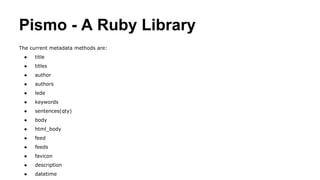
Pismo - A Ruby Library
The current metadata methods are:
● title
● titles
● author
● authors
● lede
● keywords
● sentences(qty)
● body
● html_body
● feed
● feeds
● favicon
● description
● datetime
An Example
require 'pismo'
# Load a Web page (you could pass an IO object or a string with existing HTML data along, as you prefer)
doc = Pismo::Document.new('http://www.rubyinside.com/cramp-asychronous-event-driven-ruby-web-app-framework-2928.html')
doc.title # => "Cramp: Asychronous Event-Driven Ruby Web App Framework"
doc.author # => "Peter Cooper"
doc.lede # => "Cramp (GitHub repo) is a new, asynchronous evented Web app framework by Pratik Naik of 37signals (and the
Rails core team). It's built around Ruby's EventMachine library and was designed to use event-driven I/O throughout - making it
ideal for situations where you need to handle a large number of open connections (such as Comet systems or streaming APIs.)"
doc.keywords # => [["cramp", 7], ["controllers", 3], ["app", 3], ["basic", 2], ..., ... ]
Okay so you can get metadata, what about the
content of the page?
Data Miner
Download, pull out of a ZIP/TAR/GZ/BZ2
archive, parse, correct, and import XLS,
ODS, XML, CSV, HTML, etc. into your
ActiveRecord models.
Metainspector to get links
page.links.raw # Returns all links found, unprocessed
page.links.all # Returns all links found, unrelavitized and absolutified
page.links.http # Returns all HTTP links found
page.links.non_http # Returns all non-HTTP links found
page.links.internal # Returns all internal HTTP links found
page.links.external # Returns all external HTTP links found
Very cool, but can it navigate around the web?
Mechanize
The Mechanize library is used for automating
interaction with websites. Mechanize
automatically stores and sends cookies, follows
redirects, and can follow links and submit
forms. Form fields can be populated and
submitted. Mechanize also keeps track of the
sites that you have visited as a history.
Is there one all-encompassing
library to handle all this?
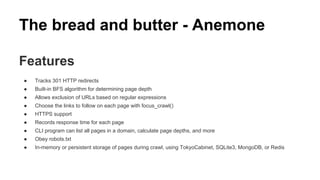
The bread and butter - Anemone
Features
● Tracks 301 HTTP redirects
● Built-in BFS algorithm for determining page depth
● Allows exclusion of URLs based on regular expressions
● Choose the links to follow on each page with focus_crawl()
● HTTPS support
● Records response time for each page
● CLI program can list all pages in a domain, calculate page depths, and more
● Obey robots.txt
● In-memory or persistent storage of pages during crawl, using TokyoCabinet, SQLite3, MongoDB, or Redis
301 Redirect is a….
The 301 status code means that a page
has permanently moved to a new
location.
BFS (Pronounced ‘Beh’-’Fuh’-’Se’)
Ach, kids these days jump from page to page
like mashuganahs. Maybe we should use some
BFS to calculate page-depth before we jump in
the digital ocean(digital ocean rights reserved
trademark 2014)
GTB Vice City
In graph theory, breadth-first search (BFS) is a strategy for searching in a graph when search is limited to essentially two
operations: (a) visit and inspect a node of a graph; (b) gain access to visit the nodes that neighbor the currently visited node. The
BFS begins at a root node and inspects all the neighboring nodes. Then for each of those neighbor nodes in turn, it inspects their
neighbor nodes which were unvisited, and so on. Compare BFS with the equivalent, but more memory-efficient Iterative
deepening depth-first search and contrast with depth-first search.
BFS was invented in the late 1950s by E. F. Moore, who used to find the shortest path out of a maze,[1]
and discovered
independently by C. Y. Lee as a wire routing algorithm (published 1961).[2]
Oh You Think You’re So Smart
(Picture several elderly women sitting around a table chatting. One elderly lady tells her friends a story)
My great-niece Bernadette’s Husband is an Ehngineeear. He was telling me some nonsense about some robots. He’s
sooo smart, he tells his robots what they do, and you know, Bella, you know, they listen! Look at that! The robots listen
to Bernadette’s husband! Bernadette doesn’t even listen to her husband. I don’t believe it!
Robots.txt is….
The Robots Exclusion Protocol.
a robot wants to vists a Web site URL, say http://www.example.com/welcome.html. Before it does so, it firsts checks for http://www.
example.com/robots.txt, and finds:
User-agent: *
Disallow: /
The "User-agent: *" means this section applies to all robots. The "Disallow: /" tells the robot that it should not visit any pages on the site.
There are two important considerations when using /robots.txt:
● robots can ignore your /robots.txt. Especially malware robots that scan the web for security vulnerabilities, and email address
harvesters used by spammers will pay no attention.
● the /robots.txt file is a publicly available file. Anyone can see what sections of your server you don't want robots to use.
So don't try to use /robots.txt to hide information.

Web Scraping

  • 1.
    Scraping The Web ForCrumbs n Stuff...
  • 2.
    What is WebScraping? Web scraping (web harvesting or web data extraction) is a computer software technique of extracting information from websites.
  • 3.
    What are someUse Cases?
  • 4.
    Uses of webscraping include online price comparison, contact scraping, weather data monitoring, website change detection, research, web mashup and web data integration.
  • 5.
  • 6.
  • 7.
    Pismo - ARuby Library The current metadata methods are: ● title ● titles ● author ● authors ● lede ● keywords ● sentences(qty) ● body ● html_body ● feed ● feeds ● favicon ● description ● datetime
  • 8.
    An Example require 'pismo' #Load a Web page (you could pass an IO object or a string with existing HTML data along, as you prefer) doc = Pismo::Document.new('http://www.rubyinside.com/cramp-asychronous-event-driven-ruby-web-app-framework-2928.html') doc.title # => "Cramp: Asychronous Event-Driven Ruby Web App Framework" doc.author # => "Peter Cooper" doc.lede # => "Cramp (GitHub repo) is a new, asynchronous evented Web app framework by Pratik Naik of 37signals (and the Rails core team). It's built around Ruby's EventMachine library and was designed to use event-driven I/O throughout - making it ideal for situations where you need to handle a large number of open connections (such as Comet systems or streaming APIs.)" doc.keywords # => [["cramp", 7], ["controllers", 3], ["app", 3], ["basic", 2], ..., ... ]
  • 9.
    Okay so youcan get metadata, what about the content of the page?
  • 10.
    Data Miner Download, pullout of a ZIP/TAR/GZ/BZ2 archive, parse, correct, and import XLS, ODS, XML, CSV, HTML, etc. into your ActiveRecord models.
  • 11.
    Metainspector to getlinks page.links.raw # Returns all links found, unprocessed page.links.all # Returns all links found, unrelavitized and absolutified page.links.http # Returns all HTTP links found page.links.non_http # Returns all non-HTTP links found page.links.internal # Returns all internal HTTP links found page.links.external # Returns all external HTTP links found
  • 12.
    Very cool, butcan it navigate around the web?
  • 13.
    Mechanize The Mechanize libraryis used for automating interaction with websites. Mechanize automatically stores and sends cookies, follows redirects, and can follow links and submit forms. Form fields can be populated and submitted. Mechanize also keeps track of the sites that you have visited as a history.
  • 14.
    Is there oneall-encompassing library to handle all this?
  • 15.
    The bread andbutter - Anemone Features ● Tracks 301 HTTP redirects ● Built-in BFS algorithm for determining page depth ● Allows exclusion of URLs based on regular expressions ● Choose the links to follow on each page with focus_crawl() ● HTTPS support ● Records response time for each page ● CLI program can list all pages in a domain, calculate page depths, and more ● Obey robots.txt ● In-memory or persistent storage of pages during crawl, using TokyoCabinet, SQLite3, MongoDB, or Redis
  • 16.
    301 Redirect isa…. The 301 status code means that a page has permanently moved to a new location.
  • 17.
    BFS (Pronounced ‘Beh’-’Fuh’-’Se’) Ach,kids these days jump from page to page like mashuganahs. Maybe we should use some BFS to calculate page-depth before we jump in the digital ocean(digital ocean rights reserved trademark 2014)
  • 18.
    GTB Vice City Ingraph theory, breadth-first search (BFS) is a strategy for searching in a graph when search is limited to essentially two operations: (a) visit and inspect a node of a graph; (b) gain access to visit the nodes that neighbor the currently visited node. The BFS begins at a root node and inspects all the neighboring nodes. Then for each of those neighbor nodes in turn, it inspects their neighbor nodes which were unvisited, and so on. Compare BFS with the equivalent, but more memory-efficient Iterative deepening depth-first search and contrast with depth-first search. BFS was invented in the late 1950s by E. F. Moore, who used to find the shortest path out of a maze,[1] and discovered independently by C. Y. Lee as a wire routing algorithm (published 1961).[2]
  • 19.
    Oh You ThinkYou’re So Smart (Picture several elderly women sitting around a table chatting. One elderly lady tells her friends a story) My great-niece Bernadette’s Husband is an Ehngineeear. He was telling me some nonsense about some robots. He’s sooo smart, he tells his robots what they do, and you know, Bella, you know, they listen! Look at that! The robots listen to Bernadette’s husband! Bernadette doesn’t even listen to her husband. I don’t believe it!
  • 20.
    Robots.txt is…. The RobotsExclusion Protocol. a robot wants to vists a Web site URL, say http://www.example.com/welcome.html. Before it does so, it firsts checks for http://www. example.com/robots.txt, and finds: User-agent: * Disallow: / The "User-agent: *" means this section applies to all robots. The "Disallow: /" tells the robot that it should not visit any pages on the site. There are two important considerations when using /robots.txt: ● robots can ignore your /robots.txt. Especially malware robots that scan the web for security vulnerabilities, and email address harvesters used by spammers will pay no attention. ● the /robots.txt file is a publicly available file. Anyone can see what sections of your server you don't want robots to use. So don't try to use /robots.txt to hide information.