Scalable web architecture LAMP  (& AWS infrastructure) Aleksandr Tsertkov
LAMP
LAMP: Platform L - Linux / Unix A - Apache / lighthttpd / nginx M - MySQL / PostgreSQL / SQLite P - PHP / Python / Perl / Ruby
LAMP: Why LAMP We know it! Proved by very big guys (Facebook, YouTube, LiveJournal, etc) Plenty of shared experience on the web Its flexible and extendable Easy to find engineers Easy to maintain Its cheap
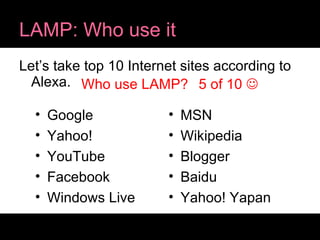
LAMP: Who use it Let’s take top 10 Internet sites according to Alexa. Google Yahoo! YouTube Facebook Windows Live MSN Wikipedia Blogger Baidu Yahoo! Yapan Who use LAMP? 5 of 10  
System design (SD)
SD: Key points Scalability HA (High Availibility) Backup & restore strategy!!! Fault-tolerant SA (Share Nothing)
SD: Load scalability “  Load scalability: The ability for a distributed system to easily expand and contract its resource pool to accommodate heavier or lighter loads. ” -Wikipedia
SD: Horizontal scalability Adding new nodes to a system for handling growing load and removing nodes when load decreases.
SD: High Availibility Complex:  High availability is a system design protocol and associated implementation that ensures a certain absolute degree of operational continuity during a given measurement period. Simple:  maximum uptime, minimum downtime.
SD: Fault Tolerant System should be able to continue function normally even if some of its components fail. No single point of failure.
SD: Share Nothing “  A shared nothing architecture (SN) is a distributed computing architecture in which each node is independent and self-sufficient, and there is no single point of contention across the system. “ - Wikipedia
SD: Share Nothing Can be achieved on different application layers separately: Database: data partitioning / sharding Cache: memcache client side partitioning Computing: job queues
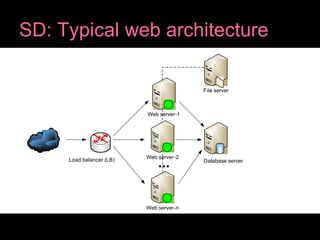
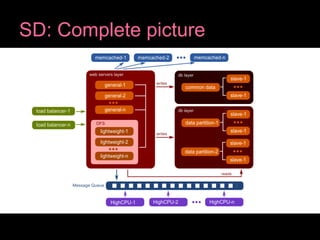
SD: Typical web architecture Load balancer Several web servers Database server(s) Shared file server (NAS) (if really needed)
SD: Typical web architecture
SD: Typical web architecture Each of these components / layers can be scaled separately. Database is usually the toughest part to scale.
SD: Scaling database Master-Slave Replication variants: Read/Write queries to Master, Read only from Slaves Writes to Master, Reads only from Slaves
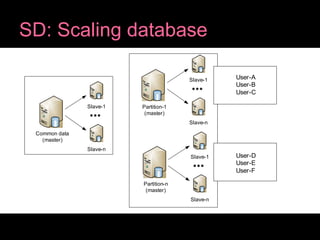
SD: Scaling database Master should be very powerful machine, but sooner or later you will hit the IO limit. Data partitioning / sharding is used to distribute data across number of Masters spreading load between them (horizontal scaling).
SD: Scaling database
SD: Caching strategy Hierarchy of caches should be used for optimal performance and efficiency. Local memory -> memcached -> local disk
SD: Caching hierarchy App server local in memory cache for highly common items (speedup scripts bootstrapping) Distributed cache system (memcached) for caching database queries and general purpose cache App server file cache for big size items
SD: High-CPU app servers For High-CPU computing operations like audio/video processing dedicated application servers should be used. Good control over them can be achieved using job queue. Video: check  YouTube Platform  ;-)
SD: Web servers optimization General web servers (apache) COMET web servers Static content web servers Content Delivery Network (CDN) should be used for static public content.
SD: Static files strategy Network attached storage (NAS) Distributed network file system (Lustre, GlusterFS, MogileFS) Not distributed (NFS) Fault-tolerance and data redundancy are required!
SD: Static files strategy Distributed filesystem is complex but in a perfect world it should give us what we need: performance, redundancy, fault-tolerance. Static content web servers can run on DF nodes!
SD: Load balancers Software or hardware load balancers Traffic distributed between several load balancers using round robin DNS HA solution for load balancers
SD: Complete picture
Amazon Web Services
AWS: What is AWS? Amazon is not only about books   Amazon Web Services provide infrastructure web services platform in the cloud.
AWS: Why AWS? Because it has everything what we need: EC2: Elastic Compute Cloud EBS: Elastic Block Store CloudWatch: monitoring service with auto scaling Elastic Load Balancing S3: Simple Storage Service Cloud front (CDN) SQS: Simple Queue Service
AWS: EC2 Easy to deploy (os images) Easy to scale up and down on demand (deals with peaks) with  Auto Scaling Out of the box monitoring with  CloudWatch Out of the box load balancing with Elastic Load Balancing http://aws.amazon.com/loadbalancing
AWS: S3 & CloudFront Out of the box CDN with CloudFront DFS (sort of) with S3 Very reliable
AWS: Services on top of AWS Some like AWS so much that they have created own cloud services on top of it   RightScale  www.rightscale.com GoGrid  www.gogrid.com
AWS: Panacea? AWS is indeed good to start with since its fast and cheap. In a long time term if everything goes as expected and profit increases it might be better to build own cloud infrastructure and migrate to it at some point.
Thank you!

Scalable Web Architecture

  • 1.
    Scalable web architectureLAMP (& AWS infrastructure) Aleksandr Tsertkov
  • 2.
  • 3.
    LAMP: Platform L- Linux / Unix A - Apache / lighthttpd / nginx M - MySQL / PostgreSQL / SQLite P - PHP / Python / Perl / Ruby
  • 4.
    LAMP: Why LAMPWe know it! Proved by very big guys (Facebook, YouTube, LiveJournal, etc) Plenty of shared experience on the web Its flexible and extendable Easy to find engineers Easy to maintain Its cheap
  • 5.
    LAMP: Who useit Let’s take top 10 Internet sites according to Alexa. Google Yahoo! YouTube Facebook Windows Live MSN Wikipedia Blogger Baidu Yahoo! Yapan Who use LAMP? 5 of 10 
  • 6.
  • 7.
    SD: Key pointsScalability HA (High Availibility) Backup & restore strategy!!! Fault-tolerant SA (Share Nothing)
  • 8.
    SD: Load scalability“ Load scalability: The ability for a distributed system to easily expand and contract its resource pool to accommodate heavier or lighter loads. ” -Wikipedia
  • 9.
    SD: Horizontal scalabilityAdding new nodes to a system for handling growing load and removing nodes when load decreases.
  • 10.
    SD: High AvailibilityComplex: High availability is a system design protocol and associated implementation that ensures a certain absolute degree of operational continuity during a given measurement period. Simple: maximum uptime, minimum downtime.
  • 11.
    SD: Fault TolerantSystem should be able to continue function normally even if some of its components fail. No single point of failure.
  • 12.
    SD: Share Nothing“ A shared nothing architecture (SN) is a distributed computing architecture in which each node is independent and self-sufficient, and there is no single point of contention across the system. “ - Wikipedia
  • 13.
    SD: Share NothingCan be achieved on different application layers separately: Database: data partitioning / sharding Cache: memcache client side partitioning Computing: job queues
  • 14.
    SD: Typical webarchitecture Load balancer Several web servers Database server(s) Shared file server (NAS) (if really needed)
  • 15.
    SD: Typical webarchitecture
  • 16.
    SD: Typical webarchitecture Each of these components / layers can be scaled separately. Database is usually the toughest part to scale.
  • 17.
    SD: Scaling databaseMaster-Slave Replication variants: Read/Write queries to Master, Read only from Slaves Writes to Master, Reads only from Slaves
  • 18.
    SD: Scaling databaseMaster should be very powerful machine, but sooner or later you will hit the IO limit. Data partitioning / sharding is used to distribute data across number of Masters spreading load between them (horizontal scaling).
  • 19.
  • 20.
    SD: Caching strategyHierarchy of caches should be used for optimal performance and efficiency. Local memory -> memcached -> local disk
  • 21.
    SD: Caching hierarchyApp server local in memory cache for highly common items (speedup scripts bootstrapping) Distributed cache system (memcached) for caching database queries and general purpose cache App server file cache for big size items
  • 22.
    SD: High-CPU appservers For High-CPU computing operations like audio/video processing dedicated application servers should be used. Good control over them can be achieved using job queue. Video: check YouTube Platform ;-)
  • 23.
    SD: Web serversoptimization General web servers (apache) COMET web servers Static content web servers Content Delivery Network (CDN) should be used for static public content.
  • 24.
    SD: Static filesstrategy Network attached storage (NAS) Distributed network file system (Lustre, GlusterFS, MogileFS) Not distributed (NFS) Fault-tolerance and data redundancy are required!
  • 25.
    SD: Static filesstrategy Distributed filesystem is complex but in a perfect world it should give us what we need: performance, redundancy, fault-tolerance. Static content web servers can run on DF nodes!
  • 26.
    SD: Load balancersSoftware or hardware load balancers Traffic distributed between several load balancers using round robin DNS HA solution for load balancers
  • 27.
  • 28.
  • 29.
    AWS: What isAWS? Amazon is not only about books  Amazon Web Services provide infrastructure web services platform in the cloud.
  • 30.
    AWS: Why AWS?Because it has everything what we need: EC2: Elastic Compute Cloud EBS: Elastic Block Store CloudWatch: monitoring service with auto scaling Elastic Load Balancing S3: Simple Storage Service Cloud front (CDN) SQS: Simple Queue Service
  • 31.
    AWS: EC2 Easyto deploy (os images) Easy to scale up and down on demand (deals with peaks) with Auto Scaling Out of the box monitoring with CloudWatch Out of the box load balancing with Elastic Load Balancing http://aws.amazon.com/loadbalancing
  • 32.
    AWS: S3 &CloudFront Out of the box CDN with CloudFront DFS (sort of) with S3 Very reliable
  • 33.
    AWS: Services ontop of AWS Some like AWS so much that they have created own cloud services on top of it  RightScale www.rightscale.com GoGrid www.gogrid.com
  • 34.
    AWS: Panacea? AWSis indeed good to start with since its fast and cheap. In a long time term if everything goes as expected and profit increases it might be better to build own cloud infrastructure and migrate to it at some point.
  • 35.