WebReports for Oracle Argus Safety: Ad Hoc Line Listings and an Alternative to Advanced Conditions 
Aston Ying 
Vice President, Sales 
November Research Group
Summary 
A quick look into the presentation 
Objectives 
•Review WebReports features and functionality 
•Provide a demo of WebReports 
Features and Benefits 
Roadmap 
Demo 
Introduction
OHSUG 2013 Award for Excellence in Innovation 
3 
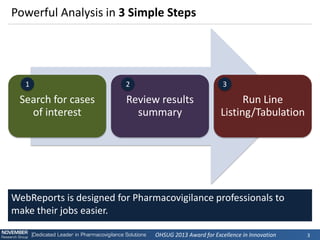
Powerful Analysis in 3 Simple Steps 
Search for cases of interest 
Review results summary 
Run Line Listing/Tabulation 
WebReports is designed for Pharmacovigilance professionals to make their jobs easier. 
1 
2 
3
OHSUG 2013 Award for Excellence in Innovation 
4 
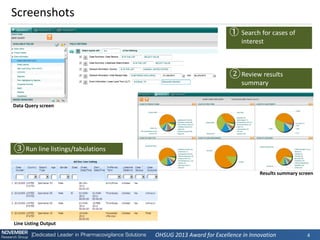
Screenshots 
Data Query screen 
Results summary screen 
Line Listing Output 
①Search for cases of interest 
②Review results summary 
③Run line listings/tabulations
OHSUG 2013 Award for Excellence in Innovation 
5 
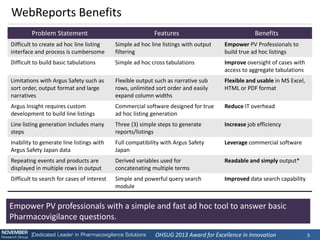
WebReports Benefits 
Problem Statement 
Features 
Benefits 
Difficult to create ad hoc line listing interface and process is cumbersome 
Simple ad hoc line listings with output filtering 
Empower PV Professionals to build true ad hoc listings 
Difficult to build basic tabulations 
Simple ad hoc cross tabulations 
Improve oversight of cases with access to aggregate tabulations 
Limitations with Argus Safety such as sort order, output format and large narratives 
Flexible output such as narrative sub rows, unlimited sort order and easily expand column widths 
Flexible and usable in MS Excel, HTML or PDF format 
Argus Insight requires custom development to build line listings 
Commercial software designed for true ad hoc listing generation 
Reduce IT overhead 
Line listing generation includes many steps 
Three (3) simple steps to generate reports/listings 
Increase job efficiency 
Inability to generate line listings with Argus Safety Japan data 
Full compatibility with Argus Safety Japan 
Leverage commercial software 
Repeating events and products are displayed in multiple rows in output 
Derived variables used for concatenating multiple terms 
Readable and simply output* 
Difficult to search for cases of interest 
Simple and powerful query search module 
Improved data search capability 
Empower PV professionals with a simple and fast ad hoc tool to answer basic Pharmacovigilance questions.
OHSUG 2013 Award for Excellence in Innovation 
6 
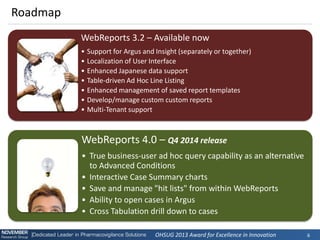
Roadmap 
WebReports 3.2 – Available now 
•Support for Argus and Insight (separately or together) 
•Localization of User Interface 
•Enhanced Japanese data support 
•Table-driven Ad Hoc Line Listing 
•Enhanced management of saved report templates 
•Develop/manage custom custom reports 
•Multi-Tenant support 
WebReports 4.0 – Q4 2014 release 
•True business-user ad hoc query capability as an alternative to Advanced Conditions 
•Interactive Case Summary charts 
•Save and manage "hit lists" from within WebReports 
•Ability to open cases in Argus 
•Cross Tabulation drill down to cases
Demo
OHSUG 2013 Award for Excellence in Innovation 
8 
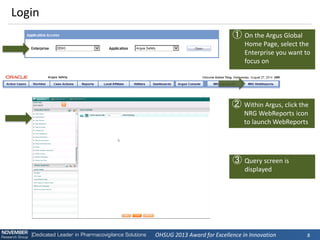
Login 
①On the Argus Global Home Page, select the Enterprise you want to focus on 
②Within Argus, click the NRG WebReports icon to launch WebReports 
③Query screen is displayed
OHSUG 2013 Award for Excellence in Innovation 
9 
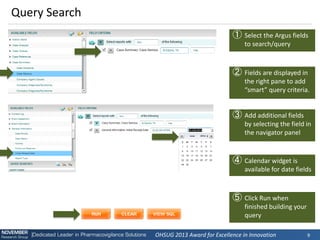
Query Search 
①Select the Argus fields to search/query 
②Fields are displayed in the right pane to add “smart” query criteria. 
③Add additional fields by selecting the field in the navigator panel 
④Calendar widget is available for date fields 
⑤Click Run when finished building your query
OHSUG 2013 Award for Excellence in Innovation 
10 
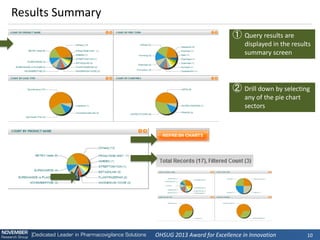
Results Summary 
①Query results are displayed in the results summary screen 
②Drill down by selecting any of the pie chart sectors
OHSUG 2013 Award for Excellence in Innovation 
11 
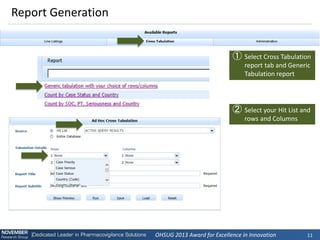
Report Generation 
①Select Cross Tabulation report tab and Generic Tabulation report 
②Select your Hit List and rows and Columns
OHSUG 2013 Award for Excellence in Innovation 
12 
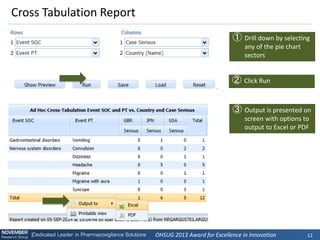
Cross Tabulation Report 
①Drill down by selecting any of the pie chart sectors 
③Output is presented on screen with options to output to Excel or PDF 
②Click Run
OHSUG 2013 Award for Excellence in Innovation 
13 
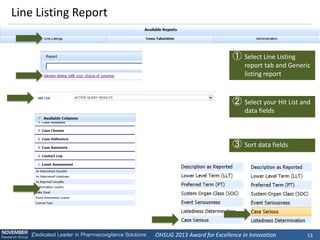
Line Listing Report 
①Select Line Listing report tab and Generic listing report 
②Select your Hit List and data fields 
③Sort data fields
OHSUG 2013 Award for Excellence in Innovation 
14 
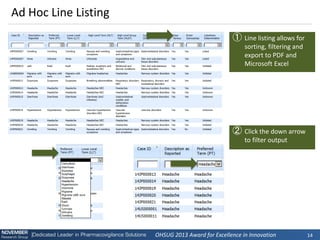
Ad Hoc Line Listing 
①Line listing allows for sorting, filtering and export to PDF and Microsoft Excel 
②Click the down arrow to filter output
OHSUG 2013 Award for Excellence in Innovation 
15 
Advanced Features 
①Select narrative, and Derived Variables 
②Narratives can expand the width of the report 
③Derived Variables concatenate multiple values in a single row
OHSUG 2013 Award for Excellence in Innovation 
16 
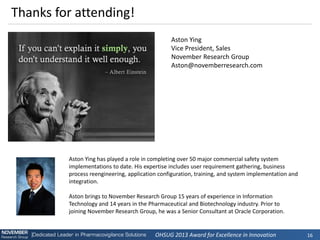
Aston Ying 
Vice President, Sales 
November Research Group 
Aston@novemberresearch.com 
Thanks for attending! 
Aston Ying has played a role in completing over 50 major commercial safety system implementations to date. His expertise includes user requirement gathering, business process reengineering, application configuration, training, and system implementation and integration. 
Aston brings to November Research Group 15 years of experience in Information Technology and 14 years in the Pharmaceutical and Biotechnology industry. Prior to joining November Research Group, he was a Senior Consultant at Oracle Corporation.

OHSUG 2014:WebReports for Oracle Argus Safety

  • 1.
    WebReports for OracleArgus Safety: Ad Hoc Line Listings and an Alternative to Advanced Conditions Aston Ying Vice President, Sales November Research Group
  • 2.
    Summary A quicklook into the presentation Objectives •Review WebReports features and functionality •Provide a demo of WebReports Features and Benefits Roadmap Demo Introduction
  • 3.
    OHSUG 2013 Awardfor Excellence in Innovation 3 Powerful Analysis in 3 Simple Steps Search for cases of interest Review results summary Run Line Listing/Tabulation WebReports is designed for Pharmacovigilance professionals to make their jobs easier. 1 2 3
  • 4.
    OHSUG 2013 Awardfor Excellence in Innovation 4 Screenshots Data Query screen Results summary screen Line Listing Output ①Search for cases of interest ②Review results summary ③Run line listings/tabulations
  • 5.
    OHSUG 2013 Awardfor Excellence in Innovation 5 WebReports Benefits Problem Statement Features Benefits Difficult to create ad hoc line listing interface and process is cumbersome Simple ad hoc line listings with output filtering Empower PV Professionals to build true ad hoc listings Difficult to build basic tabulations Simple ad hoc cross tabulations Improve oversight of cases with access to aggregate tabulations Limitations with Argus Safety such as sort order, output format and large narratives Flexible output such as narrative sub rows, unlimited sort order and easily expand column widths Flexible and usable in MS Excel, HTML or PDF format Argus Insight requires custom development to build line listings Commercial software designed for true ad hoc listing generation Reduce IT overhead Line listing generation includes many steps Three (3) simple steps to generate reports/listings Increase job efficiency Inability to generate line listings with Argus Safety Japan data Full compatibility with Argus Safety Japan Leverage commercial software Repeating events and products are displayed in multiple rows in output Derived variables used for concatenating multiple terms Readable and simply output* Difficult to search for cases of interest Simple and powerful query search module Improved data search capability Empower PV professionals with a simple and fast ad hoc tool to answer basic Pharmacovigilance questions.
  • 6.
    OHSUG 2013 Awardfor Excellence in Innovation 6 Roadmap WebReports 3.2 – Available now •Support for Argus and Insight (separately or together) •Localization of User Interface •Enhanced Japanese data support •Table-driven Ad Hoc Line Listing •Enhanced management of saved report templates •Develop/manage custom custom reports •Multi-Tenant support WebReports 4.0 – Q4 2014 release •True business-user ad hoc query capability as an alternative to Advanced Conditions •Interactive Case Summary charts •Save and manage "hit lists" from within WebReports •Ability to open cases in Argus •Cross Tabulation drill down to cases
  • 7.
  • 8.
    OHSUG 2013 Awardfor Excellence in Innovation 8 Login ①On the Argus Global Home Page, select the Enterprise you want to focus on ②Within Argus, click the NRG WebReports icon to launch WebReports ③Query screen is displayed
  • 9.
    OHSUG 2013 Awardfor Excellence in Innovation 9 Query Search ①Select the Argus fields to search/query ②Fields are displayed in the right pane to add “smart” query criteria. ③Add additional fields by selecting the field in the navigator panel ④Calendar widget is available for date fields ⑤Click Run when finished building your query
  • 10.
    OHSUG 2013 Awardfor Excellence in Innovation 10 Results Summary ①Query results are displayed in the results summary screen ②Drill down by selecting any of the pie chart sectors
  • 11.
    OHSUG 2013 Awardfor Excellence in Innovation 11 Report Generation ①Select Cross Tabulation report tab and Generic Tabulation report ②Select your Hit List and rows and Columns
  • 12.
    OHSUG 2013 Awardfor Excellence in Innovation 12 Cross Tabulation Report ①Drill down by selecting any of the pie chart sectors ③Output is presented on screen with options to output to Excel or PDF ②Click Run
  • 13.
    OHSUG 2013 Awardfor Excellence in Innovation 13 Line Listing Report ①Select Line Listing report tab and Generic listing report ②Select your Hit List and data fields ③Sort data fields
  • 14.
    OHSUG 2013 Awardfor Excellence in Innovation 14 Ad Hoc Line Listing ①Line listing allows for sorting, filtering and export to PDF and Microsoft Excel ②Click the down arrow to filter output
  • 15.
    OHSUG 2013 Awardfor Excellence in Innovation 15 Advanced Features ①Select narrative, and Derived Variables ②Narratives can expand the width of the report ③Derived Variables concatenate multiple values in a single row
  • 16.
    OHSUG 2013 Awardfor Excellence in Innovation 16 Aston Ying Vice President, Sales November Research Group Aston@novemberresearch.com Thanks for attending! Aston Ying has played a role in completing over 50 major commercial safety system implementations to date. His expertise includes user requirement gathering, business process reengineering, application configuration, training, and system implementation and integration. Aston brings to November Research Group 15 years of experience in Information Technology and 14 years in the Pharmaceutical and Biotechnology industry. Prior to joining November Research Group, he was a Senior Consultant at Oracle Corporation.