Web Design & Development
Unit 1
Unit 1 Objectives
• PART I
• Web designers vs web developers
• Expressing consequences
• Giving reasons
• PART IV
• Javascript
• Using sliders in Java
• Slider control: constructors and methods
• PART II
• HTML
• Expressing meaning
• HTML structure
• Giving graphic style to a website
• Numbers
• PART V
• PHP
• Calling a function from another module
• Creating a PHP contact form
• PART III
• CSS
• CSS syntax
• Color schemes
Web Designers & Web Developers
WEB DESIGNER
Web Designers & Web Developers
> Watch the following video:
WEB DESIGNER
> Do you agree or disagree with the info?
Web Designers & Web Developers
WEB DESIGNER
Web Designers & Web Developers
WEB DESIGNER
Web Designers & Web Developers
> What kind of abilities, interests or qualities do you need to be..
…a Web Designer? …a Web Developer?
> What profile do you identify with?
Designer/Developer Profile
> Why would you make a Web designer/developer?
I’m good at… I’m… I like…
I don’t mind… I can… I hate…
/di’sainer/
Web Designers & Web Developers
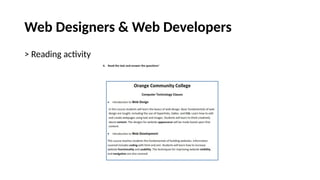
> Reading activity
Web Designers & Web Developers
> Reading activity
Web Designers & Web Developers
> Reading activity
Web Designers & Web Developers
> Reading activity
Web Designers & Web Developers
> Expressing consequences and reasons
Reason:
I need to contact a Web Designer because the company needs a new logo.
Consequence:
The code didn’t compile last time so we have to start from scratch again.
Web Designers & Web Developers
> Expressing consequences and reasons
Complete the following sentences with SO or BECAUSE
1. I don’t know how to solve this problem _________ I don’t have too much
experience.
2. I’m sure this website was made by a pro __________ it looks very attractive.
3. I heard the company has created a new IT department ______ they should be
looking for new engineers and technicians.
4. The new marketing campaign has been a success _______ all the people in the
company are really happy.
HTML
Unit 1
Part II
HTML
HTML
> Imagine you’re in charge of designing and developing the website for
a promising national company.
> Right now, you’re in a business meeting showing your proposal.
> Explain, in simple words, what HTML is.
HTML
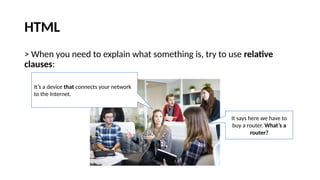
> When you need to explain what something is, try to use relative
clauses:
It says here we have to
buy a router. What’s a
router?
It’s a device that connects your network
to the Internet.
HTML
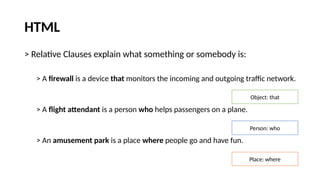
> Relative Clauses explain what something or somebody is:
> A firewall is a device that monitors the incoming and outgoing traffic network.
> A flight attendant is a person who helps passengers on a plane.
> An amusement park is a place where people go and have fun.
Object: that
Person: who
Place: where
HTML
> Imagine you’re in charge of designing and developing the website for
a promising national company.
> Right now, you’re in a business meeting showing your proposal.
> Explain, in simple words, what HTML is.
HTML
> Explain the following concepts:
A web developer
A tag
A text editor
HTML
> Go to page 7 in your booklet and do activity no. 1:
HTML
> Page 7, activity no. 2
HTML
> Are you an HTML expert?
HTML
> ASCII Characters (page 8, activity 4)
HTML
> How much do you remember about the ASCII characters/symbols
used in HTML? Click the link below and find out!
https://www.proprofs.com/flashcards/ugc/story.php?title=key-symbols
HTML
> Incomplete sentences (page 8, activity 5)
Complete the following sentences with these expressions:
Case Body HTML tags Web Browser Document
HTML
> Hands to work
HTML
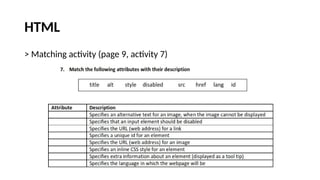
> Matching activity (page 9, activity 7)
HTML
> Matching activity (page 9, activity 7)
lang
alt
disabled
href
id
scr
style
title
HTML
> What do you do when you have a problem?
Who do you call/talk to?
Would you pay some money if necessary?
Have you ever looked for info in a forum? How was it?
HTML
> Role-Play (page 9, activities 8 and 9).
HTML
> Reading (page 10)
Read the text “Linking to
an External Style Sheet”
HTML
> Reading (page 12)
Answer these questions about the text you read:
HTML
> Reading (page 12)
Answer these questions about the text you read:
With a HTML link element <LINK REL=>
In the document <HEAD>
HTML tags like <HEAD> or <STYLE>
It states the device or media the document was designed for.
You have to use the same title in each style sheet
A designer can change the look of a site faster
HTML
> Speaking
Watch the video (link on page 13)
HTML
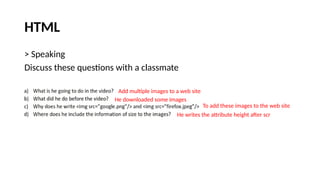
> Speaking
Discuss these questions with a classmate
Add multiple images to a web site
He downloaded some images
To add these images to the web site
He writes the attribute height after scr
CSS
Unit 1
Part III
CSS
CSS
> What’s CSS?
CSS
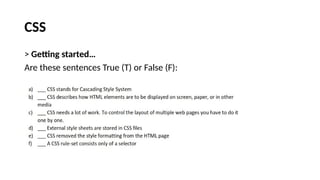
> Getting started…
Are these sentences True (T) or False (F):
CSS
> Reading (page 14)
CSS
> Complete the CSS syntax example with the following words (page 15)
selector
property value property value
declaration declaration
CSS
> Complete the following statements about CSS and the previous
activity (page 15)
selector
semicolon
declaration
semicolon
CSS
> Reading (page 16)
Mike, a web developer & designer, wants to change “hover over text”
color. This is the info he got from a forum.
CSS
> After reading the text, answer the questions:
> What can’t Tom make?
> Why can’t he use Jquery or JavaScript?
> What answer do you think is the ideal? Why?
He can’t make the top text change color when he hovers over it.
He doesn’t have enough experience.
CSS
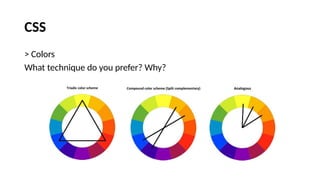
> Colors
CSS
> Colors
What technique do you prefer? Why?
CSS
> Mike needs to set a full screen background image. He finds a video in
YouTube™. Watch the video he found and answer the questions.
CSS
> Mike needs to set a full screen background image. He finds a video in
YouTube™. Watch the video he found and answer the questions.
> What’s the first thing he does?
> What does he do after that?
> Where does he include the URL of the image he downloaded?
> Where does he include the position of the image?
> What style does he give to the text?
He downloaded a background image.
He created an HTML page with a text editor.
Inside html {}
Inside html {}
White color, centered.
JavaScript
Unit 1
Part IV
JavaScript
JavaScript
> What do you know about JavaScript?
> What is it for?
> Have you ever used it? Give details.
> Watch the following video about JavaScript:
JavaScript
> About the video you just watched, answer the following questions:
> What companies are building apps around JS?
> What kind of job can you get if you master JS?
> What was JS used for at the beginning?
> What can you build with JS now?
Walmart, Netflix, Paypal, etc.
Front-End, Back-End or Full Stack Developer
Interactive web pages for browsers
Web or Mobile Apps, Chat or Video Stream Apps,
Video games, etc.
JavaScript
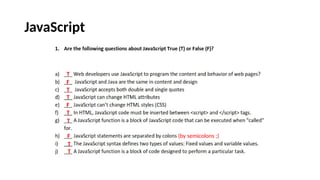
T
F
T
T
F
T
T
F
T
T
(by semicolons ;)
JavaScript
> Asking for help
Imagine you’re talking to a JS expert, what questions would you like to
make?
How do you..?
How can I..?
How can I help you?
JavaScript
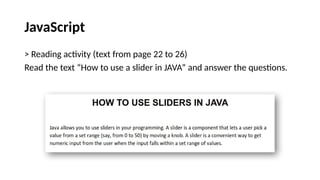
> Reading activity (text from page 22 to 26)
Read the text “How to use a slider in JAVA” and answer the questions.
JavaScript
> Reading activity (text from page 22 to 26)
JavaScript
> Listening Comprehension (page 27)
Watch the video about how to create a simple slide for a website using
JS.
JavaScript
> Listening Comprehension (page 27)
Watch the video about how to create a simple slide for a website using
JS.
PHP
Unit 1
Part V
PHP
>
PHP
> What’s PHP?
> How does it work?
> Is it different from JS, HTML or CSS? Explain.
> Have you ever used PHP? Give details.
> What would you like to learn to do with it?
PHP
> According to the video:
What is PHP usually used for?
Where does it run?
What else can you create with PHP?
PHP
> How much do you know about PHP? Take the quiz and let’s find out!
PHP
> Are the following sentences about PHP True (T) of False (F)?
1. ___ PHP is a server scripting language that helps us to make dynamic and interactive Web pages.
2. ___ PHP is open-source.
3. ___ PHP is an acronym for "PHP: Premium High Processor"
4. ___ You can’t execute PHP on the server.
5. ___ PHP files contain text, HTML and code
6. ___ PHP files have extension ".php".
7. ___ PHP runs only on Mac OS.
8. ___ A PHP script can be placed only in a specific place in the document.
9. ___ A PHP script starts with <?php and ends with ?>
10. ___ The purpose of a PHP comment is to be read by someone who is looking at the code.
11. ___ In PHP, all keywords (e.g. if, else, while, echo, etc.), classes, functions, and user-defined functions are case-
sensitive.
T
T
F
F
F
T
F
F
T
T
F
(Hypertext PreProcessor)
(Also on Windows, Linux, Unix etc.)
(Anywhere in the document)
It contains HTML tags and PHP scripting codes
(not case-sensitive)
PHP
> Reading Comprehension (page 29)
PHP
> Look at the 4 answers given. Choose one and explain why it’s the best
in your opinion.
PHP
> Look at the tutorial about how a contact form works.
PHP
> Answer these questions:
> What happens if you don’t write anything and then you press “send now”?
> What if you enter just some information, not all?
> Where does the info entered go to?
> What security measures could be added to this site?
> Does the tutorial actually explain how to create a contact form?
PHP
> Useful web sites to visit:
https://quizlet.com/543048504/flashcards
https://www.w3schools.com/php/default.asp
https://kahoot.it/challenge/02299886?challenge-id=6d99cded-8015-46
78-a97c-7b515a567f74_1618886561053

Web design and web development - Unit 1.pptx

  • 1.
    Web Design &Development Unit 1
  • 2.
    Unit 1 Objectives •PART I • Web designers vs web developers • Expressing consequences • Giving reasons • PART IV • Javascript • Using sliders in Java • Slider control: constructors and methods • PART II • HTML • Expressing meaning • HTML structure • Giving graphic style to a website • Numbers • PART V • PHP • Calling a function from another module • Creating a PHP contact form • PART III • CSS • CSS syntax • Color schemes
  • 3.
    Web Designers &Web Developers WEB DESIGNER
  • 4.
    Web Designers &Web Developers > Watch the following video: WEB DESIGNER > Do you agree or disagree with the info?
  • 5.
    Web Designers &Web Developers WEB DESIGNER
  • 6.
    Web Designers &Web Developers WEB DESIGNER
  • 7.
    Web Designers &Web Developers
  • 8.
    Web Designers &Web Developers > What kind of abilities, interests or qualities do you need to be.. …a Web Designer? …a Web Developer? > What profile do you identify with?
  • 9.
    Designer/Developer Profile > Whywould you make a Web designer/developer? I’m good at… I’m… I like… I don’t mind… I can… I hate… /di’sainer/
  • 10.
    Web Designers &Web Developers > Reading activity
  • 11.
    Web Designers &Web Developers > Reading activity
  • 12.
    Web Designers &Web Developers > Reading activity
  • 13.
    Web Designers &Web Developers > Reading activity
  • 14.
    Web Designers &Web Developers > Expressing consequences and reasons Reason: I need to contact a Web Designer because the company needs a new logo. Consequence: The code didn’t compile last time so we have to start from scratch again.
  • 15.
    Web Designers &Web Developers > Expressing consequences and reasons Complete the following sentences with SO or BECAUSE 1. I don’t know how to solve this problem _________ I don’t have too much experience. 2. I’m sure this website was made by a pro __________ it looks very attractive. 3. I heard the company has created a new IT department ______ they should be looking for new engineers and technicians. 4. The new marketing campaign has been a success _______ all the people in the company are really happy.
  • 16.
  • 17.
  • 18.
    HTML > Imagine you’rein charge of designing and developing the website for a promising national company. > Right now, you’re in a business meeting showing your proposal. > Explain, in simple words, what HTML is.
  • 19.
    HTML > When youneed to explain what something is, try to use relative clauses: It says here we have to buy a router. What’s a router? It’s a device that connects your network to the Internet.
  • 20.
    HTML > Relative Clausesexplain what something or somebody is: > A firewall is a device that monitors the incoming and outgoing traffic network. > A flight attendant is a person who helps passengers on a plane. > An amusement park is a place where people go and have fun. Object: that Person: who Place: where
  • 21.
    HTML > Imagine you’rein charge of designing and developing the website for a promising national company. > Right now, you’re in a business meeting showing your proposal. > Explain, in simple words, what HTML is.
  • 22.
    HTML > Explain thefollowing concepts: A web developer A tag A text editor
  • 23.
    HTML > Go topage 7 in your booklet and do activity no. 1:
  • 24.
    HTML > Page 7,activity no. 2
  • 25.
    HTML > Are youan HTML expert?
  • 26.
    HTML > ASCII Characters(page 8, activity 4)
  • 27.
    HTML > How muchdo you remember about the ASCII characters/symbols used in HTML? Click the link below and find out! https://www.proprofs.com/flashcards/ugc/story.php?title=key-symbols
  • 28.
    HTML > Incomplete sentences(page 8, activity 5) Complete the following sentences with these expressions: Case Body HTML tags Web Browser Document
  • 29.
  • 30.
    HTML > Matching activity(page 9, activity 7)
  • 31.
    HTML > Matching activity(page 9, activity 7) lang alt disabled href id scr style title
  • 32.
    HTML > What doyou do when you have a problem? Who do you call/talk to? Would you pay some money if necessary? Have you ever looked for info in a forum? How was it?
  • 33.
    HTML > Role-Play (page9, activities 8 and 9).
  • 34.
    HTML > Reading (page10) Read the text “Linking to an External Style Sheet”
  • 35.
    HTML > Reading (page12) Answer these questions about the text you read:
  • 36.
    HTML > Reading (page12) Answer these questions about the text you read: With a HTML link element <LINK REL=> In the document <HEAD> HTML tags like <HEAD> or <STYLE> It states the device or media the document was designed for. You have to use the same title in each style sheet A designer can change the look of a site faster
  • 37.
    HTML > Speaking Watch thevideo (link on page 13)
  • 38.
    HTML > Speaking Discuss thesequestions with a classmate Add multiple images to a web site He downloaded some images To add these images to the web site He writes the attribute height after scr
  • 39.
  • 40.
  • 41.
  • 42.
    CSS > Getting started… Arethese sentences True (T) or False (F):
  • 43.
  • 44.
    CSS > Complete theCSS syntax example with the following words (page 15) selector property value property value declaration declaration
  • 45.
    CSS > Complete thefollowing statements about CSS and the previous activity (page 15) selector semicolon declaration semicolon
  • 46.
    CSS > Reading (page16) Mike, a web developer & designer, wants to change “hover over text” color. This is the info he got from a forum.
  • 47.
    CSS > After readingthe text, answer the questions: > What can’t Tom make? > Why can’t he use Jquery or JavaScript? > What answer do you think is the ideal? Why? He can’t make the top text change color when he hovers over it. He doesn’t have enough experience.
  • 48.
  • 49.
    CSS > Colors What techniquedo you prefer? Why?
  • 50.
    CSS > Mike needsto set a full screen background image. He finds a video in YouTube™. Watch the video he found and answer the questions.
  • 51.
    CSS > Mike needsto set a full screen background image. He finds a video in YouTube™. Watch the video he found and answer the questions. > What’s the first thing he does? > What does he do after that? > Where does he include the URL of the image he downloaded? > Where does he include the position of the image? > What style does he give to the text? He downloaded a background image. He created an HTML page with a text editor. Inside html {} Inside html {} White color, centered.
  • 52.
  • 53.
  • 54.
    JavaScript > What doyou know about JavaScript? > What is it for? > Have you ever used it? Give details. > Watch the following video about JavaScript:
  • 55.
    JavaScript > About thevideo you just watched, answer the following questions: > What companies are building apps around JS? > What kind of job can you get if you master JS? > What was JS used for at the beginning? > What can you build with JS now? Walmart, Netflix, Paypal, etc. Front-End, Back-End or Full Stack Developer Interactive web pages for browsers Web or Mobile Apps, Chat or Video Stream Apps, Video games, etc.
  • 56.
  • 57.
    JavaScript > Asking forhelp Imagine you’re talking to a JS expert, what questions would you like to make? How do you..? How can I..? How can I help you?
  • 58.
    JavaScript > Reading activity(text from page 22 to 26) Read the text “How to use a slider in JAVA” and answer the questions.
  • 59.
    JavaScript > Reading activity(text from page 22 to 26)
  • 60.
    JavaScript > Listening Comprehension(page 27) Watch the video about how to create a simple slide for a website using JS.
  • 61.
    JavaScript > Listening Comprehension(page 27) Watch the video about how to create a simple slide for a website using JS.
  • 62.
  • 63.
  • 64.
    PHP > What’s PHP? >How does it work? > Is it different from JS, HTML or CSS? Explain. > Have you ever used PHP? Give details. > What would you like to learn to do with it?
  • 65.
    PHP > According tothe video: What is PHP usually used for? Where does it run? What else can you create with PHP?
  • 66.
    PHP > How muchdo you know about PHP? Take the quiz and let’s find out!
  • 67.
    PHP > Are thefollowing sentences about PHP True (T) of False (F)? 1. ___ PHP is a server scripting language that helps us to make dynamic and interactive Web pages. 2. ___ PHP is open-source. 3. ___ PHP is an acronym for "PHP: Premium High Processor" 4. ___ You can’t execute PHP on the server. 5. ___ PHP files contain text, HTML and code 6. ___ PHP files have extension ".php". 7. ___ PHP runs only on Mac OS. 8. ___ A PHP script can be placed only in a specific place in the document. 9. ___ A PHP script starts with <?php and ends with ?> 10. ___ The purpose of a PHP comment is to be read by someone who is looking at the code. 11. ___ In PHP, all keywords (e.g. if, else, while, echo, etc.), classes, functions, and user-defined functions are case- sensitive. T T F F F T F F T T F (Hypertext PreProcessor) (Also on Windows, Linux, Unix etc.) (Anywhere in the document) It contains HTML tags and PHP scripting codes (not case-sensitive)
  • 68.
  • 69.
    PHP > Look atthe 4 answers given. Choose one and explain why it’s the best in your opinion.
  • 70.
    PHP > Look atthe tutorial about how a contact form works.
  • 71.
    PHP > Answer thesequestions: > What happens if you don’t write anything and then you press “send now”? > What if you enter just some information, not all? > Where does the info entered go to? > What security measures could be added to this site? > Does the tutorial actually explain how to create a contact form?
  • 72.
    PHP > Useful websites to visit: https://quizlet.com/543048504/flashcards https://www.w3schools.com/php/default.asp https://kahoot.it/challenge/02299886?challenge-id=6d99cded-8015-46 78-a97c-7b515a567f74_1618886561053