





OFFLINE PWA
JOURNEY TO THE FUTURE
WHY PWA?
FAST - Respond quickly to user interactions with
silky smooth animations and no janky scrolling.
RELIABLE - Load instantly and never show the
downasaur, even in uncertain network conditions.
ENGAGING - Feel like a natural app on the
device, with an immersive user experience.
OFFLINE PROGRESSIVE WEB APPLICATIONS
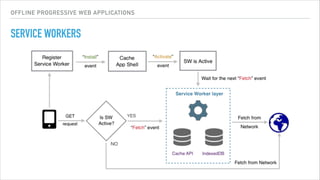
SERVICE WORKERS
▸ Runs separately from the main browser thread
▸ Designed to be fully asynchronous
▸ Programmable network proxy
▸ Runs only over HTTPS
▸ Becomes idle when not in use and restarts when it's next needed.
OFFLINE PROGRESSIVE WEB APPLICATIONS
ADVANCED FEATURES
▸ Notifications API - Display and interact with notifications using the operating
system's native notification system.
▸ Push API: Subscribe to a push service and receive push messages. Push
messages are delivered to a service worker, which can use the information in
the message to update the local state or display a notification to the user.
Because service workers run independently of the main app, they can receive
and display notifications even when the browser is not running.
OFFLINE PROGRESSIVE WEB APPLICATIONS
ADVANCED FEATURES
▸ Background Sync API: Defer actions until the user has stable connectivity. This
is useful to ensure that whatever the user wants to send is actually sent. This API
also allows servers to push periodic updates to the app so the app can update
when it's next online.
▸ Channel Messaging API: Lets web workers and service workers communicate
with each other and with the host application.
SERVICE WORKER
LIFECYCLE
OFFLINE PROGRESSIVE WEB APPLICATIONS
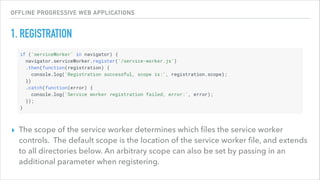
1. REGISTRATION
▸ The scope of the service worker determines which files the service worker
controls. The default scope is the location of the service worker file, and extends
to all directories below. An arbitrary scope can also be set by passing in an
additional parameter when registering.
OFFLINE PROGRESSIVE WEB APPLICATIONS
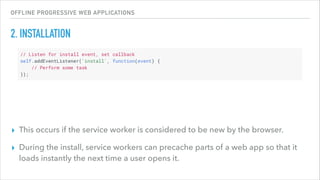
2. INSTALLATION
▸ This occurs if the service worker is considered to be new by the browser.
▸ During the install, service workers can precache parts of a web app so that it
loads instantly the next time a user opens it.
OFFLINE PROGRESSIVE WEB APPLICATIONS
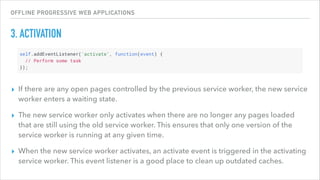
3. ACTIVATION
▸ If there are any open pages controlled by the previous service worker, the new service
worker enters a waiting state.
▸ The new service worker only activates when there are no longer any pages loaded
that are still using the old service worker. This ensures that only one version of the
service worker is running at any given time.
▸ When the new service worker activates, an activate event is triggered in the activating
service worker. This event listener is a good place to clean up outdated caches.
OFFLINE PROGRESSIVE WEB APPLICATIONS
OTHER EVENTS
▸ message - service worker can receive information from other scripts
▸ fetch - intercept requests.
▸ push - when a (Web Push Protocol) message is received.
▸ sync - ask for an event to be fired when the user has connectivity and we listen
for it
GOING OFFLINE
OFFLINE PROGRESSIVE WEB APPLICATIONS
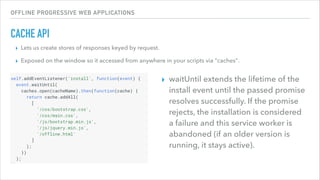
CACHE API
▸ Lets us create stores of responses keyed by request.
▸ Exposed on the window so it accessed from anywhere in your scripts via "caches".
▸ waitUntil extends the lifetime of the
install event until the passed promise
resolves successfully. If the promise
rejects, the installation is considered
a failure and this service worker is
abandoned (if an older version is
running, it stays active).
OFFLINE PROGRESSIVE WEB APPLICATIONS
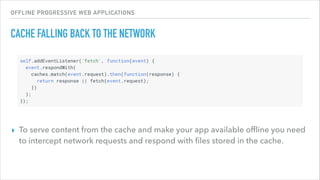
CACHE FALLING BACK TO THE NETWORK
▸ To serve content from the cache and make your app available offline you need
to intercept network requests and respond with files stored in the cache.
OFFLINE PROGRESSIVE WEB APPLICATIONS
ALL APPROACHES
▸ cache only
▸ network only
▸ cache falling back to network
▸ network falling back to cache
▸ cache then network
OFFLINE PROGRESSIVE WEB APPLICATIONS
SERVICE WORKERS
INSTALLABLE WEB APPS
OFFLINE PROGRESSIVE WEB APPLICATIONS
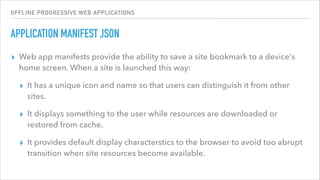
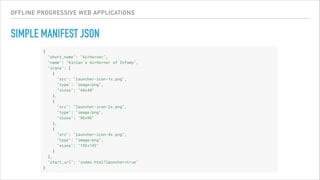
APPLICATION MANIFEST JSON
▸ Web app manifests provide the ability to save a site bookmark to a device's
home screen. When a site is launched this way:
▸ It has a unique icon and name so that users can distinguish it from other
sites.
▸ It displays something to the user while resources are downloaded or
restored from cache.
▸ It provides default display characterstics to the browser to avoid too abrupt
transition when site resources become available.
OFFLINE PROGRESSIVE WEB APPLICATIONS
SIMPLE MANIFEST JSON
IN PURSUIT OF SPEED
OFFLINE PROGRESSIVE WEB APPLICATIONS
HYPERTEXT TRANSFER PROTOCOL VERSION 2 (HTTP/2)
▸ Data compression of HTTP headers (HPACK)
▸ encode large headers using a fixed Huffman encoding
▸ encode commonly used headers as a variable length integer, rather than re-sending the whole header each
time
▸ HTTP/2 Server Push
▸ Multiplexing multiple requests over a single TCP connection
▸ Every request/response pair is mapped to a stream. Each stream is given a unique id.
▸ Priority - Allow a client to give priority preferences to particular streams
▸ Flow Control - Every stream, and the connection as a whole maintains a send window, which is the amount of
data that the server is allowed to send on the stream/connection.
OFFLINE PROGRESSIVE WEB APPLICATIONS
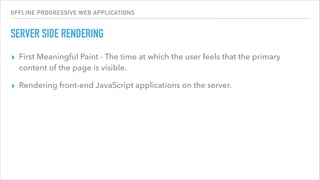
SERVER SIDE RENDERING
▸ First Meaningful Paint - The time at which the user feels that the primary
content of the page is visible.
▸ Rendering front-end JavaScript applications on the server.
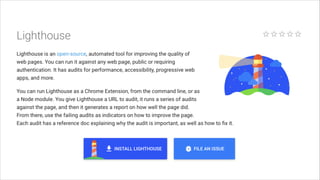
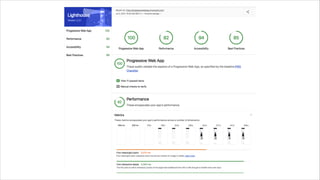
TESTING
QUESTIONS

Introduction to Offline Progressive Web Applications

  • 1.
  • 2.
    WHY PWA? FAST -Respond quickly to user interactions with silky smooth animations and no janky scrolling. RELIABLE - Load instantly and never show the downasaur, even in uncertain network conditions. ENGAGING - Feel like a natural app on the device, with an immersive user experience.
  • 3.
    OFFLINE PROGRESSIVE WEBAPPLICATIONS SERVICE WORKERS ▸ Runs separately from the main browser thread ▸ Designed to be fully asynchronous ▸ Programmable network proxy ▸ Runs only over HTTPS ▸ Becomes idle when not in use and restarts when it's next needed.
  • 4.
    OFFLINE PROGRESSIVE WEBAPPLICATIONS ADVANCED FEATURES ▸ Notifications API - Display and interact with notifications using the operating system's native notification system. ▸ Push API: Subscribe to a push service and receive push messages. Push messages are delivered to a service worker, which can use the information in the message to update the local state or display a notification to the user. Because service workers run independently of the main app, they can receive and display notifications even when the browser is not running.
  • 5.
    OFFLINE PROGRESSIVE WEBAPPLICATIONS ADVANCED FEATURES ▸ Background Sync API: Defer actions until the user has stable connectivity. This is useful to ensure that whatever the user wants to send is actually sent. This API also allows servers to push periodic updates to the app so the app can update when it's next online. ▸ Channel Messaging API: Lets web workers and service workers communicate with each other and with the host application.
  • 6.
  • 7.
    OFFLINE PROGRESSIVE WEBAPPLICATIONS 1. REGISTRATION ▸ The scope of the service worker determines which files the service worker controls. The default scope is the location of the service worker file, and extends to all directories below. An arbitrary scope can also be set by passing in an additional parameter when registering.
  • 8.
    OFFLINE PROGRESSIVE WEBAPPLICATIONS 2. INSTALLATION ▸ This occurs if the service worker is considered to be new by the browser. ▸ During the install, service workers can precache parts of a web app so that it loads instantly the next time a user opens it.
  • 9.
    OFFLINE PROGRESSIVE WEBAPPLICATIONS 3. ACTIVATION ▸ If there are any open pages controlled by the previous service worker, the new service worker enters a waiting state. ▸ The new service worker only activates when there are no longer any pages loaded that are still using the old service worker. This ensures that only one version of the service worker is running at any given time. ▸ When the new service worker activates, an activate event is triggered in the activating service worker. This event listener is a good place to clean up outdated caches.
  • 10.
    OFFLINE PROGRESSIVE WEBAPPLICATIONS OTHER EVENTS ▸ message - service worker can receive information from other scripts ▸ fetch - intercept requests. ▸ push - when a (Web Push Protocol) message is received. ▸ sync - ask for an event to be fired when the user has connectivity and we listen for it
  • 11.
  • 12.
    OFFLINE PROGRESSIVE WEBAPPLICATIONS CACHE API ▸ Lets us create stores of responses keyed by request. ▸ Exposed on the window so it accessed from anywhere in your scripts via "caches". ▸ waitUntil extends the lifetime of the install event until the passed promise resolves successfully. If the promise rejects, the installation is considered a failure and this service worker is abandoned (if an older version is running, it stays active).
  • 13.
    OFFLINE PROGRESSIVE WEBAPPLICATIONS CACHE FALLING BACK TO THE NETWORK ▸ To serve content from the cache and make your app available offline you need to intercept network requests and respond with files stored in the cache.
  • 14.
    OFFLINE PROGRESSIVE WEBAPPLICATIONS ALL APPROACHES ▸ cache only ▸ network only ▸ cache falling back to network ▸ network falling back to cache ▸ cache then network
  • 15.
    OFFLINE PROGRESSIVE WEBAPPLICATIONS SERVICE WORKERS
  • 16.
  • 17.
    OFFLINE PROGRESSIVE WEBAPPLICATIONS APPLICATION MANIFEST JSON ▸ Web app manifests provide the ability to save a site bookmark to a device's home screen. When a site is launched this way: ▸ It has a unique icon and name so that users can distinguish it from other sites. ▸ It displays something to the user while resources are downloaded or restored from cache. ▸ It provides default display characterstics to the browser to avoid too abrupt transition when site resources become available.
  • 18.
    OFFLINE PROGRESSIVE WEBAPPLICATIONS SIMPLE MANIFEST JSON
  • 19.
  • 20.
    OFFLINE PROGRESSIVE WEBAPPLICATIONS HYPERTEXT TRANSFER PROTOCOL VERSION 2 (HTTP/2) ▸ Data compression of HTTP headers (HPACK) ▸ encode large headers using a fixed Huffman encoding ▸ encode commonly used headers as a variable length integer, rather than re-sending the whole header each time ▸ HTTP/2 Server Push ▸ Multiplexing multiple requests over a single TCP connection ▸ Every request/response pair is mapped to a stream. Each stream is given a unique id. ▸ Priority - Allow a client to give priority preferences to particular streams ▸ Flow Control - Every stream, and the connection as a whole maintains a send window, which is the amount of data that the server is allowed to send on the stream/connection.
  • 21.
    OFFLINE PROGRESSIVE WEBAPPLICATIONS SERVER SIDE RENDERING ▸ First Meaningful Paint - The time at which the user feels that the primary content of the page is visible. ▸ Rendering front-end JavaScript applications on the server.
  • 22.
  • 25.