“7 easy web 2.0 tools”(45 minute presentation)Intended Audience:  FBLA AdvisersPete Dulany, CIWEast Leyden High SchoolNotes from today’s session available at DulanyConsulting.com/FBLA
Let’s start with an IMPORTANTquestionA site that is considered “Web 2.0” is a website that…Requires the Adobe Flash playerIs based on user-created contentBuilt upon national core standardsRuns on Internet 2, the faster infrastructure to support rich content
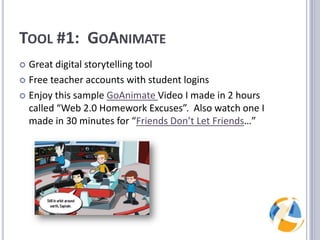
Tool #1:  GoAnimateGreat digital storytelling toolFree teacher accounts with student loginsEnjoy this sample GoAnimateVideo I made in 2 hours called “Web 2.0 Homework Excuses”.  Also watch one I made in 30 minutes for “Friends Don’t Let Friends…”
PROs / CONsPros:Digital storytelling increases student understandingStudents are actively writingStudents are engaged and excited to learnBasic accounts are freeCons:Can be sluggish over a slow Internet connectionLearning curve:  one to two class periods
Tool #2:  PreziAn alternative to tedious PowerPoint presentationsAll freshmen at Leyden HS Dist 212 learn thisEmbeds videos right from YouTube – no need to download and convertWeb Accessible – no need to move PPTs with flash drives or student login accounts.Enjoy this sample Prezi:All about FBLA
PROs / CONsPros:Students are forced to think in text blurbsSimple, easy to read colorsInstant YouTube embeddingEasy to create and edit PrezisBasic accounts are freeCons:No text animations, just zooming / positioningAll prezis are public
Tool #3:  WallWisherA great way for students to do things like:Post questions about a topicPost difficulties with an assignmentA great way for faculty to do things like:Ideas for student of the monthPost recruiting ideasPost who’s bringing what for a potluck lunchCheck out the sample Wall!
Quick PollWhat’s the biggest problem with WallWisher?Students have to sign up for a user accountThe wall owner has to approve every postKeeping the posts “unique”Abusive language and CyberBullying
PROs / CONsPros:No signup – just visit and postYou can “approve” posts or notFast and instant thoughtsEasy to create and set up.  It’s free!Cons:Unique posts / studentsRequires moderation if anyone can post
Tool #4:  WeeblyCreates instant websites for clubs, organizations, teacher webpages.  Includes a free dropbox that gets sent to your e-mail account.No expensive Dreamweaver license.  No HTML coding required.  No FTP.  No fees.EVERY teacher can have a webpage.Demo – www.mrdulany.com
Tool #5:  VuvoxAn excellent timeline creation tool.  Also useful for showing order.Helpful for creating interactive timelinesShowcase: History of the Internet (History), Moore’s Law (Math), Cell Mitosis (Science), Summarizing a story (English), even nonlinear projects like word definitions and a picture to help remember.Incorporates reading and writingDemo  : When I present...
Tool #6:  scribblemapsGoogle Maps are great – but sometimes, you just need to scribble on them.Useful for parking directionsGood for GPS devices on a “treasure hunt” – where you’ve been, or where you will go (Wireless War Walking)Demo – ScribbleMaps.comActual assignment - Trail of Tears
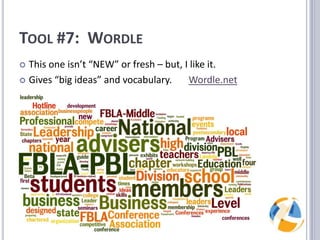
Tool #7:  WordleThis one isn’t “NEW” or fresh – but, I like it.Gives “big ideas” and vocabulary.       Wordle.net
But, remember…	Use these tools at the beginning of lesson planning, not as an add-on extra.USE THESE TOOLS TODAY.  TRY ONE.Seriously.  Try JUST ONE today.
And now this…The presentation that you’ve seen today – and many more like it – can be brought to your school district.I train teachers in all things technology-related!If you need help building (or re-building) a curriculum, particularly an online curriculum, I can help with that too.
ConclusionQuestions / AnswersAll slides are posted to DulanyConsulting.com/FBLAYou can reach me at Pete@DulanyConsulting.com

Web 2.0 tools for FBLA advisers

  • 1.
    “7 easy web2.0 tools”(45 minute presentation)Intended Audience: FBLA AdvisersPete Dulany, CIWEast Leyden High SchoolNotes from today’s session available at DulanyConsulting.com/FBLA
  • 2.
    Let’s start withan IMPORTANTquestionA site that is considered “Web 2.0” is a website that…Requires the Adobe Flash playerIs based on user-created contentBuilt upon national core standardsRuns on Internet 2, the faster infrastructure to support rich content
  • 3.
    Tool #1: GoAnimateGreat digital storytelling toolFree teacher accounts with student loginsEnjoy this sample GoAnimateVideo I made in 2 hours called “Web 2.0 Homework Excuses”. Also watch one I made in 30 minutes for “Friends Don’t Let Friends…”
  • 4.
    PROs / CONsPros:Digitalstorytelling increases student understandingStudents are actively writingStudents are engaged and excited to learnBasic accounts are freeCons:Can be sluggish over a slow Internet connectionLearning curve: one to two class periods
  • 5.
    Tool #2: PreziAn alternative to tedious PowerPoint presentationsAll freshmen at Leyden HS Dist 212 learn thisEmbeds videos right from YouTube – no need to download and convertWeb Accessible – no need to move PPTs with flash drives or student login accounts.Enjoy this sample Prezi:All about FBLA
  • 6.
    PROs / CONsPros:Studentsare forced to think in text blurbsSimple, easy to read colorsInstant YouTube embeddingEasy to create and edit PrezisBasic accounts are freeCons:No text animations, just zooming / positioningAll prezis are public
  • 7.
    Tool #3: WallWisherA great way for students to do things like:Post questions about a topicPost difficulties with an assignmentA great way for faculty to do things like:Ideas for student of the monthPost recruiting ideasPost who’s bringing what for a potluck lunchCheck out the sample Wall!
  • 8.
    Quick PollWhat’s thebiggest problem with WallWisher?Students have to sign up for a user accountThe wall owner has to approve every postKeeping the posts “unique”Abusive language and CyberBullying
  • 9.
    PROs / CONsPros:Nosignup – just visit and postYou can “approve” posts or notFast and instant thoughtsEasy to create and set up. It’s free!Cons:Unique posts / studentsRequires moderation if anyone can post
  • 10.
    Tool #4: WeeblyCreates instant websites for clubs, organizations, teacher webpages. Includes a free dropbox that gets sent to your e-mail account.No expensive Dreamweaver license. No HTML coding required. No FTP. No fees.EVERY teacher can have a webpage.Demo – www.mrdulany.com
  • 11.
    Tool #5: VuvoxAn excellent timeline creation tool. Also useful for showing order.Helpful for creating interactive timelinesShowcase: History of the Internet (History), Moore’s Law (Math), Cell Mitosis (Science), Summarizing a story (English), even nonlinear projects like word definitions and a picture to help remember.Incorporates reading and writingDemo : When I present...
  • 12.
    Tool #6: scribblemapsGoogle Maps are great – but sometimes, you just need to scribble on them.Useful for parking directionsGood for GPS devices on a “treasure hunt” – where you’ve been, or where you will go (Wireless War Walking)Demo – ScribbleMaps.comActual assignment - Trail of Tears
  • 13.
    Tool #7: WordleThis one isn’t “NEW” or fresh – but, I like it.Gives “big ideas” and vocabulary. Wordle.net
  • 14.
    But, remember… Use thesetools at the beginning of lesson planning, not as an add-on extra.USE THESE TOOLS TODAY. TRY ONE.Seriously. Try JUST ONE today.
  • 15.
    And now this…Thepresentation that you’ve seen today – and many more like it – can be brought to your school district.I train teachers in all things technology-related!If you need help building (or re-building) a curriculum, particularly an online curriculum, I can help with that too.
  • 16.
    ConclusionQuestions / AnswersAllslides are posted to DulanyConsulting.com/FBLAYou can reach me at Pete@DulanyConsulting.com