Computer Network
Activity No. # 03
VPN Configuration
Submitted By
Shahab Ahmad (12587)
M. Shoaib Hussain (15321)
Submitted To
Sir Syed Naqi Abbas
BS (Computer Science)
6th
Semester (Section D)
Spring-2022
Riphah International University
Faisalabad Campus
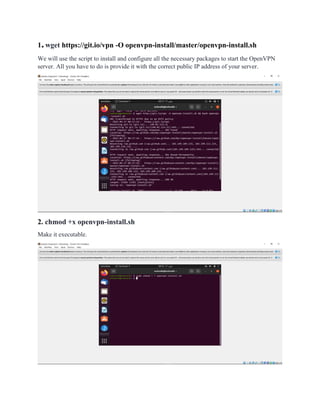
1.wget https://git.io/vpn -O openvpn-install/master/openvpn-install.sh
We will use the script to install and configure all the necessary packages to start the OpenVPN
server. All you have to do is provide it with the correct public IP address of your server.
2. chmod +x openvpn-install.sh
Make it executable.
3. openvpn-install.sh
Now run the script.
4. sudo ufw status
The output will show that the VPN status is inactive:
• Sudo ufw enable
If UFW is activated, the output will look something to the following:
• Sudo ufw status
The output will show that the VPN status is active
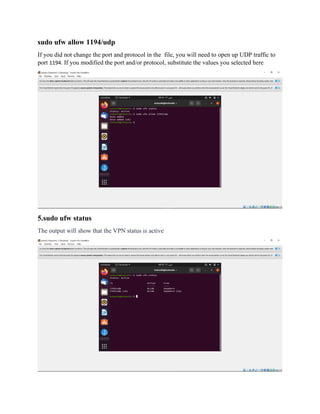
sudo ufw allow 1194/udp
If you did not change the port and protocol in the file, you will need to open up UDP traffic to
port 1194. If you modified the port and/or protocol, substitute the values you selected here
5.sudo ufw status
The output will show that the VPN status is active
6. sudo netstat-apt / group openvpn
7.Su –
Test it your root password by typing the following command
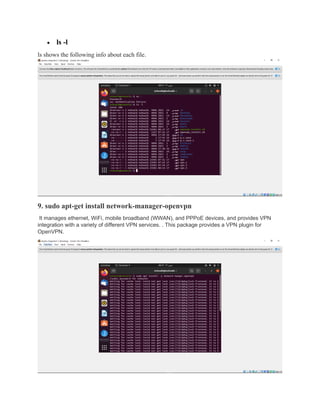
• ls -l
ls shows the following info about each file.
9. sudo apt-get install network-manager-openvpn
It manages ethernet, WiFi, mobile broadband (WWAN), and PPPoE devices, and provides VPN
integration with a variety of different VPN services. . This package provides a VPN plugin for
OpenVPN.
Conclusion.
You should now have a fully operational virtual private network running on your OpenVPN
Server. You can browse the web and download content without worrying about malicious actors
tracking your activity.
There are several steps you could take to customize your OpenVPN installation even further,
such as configuring your client to connect to the VPN automatically or configuring client-
specific rules and access policies

vpn activity.pdf

  • 1.
    Computer Network Activity No.# 03 VPN Configuration Submitted By Shahab Ahmad (12587) M. Shoaib Hussain (15321) Submitted To Sir Syed Naqi Abbas BS (Computer Science) 6th Semester (Section D) Spring-2022 Riphah International University Faisalabad Campus
  • 2.
    1.wget https://git.io/vpn -Oopenvpn-install/master/openvpn-install.sh We will use the script to install and configure all the necessary packages to start the OpenVPN server. All you have to do is provide it with the correct public IP address of your server. 2. chmod +x openvpn-install.sh Make it executable.
  • 3.
    3. openvpn-install.sh Now runthe script. 4. sudo ufw status The output will show that the VPN status is inactive:
  • 4.
    • Sudo ufwenable If UFW is activated, the output will look something to the following: • Sudo ufw status The output will show that the VPN status is active
  • 5.
    sudo ufw allow1194/udp If you did not change the port and protocol in the file, you will need to open up UDP traffic to port 1194. If you modified the port and/or protocol, substitute the values you selected here 5.sudo ufw status The output will show that the VPN status is active
  • 6.
    6. sudo netstat-apt/ group openvpn 7.Su – Test it your root password by typing the following command
  • 7.
    • ls -l lsshows the following info about each file. 9. sudo apt-get install network-manager-openvpn It manages ethernet, WiFi, mobile broadband (WWAN), and PPPoE devices, and provides VPN integration with a variety of different VPN services. . This package provides a VPN plugin for OpenVPN.
  • 8.
    Conclusion. You should nowhave a fully operational virtual private network running on your OpenVPN Server. You can browse the web and download content without worrying about malicious actors tracking your activity. There are several steps you could take to customize your OpenVPN installation even further, such as configuring your client to connect to the VPN automatically or configuring client- specific rules and access policies