Virtual Port Channel (vPC)
Content
 What is vPC
 Advantages of vPC
 Configuring vPC
 vPC Data-Plane Loop Avoidance
 Components of vpC
o vPC Peer Switch
o vPC Peer Link
o vPC Domain
o vPC Peer Keepalive
o vPC Member Port
o Host vPC Port
o vPC VLAN
o non-vPC VLAN
o Orphan Port
o Cisco Fabric Services (CFS) Protocol
 Deployment Scenarios
o Inside Data Center:
o Across Data Center
 What is vPC Object Tracking
 Can I extend vPC between 2 data centers
 Does HSRP/VRRP work with vPC
 Can I configure vPC in Mixed Chassis Mode
o Peer-link on M1 ports
o Peer-link on F1 ports
 How does vPC work with Layer 3
o L3 Backup Routing Path and vPC
 Does Cisco ASA in Transparent Mode support vPC
 Does Cisco ASA in Routed Mode support vPC
 Multicast and vPC
 What is Enhanced vPC
 Can I configure vPC with VDC
 ISSU (In-Service Software Upgrade) with vPC
o What is ISSU
 CDP and vPC
 Troubleshooting vPC
o vPC peer-link failure
o vPC Peer-Keepalive Failure
o One vPC Peer Switch Failure
o vPC Consistency parameter mismatch
 Type 1 parameters
 Type 2 parameters exist
 What is graceful consistency check
 Bypassing a vPC Consistency Check When a Peer Link is Lost
 What is auto-recovery feature
 vPC Type 1 configuration parameters
o What is split-brain scenario
What is vPC
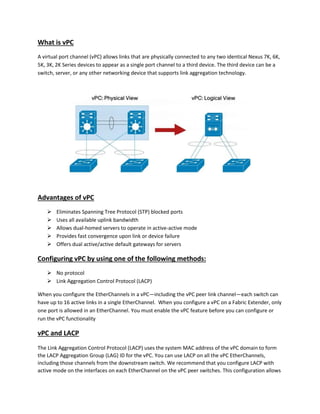
A virtual port channel (vPC) allows links that are physically connected to any two identical Nexus 7K, 6K,
5K, 3K, 2K Series devices to appear as a single port channel to a third device. The third device can be a
switch, server, or any other networking device that supports link aggregation technology.
Advantages of vPC
 Eliminates Spanning Tree Protocol (STP) blocked ports
 Uses all available uplink bandwidth
 Allows dual-homed servers to operate in active-active mode
 Provides fast convergence upon link or device failure
 Offers dual active/active default gateways for servers
Configuring vPC by using one of the following methods:
 No protocol
 Link Aggregation Control Protocol (LACP)
When you configure the EtherChannels in a vPC—including the vPC peer link channel—each switch can
have up to 16 active links in a single EtherChannel. When you configure a vPC on a Fabric Extender, only
one port is allowed in an EtherChannel. You must enable the vPC feature before you can configure or
run the vPC functionality
vPC and LACP
The Link Aggregation Control Protocol (LACP) uses the system MAC address of the vPC domain to form
the LACP Aggregation Group (LAG) ID for the vPC. You can use LACP on all the vPC EtherChannels,
including those channels from the downstream switch. We recommend that you configure LACP with
active mode on the interfaces on each EtherChannel on the vPC peer switches. This configuration allows
you to more easily detect compatibility between switches, unidirectional links, and multihop
connections, and provides dynamic reaction to run-time changes and link failures.
The vPC peer link supports 16 EtherChannel LACP interfaces. You should manually configure the system
priority on the vPC peer-link switches to ensure that the vPC peer-link switches have a higher LACP
priority than the downstream connected switches. A lower numerical value system priority means a
higher LACP priority.
vPC Data-Plane Loop Avoidance
vPC performs loop avoidance at data-plane layer instead of control plane layer for Spanning Tree
Protocol. vPC loop avoidance rule states that traffic coming from vPC member port, then crossing vPC
peer-link is NOT allowed to egress any vPC member port; however it can egress any other type of port
(L3 port, orphan port, …). The only exception to this rule occurs when vPC member port goes down. vPC
peer devices exchange memberport states and reprogram in hardware the vPC loop avoidance logic for
that particular vPC. The peer-link is then used as backup path for optimal resiliency. Traffic need not
ingress a vPC member port for this rule to be applicable.
Components of vpC
The important terms you need to know to understand vPC technology.
 vPC Peer Switch
o The vPC peer switch is one of a pair of switches that are connected to the special
PortChannel known as the vPC peer link. One device will be selected as the primary
device, and the other will be the secondary device.
 vPC Peer Link
o The vPC peer link is the link used to synchronize states between the vPC peer devices.
The vPC peer link carries control traffic between two vPC switches and also multicast,
broadcast data traffic. In some link failure scenarios, it also carries unicast traffic.
 vPC Member Port
o vPC member ports are interfaces that belong to the vPCs
 Host vPC Port
o Fabric Extender host interfaces that belong to a vPC
 vPC VLAN
o VLAN carried over the vPC peer-link and used to communicate via vPC with a third
device. As soon as a VLAN is defined on vPC peer-link, it becomes a vPC VLAN
 non-vPC VLAN
o A VLAN that is not part of any vPC and not present on vPC peer-link.
 vPC Domain
o The vPC domain includes both vPC peer devices, the vPC peer-keepalive link, and all the
PortChannels in the vPC connected to the downstream devices. It is also associated with
the configuration mode that you must use to assign vPC global parameters.
 vPC Peer Keepalive
o The vPC peer-keepalive link monitors the vitality of a vPC peer switch. The peer-
keepalive link sends periodic keepalive messages between vPC peer devices. The vPC
peer-keepalive link can be a management interface or switched virtual interface (SVI).
No data or synchronization traffic moves over the vPC peer-keepalive link; the only
traffic on this link is a message that indicates that the originating switch is operating and
running vPC. The hold-timeout value range is between 3 to 10s, default value is 3s. The
timeout value range is between 3 to 20s, with a default value of 5s.
 Orphan Port
o A port that belong to a single attached device.vPC VLAN is typically used on this port.
 Cisco Fabric Services (CFS) Protocol
o The vPC peers use the CFS protocol to synchronize forwarding-plane information and
implement necessary configuration checks. vPC peers must syncrhonize the Layer 2
forwarding table - that is, the MAC address information between the vPC peers. This
way, if one vPC peer learns a new MAC address, that MAC address is also programmed
on the Layer 2 forwarding table of the other peer device. The CFS protocol travels on the
peer link and does not require any configuration by the user.
Deployment Scenarios
vPC is typically used at the access or aggregation layer of the data center. At access layer, it is used for
active/active connectivity from network endpoint (server, switch, NAS storage device.) to vPC domain.
At aggregation layer, it is used for both active/active connectivity from network endpoint to vPC domain
and active/active default gateway for L2/L3 boundary.
However, because vPC provides capabilites to build a loop free topology, it is also commonly used to
interconnect two separate data centers together at layer 2, allowing extension of VLAN across the 2
sites.
The 2 common deployment scenarios using vPC technology are listed as below:
Inside Data Center:
 Single-sided vPC (access layer or aggregation layer) - In single-sided vPC, access devices are
directly dual-attached to pair of Cisco Nexus 7k or 5k Series Switches forming the vPC domain.
The access device can be any endpoint equipement (L2 switch, rack-mount server, blade server,
firewall, load balancer, network attached storage [NAS] device). Only prerequisite for the access
device is to support portchanneling (or link aggregation) technology.
 Double-sided vPC (access layer using vPC interconnected to aggregation layer using vPC) -This
topology superposes two layers of vPC domain and the bundle between vPC domain 1 and vPC
domain 2 is by itself a vPC. vPC domain at the bottom is used for active/active connectivity from
enpoint devices to network access layer. vPC domain at the top is used for active/active FHRP in
the L2/L3 boundary aggregation layer.
In double-sided vPC, two access switches are connected to two aggregation switches whereas in single-
sided vPC, one access switch is connected to two aggregation switches.
Across Data Center i.e vPC for Data Center Interconnect (DCI):
 Multilayer vPC for Aggregation and DCI - Dedicated layer of vPC domain (adjacent to aggregation
layer which also runs vPC) is used to interconnect the 2 data centers together.
 Dual Layer 2 /Layer 3 Pod Interconnect - Another design is to interconnect directly between vPC
aggregation layer, without using any dedicated vPC layer for DCI.
 What is vPC Object Tracking
Object tracking allows you to track specific objects on the device, such as the interface line protocol
state, IP routing, and route reachability, and to take action when the tracked object's state changes. This
feature allows you to increase the availability of the network and shorten recovery time if an object
state goes down. virtual Port Channels (vPCs) can use an object track list to modify the state of a vPC
based on the state of the multiple peer links that create the vPC. Without the vPC object tracking
feature enabled, if the module/modules fails on the vPC primary device that hosts the peer-link and
ulinks, it will lead to a complete traffic blackhole even though the vPC secondary device is up and
running.
 Can I extend vPC between 2 data centers
The vPC can be used in order to interconnect a maximum of two data centers. If more than two data
centers must be interconnected, Cisco recommends that you use Overlay Transport Virtualization (OTV).
The purpose of a Data Center Interconnect ( DCI ) is to extend specific VLANs between different data
centers, which offers L2 adjacency for servers and Network-Attached Storage (NAS) devices that are
separated by large distances. The vPC presents the benefit of STP isolation between the two sites (no
Bridge Protocol Data Unit (BPDU) across the DCI vPC), so any outage in a data center is not propagated
to the remote data center because redundant links are still provided between the data centers. High-
availability clusters, server migration, and application mobility are important use cases that require
Layer 2 extension.
 Does HSRP/VRRP work with vPC
HSRP (Hot Standby Router Protocol) and VRRP (Virtual Router Redundancy Protocol) are both network
protocols that provides high availability for servers IP default gateway. HSRP and VRRP operate in active-
active mode from data plane standpoint, as opposed to classical active/standby implementation with
STP based network. No additional configuration is required. As soon as vPC domain is configured and
interface VLAN with associated HSRP or VRRP group is activated, HSRP or VRRP will behave by default in
active/active mode (on data planeside). From a control plane standpoint, active-standby mode still
applies for HSRP/VRRP in context of vPC; the active HSRP/VRRP intance responds to ARP request.A
particularity of the active HSRP/VRRP peer device is that it is the only one to respond to ARP requests
for HSRP/VRRP VIP (Virtual IP). ARP response will contain the HSRP/VRRP vMAC which is the same on
both vPC peer devices. The standby HSRP/VRRP vPC peer device just relays the ARP request to active
HSRP/VRRP peer device through vPC peer-link.
 Can I configure vPC in Mixed Chassis Mode
Mixed chassis mode is a system where both M1 ports and F1 ports are used simultaneously.
Mixing M1 ports and F1 ports in a mixed chassis mode provides several benefits:
 Bridged traffic remains in F1 ports
 Routed traffic coming from F1 ports are proxied to M1 ports, providing F1 port
the capability to support any type of traffic.
o 2 different topologies supported with vPC in mixed chassis mode
 Peer-link on M1 ports
 Total number of MAC addresses supported is 128K
 M1 port are used for L3 uplinks and vPC peer-link
 F1 ports used for vPC member ports
 No need to use peer-gateway exclude-vlan <VLAN list> knob
 Peer-link on F1 ports
 Total number of MAC addresses supported is 16K
 M1 ports are used only for L3 uplinks
 F1 ports used for vPC member ports
 Need to use peer-gateway exclude-vlan <VLAN list> to exclude VLAN
that belong to backup routing path
 How does vPC work with Layer 3
vPC is a Layer 2 virtualization technology. That is why at Layer 2, both vPC peer devices present
themselves as a unique logical device to in the rest of the network. However, at Layer 3 no virtualization
mechanism is implemented with vPC technology. This is the reason why each vPC peer device is seen as
a distinct L3 device by the rest of the network. Attaching a L3 device (router or firewall configured in
routed mode for instance) to vPC domain using a vPC is not a supported design because of vPC loop
avoidance rule. One or multiple L3 links can be used to connect to L3 device to each vPC peer device.
NEXUS 7000 series support L3 Equal Cost Multipathing (ECMP) with up to 16 hardware load-sharing
paths per prefix. Traffic from vPC peer device to L3 device can be load-balanced across all the L3 links
interconnecting the 2 devices together.
o L3 Backup Routing Path and vPC
In case L3 uplinks on vPC peer device 1 or peer device 2 fail down, the path between the 2 peer devices
is used to redirect traffic to the switch having L3 uplinks in UP state. L3 backup routing path can be
implemented using dedicated interface VLAN (i.e SVI) over vPC peer-link or using dedicated L2 or L3 links
across the 2 vPC peer devices.
 Does Cisco ASA in Transparent Mode support vPC
Since Release 8.4, Cisco ASA 5500 Series Adaptive Security Appliance solution supports Link Aggregation
Control Protocol (LACP). ASA port-channel contains up to eight active member ports.ASA in transparent
mode behaves like a bump in the wire and bridge traffic from inside interface to outside interface by
swapping the VLAN id. Note that ingress VLAN and egress VLAN are associated to the same IP
subnet.Because service appliance in transparent mode do not need to establish any kind of L3 peering
adjacency with the 2 vPC peer devices, it makes this design very easy to deploy.
 Does Cisco ASA in Routed Mode support vPC
Services appliance in routed mode connected to vPC domain using L3 links is straightforward design and
works perfectly without special care about vPC configuration. This is the recommended way to connect
service appliance in routed mode to a vPC domain. On L3 service appliance, create a static route (it can
be the default route) pointing to HSRP/VRRP VIP (Virtual IP) defined on vPC domain. This way, L3 service
appliance (whichever one who is in active state) can send traffic to any vPC peer device. As both vPC
peer devices are HSRP active (from data plane standpoint), they will be able to route traffic coming from
the L3 service appliance. For the return traffic from vPC domain to L3 service appliance, create a static
route on each vPC peer device pointing to static VIP defined on L3 service appliance. L3 service
appliance VIP is identical for both active and standby instances. Only the active L3 service appliance
instance owns the VIP (i.e process packets destined to VIP address).
 Multicast and vPC
Multicast traffic can be carried over a vPC domain in multiple scenari:
o Multicast source can be connected in the L2 domain behind a vPC link or in the L3 core
out of vPC domain
o Multicast receiver can be connected in the L2 domain behind a vPC link or in the L3 core
out of vPC domain
From a L3 multicast routing protocol standpoint, vPC fully supports PIM SM (Protocol Independent
Multicast Sparse Mode). Each vPC peer device can be configured with PIM SM related commands and
vPC domain can interact with L3 core configured with PIM SM as well. Multicast traffic coming from one
VLAN can be routed properly to other VLAN where multicast receivers are connected.
PIM-SSM (Source Specific Multicast) and PIM Bidir (BiDirectional) are not supported with vPC.
 What is Enhanced vPC
Enhanced vPC is technology that supports the topology where a Cisco Nexus 2000 Fabric Extender (FEX)
is dual-homed to a pair of Cisco Nexus 5500 Series devices while the hosts are also dual-homed to a pair
of FEXs using a vPC. With Enhanced vPC, you could choose either a single-homed FEX topology or a dual-
homed FEX topology. All available paths from hosts to FEXs and from FEXs to the Cisco Nexus Series
Switches device are active, carry Ethernet traffic, and maximize the available bandwidth.
o The single-homed FEX topology is well suited for servers with multiple NICs that support
802.3ad port- channel.
o The dual-homed FEX topology is ideal for servers with one NIC, because the failure of
one Cisco Nexus 5500 Series device does not bring down the FEX and does not cut the
single NIC server out of the network.
 Can I configure vPC with VDC
Virtual Device Context (VDCs) is a virtual instance of a switch running on the Cisco Nexus 7000 Series. A
VDC can be configured with only 1 vPC domain. It is not possible to define multiple vPC domain within
the same VDC. For each VDC that is deployed, a separate vPC peer-link and vPC peer-keepalive link
infrastructure is needed. Running a vPC domain between VDCs on the same NEXUS 7000 series chassis is
not officially supported and it is not recommended for production environments.
 ISSU (In-Service Software Upgrade) with vPC
vPC feature is fully compatible with Cisco ISSU (In-Service Software Upgrade) or ISSD (In-Service
Software Downgrade). A Cisco NX-OS code upgrade (or downgrade) on a vPC system can be performed
without any packet loss.
o What is ISSU - The In Service Software Upgrade (ISSU) process allows Cisco IOS software
to be updated or otherwise modified while packet forwarding continues. In most
networks, planned software upgrades are a significant cause of downtime. ISSU allows
Cisco IOS software to be modified while packet forwarding continues, which increases
network availability and reduces downtime caused by planned software upgrades.
 CDP and vPC
From the perspective of the Cisco Discovery Protocol, the presence of vPC does not hide the fact that
the two Cisco Nexus Switches are two distinct devices.
Troubleshooting vPC
 vPC peer-link failure - vPC shuts down vPC member ports on the secondary switch when the
peer link is lost but the peer keepalive is still present.
 vPC Peer-Keepalive Failure- If connectivity of the peer-keepalive link is lost but peer-link
connectivity is not changed, nothing happens; both vPC peers continue to synchronize MAC
address tables, IGMP entries, and so on.
 One vPC Peer Switch Failure - If a vPC peer switch the other remaining vPC switch will keep
forwarding data. All traffic now moves via this remaining switch and this definitely results in
limited bandwidth but does not affect the end point reachability or any services running.
 vPC Consistency parameter mismatch
o When a mismatch in Type 1 parameters occur, the following applies:
 If a graceful consistency check is enabled (default), the primary switch keeps the
vPC up while the secondary switch brings it down
 If a graceful consistency check is disabled, both peer switches suspend VLANs on
the vPC ports.
o When Type 2 parameters exist, a configuration mismatch generates a warning syslog
message. The vPC on the Cisco Nexus 5000 Series switch remains up and running. The
global configuration, such as Spanning Tree Protocol (STP), and the interface-level
configurations are included in the consistency check.
o What is graceful consistency check - Beginning with Cisco NX-OS Release 5.0(2)N2(1)
and later releases, when a Type 1 mismatch occurs, by default, the primary vPC links are
not suspended. Instead, the vPC remains up on the primary switch and the Cisco Nexus
5000 Series switch performs Type 1 configurations without completely disrupting the
traffic flow. The secondary switch brings down its vPC until the inconsistency is cleared.
o Note - A graceful consistency-check does not apply to dual-homed FEX ports.
 Bypassing a vPC Consistency Check When a Peer Link is Lost - The vPC consistency check
message is sent by the vPC peer link. The vPC consistency check cannot be performed when the
peer link is lost.When the vPC peer link is lost, the operational secondary switch suspends all of
its vPC member ports while the vPC member ports remain on the operational primary switch. If
the vPC member ports on the primary switch flaps afterwards (for example, when the switch or
server that connects to the vPC primary switch is reloaded), the ports remain down due to the
vPC consistency check and you cannot add or bring up more vPCs. Beginning with Cisco NX-OS
Release 5.0(2)N2(1), the auto-recovery feature brings up the vPC links when one peer is down.
o What is auto-recovery feature - If both switches reload, and only one switch boots up,
auto-recovery allows that switch to assume the role of the primary switch.
 vPC Type 1 configuration parameters are as follows: - All the Type 1 configurations must be
identical on both sides of the vPC peer link, or the link will not come up.
o Port-channel mode: on, off, or active
o Link speed per channel
o Duplex mode per channel
o Trunk mode per channel
 Native VLAN
 VLANs allowed on trunk
 Tagging of native VLAN traffic
o Spanning Tree Protocol (STP) mode
o STP region configuration for Multiple Spanning Tree
o Enable/disable state the same per VLAN
o STP global settings
 Bridge Assurance setting
 Port type setting—We recommend that you set all vPC peer link ports as
network ports.
 Loop Guard settings
o STP interface settings:
 Port type setting
 Loop Guard
 Root Guard
o Maximum transmission unit (MTU)
o Allowed VLAN bit set
What is split-brain scenario
If the peer link and keepalive link fails, there could be a chance that both vPC switches are healthy and
the failure occurs because of a connectivity issue between the switches. In this situation, both vPC
switches claim the primary switch role and keep the vPC member ports up. Because the peer link is no
longer available, the two vPC switches cannot synchronize the unicast MAC address and the IGMP group
and therefore they cannot maintain the complete unicast and multicast forwarding table. This situation
is rare.

vPC_Final

  • 1.
    Virtual Port Channel(vPC) Content  What is vPC  Advantages of vPC  Configuring vPC  vPC Data-Plane Loop Avoidance  Components of vpC o vPC Peer Switch o vPC Peer Link o vPC Domain o vPC Peer Keepalive o vPC Member Port o Host vPC Port o vPC VLAN o non-vPC VLAN o Orphan Port o Cisco Fabric Services (CFS) Protocol  Deployment Scenarios o Inside Data Center: o Across Data Center  What is vPC Object Tracking  Can I extend vPC between 2 data centers  Does HSRP/VRRP work with vPC  Can I configure vPC in Mixed Chassis Mode o Peer-link on M1 ports o Peer-link on F1 ports  How does vPC work with Layer 3 o L3 Backup Routing Path and vPC  Does Cisco ASA in Transparent Mode support vPC  Does Cisco ASA in Routed Mode support vPC  Multicast and vPC  What is Enhanced vPC  Can I configure vPC with VDC  ISSU (In-Service Software Upgrade) with vPC o What is ISSU  CDP and vPC  Troubleshooting vPC o vPC peer-link failure o vPC Peer-Keepalive Failure
  • 2.
    o One vPCPeer Switch Failure o vPC Consistency parameter mismatch  Type 1 parameters  Type 2 parameters exist  What is graceful consistency check  Bypassing a vPC Consistency Check When a Peer Link is Lost  What is auto-recovery feature  vPC Type 1 configuration parameters o What is split-brain scenario
  • 3.
    What is vPC Avirtual port channel (vPC) allows links that are physically connected to any two identical Nexus 7K, 6K, 5K, 3K, 2K Series devices to appear as a single port channel to a third device. The third device can be a switch, server, or any other networking device that supports link aggregation technology. Advantages of vPC  Eliminates Spanning Tree Protocol (STP) blocked ports  Uses all available uplink bandwidth  Allows dual-homed servers to operate in active-active mode  Provides fast convergence upon link or device failure  Offers dual active/active default gateways for servers Configuring vPC by using one of the following methods:  No protocol  Link Aggregation Control Protocol (LACP) When you configure the EtherChannels in a vPC—including the vPC peer link channel—each switch can have up to 16 active links in a single EtherChannel. When you configure a vPC on a Fabric Extender, only one port is allowed in an EtherChannel. You must enable the vPC feature before you can configure or run the vPC functionality vPC and LACP The Link Aggregation Control Protocol (LACP) uses the system MAC address of the vPC domain to form the LACP Aggregation Group (LAG) ID for the vPC. You can use LACP on all the vPC EtherChannels, including those channels from the downstream switch. We recommend that you configure LACP with active mode on the interfaces on each EtherChannel on the vPC peer switches. This configuration allows
  • 4.
    you to moreeasily detect compatibility between switches, unidirectional links, and multihop connections, and provides dynamic reaction to run-time changes and link failures. The vPC peer link supports 16 EtherChannel LACP interfaces. You should manually configure the system priority on the vPC peer-link switches to ensure that the vPC peer-link switches have a higher LACP priority than the downstream connected switches. A lower numerical value system priority means a higher LACP priority. vPC Data-Plane Loop Avoidance vPC performs loop avoidance at data-plane layer instead of control plane layer for Spanning Tree Protocol. vPC loop avoidance rule states that traffic coming from vPC member port, then crossing vPC peer-link is NOT allowed to egress any vPC member port; however it can egress any other type of port (L3 port, orphan port, …). The only exception to this rule occurs when vPC member port goes down. vPC peer devices exchange memberport states and reprogram in hardware the vPC loop avoidance logic for that particular vPC. The peer-link is then used as backup path for optimal resiliency. Traffic need not ingress a vPC member port for this rule to be applicable. Components of vpC The important terms you need to know to understand vPC technology.  vPC Peer Switch o The vPC peer switch is one of a pair of switches that are connected to the special PortChannel known as the vPC peer link. One device will be selected as the primary device, and the other will be the secondary device.  vPC Peer Link o The vPC peer link is the link used to synchronize states between the vPC peer devices. The vPC peer link carries control traffic between two vPC switches and also multicast, broadcast data traffic. In some link failure scenarios, it also carries unicast traffic.  vPC Member Port o vPC member ports are interfaces that belong to the vPCs  Host vPC Port o Fabric Extender host interfaces that belong to a vPC  vPC VLAN o VLAN carried over the vPC peer-link and used to communicate via vPC with a third device. As soon as a VLAN is defined on vPC peer-link, it becomes a vPC VLAN  non-vPC VLAN o A VLAN that is not part of any vPC and not present on vPC peer-link.
  • 5.
     vPC Domain oThe vPC domain includes both vPC peer devices, the vPC peer-keepalive link, and all the PortChannels in the vPC connected to the downstream devices. It is also associated with the configuration mode that you must use to assign vPC global parameters.  vPC Peer Keepalive o The vPC peer-keepalive link monitors the vitality of a vPC peer switch. The peer- keepalive link sends periodic keepalive messages between vPC peer devices. The vPC peer-keepalive link can be a management interface or switched virtual interface (SVI). No data or synchronization traffic moves over the vPC peer-keepalive link; the only traffic on this link is a message that indicates that the originating switch is operating and running vPC. The hold-timeout value range is between 3 to 10s, default value is 3s. The timeout value range is between 3 to 20s, with a default value of 5s.  Orphan Port o A port that belong to a single attached device.vPC VLAN is typically used on this port.  Cisco Fabric Services (CFS) Protocol o The vPC peers use the CFS protocol to synchronize forwarding-plane information and implement necessary configuration checks. vPC peers must syncrhonize the Layer 2 forwarding table - that is, the MAC address information between the vPC peers. This way, if one vPC peer learns a new MAC address, that MAC address is also programmed on the Layer 2 forwarding table of the other peer device. The CFS protocol travels on the peer link and does not require any configuration by the user.
  • 6.
    Deployment Scenarios vPC istypically used at the access or aggregation layer of the data center. At access layer, it is used for active/active connectivity from network endpoint (server, switch, NAS storage device.) to vPC domain. At aggregation layer, it is used for both active/active connectivity from network endpoint to vPC domain and active/active default gateway for L2/L3 boundary. However, because vPC provides capabilites to build a loop free topology, it is also commonly used to interconnect two separate data centers together at layer 2, allowing extension of VLAN across the 2 sites. The 2 common deployment scenarios using vPC technology are listed as below: Inside Data Center:  Single-sided vPC (access layer or aggregation layer) - In single-sided vPC, access devices are directly dual-attached to pair of Cisco Nexus 7k or 5k Series Switches forming the vPC domain. The access device can be any endpoint equipement (L2 switch, rack-mount server, blade server, firewall, load balancer, network attached storage [NAS] device). Only prerequisite for the access device is to support portchanneling (or link aggregation) technology.  Double-sided vPC (access layer using vPC interconnected to aggregation layer using vPC) -This topology superposes two layers of vPC domain and the bundle between vPC domain 1 and vPC domain 2 is by itself a vPC. vPC domain at the bottom is used for active/active connectivity from
  • 7.
    enpoint devices tonetwork access layer. vPC domain at the top is used for active/active FHRP in the L2/L3 boundary aggregation layer. In double-sided vPC, two access switches are connected to two aggregation switches whereas in single- sided vPC, one access switch is connected to two aggregation switches. Across Data Center i.e vPC for Data Center Interconnect (DCI):  Multilayer vPC for Aggregation and DCI - Dedicated layer of vPC domain (adjacent to aggregation layer which also runs vPC) is used to interconnect the 2 data centers together.
  • 8.
     Dual Layer2 /Layer 3 Pod Interconnect - Another design is to interconnect directly between vPC aggregation layer, without using any dedicated vPC layer for DCI.  What is vPC Object Tracking Object tracking allows you to track specific objects on the device, such as the interface line protocol state, IP routing, and route reachability, and to take action when the tracked object's state changes. This feature allows you to increase the availability of the network and shorten recovery time if an object state goes down. virtual Port Channels (vPCs) can use an object track list to modify the state of a vPC based on the state of the multiple peer links that create the vPC. Without the vPC object tracking feature enabled, if the module/modules fails on the vPC primary device that hosts the peer-link and ulinks, it will lead to a complete traffic blackhole even though the vPC secondary device is up and running.  Can I extend vPC between 2 data centers The vPC can be used in order to interconnect a maximum of two data centers. If more than two data centers must be interconnected, Cisco recommends that you use Overlay Transport Virtualization (OTV). The purpose of a Data Center Interconnect ( DCI ) is to extend specific VLANs between different data centers, which offers L2 adjacency for servers and Network-Attached Storage (NAS) devices that are separated by large distances. The vPC presents the benefit of STP isolation between the two sites (no Bridge Protocol Data Unit (BPDU) across the DCI vPC), so any outage in a data center is not propagated to the remote data center because redundant links are still provided between the data centers. High- availability clusters, server migration, and application mobility are important use cases that require Layer 2 extension.  Does HSRP/VRRP work with vPC HSRP (Hot Standby Router Protocol) and VRRP (Virtual Router Redundancy Protocol) are both network protocols that provides high availability for servers IP default gateway. HSRP and VRRP operate in active- active mode from data plane standpoint, as opposed to classical active/standby implementation with STP based network. No additional configuration is required. As soon as vPC domain is configured and interface VLAN with associated HSRP or VRRP group is activated, HSRP or VRRP will behave by default in active/active mode (on data planeside). From a control plane standpoint, active-standby mode still applies for HSRP/VRRP in context of vPC; the active HSRP/VRRP intance responds to ARP request.A particularity of the active HSRP/VRRP peer device is that it is the only one to respond to ARP requests for HSRP/VRRP VIP (Virtual IP). ARP response will contain the HSRP/VRRP vMAC which is the same on
  • 9.
    both vPC peerdevices. The standby HSRP/VRRP vPC peer device just relays the ARP request to active HSRP/VRRP peer device through vPC peer-link.  Can I configure vPC in Mixed Chassis Mode Mixed chassis mode is a system where both M1 ports and F1 ports are used simultaneously. Mixing M1 ports and F1 ports in a mixed chassis mode provides several benefits:  Bridged traffic remains in F1 ports  Routed traffic coming from F1 ports are proxied to M1 ports, providing F1 port the capability to support any type of traffic. o 2 different topologies supported with vPC in mixed chassis mode  Peer-link on M1 ports  Total number of MAC addresses supported is 128K  M1 port are used for L3 uplinks and vPC peer-link  F1 ports used for vPC member ports  No need to use peer-gateway exclude-vlan <VLAN list> knob  Peer-link on F1 ports  Total number of MAC addresses supported is 16K  M1 ports are used only for L3 uplinks  F1 ports used for vPC member ports  Need to use peer-gateway exclude-vlan <VLAN list> to exclude VLAN that belong to backup routing path  How does vPC work with Layer 3 vPC is a Layer 2 virtualization technology. That is why at Layer 2, both vPC peer devices present themselves as a unique logical device to in the rest of the network. However, at Layer 3 no virtualization mechanism is implemented with vPC technology. This is the reason why each vPC peer device is seen as a distinct L3 device by the rest of the network. Attaching a L3 device (router or firewall configured in routed mode for instance) to vPC domain using a vPC is not a supported design because of vPC loop avoidance rule. One or multiple L3 links can be used to connect to L3 device to each vPC peer device. NEXUS 7000 series support L3 Equal Cost Multipathing (ECMP) with up to 16 hardware load-sharing paths per prefix. Traffic from vPC peer device to L3 device can be load-balanced across all the L3 links interconnecting the 2 devices together.
  • 10.
    o L3 BackupRouting Path and vPC In case L3 uplinks on vPC peer device 1 or peer device 2 fail down, the path between the 2 peer devices is used to redirect traffic to the switch having L3 uplinks in UP state. L3 backup routing path can be implemented using dedicated interface VLAN (i.e SVI) over vPC peer-link or using dedicated L2 or L3 links across the 2 vPC peer devices.  Does Cisco ASA in Transparent Mode support vPC Since Release 8.4, Cisco ASA 5500 Series Adaptive Security Appliance solution supports Link Aggregation Control Protocol (LACP). ASA port-channel contains up to eight active member ports.ASA in transparent mode behaves like a bump in the wire and bridge traffic from inside interface to outside interface by swapping the VLAN id. Note that ingress VLAN and egress VLAN are associated to the same IP subnet.Because service appliance in transparent mode do not need to establish any kind of L3 peering adjacency with the 2 vPC peer devices, it makes this design very easy to deploy.
  • 11.
     Does CiscoASA in Routed Mode support vPC Services appliance in routed mode connected to vPC domain using L3 links is straightforward design and works perfectly without special care about vPC configuration. This is the recommended way to connect service appliance in routed mode to a vPC domain. On L3 service appliance, create a static route (it can be the default route) pointing to HSRP/VRRP VIP (Virtual IP) defined on vPC domain. This way, L3 service appliance (whichever one who is in active state) can send traffic to any vPC peer device. As both vPC peer devices are HSRP active (from data plane standpoint), they will be able to route traffic coming from the L3 service appliance. For the return traffic from vPC domain to L3 service appliance, create a static route on each vPC peer device pointing to static VIP defined on L3 service appliance. L3 service appliance VIP is identical for both active and standby instances. Only the active L3 service appliance instance owns the VIP (i.e process packets destined to VIP address).  Multicast and vPC Multicast traffic can be carried over a vPC domain in multiple scenari: o Multicast source can be connected in the L2 domain behind a vPC link or in the L3 core out of vPC domain o Multicast receiver can be connected in the L2 domain behind a vPC link or in the L3 core out of vPC domain From a L3 multicast routing protocol standpoint, vPC fully supports PIM SM (Protocol Independent Multicast Sparse Mode). Each vPC peer device can be configured with PIM SM related commands and vPC domain can interact with L3 core configured with PIM SM as well. Multicast traffic coming from one VLAN can be routed properly to other VLAN where multicast receivers are connected. PIM-SSM (Source Specific Multicast) and PIM Bidir (BiDirectional) are not supported with vPC.  What is Enhanced vPC Enhanced vPC is technology that supports the topology where a Cisco Nexus 2000 Fabric Extender (FEX) is dual-homed to a pair of Cisco Nexus 5500 Series devices while the hosts are also dual-homed to a pair of FEXs using a vPC. With Enhanced vPC, you could choose either a single-homed FEX topology or a dual- homed FEX topology. All available paths from hosts to FEXs and from FEXs to the Cisco Nexus Series Switches device are active, carry Ethernet traffic, and maximize the available bandwidth. o The single-homed FEX topology is well suited for servers with multiple NICs that support 802.3ad port- channel.
  • 12.
    o The dual-homedFEX topology is ideal for servers with one NIC, because the failure of one Cisco Nexus 5500 Series device does not bring down the FEX and does not cut the single NIC server out of the network.  Can I configure vPC with VDC Virtual Device Context (VDCs) is a virtual instance of a switch running on the Cisco Nexus 7000 Series. A VDC can be configured with only 1 vPC domain. It is not possible to define multiple vPC domain within the same VDC. For each VDC that is deployed, a separate vPC peer-link and vPC peer-keepalive link infrastructure is needed. Running a vPC domain between VDCs on the same NEXUS 7000 series chassis is not officially supported and it is not recommended for production environments.  ISSU (In-Service Software Upgrade) with vPC vPC feature is fully compatible with Cisco ISSU (In-Service Software Upgrade) or ISSD (In-Service Software Downgrade). A Cisco NX-OS code upgrade (or downgrade) on a vPC system can be performed without any packet loss. o What is ISSU - The In Service Software Upgrade (ISSU) process allows Cisco IOS software to be updated or otherwise modified while packet forwarding continues. In most networks, planned software upgrades are a significant cause of downtime. ISSU allows Cisco IOS software to be modified while packet forwarding continues, which increases network availability and reduces downtime caused by planned software upgrades.
  • 13.
     CDP andvPC From the perspective of the Cisco Discovery Protocol, the presence of vPC does not hide the fact that the two Cisco Nexus Switches are two distinct devices. Troubleshooting vPC  vPC peer-link failure - vPC shuts down vPC member ports on the secondary switch when the peer link is lost but the peer keepalive is still present.  vPC Peer-Keepalive Failure- If connectivity of the peer-keepalive link is lost but peer-link connectivity is not changed, nothing happens; both vPC peers continue to synchronize MAC address tables, IGMP entries, and so on.  One vPC Peer Switch Failure - If a vPC peer switch the other remaining vPC switch will keep forwarding data. All traffic now moves via this remaining switch and this definitely results in limited bandwidth but does not affect the end point reachability or any services running.  vPC Consistency parameter mismatch o When a mismatch in Type 1 parameters occur, the following applies:  If a graceful consistency check is enabled (default), the primary switch keeps the vPC up while the secondary switch brings it down  If a graceful consistency check is disabled, both peer switches suspend VLANs on the vPC ports. o When Type 2 parameters exist, a configuration mismatch generates a warning syslog message. The vPC on the Cisco Nexus 5000 Series switch remains up and running. The global configuration, such as Spanning Tree Protocol (STP), and the interface-level configurations are included in the consistency check. o What is graceful consistency check - Beginning with Cisco NX-OS Release 5.0(2)N2(1) and later releases, when a Type 1 mismatch occurs, by default, the primary vPC links are not suspended. Instead, the vPC remains up on the primary switch and the Cisco Nexus 5000 Series switch performs Type 1 configurations without completely disrupting the traffic flow. The secondary switch brings down its vPC until the inconsistency is cleared.
  • 14.
    o Note -A graceful consistency-check does not apply to dual-homed FEX ports.  Bypassing a vPC Consistency Check When a Peer Link is Lost - The vPC consistency check message is sent by the vPC peer link. The vPC consistency check cannot be performed when the peer link is lost.When the vPC peer link is lost, the operational secondary switch suspends all of its vPC member ports while the vPC member ports remain on the operational primary switch. If the vPC member ports on the primary switch flaps afterwards (for example, when the switch or server that connects to the vPC primary switch is reloaded), the ports remain down due to the vPC consistency check and you cannot add or bring up more vPCs. Beginning with Cisco NX-OS Release 5.0(2)N2(1), the auto-recovery feature brings up the vPC links when one peer is down. o What is auto-recovery feature - If both switches reload, and only one switch boots up, auto-recovery allows that switch to assume the role of the primary switch.  vPC Type 1 configuration parameters are as follows: - All the Type 1 configurations must be identical on both sides of the vPC peer link, or the link will not come up. o Port-channel mode: on, off, or active o Link speed per channel o Duplex mode per channel o Trunk mode per channel  Native VLAN  VLANs allowed on trunk  Tagging of native VLAN traffic o Spanning Tree Protocol (STP) mode o STP region configuration for Multiple Spanning Tree o Enable/disable state the same per VLAN o STP global settings  Bridge Assurance setting  Port type setting—We recommend that you set all vPC peer link ports as network ports.  Loop Guard settings o STP interface settings:  Port type setting  Loop Guard  Root Guard o Maximum transmission unit (MTU) o Allowed VLAN bit set
  • 15.
    What is split-brainscenario If the peer link and keepalive link fails, there could be a chance that both vPC switches are healthy and the failure occurs because of a connectivity issue between the switches. In this situation, both vPC switches claim the primary switch role and keep the vPC member ports up. Because the peer link is no longer available, the two vPC switches cannot synchronize the unicast MAC address and the IGMP group and therefore they cannot maintain the complete unicast and multicast forwarding table. This situation is rare.