DATA VISUALIZATION
Why visualize data? It is a good way to
communicate complex information, because we
are highly visual animals, evolved to spot
patterns and make visual comparisons. To
visualize effectively, however, it helps to
understand a little about how our brains process
visual information. The mantra for this week’s
class is: Design for the human brain!
DATA VISUALIZATION: BASIC PRINCIPLES
CLARITY &SIMPLICITY
• Maximize impact, minimize noise.
• If it doesn’t add value or serve a
purpose, get rid of it.
NARRATIVE
• Don’t just show data, tell astory
• Communicate key insights clearly,
quickly and powerfully
DESIGN & FUNCTION
• Selecting the right type of chart
iscritical
• Beautiful is good, functional is
better, BOTH is ideal
THE GOOD,THE BAD
AND THE UGLY
VISUALIZATIONS
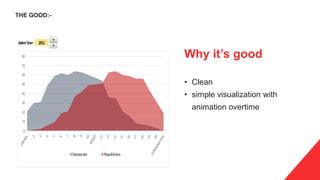
Why it’s good
• Clean
• simple visualization with
animation overtime
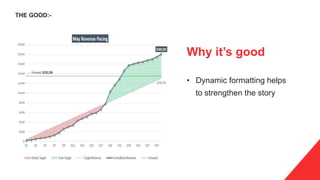
THE GOOD:-
Why it’s good
• Dynamic formatting helps
to strengthen the story
THE GOOD:-
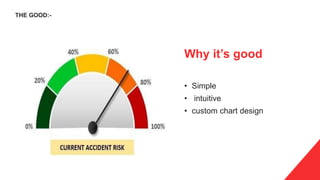
Why it’s good
• Simple
• intuitive
• custom chart design
THE GOOD:-
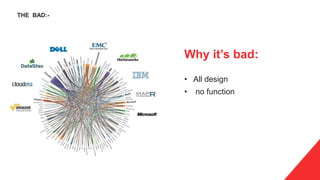
Why it’s bad:
• All design
• no function
THE BAD:-
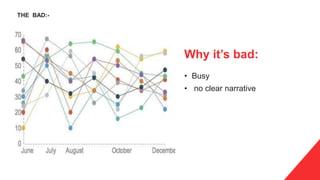
Why it’s bad:
• Busy
• no clear narrative
THE BAD:-
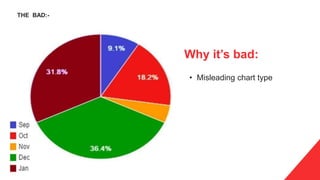
Why it’s bad:
• Misleading chart type
THE BAD:-
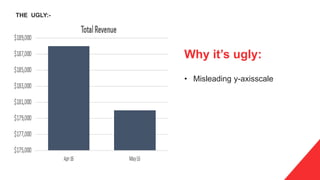
Why it’s ugly:
• Misleading y-axisscale
THE UGLY:-
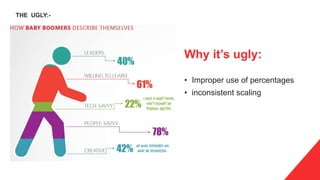
Why it’s ugly:
• Improper use of percentages
• inconsistent scaling
THE UGLY:-
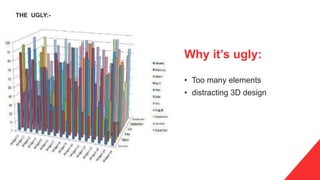
Why it’s ugly:
• Too many elements
• distracting 3D design
THE UGLY:-
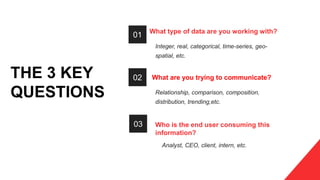
What type of data are you working with?
Integer, real, categorical, time-series, geo-
spatial, etc.
What are you trying to communicate?
Relationship, comparison, composition,
distribution, trending,etc.
Who is the end user consuming this
information?
Analyst, CEO, client, intern, etc.
THE 3 KEY
QUESTIONS
02
01
03
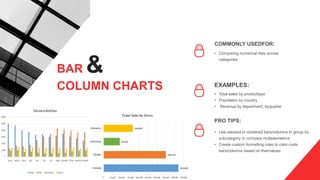
COMMONLY USEDFOR:
• Comparing numerical data across
categories
EXAMPLES:
• Total sales by producttype
• Population by country
• Revenue by department, byquarter
PRO TIPS:
• Use stacked or clustered bars/columns to group by
subcategory or compare multiplemetrics
• Create custom formatting rules to color-code
bars/columns based on theirvalues
BAR &
COLUMN CHARTS
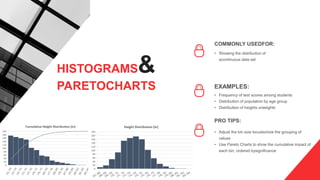
COMMONLY USEDFOR:
• Showing the distribution of
acontinuous data set
EXAMPLES:
• Frequency of test scores among students
• Distribution of population by age group
• Distribution of heights orweights
PRO TIPS:
• Adjust the bin size tocustomize the grouping of
values
• Use Pareto Charts to show the cumulative impact of
each bin, ordered bysignificance
HISTOGRAMS&
PARETOCHARTS
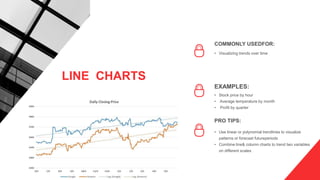
COMMONLY USEDFOR:
• Visualizing trends over time
EXAMPLES:
• Stock price by hour
• Average temperature by month
• Profit by quarter
PRO TIPS:
• Use linear or polynomial trendlines to visualize
patterns or forecast futureperiods
• Combine line& column charts to trend two variables
on different scales
LINE CHARTS
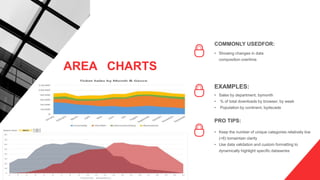
COMMONLY USEDFOR:
• Showing changes in data
composition overtime
EXAMPLES:
• Sales by department, bymonth
• % of total downloads by browser, by week
• Population by continent, bydecade
PRO TIPS:
• Keep the number of unique categories relatively low
(<6) tomaintain clarity
• Use data validation and custom formatting to
dynamically highlight specific dataseries
AREA CHARTS
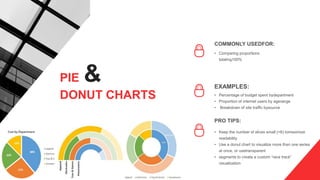
COMMONLY USEDFOR:
• Comparing proportions
totaling100%
EXAMPLES:
• Percentage of budget spent bydepartment
• Proportion of internet users by agerange
• Breakdown of site traffic bysource
PRO TIPS:
• Keep the number of slices small (<6) tomaximize
readability
• Use a donut chart to visualize more than one series
at once, or usetransparent
• segments to create a custom “race track”
visualization
PIE &
DONUT CHARTS
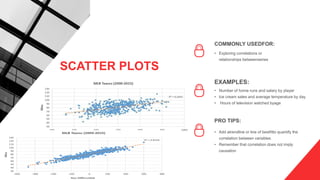
COMMONLY USEDFOR:
• Exploring correlations or
relationships betweenseries
EXAMPLES:
• Number of home runs and salary by player
• Ice cream sales and average temperature by day
• Hours of television watched byage
PRO TIPS:
• Add atrendline or line of bestfitto quantify the
correlation between variables
• Remember that correlation does not imply
causation
SCATTER PLOTS
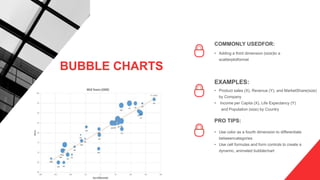
COMMONLY USEDFOR:
• Adding a third dimension (size)to a
scatterplotformat
EXAMPLES:
• Product sales (X), Revenue (Y), and MarketShare(size)
by Company
• Income per Capita (X), Life Expectancy (Y)
and Population (size) by Country
PRO TIPS:
• Use color as a fourth dimension to differentiate
betweencategories
• Use cell formulas and form controls to create a
dynamic, animated bubblechart
BUBBLE CHARTS
COMMONLY USEDFOR:
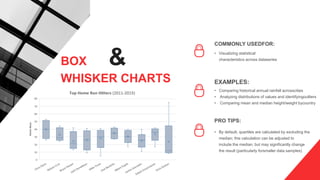
• Visualizing statistical
characteristics across dataseries
EXAMPLES:
• Comparing historical annual rainfall acrosscities
• Analyzing distributions of values and identifyingoutliers
• Comparing mean and median height/weight bycountry
PRO TIPS:
• By default, quartiles are calculated by excluding the
median; this calculation can be adjusted to
include the median, but may significantly change
the result (particularly forsmaller data samples)
BOX &
WHISKER CHARTS
COMMONLY USEDFOR:
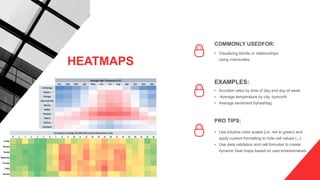
• Visualizing trends or relationships
using colorscales
EXAMPLES:
• Accident rates by time of day and day of week
• Average temperature by city, bymonth
• Average sentiment byhashtag
PRO TIPS:
• Use intuitive color scales (i.e. red to green) and
apply custom formatting to hide cell values (;;;)
• Use data validation and cell formulas to create
dynamic heat maps based on user-enteredvalues
HEATMAPS
Thanks

Visualization ppt

  • 1.
  • 2.
    Why visualize data?It is a good way to communicate complex information, because we are highly visual animals, evolved to spot patterns and make visual comparisons. To visualize effectively, however, it helps to understand a little about how our brains process visual information. The mantra for this week’s class is: Design for the human brain! DATA VISUALIZATION: BASIC PRINCIPLES CLARITY &SIMPLICITY • Maximize impact, minimize noise. • If it doesn’t add value or serve a purpose, get rid of it. NARRATIVE • Don’t just show data, tell astory • Communicate key insights clearly, quickly and powerfully DESIGN & FUNCTION • Selecting the right type of chart iscritical • Beautiful is good, functional is better, BOTH is ideal
  • 3.
    THE GOOD,THE BAD ANDTHE UGLY VISUALIZATIONS
  • 4.
    Why it’s good •Clean • simple visualization with animation overtime THE GOOD:-
  • 5.
    Why it’s good •Dynamic formatting helps to strengthen the story THE GOOD:-
  • 6.
    Why it’s good •Simple • intuitive • custom chart design THE GOOD:-
  • 7.
    Why it’s bad: •All design • no function THE BAD:-
  • 8.
    Why it’s bad: •Busy • no clear narrative THE BAD:-
  • 9.
    Why it’s bad: •Misleading chart type THE BAD:-
  • 10.
    Why it’s ugly: •Misleading y-axisscale THE UGLY:-
  • 11.
    Why it’s ugly: •Improper use of percentages • inconsistent scaling THE UGLY:-
  • 12.
    Why it’s ugly: •Too many elements • distracting 3D design THE UGLY:-
  • 13.
    What type ofdata are you working with? Integer, real, categorical, time-series, geo- spatial, etc. What are you trying to communicate? Relationship, comparison, composition, distribution, trending,etc. Who is the end user consuming this information? Analyst, CEO, client, intern, etc. THE 3 KEY QUESTIONS 02 01 03
  • 14.
    COMMONLY USEDFOR: • Comparingnumerical data across categories EXAMPLES: • Total sales by producttype • Population by country • Revenue by department, byquarter PRO TIPS: • Use stacked or clustered bars/columns to group by subcategory or compare multiplemetrics • Create custom formatting rules to color-code bars/columns based on theirvalues BAR & COLUMN CHARTS
  • 15.
    COMMONLY USEDFOR: • Showingthe distribution of acontinuous data set EXAMPLES: • Frequency of test scores among students • Distribution of population by age group • Distribution of heights orweights PRO TIPS: • Adjust the bin size tocustomize the grouping of values • Use Pareto Charts to show the cumulative impact of each bin, ordered bysignificance HISTOGRAMS& PARETOCHARTS
  • 16.
    COMMONLY USEDFOR: • Visualizingtrends over time EXAMPLES: • Stock price by hour • Average temperature by month • Profit by quarter PRO TIPS: • Use linear or polynomial trendlines to visualize patterns or forecast futureperiods • Combine line& column charts to trend two variables on different scales LINE CHARTS
  • 17.
    COMMONLY USEDFOR: • Showingchanges in data composition overtime EXAMPLES: • Sales by department, bymonth • % of total downloads by browser, by week • Population by continent, bydecade PRO TIPS: • Keep the number of unique categories relatively low (<6) tomaintain clarity • Use data validation and custom formatting to dynamically highlight specific dataseries AREA CHARTS
  • 18.
    COMMONLY USEDFOR: • Comparingproportions totaling100% EXAMPLES: • Percentage of budget spent bydepartment • Proportion of internet users by agerange • Breakdown of site traffic bysource PRO TIPS: • Keep the number of slices small (<6) tomaximize readability • Use a donut chart to visualize more than one series at once, or usetransparent • segments to create a custom “race track” visualization PIE & DONUT CHARTS
  • 19.
    COMMONLY USEDFOR: • Exploringcorrelations or relationships betweenseries EXAMPLES: • Number of home runs and salary by player • Ice cream sales and average temperature by day • Hours of television watched byage PRO TIPS: • Add atrendline or line of bestfitto quantify the correlation between variables • Remember that correlation does not imply causation SCATTER PLOTS
  • 20.
    COMMONLY USEDFOR: • Addinga third dimension (size)to a scatterplotformat EXAMPLES: • Product sales (X), Revenue (Y), and MarketShare(size) by Company • Income per Capita (X), Life Expectancy (Y) and Population (size) by Country PRO TIPS: • Use color as a fourth dimension to differentiate betweencategories • Use cell formulas and form controls to create a dynamic, animated bubblechart BUBBLE CHARTS
  • 21.
    COMMONLY USEDFOR: • Visualizingstatistical characteristics across dataseries EXAMPLES: • Comparing historical annual rainfall acrosscities • Analyzing distributions of values and identifyingoutliers • Comparing mean and median height/weight bycountry PRO TIPS: • By default, quartiles are calculated by excluding the median; this calculation can be adjusted to include the median, but may significantly change the result (particularly forsmaller data samples) BOX & WHISKER CHARTS
  • 22.
    COMMONLY USEDFOR: • Visualizingtrends or relationships using colorscales EXAMPLES: • Accident rates by time of day and day of week • Average temperature by city, bymonth • Average sentiment byhashtag PRO TIPS: • Use intuitive color scales (i.e. red to green) and apply custom formatting to hide cell values (;;;) • Use data validation and cell formulas to create dynamic heat maps based on user-enteredvalues HEATMAPS
  • 23.