19th April 2005
Advanced Human Computer
Interaction (HCI)
Week 7
CM30141-S2
Unit Lecturer: Dr Lisa Tweedie
L.A.Tweedie@bath.ac.uk
Unit Tutor: Chris Middup
C.P.Middup@bath.ac.uk
19th April
House keeping
• Switching weeks 7/8 in the course
19th April
Overview
1. Introduction
2. External Representations and
Interactivity
3. Types of Representation
4. Types of Interactivity
19th April
A Killer Application
• The Spreadsheet
• Why?
19th April
External Representations
• Reduce Cognitive Load - tool for thought
• Act as a store for our knowledge over time
• Organize and structure information for us
• However can force us to look at information in
certain ways i.e. can limit thinking. Therefore we
need to have an appropriate representation for
the external representation to be useful.
19th April
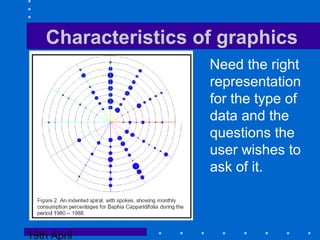
Characteristics of graphics
Need the right
representation
for the type of
data and the
questions the
user wishes to
ask of it.
19th April
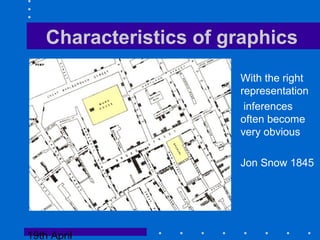
Characteristics of graphics
With the right
representation
inferences
often become
very obvious
Jon Snow 1845
19th April
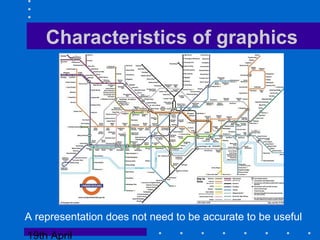
Characteristics of graphics
A representation does not need to be accurate to be useful
19th April
Characteristics of graphics
• Finding the correct representation is still
something of a black art
– Build on representations that have be used for
a problem before
– Think about the questions that need to be
asked.
– Think about multiple views of the data
19th April
Interactivity
• Adding Interactivity to representations allows a
users to proactively ask questions of the data.
• In effect an interactive visualisation allows
users to scan many hundreds of static
representations very quickly - creates a dialog
between the user and their problem.
• Encourages iterative exploration of the
problem space.
• The locus of control has switched to the user
19th April
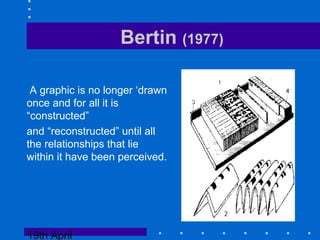
Bertin (1977)
A graphic is no longer ‘drawn
once and for all it is
“constructed”
and “reconstructed” until all
the relationships that lie
within it have been perceived.
19th April
Types of Representation - Bertin 1977
• Representations of Data Values
–bottom up
• Representations of Data Structure
– top down
19th April
Representations of Data values
show relations between subsets
of the data
e.g. histograms, scatterplots etc.
19th April
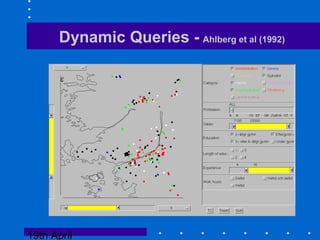
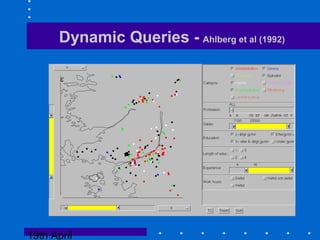
Dynamic Queries - Ahlberg et al (1992)
19th April
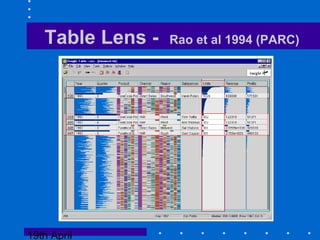
Table Lens - Rao et al 1994 (PARC)
19th April
Brushing - linking attribute views
Can take multiple similar representations of all
the attributes in a data set.
In some ways Bertins distinction disappears - as you can
see the structure of the whole set and the subset
in context.
In effect the representation provides the structure
and the interactivity provides the querying of
individual values and their relations.
19th April
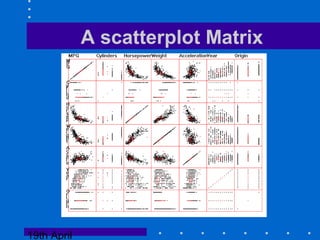
A scatterplot Matrix
19th April
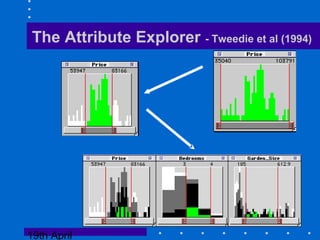
The Attribute Explorer - Tweedie et al (1994)
19th April
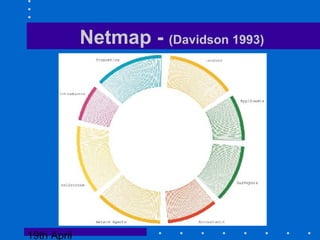
Netmap - (Davidson 1993)
19th April
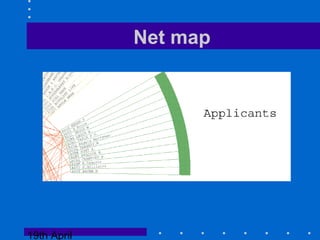
Net map
19th April
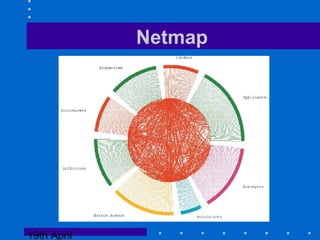
Netmap
19th April
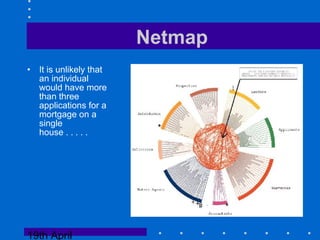
Netmap
• It is unlikely that
an individual
would have more
than three
applications for a
mortgage on a
single
house . . . . .
19th April
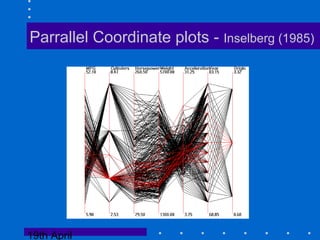
Parrallel Coordinate plots - Inselberg (1985)
19th April
Linking Multiple representations of data values
It is often difficult to anticipate the
questions a user would want to ask of the
data
Different representations might be suited
for answering different questions.
Thus brushing across different
representations is a logical extension.
19th April
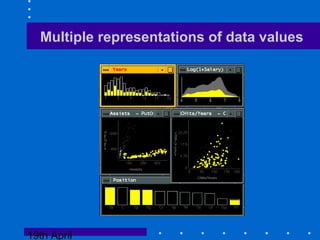
Multiple representations of data values
19th April
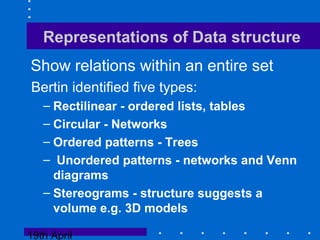
Representations of Data structure
Show relations within an entire set
Bertin identified five types:
– Rectilinear - ordered lists, tables
– Circular - Networks
– Ordered patterns - Trees
– Unordered patterns - networks and Venn
diagrams
– Stereograms - structure suggests a
volume e.g. 3D models
19th April
Representations of Data structure
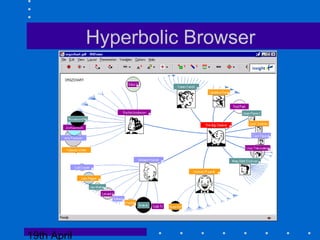
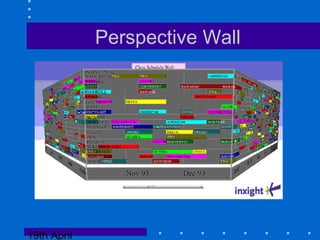
Whereas representations of Data values tend to
be used for analysis - representations of data
structure are often used for providing overview
and navigation around an information space.
19th April
Hyperbolic Browser
19th April
Perspective Wall
19th April
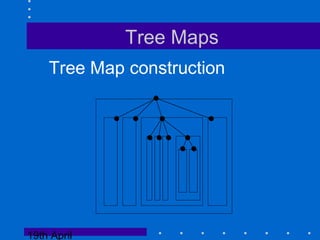
Tree Maps
Tree Map construction
19th April
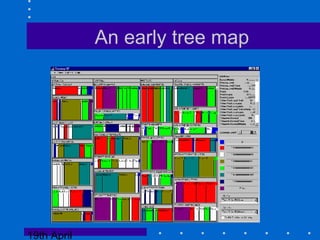
An early tree map
19th April
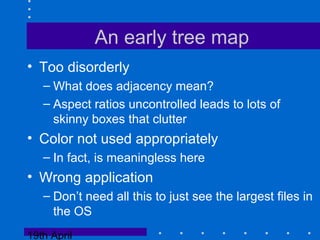
An early tree map
• Too disorderly
– What does adjacency mean?
– Aspect ratios uncontrolled leads to lots of
skinny boxes that clutter
• Color not used appropriately
– In fact, is meaningless here
• Wrong application
– Don’t need all this to just see the largest files in
the OS
19th April
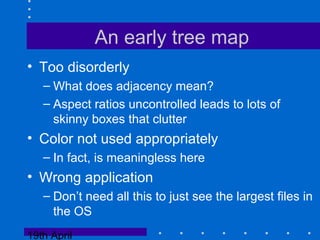
An early tree map
• Too disorderly
– What does adjacency mean?
– Aspect ratios uncontrolled leads to lots of
skinny boxes that clutter
• Color not used appropriately
– In fact, is meaningless here
• Wrong application
– Don’t need all this to just see the largest files in
the OS
19th April
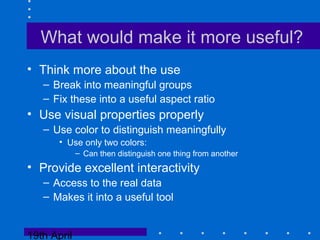
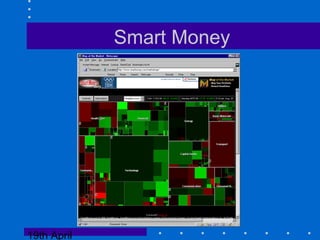
What would make it more useful?
• Think more about the use
– Break into meaningful groups
– Fix these into a useful aspect ratio
• Use visual properties properly
– Use color to distinguish meaningfully
• Use only two colors:
– Can then distinguish one thing from another
• Provide excellent interactivity
– Access to the real data
– Makes it into a useful tool
19th April
Smart Money
19th April
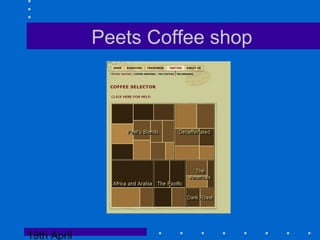
Peets Coffee shop
19th April
Types of interactivity
• hiding/ filtering data
• labeling e.g. brushing
• reordering
• providing information scent and other forms
of more complex labelling
• animated navigation/ algorithmic transformation
19th April
Information Scent
• Relates to the issues surrounding query
interfaces
• How can a user be given appropriate cues to
move towards their desired solution in the
problem space
19th April
Traditional query languages
Problems:
1. The discretionary user must learn a language. Users are often not
prepared to do this. Even for simple query languages controlled tests
(Borgman 1986) have shown that even after an hours tuition on 25%
of University Students could use the library’s online query system.
And that queries created tended to be very simple.
2. Errors are not tolerated
3. Too few or too many hits often result from queries. There is no
indication how a query might be reformulated to access fewer or
more hits.
4. There is a significant time delay between the formulation of a
query and the delivery of the result. This definitely slows the problem
solving process and probably discourages users from exploring
extensively.
19th April
Dynamic Queries - Ahlberg et al (1992)
19th April
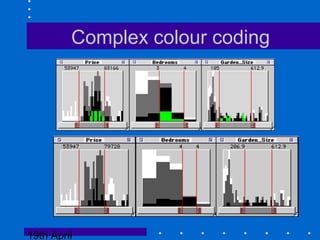
Complex colour coding
19th April
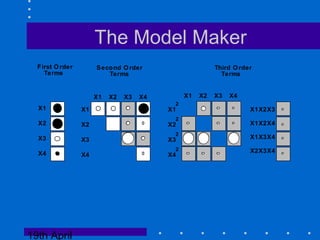
The Model Maker
First Order
Terms
X1
X2
X3
X4
X1
X2
X3
X4
X1 X2 X3 X4
X1X2X3
X1X2X4
X1X3X4
X2X3X4
X1 X2 X3 X4
X1
X2
X3
X4
2
2
2
2
Second Order
Terms
Third Order
Terms
19th April
Other forms of scent
• Social scent - e.g. recommender systems
- This is what others feel is valuable
• History (residue) - where have I been before?
- e.g. the blue text in the world wide web.
• Boolean colour coding and user defined labels
19th April
Combining automation with visualisation
Algorithms can support users in performing their
task.
Simple algorithm animations - where the user watches
an algorithm perform (e.g. data mining)
- history can then be a starting point for interactivity
- ability for user to interact directly with algorithm
Algorithmic transformations which sort and order
data creating useful metadata.
19th April
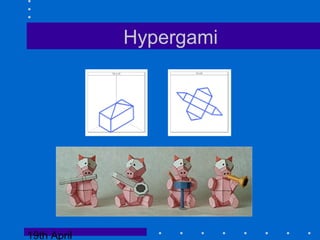
Hypergami
19th April
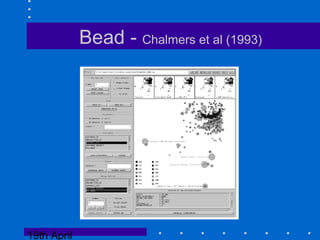
Bead - Chalmers et al (1993)
19th April
Where are the killers apps?
• Technology still not quite there
• These things are hard to design well - need to
keep it simple
• Humans take a long time to develop cultures
surrounding and learn to use new
representations
• matching tasks to representations still a black
art.
• The web is probably the domain where these
tools will emerge.
19th April
That’s it
• Any questions?
• Email contact:
L.A.Tweedie@bath.ac.uk

Visualization Lecture 2005

  • 1.
    19th April 2005 AdvancedHuman Computer Interaction (HCI) Week 7 CM30141-S2 Unit Lecturer: Dr Lisa Tweedie L.A.Tweedie@bath.ac.uk Unit Tutor: Chris Middup C.P.Middup@bath.ac.uk
  • 2.
    19th April House keeping •Switching weeks 7/8 in the course
  • 3.
    19th April Overview 1. Introduction 2.External Representations and Interactivity 3. Types of Representation 4. Types of Interactivity
  • 4.
    19th April A KillerApplication • The Spreadsheet • Why?
  • 5.
    19th April External Representations •Reduce Cognitive Load - tool for thought • Act as a store for our knowledge over time • Organize and structure information for us • However can force us to look at information in certain ways i.e. can limit thinking. Therefore we need to have an appropriate representation for the external representation to be useful.
  • 6.
    19th April Characteristics ofgraphics Need the right representation for the type of data and the questions the user wishes to ask of it.
  • 7.
    19th April Characteristics ofgraphics With the right representation inferences often become very obvious Jon Snow 1845
  • 8.
    19th April Characteristics ofgraphics A representation does not need to be accurate to be useful
  • 9.
    19th April Characteristics ofgraphics • Finding the correct representation is still something of a black art – Build on representations that have be used for a problem before – Think about the questions that need to be asked. – Think about multiple views of the data
  • 10.
    19th April Interactivity • AddingInteractivity to representations allows a users to proactively ask questions of the data. • In effect an interactive visualisation allows users to scan many hundreds of static representations very quickly - creates a dialog between the user and their problem. • Encourages iterative exploration of the problem space. • The locus of control has switched to the user
  • 11.
    19th April Bertin (1977) Agraphic is no longer ‘drawn once and for all it is “constructed” and “reconstructed” until all the relationships that lie within it have been perceived.
  • 12.
    19th April Types ofRepresentation - Bertin 1977 • Representations of Data Values –bottom up • Representations of Data Structure – top down
  • 13.
    19th April Representations ofData values show relations between subsets of the data e.g. histograms, scatterplots etc.
  • 14.
    19th April Dynamic Queries- Ahlberg et al (1992)
  • 15.
    19th April Table Lens- Rao et al 1994 (PARC)
  • 16.
    19th April Brushing -linking attribute views Can take multiple similar representations of all the attributes in a data set. In some ways Bertins distinction disappears - as you can see the structure of the whole set and the subset in context. In effect the representation provides the structure and the interactivity provides the querying of individual values and their relations.
  • 17.
  • 18.
    19th April The AttributeExplorer - Tweedie et al (1994)
  • 19.
    19th April Netmap -(Davidson 1993)
  • 20.
  • 21.
  • 22.
    19th April Netmap • Itis unlikely that an individual would have more than three applications for a mortgage on a single house . . . . .
  • 23.
    19th April Parrallel Coordinateplots - Inselberg (1985)
  • 24.
    19th April Linking Multiplerepresentations of data values It is often difficult to anticipate the questions a user would want to ask of the data Different representations might be suited for answering different questions. Thus brushing across different representations is a logical extension.
  • 25.
  • 26.
    19th April Representations ofData structure Show relations within an entire set Bertin identified five types: – Rectilinear - ordered lists, tables – Circular - Networks – Ordered patterns - Trees – Unordered patterns - networks and Venn diagrams – Stereograms - structure suggests a volume e.g. 3D models
  • 27.
    19th April Representations ofData structure Whereas representations of Data values tend to be used for analysis - representations of data structure are often used for providing overview and navigation around an information space.
  • 28.
  • 29.
  • 30.
    19th April Tree Maps TreeMap construction
  • 31.
  • 32.
    19th April An earlytree map • Too disorderly – What does adjacency mean? – Aspect ratios uncontrolled leads to lots of skinny boxes that clutter • Color not used appropriately – In fact, is meaningless here • Wrong application – Don’t need all this to just see the largest files in the OS
  • 33.
    19th April An earlytree map • Too disorderly – What does adjacency mean? – Aspect ratios uncontrolled leads to lots of skinny boxes that clutter • Color not used appropriately – In fact, is meaningless here • Wrong application – Don’t need all this to just see the largest files in the OS
  • 34.
    19th April What wouldmake it more useful? • Think more about the use – Break into meaningful groups – Fix these into a useful aspect ratio • Use visual properties properly – Use color to distinguish meaningfully • Use only two colors: – Can then distinguish one thing from another • Provide excellent interactivity – Access to the real data – Makes it into a useful tool
  • 35.
  • 36.
  • 37.
    19th April Types ofinteractivity • hiding/ filtering data • labeling e.g. brushing • reordering • providing information scent and other forms of more complex labelling • animated navigation/ algorithmic transformation
  • 38.
    19th April Information Scent •Relates to the issues surrounding query interfaces • How can a user be given appropriate cues to move towards their desired solution in the problem space
  • 39.
    19th April Traditional querylanguages Problems: 1. The discretionary user must learn a language. Users are often not prepared to do this. Even for simple query languages controlled tests (Borgman 1986) have shown that even after an hours tuition on 25% of University Students could use the library’s online query system. And that queries created tended to be very simple. 2. Errors are not tolerated 3. Too few or too many hits often result from queries. There is no indication how a query might be reformulated to access fewer or more hits. 4. There is a significant time delay between the formulation of a query and the delivery of the result. This definitely slows the problem solving process and probably discourages users from exploring extensively.
  • 40.
    19th April Dynamic Queries- Ahlberg et al (1992)
  • 41.
  • 42.
    19th April The ModelMaker First Order Terms X1 X2 X3 X4 X1 X2 X3 X4 X1 X2 X3 X4 X1X2X3 X1X2X4 X1X3X4 X2X3X4 X1 X2 X3 X4 X1 X2 X3 X4 2 2 2 2 Second Order Terms Third Order Terms
  • 43.
    19th April Other formsof scent • Social scent - e.g. recommender systems - This is what others feel is valuable • History (residue) - where have I been before? - e.g. the blue text in the world wide web. • Boolean colour coding and user defined labels
  • 44.
    19th April Combining automationwith visualisation Algorithms can support users in performing their task. Simple algorithm animations - where the user watches an algorithm perform (e.g. data mining) - history can then be a starting point for interactivity - ability for user to interact directly with algorithm Algorithmic transformations which sort and order data creating useful metadata.
  • 45.
  • 46.
    19th April Bead -Chalmers et al (1993)
  • 47.
    19th April Where arethe killers apps? • Technology still not quite there • These things are hard to design well - need to keep it simple • Humans take a long time to develop cultures surrounding and learn to use new representations • matching tasks to representations still a black art. • The web is probably the domain where these tools will emerge.
  • 48.
    19th April That’s it •Any questions? • Email contact: L.A.Tweedie@bath.ac.uk