View Inheritance
in Odoo 15
www.cybrosys.com
INTRODUCTION
 Instead of modifying existing views in place , Odoo provides view inheritance where
children “extension” views are applied on top of root views, and can add or remove content
from their parent.
 An extension view references its parent using the inherit_id field, and instead of a single
view its arch field is composed of any number of xpath elements selecting and altering the
content of their parent view.
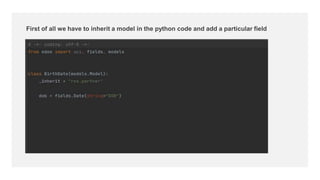
First of all we have to inherit a model in the python code and add a particular field
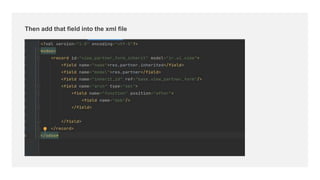
Then add that field into the xml file
To display that fields we have used xpath expression. In "expr" attribute we used
"//field[@name='function']" and "position="after"", its mean that place our newly created field after
name field of parent form view. Position attribute have following values.
1. position="after" : To display field after parent form view field mentioned in "expr"
2. position="before" : To display field before parent form view field mentioned in "expr"
3. position="inside" : To display field inside notebook of parent form view
4. position="attributes" : To change field attribute such as read only and visibility of a field
5. position="replace" : To replace parent form view field with your newly created field
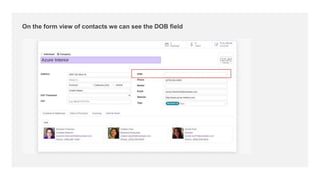
On the form view of contacts we can see the DOB field
For More
Details
Check our company website for related blogs and Odoo
book.
Odoo Book V15
Check our YouTube channel for functional and technical
videos in Odoo.
View Inheritance in Odoo 15
Thank You

View Inheritance in Odoo 15

  • 1.
    View Inheritance in Odoo15 www.cybrosys.com
  • 2.
    INTRODUCTION  Instead ofmodifying existing views in place , Odoo provides view inheritance where children “extension” views are applied on top of root views, and can add or remove content from their parent.  An extension view references its parent using the inherit_id field, and instead of a single view its arch field is composed of any number of xpath elements selecting and altering the content of their parent view.
  • 3.
    First of allwe have to inherit a model in the python code and add a particular field
  • 4.
    Then add thatfield into the xml file
  • 5.
    To display thatfields we have used xpath expression. In "expr" attribute we used "//field[@name='function']" and "position="after"", its mean that place our newly created field after name field of parent form view. Position attribute have following values. 1. position="after" : To display field after parent form view field mentioned in "expr" 2. position="before" : To display field before parent form view field mentioned in "expr" 3. position="inside" : To display field inside notebook of parent form view 4. position="attributes" : To change field attribute such as read only and visibility of a field 5. position="replace" : To replace parent form view field with your newly created field
  • 6.
    On the formview of contacts we can see the DOB field
  • 7.
    For More Details Check ourcompany website for related blogs and Odoo book. Odoo Book V15 Check our YouTube channel for functional and technical videos in Odoo. View Inheritance in Odoo 15
  • 9.