
Subtitle
Vuong Ngoc Anh
BIT1SN
IT Field Today
Subtitle (captioning)
 The texts are displayed on the screen to:
 Support people of different language or
disable to hear.
 May contain effects to make the
movie/music video more attractive.
Types of subtitle
 Real-time captioning: are created and
added during live broadcasts or events.
 Offline captioning: are created and
added after a production has been
recorded and before it is aired or played.
Soft
• Separate subtitle file.
• Located at the same
folder with video file.
Built
- in
• Embedded into video
file.
• Users can switch on
and off.
Hard
• Embedded into video
file.
• Appeared concurrently
with video file
Soft subtitle
 Frame rate: how fast a new still image is
available, measured in frame per second.
Clip: Flip book animation
 Character encoding:
 ASCII: American Standard Code for
Information Interchange, based on English
alphabet.
 UTF-8: UCS Transformation Format-8 bit:
represent characters in the Unicode
character set.
Hard subtitle
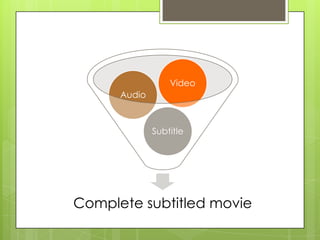
Complete subtitled movie
Subtitle
Audio
Video
Processing video file
 Sampling and quantization.
 Bit depth: the number of possible levels.
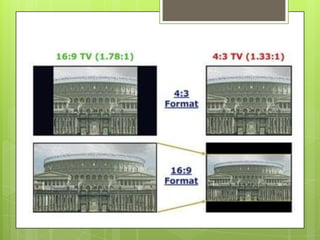
 Aspect ratio: ratio of the width of the picture
to the height (e.g.: 4:3; 16:9, etc.)
 Frame size/resolution: is measured in pixel
dimension of a frame (e.g. 720x576 pixels).
 Video compression: the process of converting
digital video into a format suitable for
transmission or storage which contains a small
amount of bits.
?????
Video conversion
 The process of preparing the video for
output, where the digital video is
encoded to meet proper formats and
specifications for recording and playback
through the use of video encoder
software.
 E.g.: convert from .mkv movie file to .avi
movie file.
Pixel aspect ratio
 Digital image editing: use square pixels by
default, some video formats use non-square
pixels to make up the frame.
 Pixel aspect ratio: The ratio of pixel’s width
to its height.
 Square pixel: 1
 Standard Digital Video format: 0.9
 Wide-screen Digital Video format: 1.2
 Width: height = 720 x 1.2 : 480 ~ 852 : 480 ~ 16:9
Counting time
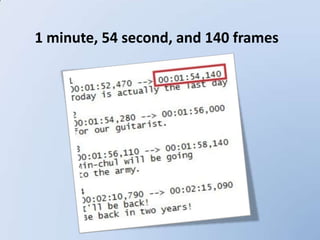
 Timecode: is used to number frames.
 SMPTE (Society of Motion Pictures and
Television Engineers) video timecode, the
most common timecode for digital video,
numbers frames in hours, minutes,
seconds, and frames.
 Timing:
1 minute, 54 second, and 140 frames
Hardware for encoding
 Minimum: Pentium IV 2.0 Ghz, RAM 512
MB, card onboard.
 Suggest: Intel celeron, RAM 1GB 3.0 Ghz,
card 8500GT.
 Ideal: Intel Core 2 Duo 3.0 Ghz (x2), RAM
2GB, card Gefore 9600 GT or above.
Software requirements
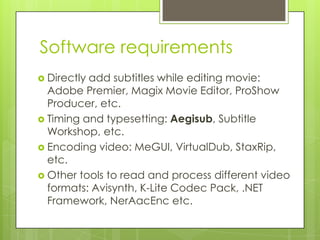
 Directly add subtitles while editing movie:
Adobe Premier, Magix Movie Editor, ProShow
Producer, etc.
 Timing and typesetting: Aegisub, Subtitle
Workshop, etc.
 Encoding video: MeGUI, VirtualDub, StaxRip,
etc.
 Other tools to read and process different video
formats: Avisynth, K-Lite Codec Pack, .NET
Framework, NerAacEnc etc.
Subtitle configuration
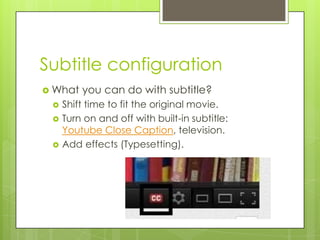
 What you can do with subtitle?
 Shift time to fit the original movie.
 Turn on and off with built-in subtitle:
Youtube Close Caption, television.
 Add effects (Typesetting).
Example
 Remember when (“Up” Original
Soundtrack)
References
 Wong, Y.-L. (2009). Digital Media Primer: Digital Audio,
Video, Imaging and Multimedia Programming. Upper
Saddle River (NJ) : Pearson, Prentice-Hall.
 Berke, J. (2010, 26 2). Deafness. Retrieved 2 19, 2012, from
About.com.
 Peters, O. (2003, December 18). A Different Drummer -
Understanding Frame Rates and Timecode. Retrieved
January 13, 2012, from digitalfilms.wordpress.com.
 Typesetting. (n.d.). Retrieved December 13, 2012, from
Aegisub Manual.
 How to add Subtitles to your videos on YouTube (easy)
1080p HD
References
 Richardson, I. (2010, May). H. 264 Advanced Video
Compression Standard. (2). Hoboken, New Jersey,
USA: Wiley.
 Clark, J. (1994, July). Reading the silver screen.
Technology Review.
 Jack, K. (2008). Digital Video and DSP. Elsevier Inc.
 Nowlin, D. (2009, June 19). Video Frame Display
Synchronization. Retrieved January 13, 2012, from
Intel.
 Silva, R. (2012, January 13). Video Resolution - An
Overview - What You Need to Know About Video
Resolution. Retrieved January 13, 2012, from
About.com Guide.

Subtitle

  • 1.
  • 2.
    Subtitle (captioning)  Thetexts are displayed on the screen to:  Support people of different language or disable to hear.  May contain effects to make the movie/music video more attractive.
  • 3.
    Types of subtitle Real-time captioning: are created and added during live broadcasts or events.  Offline captioning: are created and added after a production has been recorded and before it is aired or played.
  • 4.
    Soft • Separate subtitlefile. • Located at the same folder with video file. Built - in • Embedded into video file. • Users can switch on and off. Hard • Embedded into video file. • Appeared concurrently with video file
  • 5.
    Soft subtitle  Framerate: how fast a new still image is available, measured in frame per second. Clip: Flip book animation  Character encoding:  ASCII: American Standard Code for Information Interchange, based on English alphabet.  UTF-8: UCS Transformation Format-8 bit: represent characters in the Unicode character set.
  • 6.
  • 7.
  • 8.
    Processing video file Sampling and quantization.  Bit depth: the number of possible levels.  Aspect ratio: ratio of the width of the picture to the height (e.g.: 4:3; 16:9, etc.)  Frame size/resolution: is measured in pixel dimension of a frame (e.g. 720x576 pixels).  Video compression: the process of converting digital video into a format suitable for transmission or storage which contains a small amount of bits.
  • 10.
  • 11.
    Video conversion  Theprocess of preparing the video for output, where the digital video is encoded to meet proper formats and specifications for recording and playback through the use of video encoder software.  E.g.: convert from .mkv movie file to .avi movie file.
  • 12.
    Pixel aspect ratio Digital image editing: use square pixels by default, some video formats use non-square pixels to make up the frame.  Pixel aspect ratio: The ratio of pixel’s width to its height.  Square pixel: 1  Standard Digital Video format: 0.9  Wide-screen Digital Video format: 1.2  Width: height = 720 x 1.2 : 480 ~ 852 : 480 ~ 16:9
  • 13.
    Counting time  Timecode:is used to number frames.  SMPTE (Society of Motion Pictures and Television Engineers) video timecode, the most common timecode for digital video, numbers frames in hours, minutes, seconds, and frames.  Timing:
  • 14.
    1 minute, 54second, and 140 frames
  • 15.
    Hardware for encoding Minimum: Pentium IV 2.0 Ghz, RAM 512 MB, card onboard.  Suggest: Intel celeron, RAM 1GB 3.0 Ghz, card 8500GT.  Ideal: Intel Core 2 Duo 3.0 Ghz (x2), RAM 2GB, card Gefore 9600 GT or above.
  • 16.
    Software requirements  Directlyadd subtitles while editing movie: Adobe Premier, Magix Movie Editor, ProShow Producer, etc.  Timing and typesetting: Aegisub, Subtitle Workshop, etc.  Encoding video: MeGUI, VirtualDub, StaxRip, etc.  Other tools to read and process different video formats: Avisynth, K-Lite Codec Pack, .NET Framework, NerAacEnc etc.
  • 17.
    Subtitle configuration  Whatyou can do with subtitle?  Shift time to fit the original movie.  Turn on and off with built-in subtitle: Youtube Close Caption, television.  Add effects (Typesetting).
  • 18.
    Example  Remember when(“Up” Original Soundtrack)
  • 19.
    References  Wong, Y.-L.(2009). Digital Media Primer: Digital Audio, Video, Imaging and Multimedia Programming. Upper Saddle River (NJ) : Pearson, Prentice-Hall.  Berke, J. (2010, 26 2). Deafness. Retrieved 2 19, 2012, from About.com.  Peters, O. (2003, December 18). A Different Drummer - Understanding Frame Rates and Timecode. Retrieved January 13, 2012, from digitalfilms.wordpress.com.  Typesetting. (n.d.). Retrieved December 13, 2012, from Aegisub Manual.  How to add Subtitles to your videos on YouTube (easy) 1080p HD
  • 20.
    References  Richardson, I.(2010, May). H. 264 Advanced Video Compression Standard. (2). Hoboken, New Jersey, USA: Wiley.  Clark, J. (1994, July). Reading the silver screen. Technology Review.  Jack, K. (2008). Digital Video and DSP. Elsevier Inc.  Nowlin, D. (2009, June 19). Video Frame Display Synchronization. Retrieved January 13, 2012, from Intel.  Silva, R. (2012, January 13). Video Resolution - An Overview - What You Need to Know About Video Resolution. Retrieved January 13, 2012, from About.com Guide.