VectorBase
http://www.vectorbase.org


                 Genome Browsing at VectorBase	


                            Karyn Mégy
                             May 2010	


Karyn Mégy – May 2010                               1
VectorBase
http://www.vectorbase.org


                            Genome Browsing	


     •  This tutorial will take you through:	

            –  the list of data available (species/type), 	

            –  the information available from the main page,	

            –  the entry points to the Genome Browser,	

            –  the Genome Browser (location, gene  transcript tabs),	

            –  adding a track with external data,	

            –  how to search for help!	


Karyn Mégy – May 2010                                              2
VectorBase
http://www.vectorbase.org


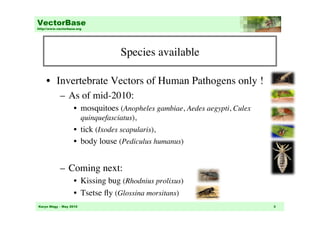
                                      Species available


     •  Invertebrate Vectors of Human Pathogens only !	

            –  As of mid-2010: 	

                    •  mosquitoes (Anopheles gambiae, Aedes aegypti, Culex
                        quinquefasciatus), 	

                    •  tick (Ixodes scapularis), 	

                    •  body louse (Pediculus humanus)	


            –  Coming next: 	

                    •  Kissing bug (Rhodnius prolixus)	

                    •  Tsetse fly (Glossina morsitans) 	

Karyn Mégy – May 2010                                                        3
VectorBase
http://www.vectorbase.org


                               Data types available


     •  Genomic sequences	

            –  annotated with genes, transcripts, translations etc. 	

            –  mapped with proteins and ESTs	

                    •  Proteins from large scope of organisms (taxonomically
                       grouped) and species-specific ESTs	

     •  External references	

            –  Link between the genes and other databases (e.g.
               Swissprot)	


Karyn Mégy – May 2010                                                          4
VectorBase
http://www.vectorbase.org


                            Genome Browsing	


     •  This tutorial will take you through:	

            –  the list of data available (species/type), 	

            –  the information available from the main page,	

            –  the entry points to the Genome Browser,	

            –  the Genome Browser (location, gene  transcript tabs),	

            –  adding a track with external data,	

            –  how to search for help!	


Karyn Mégy – May 2010                                              5
VectorBase
http://www.vectorbase.org


                                  Example


     •  Let’s take the example of Anopheles gambiae,	

            •  chr. 2L : 39,221,590-39,222,203	


     •  Starting page:	

          http://www.vectorbase.org/Anopheles_gambiae/Info/Index	


Karyn Mégy – May 2010                                                 6
VectorBase
http://www.vectorbase.org


                                        Main page
                                                	

                                4.	

                                                 •  From the main page: 	

                        1.	

                       1- Search for a keyword,	

                                         3.	

      2- Access the genomes, 	

                                                    3- Have a glance at what’s new 	

                        2.	

                                                    in the latest release.	

                                                    4- Access the BLAST, BioMart, 	

                                                    FTP and help pages	


Karyn Mégy – May 2010                                                            7
VectorBase
http://www.vectorbase.org


                                   Main page


   1.  Search for a keyword	

           –  Via popular genome, menu or complete list of species	

   2. Access the genomes	

           –  in all species or in a given species 	

   3. What’s new	

           –  description of the latest improvements	


Karyn Mégy – May 2010                                                   8
VectorBase
      http://www.vectorbase.org


                                     Main page


      4. Access other pages:	

             –  BLAST: compare your sequence to the VectorBase sequences   	

             –  BioMart: sophisticated way to mine data and extract complex
                queries	

             –  FTP: location to download data files	

             –  Help pages: link to docs, help pages and FAQ	

           Help!	

Blast	

                                            BioMart	


                                                      FTP	


       Karyn Mégy – May 2010                                                9
VectorBase
http://www.vectorbase.org


                            Genome Browsing	


     •  This tutorial will take you through:	

            –  the list of data available (species/type), 	

            –  the information available from the main page,	

            –  the entry points to the Genome Browser,	

            –  the Genome Browser (location, gene  transcript tabs),	

            –  adding a track with external data,	

            –  how to search for help!	


Karyn Mégy – May 2010                                              10
VectorBase
http://www.vectorbase.org


                      Entry points to the Genome Browser


                                          •  From the search box:	

                                             –  Location,	

                                             –  Gene or transcript names,	

                                             –  Function	

                                          •  Via the “sample entry
                                             points”:	

                                             –  Location (karyotype,
                                                positions) 	

                                             –  Gene or transcript names, 	


Karyn Mégy – May 2010                                                  11
VectorBase
http://www.vectorbase.org


                            Genome Browsing	


     •  Once you’re in the Genome Browser, you see	

            –  Location tab.	

            –  Gene and transcript tabs.	

            ! You need to have selected a gene to see the gene/
               transcript tabs. 	


     •  You can navigate by using the left hand side menu
        or by clicking on the image itself 	


Karyn Mégy – May 2010                                             12
VectorBase
http://www.vectorbase.org


                            Genome Browsing	


     •  This tutorial will take you through:	

            –  the list of data available (species/type), 	

            –  the information available from the main page,	

            –  the entry points to the Genome Browser,	

            –  the Genome Browser (location, gene  transcript tabs),	

            –  adding a track with external data,	

            –  how to search for help!	


Karyn Mégy – May 2010                                              13
VectorBase
   http://www.vectorbase.org


                                        Location Tab	


•  From here you can access:	

  - various views for this region:	


 - whole chromosome,	


 - chromosome summary,	


 - region overview,	


 - region in details	

 - comparative data,	

 - genetic variation 
       marker data (if available)	


•  You can also configure
   the page and visualise
   your own data.	

    Karyn Mégy – May 2010                                 14
VectorBase
http://www.vectorbase.org


                               Location Tab,
                            the left hand side menu	


                                    Region in detail	


                                  Region overview	

                                                          Chromosome summary	

 Whole genome	

Karyn Mégy – May 2010                                                    15
VectorBase
http://www.vectorbase.org


                            Location Tab	


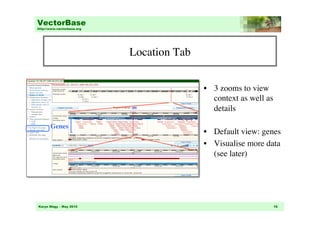
                                              •  3 zooms to view
                                                 context as well as
                                                 details	


       Genes	

                                              •  Default view: genes	

                                              •  Visualise more data 
                                                 (see later)	


Karyn Mégy – May 2010                                                 16
VectorBase
 http://www.vectorbase.org


                             Location Tab,
                              detailed view	

          Scale
              	

     Chr. band	

 Scaffold name	


    Location
(move to another
position/location)
                 	

                                                     Genes	


   Strand (+)	

 DNA	

                                          Features added 	

   Strand (-)
            	

                                  by configuring 	

                                                    the page	

                                                   (see later)	


  Karyn Mégy – May 2010                                    17
VectorBase
http://www.vectorbase.org


                                    Location Tab,
                                                	

                                    did you know?

     •  In this tab you can also:	

            –  Export the image (button right),	


            –  Zoom in or center on a specific region by 
               clicking at a position and dragging 
               the red window up to the desired location	


            –  Click on a gene to get more information, 	


and to access the GENE TAB	


Karyn Mégy – May 2010                                         18
VectorBase
    http://www.vectorbase.org


                                                       Gene Tab,
                                         the left hand side menu	


•  From here you can access:	

  - gene data	


 - alternative transcript, expression data 	

  - comparative genomic data, 	

     - orthologs, paralogs, gene tree	

  - genetic variations 
    (if any available)	

 - additional data	

 - gene history (over releases)	


•  You can also configure
   the page and visualise
   your own data.	

    Karyn Mégy – May 2010                                             19
VectorBase
http://www.vectorbase.org


                                          Gene Tab,
                     the left hand side menu – gene information	


                                                         Supporting evidence	


                    Splice variant	


                                                         External references	


                                                    Jump from one view to the other	

                                                      via the menu or the ‘buttons’ 	

                             Gene sequence	

Karyn Mégy – May 2010                                                                     20
VectorBase
http://www.vectorbase.org


                                    Gene Tab,
                    the left hand side menu – comparative data	


                    Gene Tree	


                                                            Orthologues	


                                              Alignments with other species 
                                              (C.quinquefasciatus in this case)	

Karyn Mégy – May 2010                                                                21
VectorBase
        http://www.vectorbase.org


                                                Transcript tab	


•  From here you can access:	

     - transcript data	

                                           •  …	


      summary, supporting evidence,	

           sequence, link to external databases	

     - genetic variations 
     (if any available)	

  - protein data	


 summary, domains, variations	

  - additional data	


•  You can also configure
   the page and visualise
   your own data.	

        Karyn Mégy – May 2010                                                 22
VectorBase
http://www.vectorbase.org


                                Transcript tab
                the left hand side menu – transcript information	


                                  Transcript	

                                  data	


                                                         References to external DBs:
                                                         External identifiers,
                                                         probes, ontologies	


                                                    Sequences, 	

                                                    Includes individual exons, 
                                                    transcript and protein	

Karyn Mégy – May 2010                                                                23
VectorBase
http://www.vectorbase.org


                                    Transcript tab
                  the left hand side menu – protein information	


                                          Protein	

                                          domain visualisation	


                                                                                      Protein	

                                                                                      domain list	


Variation data, 	

Listed only if a variation affects the protein,
i.e. intronic variations are NOT listed in this section (see gene tab for those)	

 Karyn Mégy – May 2010                                                                           24
VectorBase
http://www.vectorbase.org


                            Genome Browsing	


     •  This tutorial will take you through:	

            –  the list of data available (species/type), 	

            –  the information available from the main page,	

            –  the entry points to the Genome Browser,	

            –  the Genome Browser (location, gene  transcript tabs),	

            –  adding a track with external data,	

            –  how to search for help!	


Karyn Mégy – May 2010                                              25
VectorBase
http://www.vectorbase.org


                              Adding external data


     •  On the left hand side menu, for each of the tabs, there
        is a link to ‘manage your data’ or ‘export’ data:	


            –  Data can be managed by:	

                    •  Adding pre-computed data that are not shown by default,	

                    •  Adding your own data (see DAS tutorial),	


Karyn Mégy – May 2010                                                       26
VectorBase
http://www.vectorbase.org


                            Adding external data


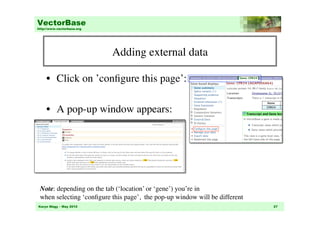
     •  Click on ’configure this page’: 	


     •  A pop-up window appears:	


 Note: depending on the tab (‘location’ or ‘gene’) you’re in 	

 when selecting ‘configure this page’, the pop-up window will be different	

Karyn Mégy – May 2010                                                          27
VectorBase
http://www.vectorbase.org


                             Adding external data


     •  Select tracks and other options in the window,	

     •  Close the popup window, 	

     •  The Genome Browser will be updated automatically. 	


     Note: To change whether a track is drawn OR how it is drawn, 	

    click on the icon by the track name to select the way the track will be drawn.	

Karyn Mégy – May 2010                                                                   28
VectorBase
http://www.vectorbase.org


                            Genome Browsing	


     •  This tutorial will take you through:	

            –  the list of data available (species/type), 	

            –  the information available from the main page,	

            –  the entry points to the Genome Browser,	

            –  the Genome Browser (location, gene  transcript tabs),	

            –  adding a track with external data,	

            –  how to search for help!	


Karyn Mégy – May 2010                                              29
VectorBase
http://www.vectorbase.org


                                         Help!


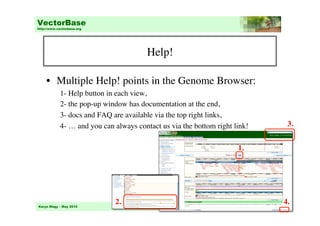
     •  Multiple Help! points in the Genome Browser:	

            1- Help button in each view,	

            2- the pop-up window has documentation at the end,	

            3- docs and FAQ are available via the top right links,	

            4- … and you can always contact us via the bottom right link!	

          3.


                                                                       1.	


Karyn Mégy – May 2010
                              2.	

                                            30
                                                                                    4.
VectorBase
http://www.vectorbase.org


                                           Questions?	


                                    * E-mail info@vectorbase.org	


                                 * Post your question on the forum
                        http://www.vectorbase.org/sections/Forum/index.php 	


                                       * Check out the FAQs
                            http://www.vectorbase.org/Help/Help:Contents 	


                                  * Ensembl Genome Browser tutorial
                             http://www.ensembl.org/Help/Movie?id=188 	


Karyn Mégy – May 2010                                                            31

Vb tutorial-genome browser2010

  • 1.
    VectorBase http://www.vectorbase.org Genome Browsing at VectorBase Karyn Mégy May 2010 Karyn Mégy – May 2010 1
  • 2.
    VectorBase http://www.vectorbase.org Genome Browsing •  This tutorial will take you through: –  the list of data available (species/type), –  the information available from the main page, –  the entry points to the Genome Browser, –  the Genome Browser (location, gene transcript tabs), –  adding a track with external data, –  how to search for help! Karyn Mégy – May 2010 2
  • 3.
    VectorBase http://www.vectorbase.org Species available •  Invertebrate Vectors of Human Pathogens only ! –  As of mid-2010: •  mosquitoes (Anopheles gambiae, Aedes aegypti, Culex quinquefasciatus), •  tick (Ixodes scapularis), •  body louse (Pediculus humanus) –  Coming next: •  Kissing bug (Rhodnius prolixus) •  Tsetse fly (Glossina morsitans) Karyn Mégy – May 2010 3
  • 4.
    VectorBase http://www.vectorbase.org Data types available •  Genomic sequences –  annotated with genes, transcripts, translations etc. –  mapped with proteins and ESTs •  Proteins from large scope of organisms (taxonomically grouped) and species-specific ESTs •  External references –  Link between the genes and other databases (e.g. Swissprot) Karyn Mégy – May 2010 4
  • 5.
    VectorBase http://www.vectorbase.org Genome Browsing •  This tutorial will take you through: –  the list of data available (species/type), –  the information available from the main page, –  the entry points to the Genome Browser, –  the Genome Browser (location, gene transcript tabs), –  adding a track with external data, –  how to search for help! Karyn Mégy – May 2010 5
  • 6.
    VectorBase http://www.vectorbase.org Example •  Let’s take the example of Anopheles gambiae, •  chr. 2L : 39,221,590-39,222,203 •  Starting page: http://www.vectorbase.org/Anopheles_gambiae/Info/Index Karyn Mégy – May 2010 6
  • 7.
    VectorBase http://www.vectorbase.org Main page 4. •  From the main page: 1. 1- Search for a keyword, 3. 2- Access the genomes, 3- Have a glance at what’s new 2. in the latest release. 4- Access the BLAST, BioMart, FTP and help pages Karyn Mégy – May 2010 7
  • 8.
    VectorBase http://www.vectorbase.org Main page 1.  Search for a keyword –  Via popular genome, menu or complete list of species 2. Access the genomes –  in all species or in a given species 3. What’s new –  description of the latest improvements Karyn Mégy – May 2010 8
  • 9.
    VectorBase http://www.vectorbase.org Main page 4. Access other pages: –  BLAST: compare your sequence to the VectorBase sequences –  BioMart: sophisticated way to mine data and extract complex queries –  FTP: location to download data files –  Help pages: link to docs, help pages and FAQ Help! Blast BioMart FTP Karyn Mégy – May 2010 9
  • 10.
    VectorBase http://www.vectorbase.org Genome Browsing •  This tutorial will take you through: –  the list of data available (species/type), –  the information available from the main page, –  the entry points to the Genome Browser, –  the Genome Browser (location, gene transcript tabs), –  adding a track with external data, –  how to search for help! Karyn Mégy – May 2010 10
  • 11.
    VectorBase http://www.vectorbase.org Entry points to the Genome Browser •  From the search box: –  Location, –  Gene or transcript names, –  Function •  Via the “sample entry points”: –  Location (karyotype, positions) –  Gene or transcript names, Karyn Mégy – May 2010 11
  • 12.
    VectorBase http://www.vectorbase.org Genome Browsing •  Once you’re in the Genome Browser, you see –  Location tab. –  Gene and transcript tabs. ! You need to have selected a gene to see the gene/ transcript tabs. •  You can navigate by using the left hand side menu or by clicking on the image itself Karyn Mégy – May 2010 12
  • 13.
    VectorBase http://www.vectorbase.org Genome Browsing •  This tutorial will take you through: –  the list of data available (species/type), –  the information available from the main page, –  the entry points to the Genome Browser, –  the Genome Browser (location, gene transcript tabs), –  adding a track with external data, –  how to search for help! Karyn Mégy – May 2010 13
  • 14.
    VectorBase http://www.vectorbase.org Location Tab •  From here you can access: - various views for this region: - whole chromosome, - chromosome summary, - region overview, - region in details - comparative data, - genetic variation marker data (if available) •  You can also configure the page and visualise your own data. Karyn Mégy – May 2010 14
  • 15.
    VectorBase http://www.vectorbase.org Location Tab, the left hand side menu Region in detail Region overview Chromosome summary Whole genome Karyn Mégy – May 2010 15
  • 16.
    VectorBase http://www.vectorbase.org Location Tab •  3 zooms to view context as well as details Genes •  Default view: genes •  Visualise more data (see later) Karyn Mégy – May 2010 16
  • 17.
    VectorBase http://www.vectorbase.org Location Tab, detailed view Scale Chr. band Scaffold name Location (move to another position/location) Genes Strand (+) DNA Features added Strand (-) by configuring the page (see later) Karyn Mégy – May 2010 17
  • 18.
    VectorBase http://www.vectorbase.org Location Tab, did you know? •  In this tab you can also: –  Export the image (button right), –  Zoom in or center on a specific region by clicking at a position and dragging the red window up to the desired location –  Click on a gene to get more information, and to access the GENE TAB Karyn Mégy – May 2010 18
  • 19.
    VectorBase http://www.vectorbase.org Gene Tab, the left hand side menu •  From here you can access: - gene data - alternative transcript, expression data - comparative genomic data, - orthologs, paralogs, gene tree - genetic variations (if any available) - additional data - gene history (over releases) •  You can also configure the page and visualise your own data. Karyn Mégy – May 2010 19
  • 20.
    VectorBase http://www.vectorbase.org Gene Tab, the left hand side menu – gene information Supporting evidence Splice variant External references Jump from one view to the other via the menu or the ‘buttons’ Gene sequence Karyn Mégy – May 2010 20
  • 21.
    VectorBase http://www.vectorbase.org Gene Tab, the left hand side menu – comparative data Gene Tree Orthologues Alignments with other species (C.quinquefasciatus in this case) Karyn Mégy – May 2010 21
  • 22.
    VectorBase http://www.vectorbase.org Transcript tab •  From here you can access: - transcript data •  … summary, supporting evidence, sequence, link to external databases - genetic variations (if any available) - protein data summary, domains, variations - additional data •  You can also configure the page and visualise your own data. Karyn Mégy – May 2010 22
  • 23.
    VectorBase http://www.vectorbase.org Transcript tab the left hand side menu – transcript information Transcript data References to external DBs: External identifiers, probes, ontologies Sequences, Includes individual exons, transcript and protein Karyn Mégy – May 2010 23
  • 24.
    VectorBase http://www.vectorbase.org Transcript tab the left hand side menu – protein information Protein domain visualisation Protein domain list Variation data, Listed only if a variation affects the protein, i.e. intronic variations are NOT listed in this section (see gene tab for those) Karyn Mégy – May 2010 24
  • 25.
    VectorBase http://www.vectorbase.org Genome Browsing •  This tutorial will take you through: –  the list of data available (species/type), –  the information available from the main page, –  the entry points to the Genome Browser, –  the Genome Browser (location, gene transcript tabs), –  adding a track with external data, –  how to search for help! Karyn Mégy – May 2010 25
  • 26.
    VectorBase http://www.vectorbase.org Adding external data •  On the left hand side menu, for each of the tabs, there is a link to ‘manage your data’ or ‘export’ data: –  Data can be managed by: •  Adding pre-computed data that are not shown by default, •  Adding your own data (see DAS tutorial), Karyn Mégy – May 2010 26
  • 27.
    VectorBase http://www.vectorbase.org Adding external data •  Click on ’configure this page’: •  A pop-up window appears: Note: depending on the tab (‘location’ or ‘gene’) you’re in when selecting ‘configure this page’, the pop-up window will be different Karyn Mégy – May 2010 27
  • 28.
    VectorBase http://www.vectorbase.org Adding external data •  Select tracks and other options in the window, •  Close the popup window, •  The Genome Browser will be updated automatically. Note: To change whether a track is drawn OR how it is drawn, click on the icon by the track name to select the way the track will be drawn. Karyn Mégy – May 2010 28
  • 29.
    VectorBase http://www.vectorbase.org Genome Browsing •  This tutorial will take you through: –  the list of data available (species/type), –  the information available from the main page, –  the entry points to the Genome Browser, –  the Genome Browser (location, gene transcript tabs), –  adding a track with external data, –  how to search for help! Karyn Mégy – May 2010 29
  • 30.
    VectorBase http://www.vectorbase.org Help! •  Multiple Help! points in the Genome Browser: 1- Help button in each view, 2- the pop-up window has documentation at the end, 3- docs and FAQ are available via the top right links, 4- … and you can always contact us via the bottom right link! 3. 1. Karyn Mégy – May 2010 2. 30 4.
  • 31.
    VectorBase http://www.vectorbase.org Questions? * E-mail info@vectorbase.org * Post your question on the forum http://www.vectorbase.org/sections/Forum/index.php * Check out the FAQs http://www.vectorbase.org/Help/Help:Contents * Ensembl Genome Browser tutorial http://www.ensembl.org/Help/Movie?id=188 Karyn Mégy – May 2010 31