VCSVaccine Control SystemByGilmore Research, Inc.Use the back-and-forth arrows below to change screens.
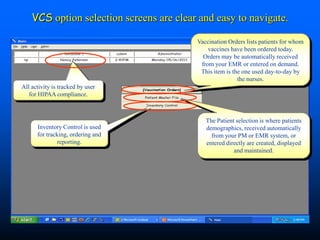
VCS option selection screens are clear and easy to navigate.Vaccination Orders lists patients for whom vaccines have been ordered today.Orders may be automatically received from your EMR or entered on demand.This item is the one used day-to-day by the nurses.All activity is tracked by user for HIPAA compliance.The Patient selection is where patients demographics, received automatically from your PM or EMR system, or entered directly are created, displayed and maintained.Inventory Control is used for tracking, ordering and reporting.
Wait a minute…what exactly is a VCS?The Technical OverviewThe Vaccine Control System is a new program designed to help you manage vaccine inventories.  It facilitates ordering, receiving, administering, reordering and reporting – the complete inventory cycle.  PC’s are stationed where vaccines are stored.  When patients are being seen orders may be sent automatically to the VCS from your EMR or entered directly. Inventories are automatically checked, either for VFC or non-VFC depending on the patient, and then suggests the lots that should be used.  On-hand inventory levels are automatically monitored and it lets you know when supplies are running low.  It can even monitor scheduled future appointments and project inventory requirements and let you know if you may run low.It includes a list of reports including an audit report for you to verify that all administered vaccines are accounted for in your billing system.The VCS improves accuracy and saves time – nurses no longer have to manually record lot and NDC numbers – your EMR and PM can instantly be updated.  And since it can monitor upcoming appointments and anticipate vaccine needs you can eliminate embarrassing rebookings.
Practically…whatit means everyday…Increased nurse productivity – pick the lot from the screen - no more writing down, rekeying and  manual messing with NDC and Lot numbers…Happier patients – no more “we seem to have run out of…you’ll need to reschedule..” – happier patients = happier providersBetter billings – accurate updating of NDC and lot numbers – no more “lost” charges and hours spent auditingEasier inventory management – know what and how much to order – know where you stand now - know what you’re going to need this month
A few things you should know first:The VCS system can serve as a stand-alone and be interfaced with your EMR and PM systems.  Saves time and improves accuracy.
When interfaced with your PM system it can monitor scheduled appointments and project upcoming needs. Eliminates rescheduling and lost time.
It is a centralized system for all of your vaccine inventories in all of your sites. Facilitates reordering and easy redistribution between sites.
Manages both VFC and non-VFC inventories. Easily make adjustments between these two types of inventories.
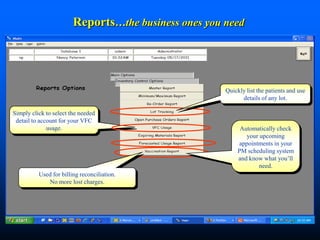
Array of utilization and audit reports including VFC usage and balancing to your PM billing system. Eliminate lost billings.
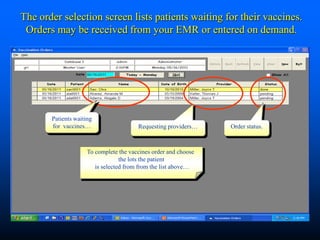
Automatically print required VIS and optional OIS forms in the patient’s native language. Never run out of forms – satisfy legal VIS requirements and promote more care with OIS forms.The order selection screen lists patients waiting for their vaccines. Orders may be received from your EMR or entered on demand.Patients waiting for  vaccines…Requesting providers…Order status.To complete the vaccines order and choose the lots the patient is selected from from the list above…
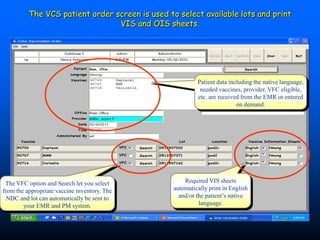
The VCS patient order screen is used to select available lots and print VIS and OIS sheets.Patient data including the native language, needed vaccines, provider, VFC eligible, etc. are received from the EMR or entered on demand.Required VIS sheets automatically print in English and/or the patient’s native language.The VFC option and Search let you select from the appropriate vaccine inventory. The NDC and lot can automatically be sent to your EMR and PM system.
Lot selection is simple. And, if needed the system can automatically search for available vaccines in other locations.When the vaccine search is clicked the applicable inventory to select from will display. If  VFC is checked then only VFC inventory will display.Note: Since the system already knows the lot and NDC numbers there is no need to write them down and reenter them into the EMR and billing systems.“Nice”Lots are sorted by expiration date to help minimize waste.
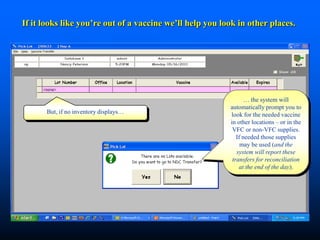
If it looks like you’re out of a vaccine we’ll help you look in other places.… the system will automatically prompt you to look for the needed vaccine in other locations – or in the VFC or non-VFC supplies. If needed those supplies may be used (and the system will report these transfers for reconciliation at the end of the day).But, if no inventory displays…
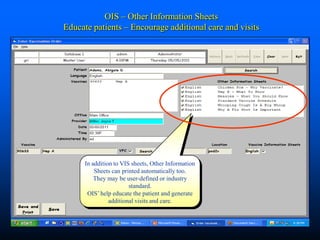
OIS – Other Information SheetsEducate patients – Encourage additional care and visitsIn addition to VIS sheets, Other Information Sheets can printed automatically too. They may be user-defined or industry standard. OIS’ help educate the patient and generate additional visits and care.

Vaccine Control System

  • 1.
    VCSVaccine Control SystemByGilmoreResearch, Inc.Use the back-and-forth arrows below to change screens.
  • 2.
    VCS option selectionscreens are clear and easy to navigate.Vaccination Orders lists patients for whom vaccines have been ordered today.Orders may be automatically received from your EMR or entered on demand.This item is the one used day-to-day by the nurses.All activity is tracked by user for HIPAA compliance.The Patient selection is where patients demographics, received automatically from your PM or EMR system, or entered directly are created, displayed and maintained.Inventory Control is used for tracking, ordering and reporting.
  • 3.
    Wait a minute…whatexactly is a VCS?The Technical OverviewThe Vaccine Control System is a new program designed to help you manage vaccine inventories. It facilitates ordering, receiving, administering, reordering and reporting – the complete inventory cycle. PC’s are stationed where vaccines are stored. When patients are being seen orders may be sent automatically to the VCS from your EMR or entered directly. Inventories are automatically checked, either for VFC or non-VFC depending on the patient, and then suggests the lots that should be used. On-hand inventory levels are automatically monitored and it lets you know when supplies are running low. It can even monitor scheduled future appointments and project inventory requirements and let you know if you may run low.It includes a list of reports including an audit report for you to verify that all administered vaccines are accounted for in your billing system.The VCS improves accuracy and saves time – nurses no longer have to manually record lot and NDC numbers – your EMR and PM can instantly be updated. And since it can monitor upcoming appointments and anticipate vaccine needs you can eliminate embarrassing rebookings.
  • 4.
    Practically…whatit means everyday…Increasednurse productivity – pick the lot from the screen - no more writing down, rekeying and manual messing with NDC and Lot numbers…Happier patients – no more “we seem to have run out of…you’ll need to reschedule..” – happier patients = happier providersBetter billings – accurate updating of NDC and lot numbers – no more “lost” charges and hours spent auditingEasier inventory management – know what and how much to order – know where you stand now - know what you’re going to need this month
  • 5.
    A few thingsyou should know first:The VCS system can serve as a stand-alone and be interfaced with your EMR and PM systems. Saves time and improves accuracy.
  • 6.
    When interfaced withyour PM system it can monitor scheduled appointments and project upcoming needs. Eliminates rescheduling and lost time.
  • 7.
    It is acentralized system for all of your vaccine inventories in all of your sites. Facilitates reordering and easy redistribution between sites.
  • 8.
    Manages both VFCand non-VFC inventories. Easily make adjustments between these two types of inventories.
  • 9.
    Array of utilizationand audit reports including VFC usage and balancing to your PM billing system. Eliminate lost billings.
  • 10.
    Automatically print requiredVIS and optional OIS forms in the patient’s native language. Never run out of forms – satisfy legal VIS requirements and promote more care with OIS forms.The order selection screen lists patients waiting for their vaccines. Orders may be received from your EMR or entered on demand.Patients waiting for vaccines…Requesting providers…Order status.To complete the vaccines order and choose the lots the patient is selected from from the list above…
  • 11.
    The VCS patientorder screen is used to select available lots and print VIS and OIS sheets.Patient data including the native language, needed vaccines, provider, VFC eligible, etc. are received from the EMR or entered on demand.Required VIS sheets automatically print in English and/or the patient’s native language.The VFC option and Search let you select from the appropriate vaccine inventory. The NDC and lot can automatically be sent to your EMR and PM system.
  • 12.
    Lot selection issimple. And, if needed the system can automatically search for available vaccines in other locations.When the vaccine search is clicked the applicable inventory to select from will display. If VFC is checked then only VFC inventory will display.Note: Since the system already knows the lot and NDC numbers there is no need to write them down and reenter them into the EMR and billing systems.“Nice”Lots are sorted by expiration date to help minimize waste.
  • 13.
    If it lookslike you’re out of a vaccine we’ll help you look in other places.… the system will automatically prompt you to look for the needed vaccine in other locations – or in the VFC or non-VFC supplies. If needed those supplies may be used (and the system will report these transfers for reconciliation at the end of the day).But, if no inventory displays…
  • 14.
    OIS – OtherInformation SheetsEducate patients – Encourage additional care and visitsIn addition to VIS sheets, Other Information Sheets can printed automatically too. They may be user-defined or industry standard. OIS’ help educate the patient and generate additional visits and care.