CiUn Blogger Training Write a Post (Article)
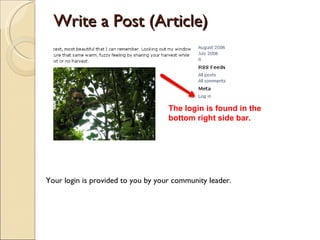
Write a Post (Article) The login is found in the bottom right side bar. Your login is provided to you by your community leader.
Write a Post (Article) This is Your admin panel also called Dashboard:  Click Write a new Post. You arrive at the Dashboard upon login.
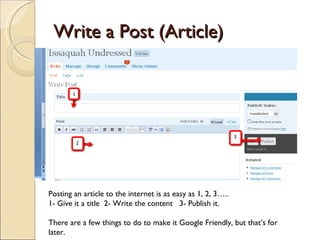
Write a Post (Article) Posting an article to the internet is as easy as 1, 2, 3….. 1- Give it a title  2- Write the content  3- Publish it. There are a few things to do to make it Google Friendly, but that’s for later.
Write a Post (Article) You do want to give it a category.  Planning your categories in advance helps you think of content. Look at our network sites for ideas.
Write a Post (Article) You Will also Want to Add Photos: See Flickr Instructions and How to Add Photos to your post. And you thought this was going to be hard.

V2 Writing A Post

  • 1.
    CiUn Blogger TrainingWrite a Post (Article)
  • 2.
    Write a Post(Article) The login is found in the bottom right side bar. Your login is provided to you by your community leader.
  • 3.
    Write a Post(Article) This is Your admin panel also called Dashboard: Click Write a new Post. You arrive at the Dashboard upon login.
  • 4.
    Write a Post(Article) Posting an article to the internet is as easy as 1, 2, 3….. 1- Give it a title 2- Write the content 3- Publish it. There are a few things to do to make it Google Friendly, but that’s for later.
  • 5.
    Write a Post(Article) You do want to give it a category. Planning your categories in advance helps you think of content. Look at our network sites for ideas.
  • 6.
    Write a Post(Article) You Will also Want to Add Photos: See Flickr Instructions and How to Add Photos to your post. And you thought this was going to be hard.