Intro To Blogging
What is a blog?

 blog/blôg/Noun: A Web site on which an
      individual or group of users record
opinions, information, etc. on a regular basis.
                  (wikipedia)
Why Blog?
•Low cost or free
•Easy to update
•Make connections and network
•Develop a relationship with your readers
   –Readers who come to the ACHLS site from the blog spend more
   time there and visit more pages than users who find us thru search.
•Become a thought leader
•Great SEO value (we’ll get to that later)
•Bring more people to your website – websites with blogs get
55% more traffic
•Credibility – people trust sources where they find the most
credible answers
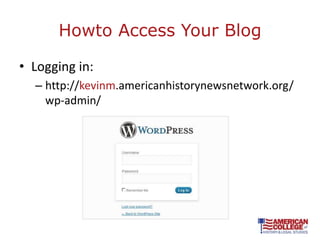
Howto Access Your Blog

• Logging in:
  – http://kevinm.americanhistorynewsnetwork.org/
    wp-admin/
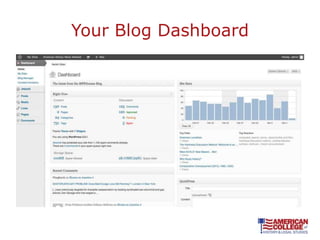
Your Blog Dashboard
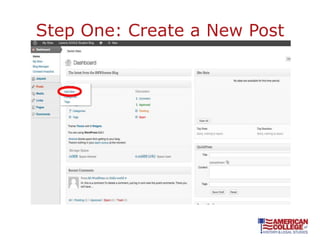
Step One: Create a New Post
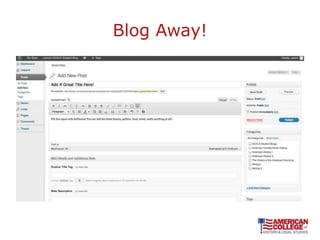
Blog Away!
Blog Tool Bar


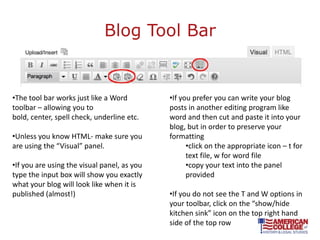
•The tool bar works just like a Word         •If you prefer you can write your blog
toolbar – allowing you to                    posts in another editing program like
bold, center, spell check, underline etc.    word and then cut and paste it into your
                                             blog, but in order to preserve your
•Unless you know HTML- make sure you         formatting
are using the “Visual” panel.                      •click on the appropriate icon – t for
                                                   text file, w for word file
•If you are using the visual panel, as you         •copy your text into the panel
type the input box will show you exactly           provided
what your blog will look like when it is
published (almost!)                          •If you do not see the T and W options in
                                             your toolbar, click on the “show/hide
                                             kitchen sink” icon on the top right hand
                                             side of the top row
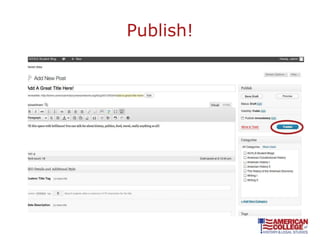
Publish!
What Does Your Blog Look Like?


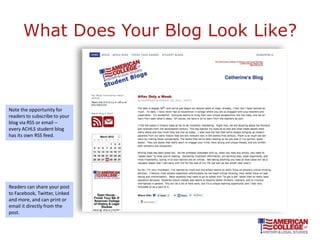
Note the opportunity for
readers to subscribe to your
blog via RSS or email –
every ACHLS student blog
has its own RSS feed.


Readers can share your post
to Facebook, Twitter, Linked
and more, and can print or
email it directly from the
post.
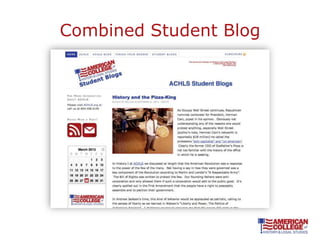
Combined Student Blog
RSSfeed
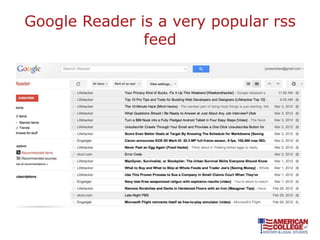
• An Rss feed lets you syndicate content
• …often dubbed Really Simple
  Syndication) RSS is a family of web feed
  formats used to publish frequently
  updated works—such as blog
  entries, news headlines, audio, and
  video—in a standardized format.[2] An
  RSS document (which is called a
  "feed", "web feed",[3] or "channel")
  includes full or summarized text, plus
  metadata such as publishing dates and
  authorship. (wikipedia)
Google Reader is a very popular rss
               feed
Blogging Basics

Adding Links and Images
Adding Links
• Why add links?
   – a great way to add value to your reader
   – A great way to build better SEO (get your blog found by
     search engines)
   – At it’s essence the internet is made up of linked data

• When do you add a link?
   – When you are referring to another source of information
     like an article or another blog
   – To provide context
   – To further illustrate your point or story
   – To link back to a previous post that you wrote
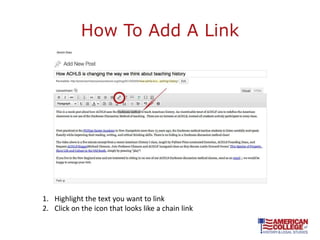
How To Add A Link


1. Highlight the text you want to link
2. Click on the icon that looks like a chain link
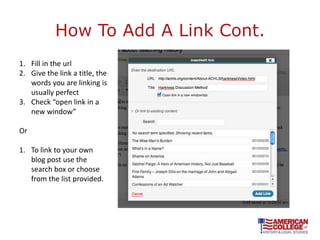
How To Add A Link Cont.
1. Fill in the url
2. Give the link a title, the
   words you are linking is
   usually perfect
3. Check “open link in a
   new window”

Or

1. To link to your own
   blog post use the
   search box or choose
   from the list provided.
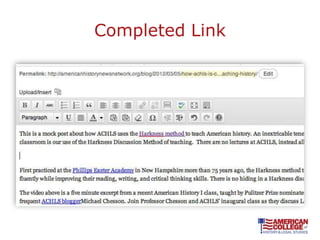
Completed Link
Add Images

Why use images?
• Makesyour content more visually appealing to
  readers.
• Breaks up blocks of text
• Blog posts that include pictures typically see
  more traffic and more engagement than blog
  posts that are pure text
Where Do I find images
• Images should be either owned by you, Creative
  Commons Images or images in the Public Domain

   “Creative Commons licenses provide a flexible range of
       protections and freedoms for authors, artists, and
              educators.” – CreativeCommons.org

• Twogreat places to find Creative Commons
  pictures and public domain images
  – Flickr.com
  – Wikimedia.com
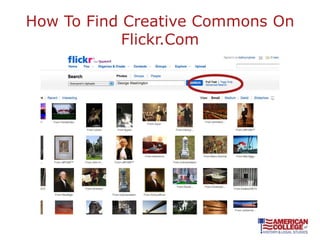
How To Find Creative Commons On
            Flickr.Com
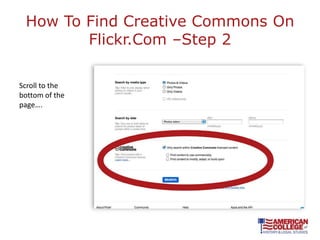
How To Find Creative Commons On
        Flickr.Com –Step 2

Scroll to the
bottom of the
page….
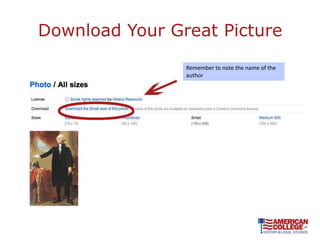
Download Your Great Picture
                Remember to note the name of the
                author
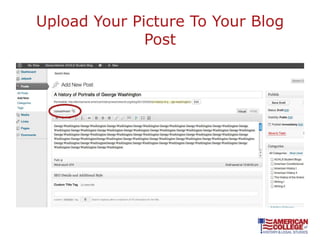
Upload Your Picture To Your Blog
              Post
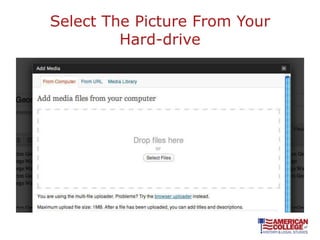
Select The Picture From Your
         Hard-drive
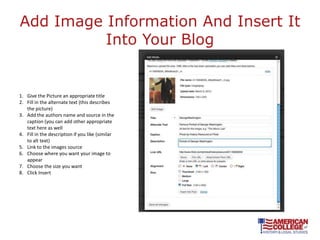
Add Image Information And Insert It
          Into Your Blog


1. Give the Picture an appropriate title
2. Fill in the alternate text (this describes
   the picture)
3. Add the authors name and source in the
   caption (you can add other appropriate
   text here as well
4. Fill in the description if you like (similar
   to alt text)
5. Link to the images source
6. Choose where you want your image to
   appear
7. Choose the size you want
8. Click Insert
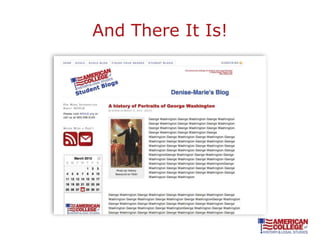
And There It Is!
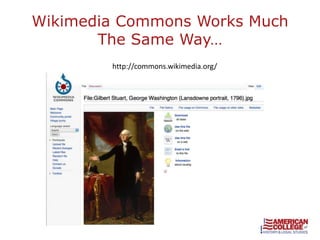
Wikimedia Commons Works Much
       The Same Way…
        http://commons.wikimedia.org/
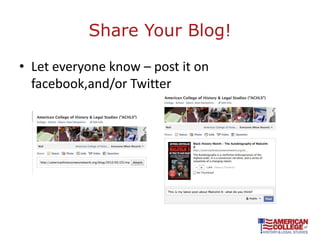
Share Your Blog!

• Let everyone know – post it on
  facebook,and/or Twitter
How Do I Increase My SEO?

• What is SEO?
  – SEO stands for search engine optimization. It is a
    way to organically increase the traffic to your site
    by speaking to search engines in the language that
    they understand (meta, tag, category, title tag)
Basic Important SEO elements

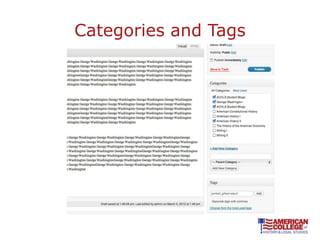
• Categories and Tags help your blog get found
  by readers and search engines alike.
  – Categories are broader than tags. A category is a
    general topic ie. George Washington
  – Tags are terms that are specific to a particular post
    ie. portraits, Gilbert Stuart,
Categories and Tags
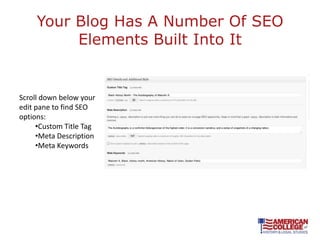
Your Blog Has A Number Of SEO
          Elements Built Into It


Scroll down below your
edit pane to find SEO
options:
     •Custom Title Tag
     •Meta Description
     •Meta Keywords
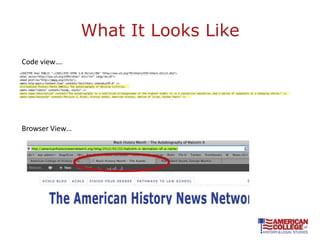
What It Looks Like
Code view….


Browser View…
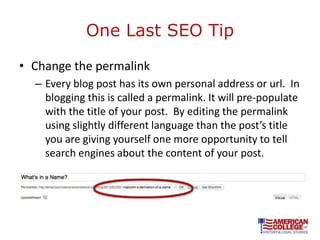
One Last SEO Tip

• Change the permalink
  – Every blog post has its own personal address or url. In
    blogging this is called a permalink. It will pre-populate
    with the title of your post. By editing the permalink
    using slightly different language than the post’s title
    you are giving yourself one more opportunity to tell
    search engines about the content of your post.
SEO Review

•   Assign a category to every blog post
•   Add tags to every blog post
•   Create a custom title tag
•   Write a meta description
•   Insert meta-tags
•   Edit your permalink
Best Practices

• Blog often – people who blog 20 or more
  times a month see the most traffic
• Blog posts should be at least 300 words.
• Concentrate on providing value to your reader
• Use links and images
• Be authentic.
• Be controversial (authentically)
What should I blog about

•Have a differing opinion with someone in class?
Blog about it?
•Loved a book? Blog about it!
•Did something fun over the weekend? Blog
about it!
•Political issue that is really getting your goat?
Blog about it!
What happens to my blog when I
          leave ACHLS?
•Easily export all of your posts to your new blog
•Forward your personal feed address, so you
don’t lose any subscribers

ACHLS Introduction To Blogging

  • 1.
  • 2.
    What is ablog? blog/blôg/Noun: A Web site on which an individual or group of users record opinions, information, etc. on a regular basis. (wikipedia)
  • 3.
    Why Blog? •Low costor free •Easy to update •Make connections and network •Develop a relationship with your readers –Readers who come to the ACHLS site from the blog spend more time there and visit more pages than users who find us thru search. •Become a thought leader •Great SEO value (we’ll get to that later) •Bring more people to your website – websites with blogs get 55% more traffic •Credibility – people trust sources where they find the most credible answers
  • 4.
    Howto Access YourBlog • Logging in: – http://kevinm.americanhistorynewsnetwork.org/ wp-admin/
  • 5.
  • 6.
    Step One: Createa New Post
  • 7.
  • 8.
    Blog Tool Bar •Thetool bar works just like a Word •If you prefer you can write your blog toolbar – allowing you to posts in another editing program like bold, center, spell check, underline etc. word and then cut and paste it into your blog, but in order to preserve your •Unless you know HTML- make sure you formatting are using the “Visual” panel. •click on the appropriate icon – t for text file, w for word file •If you are using the visual panel, as you •copy your text into the panel type the input box will show you exactly provided what your blog will look like when it is published (almost!) •If you do not see the T and W options in your toolbar, click on the “show/hide kitchen sink” icon on the top right hand side of the top row
  • 9.
  • 10.
    What Does YourBlog Look Like? Note the opportunity for readers to subscribe to your blog via RSS or email – every ACHLS student blog has its own RSS feed. Readers can share your post to Facebook, Twitter, Linked and more, and can print or email it directly from the post.
  • 11.
  • 12.
    RSSfeed • An Rssfeed lets you syndicate content • …often dubbed Really Simple Syndication) RSS is a family of web feed formats used to publish frequently updated works—such as blog entries, news headlines, audio, and video—in a standardized format.[2] An RSS document (which is called a "feed", "web feed",[3] or "channel") includes full or summarized text, plus metadata such as publishing dates and authorship. (wikipedia)
  • 13.
    Google Reader isa very popular rss feed
  • 14.
  • 15.
    Adding Links • Whyadd links? – a great way to add value to your reader – A great way to build better SEO (get your blog found by search engines) – At it’s essence the internet is made up of linked data • When do you add a link? – When you are referring to another source of information like an article or another blog – To provide context – To further illustrate your point or story – To link back to a previous post that you wrote
  • 16.
    How To AddA Link 1. Highlight the text you want to link 2. Click on the icon that looks like a chain link
  • 17.
    How To AddA Link Cont. 1. Fill in the url 2. Give the link a title, the words you are linking is usually perfect 3. Check “open link in a new window” Or 1. To link to your own blog post use the search box or choose from the list provided.
  • 18.
  • 19.
    Add Images Why useimages? • Makesyour content more visually appealing to readers. • Breaks up blocks of text • Blog posts that include pictures typically see more traffic and more engagement than blog posts that are pure text
  • 20.
    Where Do Ifind images • Images should be either owned by you, Creative Commons Images or images in the Public Domain “Creative Commons licenses provide a flexible range of protections and freedoms for authors, artists, and educators.” – CreativeCommons.org • Twogreat places to find Creative Commons pictures and public domain images – Flickr.com – Wikimedia.com
  • 21.
    How To FindCreative Commons On Flickr.Com
  • 22.
    How To FindCreative Commons On Flickr.Com –Step 2 Scroll to the bottom of the page….
  • 23.
    Download Your GreatPicture Remember to note the name of the author
  • 24.
    Upload Your PictureTo Your Blog Post
  • 25.
    Select The PictureFrom Your Hard-drive
  • 26.
    Add Image InformationAnd Insert It Into Your Blog 1. Give the Picture an appropriate title 2. Fill in the alternate text (this describes the picture) 3. Add the authors name and source in the caption (you can add other appropriate text here as well 4. Fill in the description if you like (similar to alt text) 5. Link to the images source 6. Choose where you want your image to appear 7. Choose the size you want 8. Click Insert
  • 27.
  • 28.
    Wikimedia Commons WorksMuch The Same Way… http://commons.wikimedia.org/
  • 29.
    Share Your Blog! •Let everyone know – post it on facebook,and/or Twitter
  • 30.
    How Do IIncrease My SEO? • What is SEO? – SEO stands for search engine optimization. It is a way to organically increase the traffic to your site by speaking to search engines in the language that they understand (meta, tag, category, title tag)
  • 31.
    Basic Important SEOelements • Categories and Tags help your blog get found by readers and search engines alike. – Categories are broader than tags. A category is a general topic ie. George Washington – Tags are terms that are specific to a particular post ie. portraits, Gilbert Stuart,
  • 32.
  • 33.
    Your Blog HasA Number Of SEO Elements Built Into It Scroll down below your edit pane to find SEO options: •Custom Title Tag •Meta Description •Meta Keywords
  • 34.
    What It LooksLike Code view…. Browser View…
  • 35.
    One Last SEOTip • Change the permalink – Every blog post has its own personal address or url. In blogging this is called a permalink. It will pre-populate with the title of your post. By editing the permalink using slightly different language than the post’s title you are giving yourself one more opportunity to tell search engines about the content of your post.
  • 36.
    SEO Review • Assign a category to every blog post • Add tags to every blog post • Create a custom title tag • Write a meta description • Insert meta-tags • Edit your permalink
  • 37.
    Best Practices • Blogoften – people who blog 20 or more times a month see the most traffic • Blog posts should be at least 300 words. • Concentrate on providing value to your reader • Use links and images • Be authentic. • Be controversial (authentically)
  • 38.
    What should Iblog about •Have a differing opinion with someone in class? Blog about it? •Loved a book? Blog about it! •Did something fun over the weekend? Blog about it! •Political issue that is really getting your goat? Blog about it!
  • 39.
    What happens tomy blog when I leave ACHLS? •Easily export all of your posts to your new blog •Forward your personal feed address, so you don’t lose any subscribers

Editor's Notes

  • #2 Very simpleTalk about what a blog isTalk about why blogging is a great thingShow you how to publish a basic blog postShow you how to share your blogShow you how to add images and linksTalk about how to get your blog noticed by search enginesWhat you should talk aboutWhat happens to your blog when you leave ACHLS