Design
Systems
Curated by Vani Jain
Why do we have to start building our design system?
5/10 companies from the top 10 companies
by the market cap are either exclusively
growing by producing software, or software is
an important part of their revenue stream.
And in the past 12 months these companies increased
their design headcount by an average of 65%.
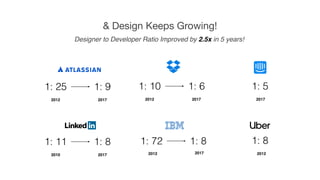
Designer to Developer Ratio Improved by 2.5x in 5 years!
& Design Keeps Growing!
1: 25 1: 9
2012 2017
1: 10 1: 6
2012 2017
1: 5
2017
1: 11 1: 8
2010 2017
1: 8
20122017
1: 72 1: 8
2012
The market is booming and there’s more demand
for designers than ever, but with the new scale,
new problems emerge…
Design Does Not Scale
Through Hiring Only
The business requirements pressure designers to build
more, faster and better, but without standards in place,
every new hire is going to further slow down the process.
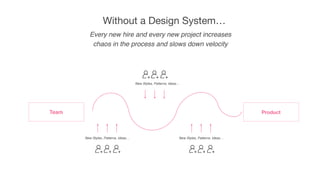
Team Product
New Styles, Patterns, Ideas…
New Styles, Patterns, Ideas… New Styles, Patterns, Ideas…
Every new hire and every new project increases
chaos in the process and slows down velocity
Without a Design System…
Without a design system, software development process
becomes gradually slower and slower and the
experience of users suffers from growing inconsistencies.
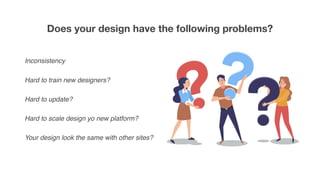
Does your design have the following problems?
Inconsistency
Hard to train new designers?
Hard to update?
Hard to scale design yo new platform?
Your design look the same with other sites?
One YES makes the creation of the design system worthwhile.
To overcome these challenges thousands of
companies are investing in Design Systems.
What is a Design System?
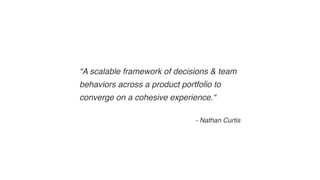
“A scalable framework of decisions & team
behaviors across a product portfolio to
converge on a cohesive experience.“
- Nathan Curtis
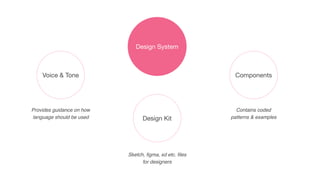
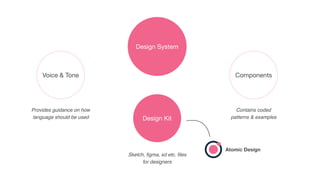
Design System
Components
Design Kit
Voice & Tone
Provides guidance on how
language should be used
Sketch, figma, xd etc. files
for designers
Contains coded
patterns & examples
Design System
Components
Design Kit
Voice & Tone
Provides guidance on how
language should be used
Sketch, figma, xd etc. files
for designers
Contains coded
patterns & examples
Atomic Design
What is Atomic Design?
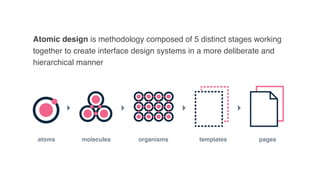
atoms molecules organisms templates pages
Atomic design is methodology composed of 5 distinct stages working
together to create interface design systems in a more deliberate and
hierarchical manner
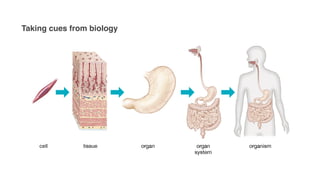
Taking cues from biology
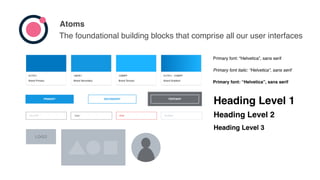
Atoms
The foundational building blocks that comprise all our user interfaces
1397E1
Brand Secondary
1CB3FF
Brand Terciary
0177C1 - 1CB3FF
Brand Gradient
0177C1
Brand Primary
Primary font: “Helvetica”, sans serif
Primary font italic: “Helvetica”, sans serif
PRIMARY SECONDARY TERTIARY
HOVER HOVER HOVER
SELECTED SELECTED SELECTED
DISABLED DISABLED DISABLED
Type Error DisabledInput field
LOGO
Heading Level 1
Heading Level 2
Heading Level 3
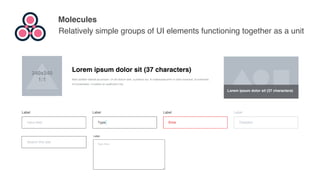
Molecules
Relatively simple groups of UI elements functioning together as a unit
240x240
1:1
Lorem ipsum dolor sit (37 characters)
Nam porttitor blandit accumsan. Ut vel dictum sem, a pretium dui. In malesuada enim in dolor euismod, id commodo
mi consectetur. Curabitur at vestibulum nisi.
Lorem ipsum dolor sit (37 characters)
Input field
Label
Type
Label
Error
Label
Disabled
Label
Search this site
Type here
Label
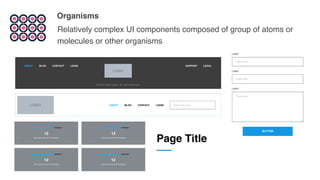
Organisms
Relatively complex UI components composed of group of atoms or
molecules or other organisms
LOGO
© 2016 Lorem ipsum. All rights reserved.
ABOUT BLOG CONTACT SUPPORTLOGIN LEGAL
LOGO ABOUT BLOG CONTACT LOGIN Search this site
Input field
Label
Input field
Label
Type here
Label
BUTTON
12
Lorem ipsum dolor sit (37 characters)
12
Lorem ipsum dolor sit (37 characters)
12
Lorem ipsum dolor sit (37 characters)
12
Lorem ipsum dolor sit (37 characters)
Page Title
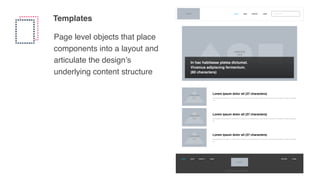
Templates
Page level objects that place
components into a layout and
articulate the design’s
underlying content structure
LOGO
© 2016 Lorem ipsum. All rights reserved.
ABOUT BLOG CONTACT SUPPORTLOGIN LEGAL
LOGO ABOUT BLOG CONTACT LOGIN Search this site
240x240
1:1
Lorem ipsum dolor sit (37 characters)
Nam porttitor blandit accumsan. Ut vel dictum sem, a pretium dui. In malesuada enim in dolor euismod, id commodo mi consectetur. Curabitur at vestibulum
nisi.
240x240
1:1
Lorem ipsum dolor sit (37 characters)
Nam porttitor blandit accumsan. Ut vel dictum sem, a pretium dui. In malesuada enim in dolor euismod, id commodo mi consectetur. Curabitur at vestibulum
nisi.
240x240
1:1
Lorem ipsum dolor sit (37 characters)
Nam porttitor blandit accumsan. Ut vel dictum sem, a pretium dui. In malesuada enim in dolor euismod, id commodo mi consectetur. Curabitur at vestibulum
nisi.
1280x720
16:9
In hac habitasse platea dictumst.
Vivamus adipiscing fermentum.
(80 characters)
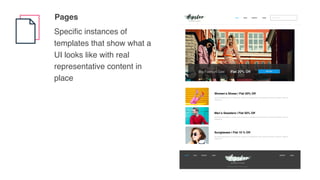
Pages
Specific instances of
templates that show what a
UI looks like with real
representative content in
place
© 2016 Lorem ipsum. All rights reserved.
ABOUT BLOG CONTACT SUPPORTLOGIN LEGAL
ABOUT BLOG CONTACT LOGIN Search this site
Flat 20% OffBig Fashion Sale SHOP NOW
240x240
1:1
Women’s Shoes | Flat 20% Off
Nam porttitor blandit accumsan. Ut vel dictum sem, a pretium dui. In malesuada enim in dolor euismod, id commodo mi consectetur. Curabitur at
vestibulum nisi.
240x240
1:1
Men’s Sweaters | Flat 50% Off
Nam porttitor blandit accumsan. Ut vel dictum sem, a pretium dui. In malesuada enim in dolor euismod, id commodo mi consectetur. Curabitur at
vestibulum nisi.
240x240
1:1
Sunglasses | Flat 10 % Off
Nam porttitor blandit accumsan. Ut vel dictum sem, a pretium dui. In malesuada enim in dolor euismod, id commodo mi consectetur. Curabitur at
vestibulum nisi.
So now you know how atomic designs help designers
build a design system? But how other stakeholders are
involved in building this. Let’s go over that!
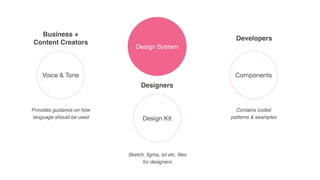
Design System
Components
Design Kit
Voice & Tone
Provides guidance on how
language should be used
Sketch, figma, xd etc. files
for designers
Contains coded
patterns & examples
Business +
Content Creators
Designers
Developers
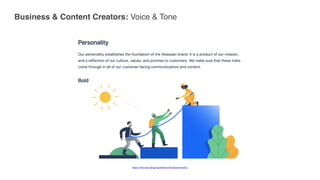
Business & Content Creators: Voice & Tone
https://atlassian.design/guidelines/brand/personality
Designers: Design Kit
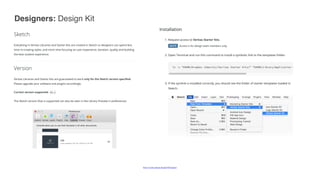
https://veritas.udacity.design/#!/Designers
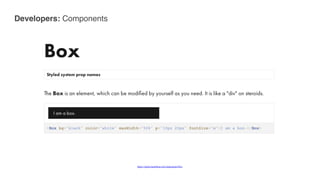
Developers: Components
https://pulse.heartbeat.ua/components/box
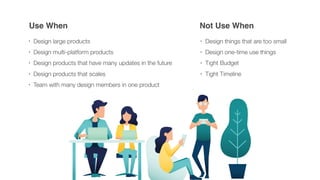
When should we avoid using design system?
Use When Not Use When
• Design large products
• Design multi-platform products
• Design products that have many updates in the future
• Design products that scales
• Team with many design members in one product
• Design things that are too small
• Design one-time use things
• Tight Budget
• Tight Timeline
Pros & Cons of a Design System
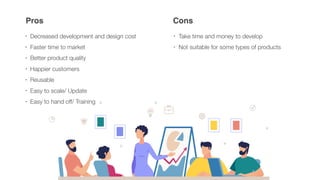
Pros Cons
• Decreased development and design cost
• Faster time to market
• Better product quality
• Happier customers
• Reusable
• Easy to scale/ Update
• Easy to hand off/ Training
• Take time and money to develop
• Not suitable for some types of products
It takes time & money initially, But it’s an asset in long term
You end up saving the time and money
saved thanks to a design system makes the
whole project worth it
We’ll deliver better experiences faster.
Customers will notice.
By using well-tested components, we’ll
lower the cost of long-term maintenance.
And we’ll get the most out of every new hire,
due to faster standardized onboarding with
the design system.
Thank You

Design System & Atomic Design

  • 1.
  • 2.
    Why do wehave to start building our design system?
  • 3.
    5/10 companies fromthe top 10 companies by the market cap are either exclusively growing by producing software, or software is an important part of their revenue stream.
  • 4.
    And in thepast 12 months these companies increased their design headcount by an average of 65%.
  • 5.
    Designer to DeveloperRatio Improved by 2.5x in 5 years! & Design Keeps Growing! 1: 25 1: 9 2012 2017 1: 10 1: 6 2012 2017 1: 5 2017 1: 11 1: 8 2010 2017 1: 8 20122017 1: 72 1: 8 2012
  • 6.
    The market isbooming and there’s more demand for designers than ever, but with the new scale, new problems emerge…
  • 7.
    Design Does NotScale Through Hiring Only
  • 8.
    The business requirementspressure designers to build more, faster and better, but without standards in place, every new hire is going to further slow down the process.
  • 9.
    Team Product New Styles,Patterns, Ideas… New Styles, Patterns, Ideas… New Styles, Patterns, Ideas… Every new hire and every new project increases chaos in the process and slows down velocity Without a Design System…
  • 10.
    Without a designsystem, software development process becomes gradually slower and slower and the experience of users suffers from growing inconsistencies.
  • 11.
    Does your designhave the following problems?
  • 12.
    Does your designhave the following problems? Inconsistency Hard to train new designers? Hard to update? Hard to scale design yo new platform? Your design look the same with other sites?
  • 13.
    One YES makesthe creation of the design system worthwhile.
  • 14.
    To overcome thesechallenges thousands of companies are investing in Design Systems.
  • 15.
    What is aDesign System?
  • 16.
    “A scalable frameworkof decisions & team behaviors across a product portfolio to converge on a cohesive experience.“ - Nathan Curtis
  • 17.
    Design System Components Design Kit Voice& Tone Provides guidance on how language should be used Sketch, figma, xd etc. files for designers Contains coded patterns & examples
  • 18.
    Design System Components Design Kit Voice& Tone Provides guidance on how language should be used Sketch, figma, xd etc. files for designers Contains coded patterns & examples Atomic Design
  • 19.
  • 20.
    atoms molecules organismstemplates pages Atomic design is methodology composed of 5 distinct stages working together to create interface design systems in a more deliberate and hierarchical manner
  • 21.
  • 22.
    Atoms The foundational buildingblocks that comprise all our user interfaces 1397E1 Brand Secondary 1CB3FF Brand Terciary 0177C1 - 1CB3FF Brand Gradient 0177C1 Brand Primary Primary font: “Helvetica”, sans serif Primary font: “Helvetica”, sans serif Primary font italic: “Helvetica”, sans serif PRIMARY SECONDARY TERTIARY HOVER HOVER HOVER SELECTED SELECTED SELECTED DISABLED DISABLED DISABLED Type Error DisabledInput field LOGO Heading Level 1 Heading Level 2 Heading Level 3
  • 23.
    Molecules Relatively simple groupsof UI elements functioning together as a unit 240x240 1:1 Lorem ipsum dolor sit (37 characters) Nam porttitor blandit accumsan. Ut vel dictum sem, a pretium dui. In malesuada enim in dolor euismod, id commodo mi consectetur. Curabitur at vestibulum nisi. Lorem ipsum dolor sit (37 characters) Input field Label Type Label Error Label Disabled Label Search this site Type here Label
  • 24.
    Organisms Relatively complex UIcomponents composed of group of atoms or molecules or other organisms LOGO © 2016 Lorem ipsum. All rights reserved. ABOUT BLOG CONTACT SUPPORTLOGIN LEGAL LOGO ABOUT BLOG CONTACT LOGIN Search this site Input field Label Input field Label Type here Label BUTTON 12 Lorem ipsum dolor sit (37 characters) 12 Lorem ipsum dolor sit (37 characters) 12 Lorem ipsum dolor sit (37 characters) 12 Lorem ipsum dolor sit (37 characters) Page Title
  • 25.
    Templates Page level objectsthat place components into a layout and articulate the design’s underlying content structure LOGO © 2016 Lorem ipsum. All rights reserved. ABOUT BLOG CONTACT SUPPORTLOGIN LEGAL LOGO ABOUT BLOG CONTACT LOGIN Search this site 240x240 1:1 Lorem ipsum dolor sit (37 characters) Nam porttitor blandit accumsan. Ut vel dictum sem, a pretium dui. In malesuada enim in dolor euismod, id commodo mi consectetur. Curabitur at vestibulum nisi. 240x240 1:1 Lorem ipsum dolor sit (37 characters) Nam porttitor blandit accumsan. Ut vel dictum sem, a pretium dui. In malesuada enim in dolor euismod, id commodo mi consectetur. Curabitur at vestibulum nisi. 240x240 1:1 Lorem ipsum dolor sit (37 characters) Nam porttitor blandit accumsan. Ut vel dictum sem, a pretium dui. In malesuada enim in dolor euismod, id commodo mi consectetur. Curabitur at vestibulum nisi. 1280x720 16:9 In hac habitasse platea dictumst. Vivamus adipiscing fermentum. (80 characters)
  • 26.
    Pages Specific instances of templatesthat show what a UI looks like with real representative content in place © 2016 Lorem ipsum. All rights reserved. ABOUT BLOG CONTACT SUPPORTLOGIN LEGAL ABOUT BLOG CONTACT LOGIN Search this site Flat 20% OffBig Fashion Sale SHOP NOW 240x240 1:1 Women’s Shoes | Flat 20% Off Nam porttitor blandit accumsan. Ut vel dictum sem, a pretium dui. In malesuada enim in dolor euismod, id commodo mi consectetur. Curabitur at vestibulum nisi. 240x240 1:1 Men’s Sweaters | Flat 50% Off Nam porttitor blandit accumsan. Ut vel dictum sem, a pretium dui. In malesuada enim in dolor euismod, id commodo mi consectetur. Curabitur at vestibulum nisi. 240x240 1:1 Sunglasses | Flat 10 % Off Nam porttitor blandit accumsan. Ut vel dictum sem, a pretium dui. In malesuada enim in dolor euismod, id commodo mi consectetur. Curabitur at vestibulum nisi.
  • 27.
    So now youknow how atomic designs help designers build a design system? But how other stakeholders are involved in building this. Let’s go over that!
  • 28.
    Design System Components Design Kit Voice& Tone Provides guidance on how language should be used Sketch, figma, xd etc. files for designers Contains coded patterns & examples Business + Content Creators Designers Developers
  • 29.
    Business & ContentCreators: Voice & Tone https://atlassian.design/guidelines/brand/personality
  • 30.
  • 31.
  • 32.
    When should weavoid using design system?
  • 33.
    Use When NotUse When • Design large products • Design multi-platform products • Design products that have many updates in the future • Design products that scales • Team with many design members in one product • Design things that are too small • Design one-time use things • Tight Budget • Tight Timeline
  • 34.
    Pros & Consof a Design System
  • 35.
    Pros Cons • Decreaseddevelopment and design cost • Faster time to market • Better product quality • Happier customers • Reusable • Easy to scale/ Update • Easy to hand off/ Training • Take time and money to develop • Not suitable for some types of products
  • 36.
    It takes time& money initially, But it’s an asset in long term
  • 37.
    You end upsaving the time and money saved thanks to a design system makes the whole project worth it
  • 38.
    We’ll deliver betterexperiences faster. Customers will notice.
  • 39.
    By using well-testedcomponents, we’ll lower the cost of long-term maintenance.
  • 40.
    And we’ll getthe most out of every new hire, due to faster standardized onboarding with the design system.
  • 41.