Michael Rys
Principal Program Manager, Big Data @ Microsoft
@MikeDoesBigData, {mrys, usql}@microsoft.com
U-SQL Partitioned Data and Tables
Data
Partitioning
Files
Tables
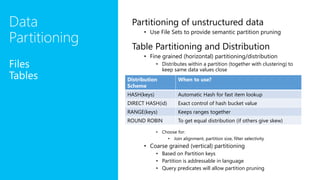
Partitioning of unstructured data
• Use File Sets to provide semantic partition pruning
Table Partitioning and Distribution
• Fine grained (horizontal) partitioning/distribution
• Distributes within a partition (together with clustering) to
keep same data values close
• Choose for:
• Join alignment, partition size, filter selectivity
• Coarse grained (vertical) partitioning
• Based on Partition keys
• Partition is addressable in language
• Query predicates will allow partition pruning
Distribution
Scheme
When to use?
HASH(keys) Automatic Hash for fast item lookup
DIRECT HASH(id) Exact control of hash bucket value
RANGE(keys) Keeps ranges together
ROUND ROBIN To get equal distribution (if others give skew)
Partitions,
Distributions and
Clusters L
o
g
i
c
a
l
PARTITION (@date1) PARTITION (@date2) PARTITION (@date3)
TABLE T ( key …, C …, date DateTime, …
, INDEX i CLUSTERED (key, C)
PARTITIONED BY BUCKETS (date)
HASH (key) INTO 4)
P
h
y
s
i
c
a
l
HASH DISTRIBUTION 1
HASH DISTRIBUTION 2
HASH DISTRIBUTION 3
HASH DISTRIBUTION 1
HASH DISTRIBUTION 1
HASH DISTRIBUTION 2
HASH DISTRIBUTION 3
HASH DISTRIBUTION 4 HASH DISTRIBUTION 3
C1
C2
C3
C1
C2
C4
C5
C4
C6
C6
C7
C8
C7
C5
C6
C9
C10
C1
C3
/catalog/…/tables/Guid(T)/
Guid(T.p1).ss Guid(T.p2).ss Guid(T.p3).ss
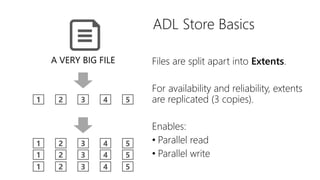
ADL Store Basics
A VERY BIG FILE
1 2 3 4 5
1 2 3 4 5
1 2 3 4 5
1 2 3 4 5
Files are split apart into Extents.
For availability and reliability, extents
are replicated (3 copies).
Enables:
• Parallel read
• Parallel write
Extent
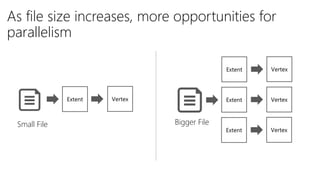
As file size increases, more opportunities for
parallelism
Vertex
Extent Vertex
Extent Vertex
Extent Vertex
Small File Bigger File
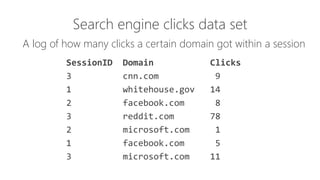
Search engine clicks data set
A log of how many clicks a certain domain got within a session
SessionID Domain Clicks
3 cnn.com 9
1 whitehouse.gov 14
2 facebook.com 8
3 reddit.com 78
2 microsoft.com 1
1 facebook.com 5
3 microsoft.com 11
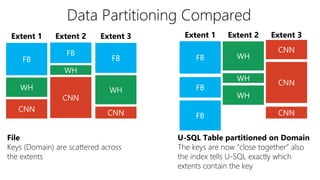
Data Partitioning Compared
Extent 2 Extent 3Extent 1
File
Keys (Domain) are scattered across
the extents
Extent 2 Extent 3
FB
WH
CNN
FB
WH
CNN
FB
WH
CNN
WH
WH
WH
CNN
CNN
CNN
FB
FB
FB
Extent 1
U-SQL Table partitioned on Domain
The keys are now “close together” also
the index tells U-SQL exactly which
extents contain the key
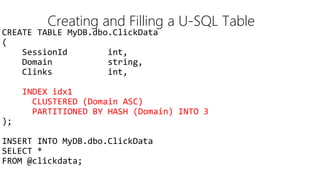
CREATE TABLE MyDB.dbo.ClickData
(
SessionId int,
Domain string,
Clinks int,
INDEX idx1
CLUSTERED (Domain ASC)
PARTITIONED BY HASH (Domain) INTO 3
);
INSERT INTO MyDB.dbo.ClickData
SELECT *
FROM @clickdata;
Creating and Filling a U-SQL Table
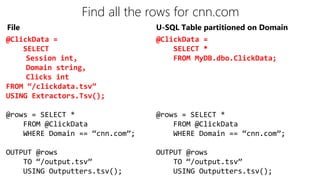
Find all the rows for cnn.com
@ClickData =
SELECT
Session int,
Domain string,
Clicks int
FROM “/clickdata.tsv”
USING Extractors.Tsv();
@rows = SELECT *
FROM @ClickData
WHERE Domain == “cnn.com”;
OUTPUT @rows
TO “/output.tsv”
USING Outputters.tsv();
@ClickData =
SELECT *
FROM MyDB.dbo.ClickData;
@rows = SELECT *
FROM @ClickData
WHERE Domain == “cnn.com”;
OUTPUT @rows
TO “/output.tsv”
USING Outputters.tsv();
File U-SQL Table partitioned on Domain
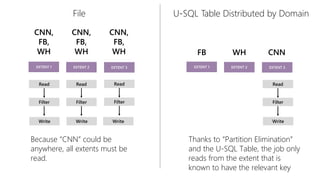
Read Read
Write Write Write
Read
Filter Filter Filter
CNN,
FB,
WH
EXTENT 1 EXTENT 2 EXTENT 3
CNN,
FB,
WH
CNN,
FB,
WH
Because “CNN” could be
anywhere, all extents must be
read.
Read
Write
Filter
FB
EXTENT 1 EXTENT 2 EXTENT 3
WH CNN
Thanks to “Partition Elimination”
and the U-SQL Table, the job only
reads from the extent that is
known to have the relevant key
File U-SQL Table Distributed by Domain
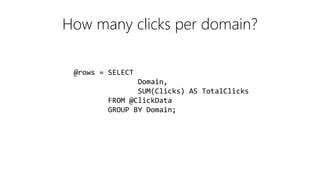
How many clicks per domain?
@rows = SELECT
Domain,
SUM(Clicks) AS TotalClicks
FROM @ClickData
GROUP BY Domain;
File
Read Read
Partition Partition
Full Agg
Write
Full Agg
Write
Full Agg
Write
Read
Partition
Partial Agg Partial Agg Partial Agg
CNN,
FB,
WH
EXTENT 1 EXTENT 2 EXTENT 3
CNN,
FB,
WH
CNN,
FB,
WH
U-SQL Table Distributed by Domain
Read Read
Full Agg Full Agg
Write Write
Read
Full Agg
Write
FB
EXTENT 1
WH
EXTENT 2
CNN
EXTENT 3
Expensive!
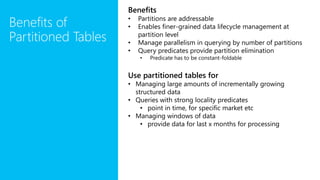
Benefits of
Partitioned Tables
Benefits
• Partitions are addressable
• Enables finer-grained data lifecycle management at
partition level
• Manage parallelism in querying by number of partitions
• Query predicates provide partition elimination
• Predicate has to be constant-foldable
Use partitioned tables for
• Managing large amounts of incrementally growing
structured data
• Queries with strong locality predicates
• point in time, for specific market etc
• Managing windows of data
• provide data for last x months for processing
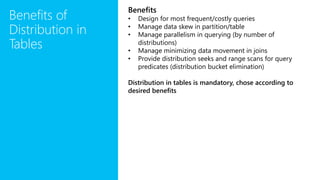
Benefits of
Distribution in
Tables
Benefits
• Design for most frequent/costly queries
• Manage data skew in partition/table
• Manage parallelism in querying (by number of
distributions)
• Manage minimizing data movement in joins
• Provide distribution seeks and range scans for query
predicates (distribution bucket elimination)
Distribution in tables is mandatory, chose according to
desired benefits
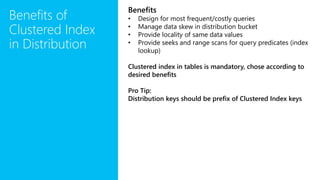
Benefits of
Clustered Index
in Distribution
Benefits
• Design for most frequent/costly queries
• Manage data skew in distribution bucket
• Provide locality of same data values
• Provide seeks and range scans for query predicates (index
lookup)
Clustered index in tables is mandatory, chose according to
desired benefits
Pro Tip:
Distribution keys should be prefix of Clustered Index keys
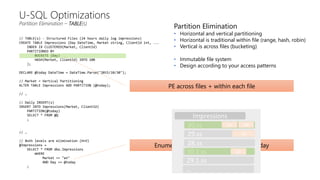
// TABLE(s) - Structured Files (24 hours daily log impressions)
CREATE TABLE Impressions (Day DateTime, Market string, ClientId int, ...
INDEX IX CLUSTERED(Market, ClientId)
PARTITIONED BY
BUCKETS (Day)
HASH(Market, ClientId) INTO 100
);
DECLARE @today DateTime = DateTime.Parse("2015/10/30");
// Market = Vertical Partitioning
ALTER TABLE Impressions ADD PARTITION (@today);
// …
// Daily INSERT(s)
INSERT INTO Impressions(Market, ClientId)
PARTITION(@today)
SELECT * FROM @Q
;
// …
// Both levels are elimination (H+V)
@Impressions =
SELECT * FROM dbo.Impressions
WHERE
Market == "en"
AND Day == @today
;
U-SQL Optimizations
Partition Elimination – TABLE(s)
Partition Elimination
• Horizontal and vertical partitioning
• Horizontal is traditional within file (range, hash, robin)
• Vertical is across files (bucketing)
• Immutable file system
• Design according to your access patterns
Enumerate all partitions filtering for today
30.ss
30.1.ss
29.ss
28.ss
29.1.ss
Impressions
…
deen
jp
de
PE across files + within each file
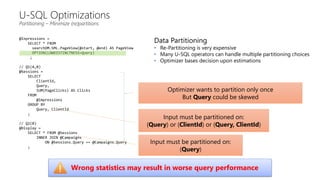
@Inpressions =
SELECT * FROM
searchDM.SML.PageView(@start, @end) AS PageView
OPTION(LOWDISTINCTNESS=Query)
;
// Q1(A,B)
@Sessions =
SELECT
ClientId,
Query,
SUM(PageClicks) AS Clicks
FROM
@Impressions
GROUP BY
Query, ClientId
;
// Q2(B)
@Display =
SELECT * FROM @Sessions
INNER JOIN @Campaigns
ON @Sessions.Query == @Campaigns.Query
;
U-SQL Optimizations
Partitioning – Minimize (re)partitions
Input must be partitioned on:
(Query)
Input must be partitioned on:
(Query) or (ClientId) or (Query, ClientId)
Optimizer wants to partition only once
But Query could be skewed
Data Partitioning
• Re-Partitioning is very expensive
• Many U-SQL operators can handle multiple partitioning choices
• Optimizer bases decision upon estimations
Wrong statistics may result in worse query performance
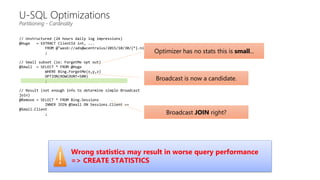
// Unstructured (24 hours daily log impressions)
@Huge = EXTRACT ClientId int, ...
FROM @"wasb://ads@wcentralus/2015/10/30/{*}.nif"
;
// Small subset (ie: ForgetMe opt out)
@Small = SELECT * FROM @Huge
WHERE Bing.ForgetMe(x,y,z)
OPTION(ROWCOUNT=500)
;
// Result (not enough info to determine simple Broadcast
join)
@Remove = SELECT * FROM Bing.Sessions
INNER JOIN @Small ON Sessions.Client ==
@Small.Client
;
U-SQL Optimizations
Partitioning - Cardinality
Broadcast JOIN right?
Broadcast is now a candidate.
Wrong statistics may result in worse query performance
=> CREATE STATISTICS
Optimizer has no stats this is small...
Partitioned
tables
Use partitioned tables for
querying parts of large
amounts of incrementally
growing structured data
Get partition elimination
optimizations with the
right query predicates
Creating partition table
CREATE TABLE PartTable(id int, event_date DateTime, lat float, long float
, INDEX idx CLUSTERED (vehicle_id ASC)
PARTITIONED BY BUCKETS (event_date) HASH (vehicle_id) INTO 4);
Creating partitions
DECLARE @pdate1 DateTime = new DateTime(2014, 9, 14, 00,00,00,00,DateTimeKind.Utc);
DECLARE @pdate2 DateTime = new DateTime(2014, 9, 15, 00,00,00,00,DateTimeKind.Utc);
ALTER TABLE vehiclesP ADD PARTITION (@pdate1), PARTITION (@pdate2);
Loading data into partitions dynamically
DECLARE @date1 DateTime = DateTime.Parse("2014-09-14");
DECLARE @date2 DateTime = DateTime.Parse("2014-09-16");
INSERT INTO vehiclesP ON INTEGRITY VIOLATION IGNORE
SELECT vehicle_id, event_date, lat, long FROM @data
WHERE event_date >= @date1 AND event_date <= @date2;
• Filters and inserts clean data only, ignore “dirty” data
Loading data into partitions statically
ALTER TABLE vehiclesP ADD PARTITION (@pdate1), PARTITION (@baddate);
INSERT INTO vehiclesP ON INTEGRITY VIOLATION MOVE TO @baddate
SELECT vehicle_id, lat, long FROM @data
WHERE event_date >= @date1 AND event_date <= @date2;
• Filters and inserts clean data only, put “dirty” data into special partition
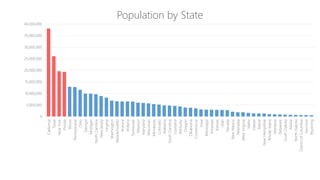
Data “Skew”
(aka “a vertex is receiving too much data”)
0
5,000,000
10,000,000
15,000,000
20,000,000
25,000,000
30,000,000
35,000,000
40,000,000
California
Texas
NewYork
Florida
Illinois
Pennsylvania
Ohio
Georgia
Michigan
NorthCarolina
NewJersey
Virginia
Washington
Massachusetts
Arizona
Indiana
Tennessee
Missouri
Maryland
Wisconsin
Minnesota
Colorado
Alabama
SouthCarolina
Louisiana
Kentucky
Oregon
Oklahoma
Connecticut
Iowa
Mississippi
Arkansas
Kansas
Utah
Nevada
NewMexico
Nebraska
WestVirginia
Idaho
Hawaii
Maine
NewHampshire
RhodeIsland
Montana
Delaware
SouthDakota
Alaska
NorthDakota
DistrictofColumbia
Vermont
Wyoming
Population by State
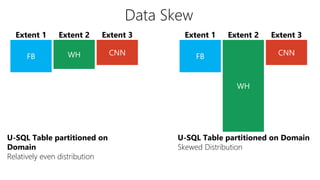
Data Skew
U-SQL Table partitioned on
Domain
Relatively even distribution
Extent 2 Extent 3
WH
CNNFB
Extent 1
U-SQL Table partitioned on Domain
Skewed Distribution
Extent 2 Extent 3
WH CNNFB
Extent 1
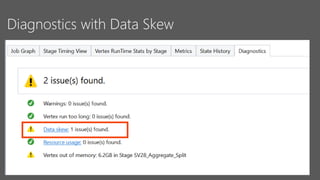
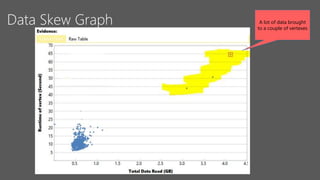
Why is this a problem?
• Vertexes have a 5 hour runtime limit!
• Your UDO may excessively allocate memory.
• Your memory usage may not be obvious due to garbage collection
Diagnostics with Data Skew
Data Skew Graph A lot of data brought
to a couple of vertexes
What are your Options?
• Re-partition your input data to get a better distribution
• Use a different partitioning scheme
• Pick a different key
• Use more than one key for partitioning
• Use Data Hints to identify “low distinctness” in keys
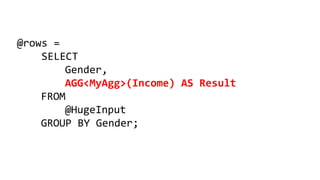
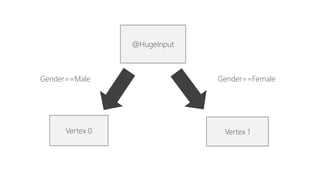
@rows =
SELECT
Gender,
AGG<MyAgg>(Income) AS Result
FROM
@HugeInput
GROUP BY Gender;
Gender==Female
@HugeInput
Vertex 0 Vertex 1
Gender==Male
What are your Options?
• Use a Recursive Aggregator (if possible)
• If a Row-Level combiner mode (if possible)
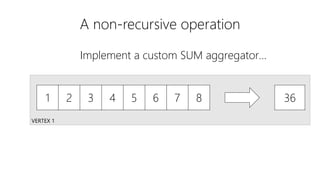
A non-recursive operation
VERTEX 1
1 2 3 4 5 6 7 8 36
Implement a custom SUM aggregator…Implement a custom SUM aggregator…
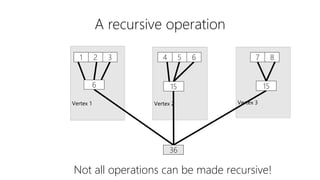
A recursive operation
Vertex 3Vertex 2Vertex 1
1 2 3 4 5 6 7 8
6 15 15
36
Not all operations can be made recursive!
High-Level Performance Advice
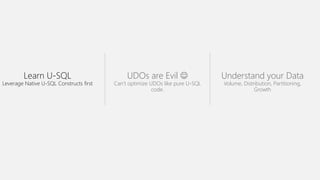
Learn U-SQL
Leverage Native U-SQL Constructs first
UDOs are Evil 
Can’t optimize UDOs like pure U-SQL
code.
Understand your Data
Volume, Distribution, Partitioning,
Growth
Additional
Resources
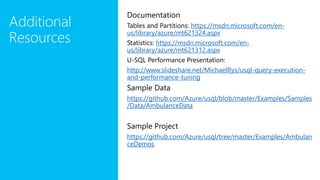
Documentation
Tables and Partitions: https://msdn.microsoft.com/en-
us/library/azure/mt621324.aspx
Statistics: https://msdn.microsoft.com/en-
us/library/azure/mt621312.aspx
U-SQL Performance Presentation:
http://www.slideshare.net/MichaelRys/usql-query-execution-
and-performance-tuning
Sample Data
https://github.com/Azure/usql/blob/master/Examples/Samples
/Data/AmbulanceData
Sample Project
https://github.com/Azure/usql/tree/master/Examples/Ambulan
ceDemos
http://aka.ms/AzureDataLake

U-SQL Partitioned Data and Tables (SQLBits 2016)

  • 1.
    Michael Rys Principal ProgramManager, Big Data @ Microsoft @MikeDoesBigData, {mrys, usql}@microsoft.com U-SQL Partitioned Data and Tables
  • 2.
    Data Partitioning Files Tables Partitioning of unstructureddata • Use File Sets to provide semantic partition pruning Table Partitioning and Distribution • Fine grained (horizontal) partitioning/distribution • Distributes within a partition (together with clustering) to keep same data values close • Choose for: • Join alignment, partition size, filter selectivity • Coarse grained (vertical) partitioning • Based on Partition keys • Partition is addressable in language • Query predicates will allow partition pruning Distribution Scheme When to use? HASH(keys) Automatic Hash for fast item lookup DIRECT HASH(id) Exact control of hash bucket value RANGE(keys) Keeps ranges together ROUND ROBIN To get equal distribution (if others give skew)
  • 3.
    Partitions, Distributions and Clusters L o g i c a l PARTITION(@date1) PARTITION (@date2) PARTITION (@date3) TABLE T ( key …, C …, date DateTime, … , INDEX i CLUSTERED (key, C) PARTITIONED BY BUCKETS (date) HASH (key) INTO 4) P h y s i c a l HASH DISTRIBUTION 1 HASH DISTRIBUTION 2 HASH DISTRIBUTION 3 HASH DISTRIBUTION 1 HASH DISTRIBUTION 1 HASH DISTRIBUTION 2 HASH DISTRIBUTION 3 HASH DISTRIBUTION 4 HASH DISTRIBUTION 3 C1 C2 C3 C1 C2 C4 C5 C4 C6 C6 C7 C8 C7 C5 C6 C9 C10 C1 C3 /catalog/…/tables/Guid(T)/ Guid(T.p1).ss Guid(T.p2).ss Guid(T.p3).ss
  • 5.
    ADL Store Basics AVERY BIG FILE 1 2 3 4 5 1 2 3 4 5 1 2 3 4 5 1 2 3 4 5 Files are split apart into Extents. For availability and reliability, extents are replicated (3 copies). Enables: • Parallel read • Parallel write
  • 6.
    Extent As file sizeincreases, more opportunities for parallelism Vertex Extent Vertex Extent Vertex Extent Vertex Small File Bigger File
  • 7.
    Search engine clicksdata set A log of how many clicks a certain domain got within a session SessionID Domain Clicks 3 cnn.com 9 1 whitehouse.gov 14 2 facebook.com 8 3 reddit.com 78 2 microsoft.com 1 1 facebook.com 5 3 microsoft.com 11
  • 8.
    Data Partitioning Compared Extent2 Extent 3Extent 1 File Keys (Domain) are scattered across the extents Extent 2 Extent 3 FB WH CNN FB WH CNN FB WH CNN WH WH WH CNN CNN CNN FB FB FB Extent 1 U-SQL Table partitioned on Domain The keys are now “close together” also the index tells U-SQL exactly which extents contain the key
  • 9.
    CREATE TABLE MyDB.dbo.ClickData ( SessionIdint, Domain string, Clinks int, INDEX idx1 CLUSTERED (Domain ASC) PARTITIONED BY HASH (Domain) INTO 3 ); INSERT INTO MyDB.dbo.ClickData SELECT * FROM @clickdata; Creating and Filling a U-SQL Table
  • 10.
    Find all therows for cnn.com @ClickData = SELECT Session int, Domain string, Clicks int FROM “/clickdata.tsv” USING Extractors.Tsv(); @rows = SELECT * FROM @ClickData WHERE Domain == “cnn.com”; OUTPUT @rows TO “/output.tsv” USING Outputters.tsv(); @ClickData = SELECT * FROM MyDB.dbo.ClickData; @rows = SELECT * FROM @ClickData WHERE Domain == “cnn.com”; OUTPUT @rows TO “/output.tsv” USING Outputters.tsv(); File U-SQL Table partitioned on Domain
  • 11.
    Read Read Write WriteWrite Read Filter Filter Filter CNN, FB, WH EXTENT 1 EXTENT 2 EXTENT 3 CNN, FB, WH CNN, FB, WH Because “CNN” could be anywhere, all extents must be read. Read Write Filter FB EXTENT 1 EXTENT 2 EXTENT 3 WH CNN Thanks to “Partition Elimination” and the U-SQL Table, the job only reads from the extent that is known to have the relevant key File U-SQL Table Distributed by Domain
  • 12.
    How many clicksper domain? @rows = SELECT Domain, SUM(Clicks) AS TotalClicks FROM @ClickData GROUP BY Domain;
  • 13.
    File Read Read Partition Partition FullAgg Write Full Agg Write Full Agg Write Read Partition Partial Agg Partial Agg Partial Agg CNN, FB, WH EXTENT 1 EXTENT 2 EXTENT 3 CNN, FB, WH CNN, FB, WH U-SQL Table Distributed by Domain Read Read Full Agg Full Agg Write Write Read Full Agg Write FB EXTENT 1 WH EXTENT 2 CNN EXTENT 3 Expensive!
  • 14.
    Benefits of Partitioned Tables Benefits •Partitions are addressable • Enables finer-grained data lifecycle management at partition level • Manage parallelism in querying by number of partitions • Query predicates provide partition elimination • Predicate has to be constant-foldable Use partitioned tables for • Managing large amounts of incrementally growing structured data • Queries with strong locality predicates • point in time, for specific market etc • Managing windows of data • provide data for last x months for processing
  • 15.
    Benefits of Distribution in Tables Benefits •Design for most frequent/costly queries • Manage data skew in partition/table • Manage parallelism in querying (by number of distributions) • Manage minimizing data movement in joins • Provide distribution seeks and range scans for query predicates (distribution bucket elimination) Distribution in tables is mandatory, chose according to desired benefits
  • 16.
    Benefits of Clustered Index inDistribution Benefits • Design for most frequent/costly queries • Manage data skew in distribution bucket • Provide locality of same data values • Provide seeks and range scans for query predicates (index lookup) Clustered index in tables is mandatory, chose according to desired benefits Pro Tip: Distribution keys should be prefix of Clustered Index keys
  • 17.
    // TABLE(s) -Structured Files (24 hours daily log impressions) CREATE TABLE Impressions (Day DateTime, Market string, ClientId int, ... INDEX IX CLUSTERED(Market, ClientId) PARTITIONED BY BUCKETS (Day) HASH(Market, ClientId) INTO 100 ); DECLARE @today DateTime = DateTime.Parse("2015/10/30"); // Market = Vertical Partitioning ALTER TABLE Impressions ADD PARTITION (@today); // … // Daily INSERT(s) INSERT INTO Impressions(Market, ClientId) PARTITION(@today) SELECT * FROM @Q ; // … // Both levels are elimination (H+V) @Impressions = SELECT * FROM dbo.Impressions WHERE Market == "en" AND Day == @today ; U-SQL Optimizations Partition Elimination – TABLE(s) Partition Elimination • Horizontal and vertical partitioning • Horizontal is traditional within file (range, hash, robin) • Vertical is across files (bucketing) • Immutable file system • Design according to your access patterns Enumerate all partitions filtering for today 30.ss 30.1.ss 29.ss 28.ss 29.1.ss Impressions … deen jp de PE across files + within each file
  • 18.
    @Inpressions = SELECT *FROM searchDM.SML.PageView(@start, @end) AS PageView OPTION(LOWDISTINCTNESS=Query) ; // Q1(A,B) @Sessions = SELECT ClientId, Query, SUM(PageClicks) AS Clicks FROM @Impressions GROUP BY Query, ClientId ; // Q2(B) @Display = SELECT * FROM @Sessions INNER JOIN @Campaigns ON @Sessions.Query == @Campaigns.Query ; U-SQL Optimizations Partitioning – Minimize (re)partitions Input must be partitioned on: (Query) Input must be partitioned on: (Query) or (ClientId) or (Query, ClientId) Optimizer wants to partition only once But Query could be skewed Data Partitioning • Re-Partitioning is very expensive • Many U-SQL operators can handle multiple partitioning choices • Optimizer bases decision upon estimations Wrong statistics may result in worse query performance
  • 19.
    // Unstructured (24hours daily log impressions) @Huge = EXTRACT ClientId int, ... FROM @"wasb://ads@wcentralus/2015/10/30/{*}.nif" ; // Small subset (ie: ForgetMe opt out) @Small = SELECT * FROM @Huge WHERE Bing.ForgetMe(x,y,z) OPTION(ROWCOUNT=500) ; // Result (not enough info to determine simple Broadcast join) @Remove = SELECT * FROM Bing.Sessions INNER JOIN @Small ON Sessions.Client == @Small.Client ; U-SQL Optimizations Partitioning - Cardinality Broadcast JOIN right? Broadcast is now a candidate. Wrong statistics may result in worse query performance => CREATE STATISTICS Optimizer has no stats this is small...
  • 21.
    Partitioned tables Use partitioned tablesfor querying parts of large amounts of incrementally growing structured data Get partition elimination optimizations with the right query predicates Creating partition table CREATE TABLE PartTable(id int, event_date DateTime, lat float, long float , INDEX idx CLUSTERED (vehicle_id ASC) PARTITIONED BY BUCKETS (event_date) HASH (vehicle_id) INTO 4); Creating partitions DECLARE @pdate1 DateTime = new DateTime(2014, 9, 14, 00,00,00,00,DateTimeKind.Utc); DECLARE @pdate2 DateTime = new DateTime(2014, 9, 15, 00,00,00,00,DateTimeKind.Utc); ALTER TABLE vehiclesP ADD PARTITION (@pdate1), PARTITION (@pdate2); Loading data into partitions dynamically DECLARE @date1 DateTime = DateTime.Parse("2014-09-14"); DECLARE @date2 DateTime = DateTime.Parse("2014-09-16"); INSERT INTO vehiclesP ON INTEGRITY VIOLATION IGNORE SELECT vehicle_id, event_date, lat, long FROM @data WHERE event_date >= @date1 AND event_date <= @date2; • Filters and inserts clean data only, ignore “dirty” data Loading data into partitions statically ALTER TABLE vehiclesP ADD PARTITION (@pdate1), PARTITION (@baddate); INSERT INTO vehiclesP ON INTEGRITY VIOLATION MOVE TO @baddate SELECT vehicle_id, lat, long FROM @data WHERE event_date >= @date1 AND event_date <= @date2; • Filters and inserts clean data only, put “dirty” data into special partition
  • 22.
    Data “Skew” (aka “avertex is receiving too much data”)
  • 23.
  • 24.
    Data Skew U-SQL Tablepartitioned on Domain Relatively even distribution Extent 2 Extent 3 WH CNNFB Extent 1 U-SQL Table partitioned on Domain Skewed Distribution Extent 2 Extent 3 WH CNNFB Extent 1
  • 25.
    Why is thisa problem? • Vertexes have a 5 hour runtime limit! • Your UDO may excessively allocate memory. • Your memory usage may not be obvious due to garbage collection
  • 26.
  • 27.
    Data Skew GraphA lot of data brought to a couple of vertexes
  • 28.
    What are yourOptions? • Re-partition your input data to get a better distribution • Use a different partitioning scheme • Pick a different key • Use more than one key for partitioning • Use Data Hints to identify “low distinctness” in keys
  • 29.
    @rows = SELECT Gender, AGG<MyAgg>(Income) ASResult FROM @HugeInput GROUP BY Gender;
  • 30.
  • 31.
    What are yourOptions? • Use a Recursive Aggregator (if possible) • If a Row-Level combiner mode (if possible)
  • 32.
    A non-recursive operation VERTEX1 1 2 3 4 5 6 7 8 36 Implement a custom SUM aggregator…Implement a custom SUM aggregator…
  • 33.
    A recursive operation Vertex3Vertex 2Vertex 1 1 2 3 4 5 6 7 8 6 15 15 36 Not all operations can be made recursive!
  • 34.
  • 35.
    Learn U-SQL Leverage NativeU-SQL Constructs first UDOs are Evil  Can’t optimize UDOs like pure U-SQL code. Understand your Data Volume, Distribution, Partitioning, Growth
  • 36.
    Additional Resources Documentation Tables and Partitions:https://msdn.microsoft.com/en- us/library/azure/mt621324.aspx Statistics: https://msdn.microsoft.com/en- us/library/azure/mt621312.aspx U-SQL Performance Presentation: http://www.slideshare.net/MichaelRys/usql-query-execution- and-performance-tuning Sample Data https://github.com/Azure/usql/blob/master/Examples/Samples /Data/AmbulanceData Sample Project https://github.com/Azure/usql/tree/master/Examples/Ambulan ceDemos
  • 37.

Editor's Notes

  • #21 https://github.com/Azure/usql/tree/master/Examples/AmbulanceDemos/AmbulanceDemos/5-Ambulance-StreamSets-PartitionedTables