Using Twitter to Build Your PLN
Scot Wright, Principal
Ore City High School
 Rita Clawson – Art, Student Council Advisor
@RitaClawson
 Sally Cariker – Biology
@carikers
 Jennifer Rogers – Principals of Information Technology
@rogersjochs
Why Twitter?
Today’s Goals:
1. Examine your individual Professional
Development needs
2. Use the power of Twitter to build your PLN
Personal Learning Network
 What is a Personal Learning Network? (PLN)
 A Personal Learning Network (PLN) is about using social networking
tools to interact with people who have a passion for something similar to
you, and/or who can provide you with necessary information. Through
their PLNs, people share ideas, lessons, websites, etc. PLNs also serve to
motivate you and challenge your thinking.
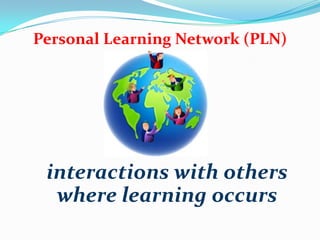
Personal Learning Network (PLN)
interactions with others
where learning occurs
 Huntsville, Texas
 Melbourne, Australia
 Langley, BC
 Texas A&M Commerce
 Scottsbluff, Nebraska
 Auckland, New Zealand
 Brenham, Texas
 Houston, Texas
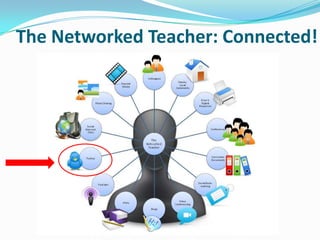
The Networked Teacher: Connected!
Why Twitter?
 Access to Professional
Development 24/7
PERSONAL
Professional Development
Why Twitter?
It’s
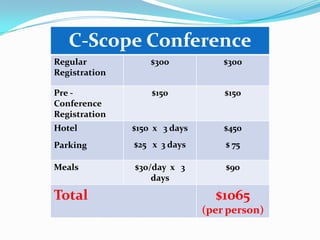
C-Scope Conference
Regular
Registration
$300 $300
Pre -
Conference
Registration
$150 $150
Hotel
Parking
$150 x 3 days
$25 x 3 days
$450
$ 75
Meals $30/day x 3
days
$90
Total $1065
(per person)
Twitter Basics
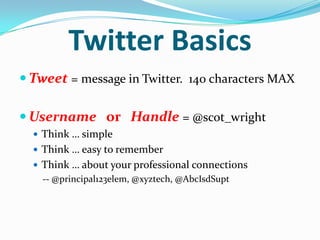
 Tweet = message in Twitter. 140 characters MAX
 Username or Handle = @scot_wright
 Think … simple
 Think … easy to remember
 Think … about your professional connections
-- @principal123elem, @xyztech, @AbcIsdSupt
Twitter Basics
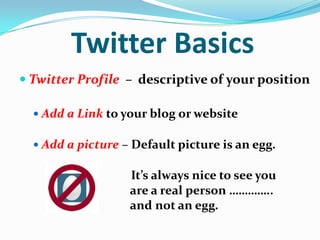
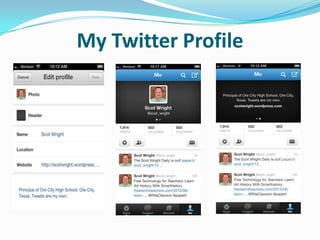
 Twitter Profile – descriptive of your position
 Add a Link to your blog or website
 Add a picture – Default picture is an egg.
It’s always nice to see you
are a real person …………..
and not an egg.
My Twitter Profile
Twitter Basics
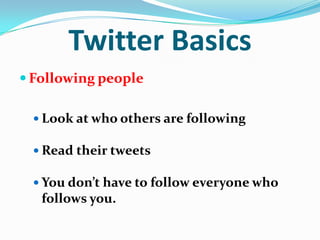
 Following people
 Look at who others are following
 Read their tweets
 You don’t have to follow everyone who
follows you.
Twitter Basics
 Re-tweet - re-sending someone else’s tweet
 Hashtag (#) – A word or phrase included in
a tweet that makes it appear in a stream of
tweets on that subject (#txed)
Twitter Basics
 Chats – different subjects on different days /
nights. This is a great way to get subject-
specific information or ideas.
 http://bit.ly/XrvCuM
*** Google Doc – Weekly Twitter chats listed by Hashtag
 http://cybraryman.com/chats.html
***Lists of educational related chats
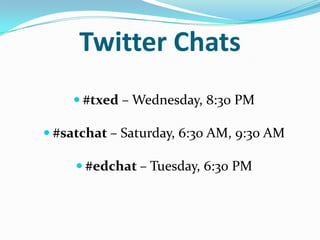
Twitter Chats
 #txed – Wednesday, 8:30 PM
 #satchat – Saturday, 6:30 AM, 9:30 AM
 #edchat – Tuesday, 6:30 PM
What do teachers
have to say about Twitter?
Rita Clawson -- @RitaClawson
Sally Cariker -- @carikers
Jennifer Rogers -- @rogersjochs
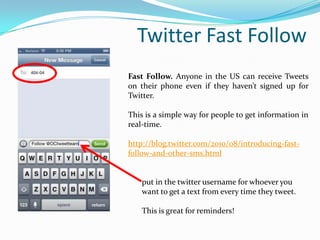
Twitter Fast Follow
Fast Follow. Anyone in the US can receive Tweets
on their phone even if they haven’t signed up for
Twitter.
This is a simple way for people to get information in
real-time.
http://blog.twitter.com/2010/08/introducing-fast-
follow-and-other-sms.html
put in the twitter username for whoever you
want to get a text from every time they tweet.
This is great for reminders!
Final thoughts:
 What new connections can I make today?
 What can I learn to make learning better for kids?
 Questions?
 Sign up and get started on Twitter!
Resources:
- http://bit.ly/w64Oyq
 Twitter 101 - http://dashburst.com/guide/what-is-twitter-about/
 Twitter by Texts (Twitter Fast Follow)-
http://blog.twitter.com/2010/08/introducing-fast-follow-and-other-
sms.html
 Video Tutorials on Twitter in Education -
http://www.educatorstechnology.com/2013/02/10-great-video-tutorials-
on-using.html
Resources, continued:
 Jerry Blumengarten – AKA Cybraryman - @cybraryman1
 Cybrary Man's Educational Web Sites -
http://cybraryman.com/
 Twitter from Cybraryman -
http://cybraryman.com/twitter.html
 Twitter Chats page -
http://cybraryman.com/chats.html
Resources, continued:
 Twitter Hashtags – An Unofficial Guide
https://docs.google.com/document/d/1CkUrFNr3ZThZXLh4kwk9rk-
wQlwfcg8YL9zVx1R_C2s/edit
https://docs.google.com/spreadsheet/ccc?key=0AiftIdjCeWSXdDRLR
zNsVktUUGJpRWJhdUlWLS1Genc#gid=0
 http://bit.ly/XrvCuM
Resources, continued:
 Everything We Need To Know We Learned
on Twitter
http://leadingmotivatedlearners.blogspot.com/2013
/04/everything-we-need-to-know-we-
learned.html?m=1
 Twitter For Teachers: Erin Klein’s Awesome 10-
Minute Video Tells All http://bit.ly/11liycV
 How To Join Twitter – A Step-by-Step Guide
http://instructionaltechtalk.com/how-to-join-twitter/
@scot_wright Blog  http://scotwright.wordpress.com/
@RitaClawson Blog  http://awesomeclawson.wordpress.com/
@carikers Blog  http://sallycariker.wordpress.com/
@rogersjochs Blog  http://technologytimesteacher.weebly.com/
Contact Information…….
Email – wrights@ocisd.net
Twitter - @scot_wright
School Phone – (903) 968-3300
Ext. 3215
Sign up to Twitter – A Video Tutorial
 Send your first tweet!!
 Follow others
 Start building your PLN!!

Using twitter to build your pln

  • 1.
    Using Twitter toBuild Your PLN Scot Wright, Principal Ore City High School
  • 2.
     Rita Clawson– Art, Student Council Advisor @RitaClawson  Sally Cariker – Biology @carikers  Jennifer Rogers – Principals of Information Technology @rogersjochs
  • 3.
    Why Twitter? Today’s Goals: 1.Examine your individual Professional Development needs 2. Use the power of Twitter to build your PLN
  • 4.
    Personal Learning Network What is a Personal Learning Network? (PLN)  A Personal Learning Network (PLN) is about using social networking tools to interact with people who have a passion for something similar to you, and/or who can provide you with necessary information. Through their PLNs, people share ideas, lessons, websites, etc. PLNs also serve to motivate you and challenge your thinking.
  • 5.
    Personal Learning Network(PLN) interactions with others where learning occurs
  • 6.
     Huntsville, Texas Melbourne, Australia  Langley, BC  Texas A&M Commerce  Scottsbluff, Nebraska  Auckland, New Zealand  Brenham, Texas  Houston, Texas
  • 7.
  • 8.
    Why Twitter?  Accessto Professional Development 24/7
  • 9.
  • 10.
  • 11.
    C-Scope Conference Regular Registration $300 $300 Pre- Conference Registration $150 $150 Hotel Parking $150 x 3 days $25 x 3 days $450 $ 75 Meals $30/day x 3 days $90 Total $1065 (per person)
  • 12.
    Twitter Basics  Tweet= message in Twitter. 140 characters MAX  Username or Handle = @scot_wright  Think … simple  Think … easy to remember  Think … about your professional connections -- @principal123elem, @xyztech, @AbcIsdSupt
  • 13.
    Twitter Basics  TwitterProfile – descriptive of your position  Add a Link to your blog or website  Add a picture – Default picture is an egg. It’s always nice to see you are a real person ………….. and not an egg.
  • 14.
  • 15.
    Twitter Basics  Followingpeople  Look at who others are following  Read their tweets  You don’t have to follow everyone who follows you.
  • 16.
    Twitter Basics  Re-tweet- re-sending someone else’s tweet  Hashtag (#) – A word or phrase included in a tweet that makes it appear in a stream of tweets on that subject (#txed)
  • 17.
    Twitter Basics  Chats– different subjects on different days / nights. This is a great way to get subject- specific information or ideas.  http://bit.ly/XrvCuM *** Google Doc – Weekly Twitter chats listed by Hashtag  http://cybraryman.com/chats.html ***Lists of educational related chats
  • 18.
    Twitter Chats  #txed– Wednesday, 8:30 PM  #satchat – Saturday, 6:30 AM, 9:30 AM  #edchat – Tuesday, 6:30 PM
  • 19.
    What do teachers haveto say about Twitter? Rita Clawson -- @RitaClawson Sally Cariker -- @carikers Jennifer Rogers -- @rogersjochs
  • 21.
    Twitter Fast Follow FastFollow. Anyone in the US can receive Tweets on their phone even if they haven’t signed up for Twitter. This is a simple way for people to get information in real-time. http://blog.twitter.com/2010/08/introducing-fast- follow-and-other-sms.html put in the twitter username for whoever you want to get a text from every time they tweet. This is great for reminders!
  • 22.
    Final thoughts:  Whatnew connections can I make today?  What can I learn to make learning better for kids?  Questions?  Sign up and get started on Twitter!
  • 23.
    Resources: - http://bit.ly/w64Oyq  Twitter101 - http://dashburst.com/guide/what-is-twitter-about/  Twitter by Texts (Twitter Fast Follow)- http://blog.twitter.com/2010/08/introducing-fast-follow-and-other- sms.html  Video Tutorials on Twitter in Education - http://www.educatorstechnology.com/2013/02/10-great-video-tutorials- on-using.html
  • 24.
    Resources, continued:  JerryBlumengarten – AKA Cybraryman - @cybraryman1  Cybrary Man's Educational Web Sites - http://cybraryman.com/  Twitter from Cybraryman - http://cybraryman.com/twitter.html  Twitter Chats page - http://cybraryman.com/chats.html
  • 25.
    Resources, continued:  TwitterHashtags – An Unofficial Guide https://docs.google.com/document/d/1CkUrFNr3ZThZXLh4kwk9rk- wQlwfcg8YL9zVx1R_C2s/edit https://docs.google.com/spreadsheet/ccc?key=0AiftIdjCeWSXdDRLR zNsVktUUGJpRWJhdUlWLS1Genc#gid=0  http://bit.ly/XrvCuM
  • 26.
    Resources, continued:  EverythingWe Need To Know We Learned on Twitter http://leadingmotivatedlearners.blogspot.com/2013 /04/everything-we-need-to-know-we- learned.html?m=1  Twitter For Teachers: Erin Klein’s Awesome 10- Minute Video Tells All http://bit.ly/11liycV  How To Join Twitter – A Step-by-Step Guide http://instructionaltechtalk.com/how-to-join-twitter/
  • 27.
    @scot_wright Blog http://scotwright.wordpress.com/ @RitaClawson Blog  http://awesomeclawson.wordpress.com/ @carikers Blog  http://sallycariker.wordpress.com/ @rogersjochs Blog  http://technologytimesteacher.weebly.com/
  • 28.
    Contact Information……. Email –wrights@ocisd.net Twitter - @scot_wright School Phone – (903) 968-3300 Ext. 3215
  • 29.
    Sign up toTwitter – A Video Tutorial
  • 30.
     Send yourfirst tweet!!  Follow others  Start building your PLN!!