Using the VLE to communicate & conduct polls via SMS Lets Talk about txt 6 – 19th May 2010Marc Jennings, The University of Edinburgh
OverviewBackground
EdutxtPowerlink
 Polls
 Further Developments
 QuestionsBackgroundThe University of Edinburgh
Research-based
c. 23,000 FTE students
WebCT Vista 8 and Campus Edition 4.2
SMS text messaging service:
switched from JANET txt to Edutxt this academic year
most usage is from central support areas
investigating potential teaching uses
Powerlink integration for WebCT was created
equivalent Building Block version due summer 2010EdutxtPowerLinkUsed alongside the web interface
Service accounts are created for courses (not individuals)
Students add their mobile number to their WebCT profile – number need not be made public

Using the VLE to communicate & conduct polls via SMS

Editor's Notes

  • #2 Introduce self...Helloi am Marc Jennings from The University of Edinburgh. Today i want to talk about Using the VLE to communicate & conduct polls via SMS.
  • #3 OverviewSo to give a quick overview of what i will be presenting...I will give a bit of background on our institution, discuss and show the EdutxtPowerlink for WebCT, discuss and conduct a poll using the Polling functionality and highlight any further developments which are ongoing with both of these. I will then be happy to answer any questions you may have.
  • #4 Background...The University of Edinburgh is a research-based institution with approx 23,000 FTE students (This is UG & PG). Currently we use WebCT Vista 8 and Campus Edition 4.2 as our VLE.We were previously users of the JANETtxt service, which was hosted with PageOne, but moved from that to Edutxt this academic year. The highest proportion of use comes from our central support areas, i.e. Disability, Careers, Registry. Although more schools/Depts are approaching us with interest. With this increase in interest from the schools we are further developing the potential teaching uses, with alot of interest coming from the VLE use, particularly with regards to the polling functionality. As a result of our current level of use and feedback from colleagues Stephen Vickers looked at creating a WebCTpowerlink, which he then created for TxtTools. An equivalent building bock version is due summer 2010!
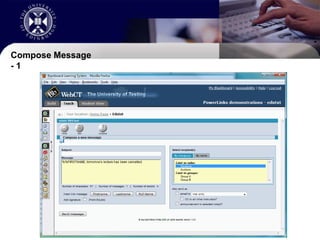
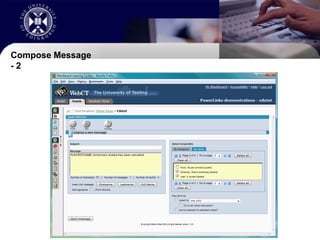
  • #5 Powerlink...The powerlink itself is used alongside the web interface, by this we mean that an XML account is created to allow interaction with the service from within WebCT. These accounts are created for courses, and not indivduals. This allows all roles within a course to have the correct level of access to the powerlink. i.e. a student cannot use the powerlink to send messages whereas instructors etc can.The powerlink allows the student to decide if they want to “Opt-in” to the service by simply adding their number to their profile in WebCT, this also means that the instructors etc will never see the number, only the name of the student!Messages can be composed and sent to recipients based on role (instructor, TA, student, auditor), group (if any are configured), name (individual users), or any combination of the above. When composing messages it is also possible to have them sent as WebCT announcements and/or via WebCT mail. This means that students who decide not to include their mobile phone numbers can also receive the messages.
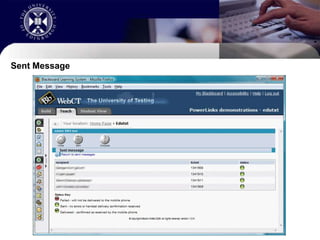
  • #6 Show the various options etc and how easily messages can be sent and received!
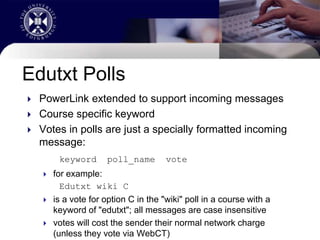
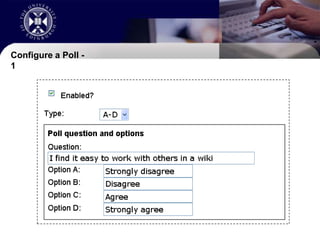
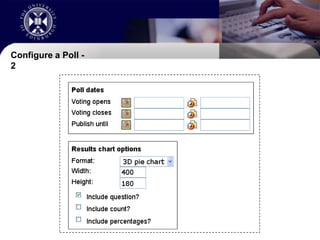
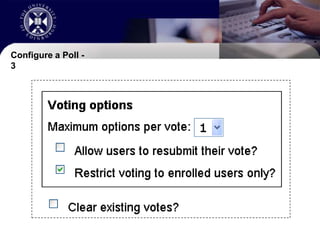
  • #7 Polls...After thePowerlink was created it was suggested that it would be good to use this for some for of data capturing via SMS, as a result the powerlink was extended to allow incoming messages. This was then taken a stage further so that the incoming messages could be used to cast a vote.As with any other use the course must have a keyword setup for it.Votes cast for the poll are simple text messages but MUST be in the correct format...Which is KEYWORD POLL_NAME VOTEfor example:Edutxt wiki CThis is a vote for option “C” in the “wiki” poll with the keyword of “edutxt”; it’s worth noting that all messages ARE case insensitiveVotes can also be cast from within WebCT allowing user who are unable or unwilling to use their phones to take part.
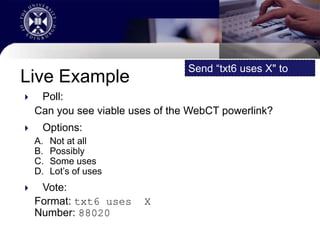
  • #8 Live Example...To show how this can be used i have setup a poll in the WebCTpowerlink that we can use today.The poll is simply asking if you can see any viable uses of the WebCTPowerlink, or even the building block when it is released.There are four options:Not at allPossiblySome usesLot’s of usesAt this stage i would welcome anyone who wishes to take part in a poll to send a message with the following information to 88020.Please start the text with txt6 then uses and then the option (A – D)
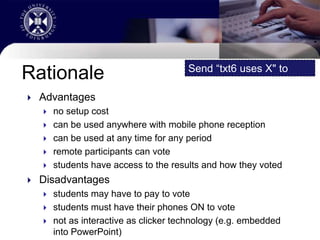
  • #9 Rationale...The advantages to using this over other polling/PRS systems are.. There is no setup cost, you will already have an edutxt account and a relevant VLE It can be used anywhere with a mobile phone reception It can be used for any time period YOU specify remote participants can vote, providing the know the details students have access to the results and how THEY votedThere are, however, some disadvantages which are also worth highlighting... Students may have to pay to vote, standard message rate if using a phone Students must have their phones ON to vote Not as interactive as some PRS technologies (e.g. embedded into PowerPoint)
  • #10 Show The Poll and explain how it was setup!
  • #11 Further Developments...Based on feedback we have had so far there are already some developments in the pipeline!These are: Anonymous polls Download vote data (CSV format) Option to publish results graph to a public URL Auto-refresh on results graph page on Teach tab Building Block version
  • #12 Any Questions...