Using student
mobiles as voting
devices with
TurningPoint
ResponseWare
Dr Siân Lindsay
27th October 2011
Turning Technologies User Conference
University of Surrey
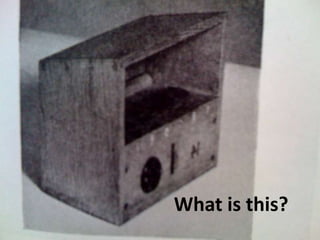
What is this?
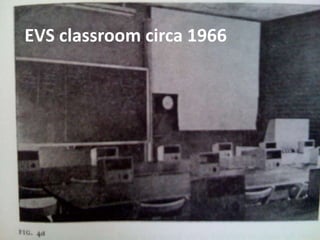
EVS classroom circa 1966
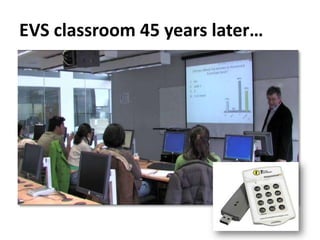
EVS classroom 45 years later…
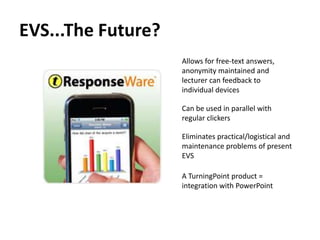
EVS...The Future?
                    Allows for free-text answers,
                    anonymity maintained and
                    lecturer can feedback to
                    individual devices

                    Can be used in parallel with
                    regular clickers

                    Eliminates practical/logistical and
                    maintenance problems of present
                    EVS

                    A TurningPoint product =
                    integration with PowerPoint
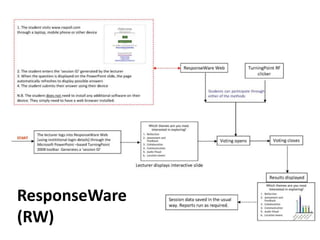
ResponseWare
(RW)
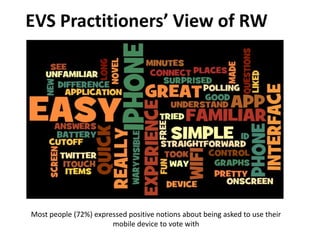
EVS Practitioners’ View of RW


Most people (72%) expressed positive notions about being asked to use their
                       mobile device to vote with
EVS Practitioners’ View of RW
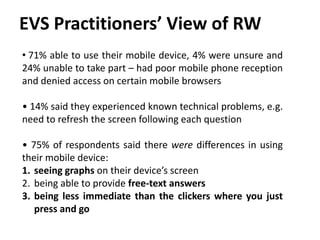
• 71% able to use their mobile device, 4% were unsure and
24% unable to take part – had poor mobile phone reception
and denied access on certain mobile browsers

• 14% said they experienced known technical problems, e.g.
need to refresh the screen following each question

• 75% of respondents said there were differences in using
their mobile device:
1. seeing graphs on their device’s screen
2. being able to provide free-text answers
3. being less immediate than the clickers where you just
   press and go
What do you think of ResponseWare?
           Let’s try this now.
Please connect your mobile device to
        the Internet and go to
           www.rwpoll.com
        - Session ID is MOBILE
- You can enter your name if you want
           (not compulsory)
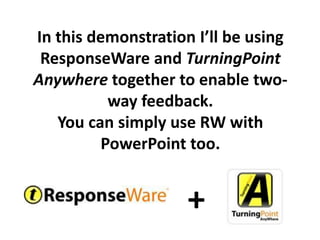
In this demonstration I’ll be using
 ResponseWare and TurningPoint
Anywhere together to enable two-
           way feedback.
   You can simply use RW with
          PowerPoint too.


                     +
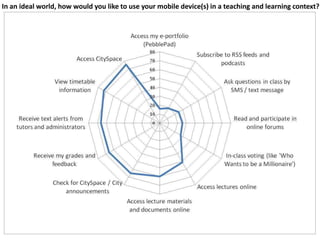
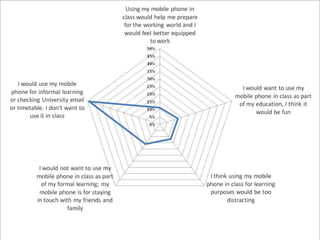
In an ideal world, how would you like to use your mobile device(s) in a teaching and learning context?
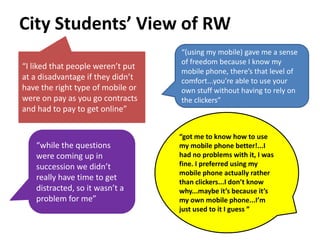
City Students’ View of RW
                                   “(using my mobile) gave me a sense
                                   of freedom because I know my
“I liked that people weren’t put
                                   mobile phone, there’s that level of
at a disadvantage if they didn’t   comfort...you’re able to use your
have the right type of mobile or   own stuff without having to rely on
were on pay as you go contracts    the clickers”
and had to pay to get online”


                                   “got me to know how to use
   “while the questions            my mobile phone better!...I
   were coming up in               had no problems with it, I was
   succession we didn’t            fine. I preferred using my
                                   mobile phone actually rather
   really have time to get         than clickers...I don’t know
   distracted, so it wasn’t a      why...maybe it’s because it’s
   problem for me”                 my own mobile phone...I’m
                                   just used to it I guess ”
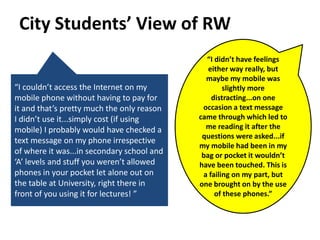
City Students’ View of RW
                                              “I didn’t have feelings
                                               either way really, but
                                              maybe my mobile was
“I couldn’t access the Internet on my               slightly more
mobile phone without having to pay for          distracting...on one
it and that’s pretty much the only reason    occasion a text message
I didn’t use it...simply cost (if using     came through which led to
mobile) I probably would have checked a       me reading it after the
                                             questions were asked...if
text message on my phone irrespective
                                            my mobile had been in my
of where it was...in secondary school and    bag or pocket it wouldn’t
‘A’ levels and stuff you weren’t allowed    have been touched. This is
phones in your pocket let alone out on       a failing on my part, but
the table at University, right there in     one brought on by the use
front of you using it for lectures! ”            of these phones.”
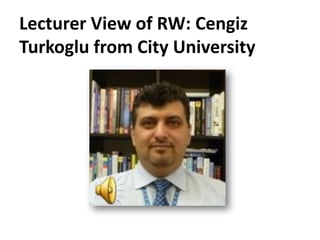
Lecturer View of RW: Cengiz
Turkoglu from City University
Lessons Learned
1. Mismatch between student expectations and student
   experience, students have their own technology and seem
   happy to use it
2. Pros: Simple, familiar, anonymous, free-text, two-way
   feedback, PowerPoint integration, parallel use with regular
   clickers
3. Cons: dependent on Internet connection (ideally free WiFi
   so students not out of pocket), not all students will have
   right mobile device/browser, limited characters for text
   feedback, ideal if also supported voting by text, Twitter(?),
   pricing model could support ad-hoc use
4. What Next? – keep exploring features, use more in
   conjunction with TurningPoint Anywhere (to enable two-
   way feedback)
Acknowledgements
              Mike Cameron              Kate Reader
              Educational Development   Senior Educational
              and e-Learning Team,      Technologist
              Newcastle University      City University , London


              Nitin Parmar              Ajmal Sultany
              Learning Technologist     Researcher
              University of Bath        City University , London


Paul Jenner
TurningPoint Account Manager
Reivo Ltd.
Thank you for listening.
Any questions?
sian.lindsay.1@city.ac.uk
http://uk.linkedin.com/in/siany
#sianylindsay


                                  http://www.flickr.com/photos/ianvisits/5107112789

TP User conference 2011 presentation

  • 1.
    Using student mobiles asvoting devices with TurningPoint ResponseWare Dr Siân Lindsay 27th October 2011 Turning Technologies User Conference University of Surrey
  • 2.
  • 3.
  • 4.
    EVS classroom 45years later…
  • 5.
    EVS...The Future? Allows for free-text answers, anonymity maintained and lecturer can feedback to individual devices Can be used in parallel with regular clickers Eliminates practical/logistical and maintenance problems of present EVS A TurningPoint product = integration with PowerPoint
  • 6.
  • 7.
    EVS Practitioners’ Viewof RW Most people (72%) expressed positive notions about being asked to use their mobile device to vote with
  • 8.
    EVS Practitioners’ Viewof RW • 71% able to use their mobile device, 4% were unsure and 24% unable to take part – had poor mobile phone reception and denied access on certain mobile browsers • 14% said they experienced known technical problems, e.g. need to refresh the screen following each question • 75% of respondents said there were differences in using their mobile device: 1. seeing graphs on their device’s screen 2. being able to provide free-text answers 3. being less immediate than the clickers where you just press and go
  • 9.
    What do youthink of ResponseWare? Let’s try this now. Please connect your mobile device to the Internet and go to www.rwpoll.com - Session ID is MOBILE - You can enter your name if you want (not compulsory)
  • 10.
    In this demonstrationI’ll be using ResponseWare and TurningPoint Anywhere together to enable two- way feedback. You can simply use RW with PowerPoint too. +
  • 11.
    In an idealworld, how would you like to use your mobile device(s) in a teaching and learning context?
  • 13.
    City Students’ Viewof RW “(using my mobile) gave me a sense of freedom because I know my “I liked that people weren’t put mobile phone, there’s that level of at a disadvantage if they didn’t comfort...you’re able to use your have the right type of mobile or own stuff without having to rely on were on pay as you go contracts the clickers” and had to pay to get online” “got me to know how to use “while the questions my mobile phone better!...I were coming up in had no problems with it, I was succession we didn’t fine. I preferred using my mobile phone actually rather really have time to get than clickers...I don’t know distracted, so it wasn’t a why...maybe it’s because it’s problem for me” my own mobile phone...I’m just used to it I guess ”
  • 14.
    City Students’ Viewof RW “I didn’t have feelings either way really, but maybe my mobile was “I couldn’t access the Internet on my slightly more mobile phone without having to pay for distracting...on one it and that’s pretty much the only reason occasion a text message I didn’t use it...simply cost (if using came through which led to mobile) I probably would have checked a me reading it after the questions were asked...if text message on my phone irrespective my mobile had been in my of where it was...in secondary school and bag or pocket it wouldn’t ‘A’ levels and stuff you weren’t allowed have been touched. This is phones in your pocket let alone out on a failing on my part, but the table at University, right there in one brought on by the use front of you using it for lectures! ” of these phones.”
  • 15.
    Lecturer View ofRW: Cengiz Turkoglu from City University
  • 16.
    Lessons Learned 1. Mismatchbetween student expectations and student experience, students have their own technology and seem happy to use it 2. Pros: Simple, familiar, anonymous, free-text, two-way feedback, PowerPoint integration, parallel use with regular clickers 3. Cons: dependent on Internet connection (ideally free WiFi so students not out of pocket), not all students will have right mobile device/browser, limited characters for text feedback, ideal if also supported voting by text, Twitter(?), pricing model could support ad-hoc use 4. What Next? – keep exploring features, use more in conjunction with TurningPoint Anywhere (to enable two- way feedback)
  • 17.
    Acknowledgements Mike Cameron Kate Reader Educational Development Senior Educational and e-Learning Team, Technologist Newcastle University City University , London Nitin Parmar Ajmal Sultany Learning Technologist Researcher University of Bath City University , London Paul Jenner TurningPoint Account Manager Reivo Ltd.
  • 18.
    Thank you forlistening. Any questions? sian.lindsay.1@city.ac.uk http://uk.linkedin.com/in/siany #sianylindsay http://www.flickr.com/photos/ianvisits/5107112789

Editor's Notes

  • #5 At City University in London we have basic, simple (wireless) clickers now – like this TurningPoint one here which works off radio wavesThese work well an students enjoy them a lot, however they are expensive (£40 each) and lecturers and EVS practitioners commonly cite problems with handing clickers out, collecting them back in.Also found that with our clickers, restricted to multiple choice answers, can’t offer free text answers, which does restrict the types of questions that the lecturer can ask, could argue that by allowing for free text answers, you can ask questions that test at the higher end of cognitive complexityNow there are clickers which allow for free text entry, however these are more expensive, heavier and arguably more likely to run out of battery faster than the the regular clickers.
  • #6 So we decided to make use of the mobile devices that students have in their pocket as voting devices using a system called ResponseWareWe felt this would help solve some of the logistical and pedagogic problems of the existing EVS
  • #7 This is how Response Ware works…Remember to credit Nitin
  • #8 Before we let loose ResponseWare on our students, we piloted it an ESTICT event last year at the University of Edinburgh. My colleague Mike Cameron and I used ResponseWare with a prezi presentation and it worked really well. Thewordleshows a visual summaryof their comments relating to their likes and dislikes of voting using a mobile device to vote withGenerally quite positive, one of the comments was “In control, with a device I was familiar with”
  • #10 Sian.lindsay.1@city.ac.ukMOBILE
  • #12 In the survey we asked students: ‘in an ideal world, how would you like to use you mobile devices in a teaching and learning context’?As this graph shows, most students expressed a preference for receiving and accessing information via their mobile devices, as opposed to using their mobile devices for interacting with others and content online.So for example lots of students wanted to be able to view timetable information on their mobile device, whereas only a few wanted to read and participate in online forums.From this graph we wondered were our students actually web 1.0 when we wanted them to be web 2.0 ?
  • #13 We then asked students about their attitudes to using their mobile device as an electronic voting device, or clicker, in class. We asked students to select a statement that they most agreed with in relation to this, and as you can see most students agreed with statements which indicated a preference not to use their mobile phone in class.A few students expressed negative views around using their mobile devices in class, with some saying that mobile phones and texting would be too distracting and might cause dumbing down in terms of communicating written language via text speak!
  • #14 Generally the views were positive, for example…
  • #16 Have a short 30 sec audio recording from Cengiz here…CengizTurkoglu from the School of Engineering and Mathematical Sciences used ResponseWare™ extensively with student mobile devices and in PC labs where students used PCs to vote and write back full-text answers. Like the EVS practitioners and students, he condoned ResponseWare’s ability to allow textual feedback and work in parallel with regular clickers. However only 10-15% of his students used their mobile devices for voting with. Using focus group feedback this could be explained by the inability and/or costliness of some mobile phones to access the Internet. At the time, City University did not have a wireless network capable of providing access for mobile phones - had this have been in place, more students may have tried ResponseWare™ because it would have allowed them free Internet access. Cengiz will be trying ResponseWare™ again next year and hopes to have better success with it now that a mobile phone-enabled WiFi is in place at City and students with Smartphones become more commonplace.
  • #17 Rww and tp anywhere for instant text feedback!
  • #19 Any questions?Include email address#sianylindsay