Using QuickBooks to Ensure Your Nonprofit
Is Audit-Proof
Hello!
Bob Wang CPA, CA
Jean Elwell CPA, CA
We love charities!
Two main types of audit
● CRA audit (to qualify for Charitable status)
● Year end audit (for compliance with CASNPO)
Agenda
× Adequate Controls Around Cash Management
× Have a knowledgeable Board
× Have a Manageable/Understandable Chart of
Accounts
× Internal Controls over Expenses
× Documentation and Compliance of Grants
× Do not co-mingle externally restricted funds
× Record Keeping
× Common Errors
Adequate controls around cash
management
Use Less Cash
Adequate Controls Around Cash Management
× Reduce use of Cash
× Segregation of Duties
× Example: 1 bookkeeper that as collecting cash
at fundraising events, counting cash by herself,
depositing cash, and reconciling the bank
account.
× When people are around cash, they become
tempted
Adequate Controls Around Cash Management
× Take cheques, credit cards, increase online
donations
× PayPal has a non-profit rate
× Rotessa & Plooto are great for recurring donors
× Low fee pre-authorized Debit
Adequate Controls Around Cash Management
× Plooto
× https://www.plooto.com/us/
× Rotessa
× https://www.rotessa.com/
× Donors sign a PAD Authorization, give you a void
cheque, then you can automate donations
× $1/transaction vs % of revenues
× They all Sync in Quickbooks Online
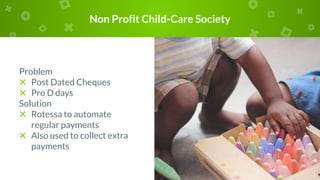
Non Profit Child-Care Society
Problem
× Post Dated Cheques
× Pro D days
Solution
× Rotessa to automate
regular payments
× Also used to collect extra
payments
Have
a knowledgeable Board
Proper Governance is the
foundation to staying Audit Proof
https://www.canada.ca/en/services/
taxes/charities.html
Have a Knowledgeable Board
× Charities are managed by a
volunteer Board who many not
have a strong financial
background.
× Finding a treasurer who can read
and interpret financials can help
the charity stay on track.
× Most people are on Boards are
there because they buy into the
mission, but they are not
business people.
Have a Knowledgeable Board
× Charities are very different from
for-profit organizations. Their aim
is to do as much good as possible
using all of the funds.
× Profit motivation is discouraged by
donors.
× Determine budget, analyze budget,
do budget vs actual analysis
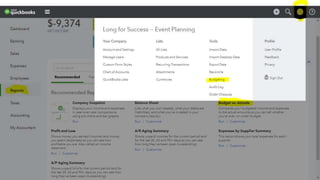
× Use QBO to keep you on track
× Board Minutes must be signed..
Have a Knowledgeable Board
Have a
Manageable/Understandable
Chart of Accounts
Keep It Simple
Have a Manageable/Understandable Chart of
Accounts
× Key: Start with the end in
mind. Who are the users of
the financial information?
At what level of detail?
Then create a COA that will
provide you with the right
level of detail.
× More detail doesn’t mean
more accuracy.
Have a Manageable/Understandable Chart of
Accounts
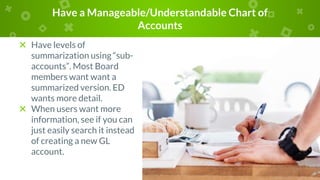
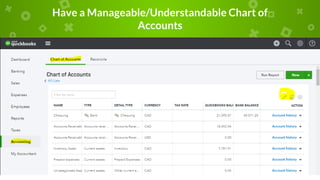
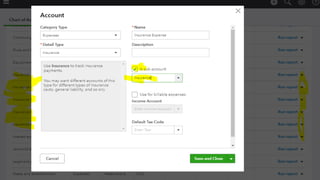
× Have levels of
summarization using “sub-
accounts”. Most Board
members want want a
summarized version. ED
wants more detail.
× When users want more
information, see if you can
just easily search it instead
of creating a new GL
account.
Have a Manageable/Understandable Chart of
Accounts
Have a Manageable/Understandable Chart of
Accounts
Internal Controls over
Expenses
Keep It Simple
Internal Controls over Expenses
× Complete documentation.
Auditors will ask for back
up support for various
transactions.
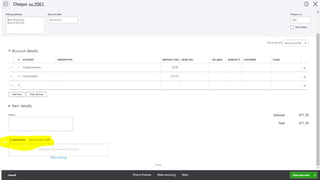
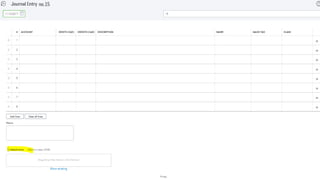
× QBO allows you to attach
receipts or bills to the
transaction.
× Receipt-bank and Expensify
× WayPay can be used to add
multiple layers of
authorization
Internal Controls over Expenses
× Payroll Audit Process
× Employee contracts. If they
are contractors, ensure to
have those contracts as
well
× Need payroll registers that
match up to the accounting
records
× If payroll is broken out into
various departments,
ensure to have backup on
how you calculated those
breakouts.
Internal Controls over Expenses
Documentation and Compliance
of Grant requirements
Respect You Granters’ Wishes
Documentation and Compliance of Grants
× Keep all grant compliance
agreements and know
where to find them.
× Read them. Ensure you
understand your
responsibilities and what
you are allowed to use the
money for.
Documentation and Compliance of Grants
× Don’t get double funding
for the same program.
× Example: Capital funding
for Emergency Vehicle.
× Attach the grant document
in Quickbooks Online for
easy reference.
Do not co-mingle externally
restricted funds
This creates a hornets nest
Do not co-mingle externally restricted funds
× Set up different “classes” when
fundrasing for different projects.
× Don’t transfer funds from one
account to another without
documentation of appropriate
approvals.
× Not necessary to open a separate
bank account for each fund, but
be sure to keep proper records
Record Keeping
Keep them for at least 7 years
Record Keeping
× Keep records of PPE
additions. Attach them to
the transaction itself.
× Keep records of insurance
× Keep for 7 years
× Separate folder for each
grant
× Ensure donation receipts
are compliant with CRA
requirements.
Record Keeping
× Tools
× Receipt Bank & Expensify
× Does CRA accept digital
records?
× Use a Donor Management
Software, to manage
donation receipts.
× Reconcile it monthly to GL
(i.e. accounting system)
Common Errors
Avoid them
Common Errors
× Don’t net revenues and expenses.
Track them separately
× Don’t record Pledges as Revenues
until Received. This is different than
“Grants”. Grants are legal
documents; pledges are not
× Gifts in Kind > $1K must be
appraised
× Donations for services not allowed.
Perform a cheque exchange
Common Errors (cont)
Receipts missing info:
● a statement that it is an official receipt for income tax purposes
● the name and address of the charity as on file with the Canada
Revenue Agency (CRA)
● a unique serial number
● the registration number issued by the CRA
● the location where the receipt was issued (city, town,
municipality)
● the date or year the gift was received
● the date the receipt was issued
● the full name, including middle initial, and address of the donor
● the amount of the gift
● the amount and description of any advantage received by the
donor
● the eligible amount of the gift
● the signature of an individual authorized by the charity to
acknowledge gifts
● the name and website address of the CRA
Thanks!
Any questions?
You can find us at
bwang@legacyadvantage.ca
jelwell@legacyadvantage.ca
Facebook: Legacy Advantage

Using QuickBooks to Audit-proof Your Nonprofit

  • 1.
    Using QuickBooks toEnsure Your Nonprofit Is Audit-Proof
  • 2.
    Hello! Bob Wang CPA,CA Jean Elwell CPA, CA We love charities!
  • 3.
    Two main typesof audit ● CRA audit (to qualify for Charitable status) ● Year end audit (for compliance with CASNPO)
  • 4.
    Agenda × Adequate ControlsAround Cash Management × Have a knowledgeable Board × Have a Manageable/Understandable Chart of Accounts × Internal Controls over Expenses × Documentation and Compliance of Grants × Do not co-mingle externally restricted funds × Record Keeping × Common Errors
  • 5.
    Adequate controls aroundcash management Use Less Cash
  • 6.
    Adequate Controls AroundCash Management × Reduce use of Cash × Segregation of Duties × Example: 1 bookkeeper that as collecting cash at fundraising events, counting cash by herself, depositing cash, and reconciling the bank account. × When people are around cash, they become tempted
  • 7.
    Adequate Controls AroundCash Management × Take cheques, credit cards, increase online donations × PayPal has a non-profit rate × Rotessa & Plooto are great for recurring donors × Low fee pre-authorized Debit
  • 8.
    Adequate Controls AroundCash Management × Plooto × https://www.plooto.com/us/ × Rotessa × https://www.rotessa.com/ × Donors sign a PAD Authorization, give you a void cheque, then you can automate donations × $1/transaction vs % of revenues × They all Sync in Quickbooks Online
  • 9.
    Non Profit Child-CareSociety Problem × Post Dated Cheques × Pro D days Solution × Rotessa to automate regular payments × Also used to collect extra payments
  • 10.
    Have a knowledgeable Board ProperGovernance is the foundation to staying Audit Proof https://www.canada.ca/en/services/ taxes/charities.html
  • 11.
    Have a KnowledgeableBoard × Charities are managed by a volunteer Board who many not have a strong financial background. × Finding a treasurer who can read and interpret financials can help the charity stay on track. × Most people are on Boards are there because they buy into the mission, but they are not business people.
  • 12.
    Have a KnowledgeableBoard × Charities are very different from for-profit organizations. Their aim is to do as much good as possible using all of the funds. × Profit motivation is discouraged by donors. × Determine budget, analyze budget, do budget vs actual analysis × Use QBO to keep you on track × Board Minutes must be signed..
  • 13.
  • 14.
  • 15.
    Have a Manageable/UnderstandableChart of Accounts × Key: Start with the end in mind. Who are the users of the financial information? At what level of detail? Then create a COA that will provide you with the right level of detail. × More detail doesn’t mean more accuracy.
  • 16.
    Have a Manageable/UnderstandableChart of Accounts × Have levels of summarization using “sub- accounts”. Most Board members want want a summarized version. ED wants more detail. × When users want more information, see if you can just easily search it instead of creating a new GL account.
  • 17.
  • 18.
  • 19.
  • 20.
    Internal Controls overExpenses × Complete documentation. Auditors will ask for back up support for various transactions. × QBO allows you to attach receipts or bills to the transaction. × Receipt-bank and Expensify × WayPay can be used to add multiple layers of authorization
  • 21.
    Internal Controls overExpenses × Payroll Audit Process × Employee contracts. If they are contractors, ensure to have those contracts as well × Need payroll registers that match up to the accounting records × If payroll is broken out into various departments, ensure to have backup on how you calculated those breakouts.
  • 22.
  • 23.
  • 24.
    Documentation and Compliance ofGrant requirements Respect You Granters’ Wishes
  • 25.
    Documentation and Complianceof Grants × Keep all grant compliance agreements and know where to find them. × Read them. Ensure you understand your responsibilities and what you are allowed to use the money for.
  • 26.
    Documentation and Complianceof Grants × Don’t get double funding for the same program. × Example: Capital funding for Emergency Vehicle. × Attach the grant document in Quickbooks Online for easy reference.
  • 27.
    Do not co-mingleexternally restricted funds This creates a hornets nest
  • 28.
    Do not co-mingleexternally restricted funds × Set up different “classes” when fundrasing for different projects. × Don’t transfer funds from one account to another without documentation of appropriate approvals. × Not necessary to open a separate bank account for each fund, but be sure to keep proper records
  • 29.
    Record Keeping Keep themfor at least 7 years
  • 30.
    Record Keeping × Keeprecords of PPE additions. Attach them to the transaction itself. × Keep records of insurance × Keep for 7 years × Separate folder for each grant × Ensure donation receipts are compliant with CRA requirements.
  • 31.
    Record Keeping × Tools ×Receipt Bank & Expensify × Does CRA accept digital records? × Use a Donor Management Software, to manage donation receipts. × Reconcile it monthly to GL (i.e. accounting system)
  • 32.
  • 33.
    Common Errors × Don’tnet revenues and expenses. Track them separately × Don’t record Pledges as Revenues until Received. This is different than “Grants”. Grants are legal documents; pledges are not × Gifts in Kind > $1K must be appraised × Donations for services not allowed. Perform a cheque exchange
  • 34.
    Common Errors (cont) Receiptsmissing info: ● a statement that it is an official receipt for income tax purposes ● the name and address of the charity as on file with the Canada Revenue Agency (CRA) ● a unique serial number ● the registration number issued by the CRA ● the location where the receipt was issued (city, town, municipality) ● the date or year the gift was received ● the date the receipt was issued ● the full name, including middle initial, and address of the donor ● the amount of the gift ● the amount and description of any advantage received by the donor ● the eligible amount of the gift ● the signature of an individual authorized by the charity to acknowledge gifts ● the name and website address of the CRA
  • 35.
    Thanks! Any questions? You canfind us at bwang@legacyadvantage.ca jelwell@legacyadvantage.ca Facebook: Legacy Advantage