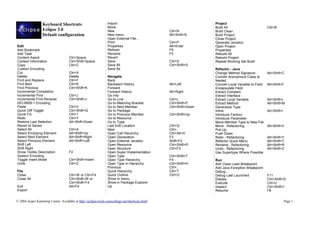
Keyboard Shortcuts                             Import                                            Project
                                                                  Move                                              Build All                         Ctrl+B
                   Eclipse 3.0                                    New                             Ctrl+N            Build Clean
                   Default configuration                          New menu                        Alt+Shift+N       Build Project
                                                                  Open External File...                             Close Project
                                                                  Print                           Ctrl+P            Generate Javadoc
Edit                                                              Properties                      Alt+Enter         Open Project
Add Bookmark                                                      Refresh                         F5                Properties
Add Task                                                          Rename                          F2                Rebuild All
Content Assist                        Ctrl+Space                  Revert                                            Rebuild Project
Context Information                   Ctrl+Shift+Space            Save                            Ctrl+S            Repeat Working Set Build
Copy                                  Ctrl+C                      Save All                        Ctrl+Shift+S
Custom Encoding                                                   Save As                                           Refactor - Java
Cut                                   Ctrl+X                                                                        Change Method Signature           Alt+Shift+C
Delete                                Delete                      Navigate                                          Convert Anonymous Class to
Find and Replace                      Ctrl+F                      Back                                              Nested
Find Next                             Ctrl+K                      Backward History                Alt+Left          Convert Local Variable to Field   Alt+Shift+F
Find Previous                         Ctrl+Shift+K                Forward                                           Encapsulate Field
Incremental Completion                                            Forward History                 Alt+Right         Extract Constant
Incremental Find                      Ctrl+J                      Go Into                                           Extract Interface
Incremental Find Reverse              Ctrl+Shift+J                Go to Line                      Ctrl+L            Extract Local Variable            Alt+Shift+L
ISO-8859-1 Encoding                                               Go to Matching Bracket          Ctrl+Shift+P      Extract Method                    Alt+Shift+M
Paste                                 Ctrl+V                      Go to Next Member               Ctrl+Shift+Down   Generalize Type
Quick Diff Toggle                     Ctrl+Shift+Q                Go to Package                                     Inline                            Alt+Shift+I
Quick Fix                             Ctrl+1                      Go to Previous Member           Ctrl+Shift+Up     Introduce Factory
Redo                                  Ctrl+Y                      Go to Resource                                    Introduce Parameter
Restore Last Selection                Alt+Shift+Down              Go to Type                                        Move Member Type to New File
Revert to Saved                                                   Last Edit Location              Ctrl+Q            Move - Refactoring                Alt+Shift+V
Select All                            Ctrl+A                      Next                            Ctrl+.            Pull Up
Select Enclosing Element              Alt+Shift+Up                Open Call Hierarchy             Ctrl+Alt+H        Push Down
Select Next Element                   Alt+Shift+Right             Open Declaration                F3                Redo - Refactoring                Alt+Shift+Y
Select Previous Element               Alt+Shift+Left              Open External Javadoc           Shift+F2          Refactor Quick Menu               Alt+Shift+T
Shift Left                                                        Open Resource                   Ctrl+Shift+R      Rename - Refactoring              Alt+Shift+R
Shift Right                                                       Open Structure                  Ctrl+F3           Undo - Refactoring                Alt+Shift+Z
Show Tooltip Description              F2                          Open Super Implementation                         Use Supertype Where Possible
System Encoding                                                   Open Type                       Ctrl+Shift+T
Toggle Insert Mode                    Ctrl+Shift+Insert           Open Type Hierarchy             F4                Run
Undo                                  Ctrl+Z                      Open Type in Hierarchy          Ctrl+Shift+H      Add Class Load Breakpoint
                                                                  Previous                        Ctrl+,            Add Java Exception Breakpoint
File                                                              Quick Hierarchy                 Ctrl+T            Debug...
Close                                 Ctrl+W or Ctrl+F4           Quick Outline                   Ctrl+O            Debug Last Launched               F11
Close All                             Ctrl+Shift+W or             Show In menu                                      Display                           Ctrl+Shift+D
                                      Ctrl+Shift+F4               Show in Package Explorer                          Execute                           Ctrl+U
Exit                                  Alt+F4                      Up                                                Inspect                           Ctrl+Shift+I
Export                                                                                                              Resume                            F8


© 2004 Jesper Kamstrup Linnet. Available at http://eclipse-tools.sourceforge.net/shortcuts.html                                                                     Page 1
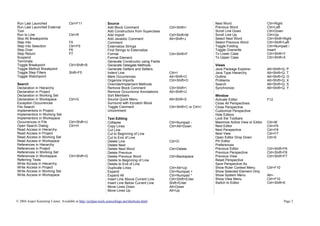
Run Last Launched                     Ctrl+F11                    Source                                                       Next Word                        Ctrl+Right
Run Last Launched External                                        Add Block Comment                   Ctrl+Shift+/             Previous Word                    Ctrl+Left
Tool                                                              Add Constructors from Superclass                             Scroll Line Down                 Ctrl+Down
Run to Line                           Ctrl+R                      Add Import                          Ctrl+Shift+M             Scroll Line Up                   Ctrl+Up
Skip All Breakpoints                                              Add Javadoc Comment                 Alt+Shift+J              Select Next Word                 Ctrl+Shift+Right
Step Into                             F5                          Comment                                                      Select Previous Word             Ctrl+Shift+Left
Step Into Selection                   Ctrl+F5                     Externalize Strings                                          Toggle Folding                   Ctrl+Numpad /
Step Over                             F6                          Find Strings to Externalize                                  Toggle Overwrite                 Insert
Step Return                           F7                          Format                              Ctrl+Shift+F             To Lower Case                    Ctrl+Shift+Y
Suspend                                                           Format Element                                               To Upper Case                    Ctrl+Shift+X
Terminate                                                         Generate Constructor using Fields
Toggle Breakpoint                     Ctrl+Shift+B                Generate Delegate Methods                                    Views
Toggle Method Breakpoint                                          Generate Getters and Setters                                 Java Package Explorer            Alt+Shift+Q, P
Toggle Step Filters                   Shift+F5                    Indent Line                         Ctrl+I                   Java Type Hierarchy              Alt+Shift+Q, T
Toggle Watchpoint                                                 Mark Occurrences                    Alt+Shift+O              Outline                          Alt+Shift+Q, O
                                                                  Organize Imports                    Ctrl+Shift+O             Problems                         Alt+Shift+Q, X
Search                                                            Override/Implement Methods                                   Search                           Alt+Shift+Q, S
Declaration in Hierarchy                                          Remove Block Comment                Ctrl+Shift+             Synchronize                      Alt+Shift+Q, Y
Declaration in Project                                            Remove Occurrence Annotations       Alt+Shift+U
Declaration in Working Set                                        Sort Members                                                 Window
Declaration in Workspace              Ctrl+G                      Source Quick Menu                   Alt+Shift+S              Activate Editor                  F12
Exception Occurrences                                             Surround with try/catch Block                                Close All Perspectives
File Search                                                       Toggle Comment                      Ctrl+Shift+C or Ctrl+/   Close Perspective
Implementors in Project                                           Uncomment                                                    Customize Perspective
Implementors in Working Set                                                                                                    Hide Editors
Implementors in Workspace                                         Text Editing                                                 Lock the Toolbars
Occurrences in File                   Ctrl+Shift+U                Collapse                            Ctrl+Numpad -            Maximize Active View or Editor   Ctrl+M
Open Search Dialog                    Ctrl+H                      Copy Lines                          Ctrl+Alt+Down            Next Editor                      Ctrl+F6
Read Access in Hierarchy                                          Cut Line                                                     Next Perspective                 Ctrl+F8
Read Access in Project                                            Cut to Beginning of Line                                     Next View                        Ctrl+F7
Read Access in Working Set                                        Cut to End of Line                                           Open Editor Drop Down            Ctrl+E
Read Access in Workspace                                          Delete Line                         Ctrl+D                   Pin Editor
References in Hierarchy                                           Delete Next                                                  Preferences
References in Project                                             Delete Next Word                    Ctrl+Delete              Previous Editor                  Ctrl+Shift+F6
References in Working Set                                         Delete Previous                                              Previous Perspective             Ctrl+Shift+F8
References in Workspace               Ctrl+Shift+G                Delete Previous Word                Ctrl+Backspace           Previous View                    Ctrl+Shift+F7
Referring Tests                                                   Delete to Beginning of Line                                  Reset Perspective
Write Access in Hierarchy                                         Delete to End of Line                                        Save Perspective As
Write Access in Project                                           Duplicate Lines                     Ctrl+Alt+Up              Show Ruler Context Menu          Ctrl+F10
Write Access in Working Set                                       Expand                              Ctrl+Numpad +            Show Selected Element Only
Write Access in Workspace                                         Expand All                          Ctrl+Numpad *            Show System Menu                 Alt+-
                                                                  Insert Line Above Current Line      Ctrl+Shift+Enter         Show View Menu                   Ctrl+F10
                                                                  Insert Line Below Current Line      Shift+Enter              Switch to Editor                 Ctrl+Shift+E
                                                                  Move Lines Down                     Alt+Down
                                                                  Move Lines Up                       Alt+Up


© 2004 Jesper Kamstrup Linnet. Available at http://eclipse-tools.sourceforge.net/shortcuts.html                                                                            Page 2

Janatreek3

  • 1.
    Keyboard Shortcuts Import Project Move Build All Ctrl+B Eclipse 3.0 New Ctrl+N Build Clean Default configuration New menu Alt+Shift+N Build Project Open External File... Close Project Print Ctrl+P Generate Javadoc Edit Properties Alt+Enter Open Project Add Bookmark Refresh F5 Properties Add Task Rename F2 Rebuild All Content Assist Ctrl+Space Revert Rebuild Project Context Information Ctrl+Shift+Space Save Ctrl+S Repeat Working Set Build Copy Ctrl+C Save All Ctrl+Shift+S Custom Encoding Save As Refactor - Java Cut Ctrl+X Change Method Signature Alt+Shift+C Delete Delete Navigate Convert Anonymous Class to Find and Replace Ctrl+F Back Nested Find Next Ctrl+K Backward History Alt+Left Convert Local Variable to Field Alt+Shift+F Find Previous Ctrl+Shift+K Forward Encapsulate Field Incremental Completion Forward History Alt+Right Extract Constant Incremental Find Ctrl+J Go Into Extract Interface Incremental Find Reverse Ctrl+Shift+J Go to Line Ctrl+L Extract Local Variable Alt+Shift+L ISO-8859-1 Encoding Go to Matching Bracket Ctrl+Shift+P Extract Method Alt+Shift+M Paste Ctrl+V Go to Next Member Ctrl+Shift+Down Generalize Type Quick Diff Toggle Ctrl+Shift+Q Go to Package Inline Alt+Shift+I Quick Fix Ctrl+1 Go to Previous Member Ctrl+Shift+Up Introduce Factory Redo Ctrl+Y Go to Resource Introduce Parameter Restore Last Selection Alt+Shift+Down Go to Type Move Member Type to New File Revert to Saved Last Edit Location Ctrl+Q Move - Refactoring Alt+Shift+V Select All Ctrl+A Next Ctrl+. Pull Up Select Enclosing Element Alt+Shift+Up Open Call Hierarchy Ctrl+Alt+H Push Down Select Next Element Alt+Shift+Right Open Declaration F3 Redo - Refactoring Alt+Shift+Y Select Previous Element Alt+Shift+Left Open External Javadoc Shift+F2 Refactor Quick Menu Alt+Shift+T Shift Left Open Resource Ctrl+Shift+R Rename - Refactoring Alt+Shift+R Shift Right Open Structure Ctrl+F3 Undo - Refactoring Alt+Shift+Z Show Tooltip Description F2 Open Super Implementation Use Supertype Where Possible System Encoding Open Type Ctrl+Shift+T Toggle Insert Mode Ctrl+Shift+Insert Open Type Hierarchy F4 Run Undo Ctrl+Z Open Type in Hierarchy Ctrl+Shift+H Add Class Load Breakpoint Previous Ctrl+, Add Java Exception Breakpoint File Quick Hierarchy Ctrl+T Debug... Close Ctrl+W or Ctrl+F4 Quick Outline Ctrl+O Debug Last Launched F11 Close All Ctrl+Shift+W or Show In menu Display Ctrl+Shift+D Ctrl+Shift+F4 Show in Package Explorer Execute Ctrl+U Exit Alt+F4 Up Inspect Ctrl+Shift+I Export Resume F8 © 2004 Jesper Kamstrup Linnet. Available at http://eclipse-tools.sourceforge.net/shortcuts.html Page 1
  • 2.
    Run Last Launched Ctrl+F11 Source Next Word Ctrl+Right Run Last Launched External Add Block Comment Ctrl+Shift+/ Previous Word Ctrl+Left Tool Add Constructors from Superclass Scroll Line Down Ctrl+Down Run to Line Ctrl+R Add Import Ctrl+Shift+M Scroll Line Up Ctrl+Up Skip All Breakpoints Add Javadoc Comment Alt+Shift+J Select Next Word Ctrl+Shift+Right Step Into F5 Comment Select Previous Word Ctrl+Shift+Left Step Into Selection Ctrl+F5 Externalize Strings Toggle Folding Ctrl+Numpad / Step Over F6 Find Strings to Externalize Toggle Overwrite Insert Step Return F7 Format Ctrl+Shift+F To Lower Case Ctrl+Shift+Y Suspend Format Element To Upper Case Ctrl+Shift+X Terminate Generate Constructor using Fields Toggle Breakpoint Ctrl+Shift+B Generate Delegate Methods Views Toggle Method Breakpoint Generate Getters and Setters Java Package Explorer Alt+Shift+Q, P Toggle Step Filters Shift+F5 Indent Line Ctrl+I Java Type Hierarchy Alt+Shift+Q, T Toggle Watchpoint Mark Occurrences Alt+Shift+O Outline Alt+Shift+Q, O Organize Imports Ctrl+Shift+O Problems Alt+Shift+Q, X Search Override/Implement Methods Search Alt+Shift+Q, S Declaration in Hierarchy Remove Block Comment Ctrl+Shift+ Synchronize Alt+Shift+Q, Y Declaration in Project Remove Occurrence Annotations Alt+Shift+U Declaration in Working Set Sort Members Window Declaration in Workspace Ctrl+G Source Quick Menu Alt+Shift+S Activate Editor F12 Exception Occurrences Surround with try/catch Block Close All Perspectives File Search Toggle Comment Ctrl+Shift+C or Ctrl+/ Close Perspective Implementors in Project Uncomment Customize Perspective Implementors in Working Set Hide Editors Implementors in Workspace Text Editing Lock the Toolbars Occurrences in File Ctrl+Shift+U Collapse Ctrl+Numpad - Maximize Active View or Editor Ctrl+M Open Search Dialog Ctrl+H Copy Lines Ctrl+Alt+Down Next Editor Ctrl+F6 Read Access in Hierarchy Cut Line Next Perspective Ctrl+F8 Read Access in Project Cut to Beginning of Line Next View Ctrl+F7 Read Access in Working Set Cut to End of Line Open Editor Drop Down Ctrl+E Read Access in Workspace Delete Line Ctrl+D Pin Editor References in Hierarchy Delete Next Preferences References in Project Delete Next Word Ctrl+Delete Previous Editor Ctrl+Shift+F6 References in Working Set Delete Previous Previous Perspective Ctrl+Shift+F8 References in Workspace Ctrl+Shift+G Delete Previous Word Ctrl+Backspace Previous View Ctrl+Shift+F7 Referring Tests Delete to Beginning of Line Reset Perspective Write Access in Hierarchy Delete to End of Line Save Perspective As Write Access in Project Duplicate Lines Ctrl+Alt+Up Show Ruler Context Menu Ctrl+F10 Write Access in Working Set Expand Ctrl+Numpad + Show Selected Element Only Write Access in Workspace Expand All Ctrl+Numpad * Show System Menu Alt+- Insert Line Above Current Line Ctrl+Shift+Enter Show View Menu Ctrl+F10 Insert Line Below Current Line Shift+Enter Switch to Editor Ctrl+Shift+E Move Lines Down Alt+Down Move Lines Up Alt+Up © 2004 Jesper Kamstrup Linnet. Available at http://eclipse-tools.sourceforge.net/shortcuts.html Page 2