Linux Access Control List (ACL)
1
Managing ACLs in Linux
Access Control Lists
Linux Advanced Directory and File Permission
Access Control List (ACL) provides an additional, more flexible
permission mechanism for file systems. It is designed to assist
with UNIX/Linux file permissions.
2
Why Access Control Lists (ACL) ?
- Linux advanced permissions does not allow to give
permissions to more than one user or one group on the
same file
- Access control lists do offer this feature
- It allows administrators to set default permissions in a
sophisticated way where the permissions that are set can
differ on different directories
3
Understanding ACLs
Although the ACL subsystem adds great functionality to
your server, there is one drawback
- Not all utilities support it
- Therefore, you might lose ACL settings when copying or
moving files, and your backup software might not be able
to back up ACL settings
4
SETTING ACCESS ACLS
There are two types of ACLs
Access ACLs and
Default ACLs
Access ACL is the access control list for a specific file or
directory.
Default ACL can only be associated with a directory; if a
file within the directory does not have an access ACL, it
uses the rules of the default ACL for the directory
Default ACLs are optional
5
ACLs can be configured
1. Per user
2. Per group
3. Via the effective rights mask
4. For users not in the user group for the file
6
ACLs can be configured
The setfacl utility sets ACLs for files and
directories.
Use the -m option to add or modify the ACL of a
file or directory
# setfacl -m rules files
7
ACLs can be configured
Rules (rules) must be specified in the following
formats. Multiple rules can be specified in the
same command if they are separated by commas.
u:uid:perms
Sets the access ACL for a user. The user name or
UID may be specified. The user may be any valid
user on the system.
8
ACLs can be configured
g:gid:perms
Sets the access ACL for a group.
The group name or GID may be specified. The group
may be any valid group on the system.
m:perms
Sets the effective rights mask. The mask is the union of
all permissions of the owning group and all of the user
and group entries.
9
ACLs can be configured
o:perms
Sets the access ACL for users other than the ones
in the group for the file.
Permissions (perms) must be a combination of the
characters r, w, and x for read, write, and execute.
10
ACLs can be configured
If a file or directory already has an ACL, and the
setfacl command
is used the additional rules are added to the
existing ACL or the existing rule is modified.
11
Changing and Viewing ACL Settings
Changing and Viewing ACL Settings with
setfacl and
getfacl
To set ACLs, you need the setfacl command
To see current ACL settings, you need getfacl
command
12
Changing and Viewing ACL Settings
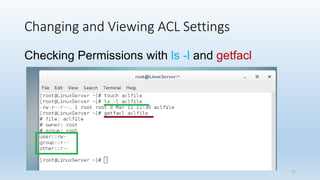
The ls -l command does not show any existing
ACLs
It just shows a + after the listing of the permissions
which indicates that ACLs apply to the file as well
Before setting ACLs
It is always a good idea to show current ACL
settings using getfacl
13
Changing and Viewing ACL Settings
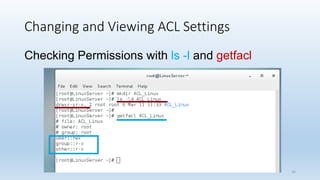
ls -l and also as shown with getfacl . If you look
closely enough, you can see that the information
shown is exactly the same.
14
Changing and Viewing ACL Settings
Checking Permissions with ls -l and getfacl
-d, --directory
list directories themselves, not their
contents
-l use a long listing format
15
Changing and Viewing ACL Settings
Checking Permissions with ls -l and getfacl
16
Changing and Viewing ACL Settings
Checking Permissions with ls -l and getfacl
17
Examples - Access Control Lists (ACLs)
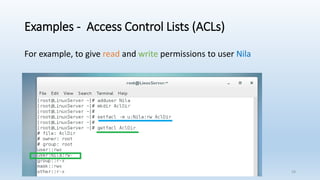
For example, to give read and write permissions to user Nila
18
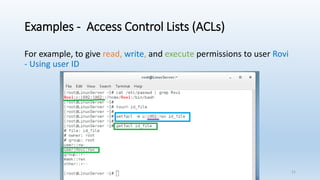
Examples - Access Control Lists (ACLs)
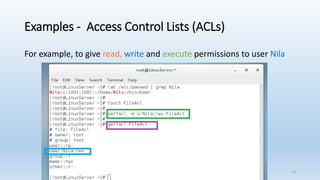
For example, to give read, write and execute permissions to user Nila
19
Examples - Access Control Lists (ACLs)
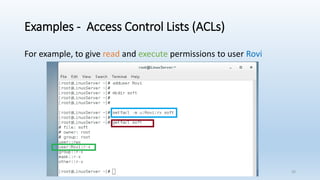
For example, to give read and execute permissions to user Rovi
20
Examples - Access Control Lists (ACLs)
For example, to give read, write, and execute permissions to user Rovi
- Using user ID
21
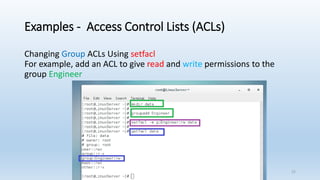
Examples - Access Control Lists (ACLs)
Changing Group ACLs Using setfacl
For example, add an ACL to give read and write permissions to the
group Engineer
22
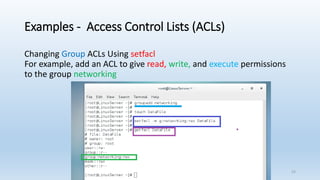
Examples - Access Control Lists (ACLs)
Changing Group ACLs Using setfacl
For example, add an ACL to give read, write, and execute permissions
to the group networking
23
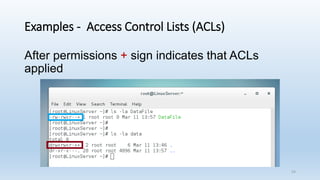
Examples - Access Control Lists (ACLs)
After permissions + sign indicates that ACLs
applied
24
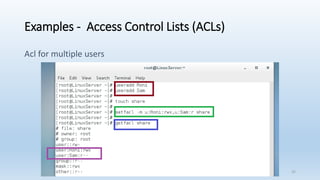
Examples - Access Control Lists (ACLs)
Acl for multiple users
25
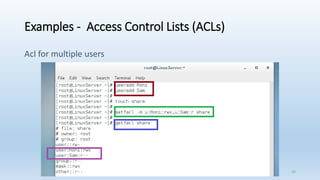
Examples - Access Control Lists (ACLs)
Acl for multiple users
26
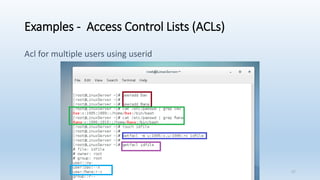
Examples - Access Control Lists (ACLs)
Acl for multiple users using userid
27
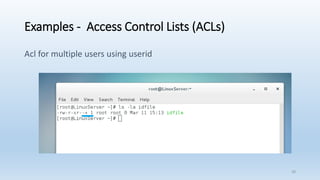
Examples - Access Control Lists (ACLs)
Acl for multiple users using userid
28
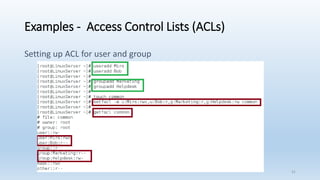
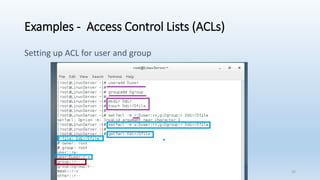
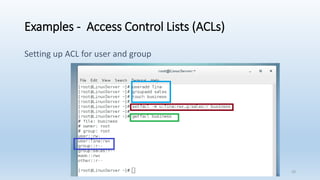
Examples - Access Control Lists (ACLs)
Setting up ACL for user and group
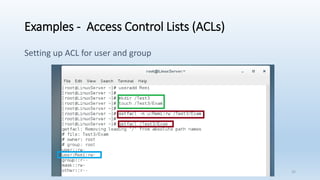
29
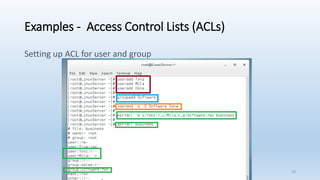
Examples - Access Control Lists (ACLs)
Setting up ACL for user and group
30
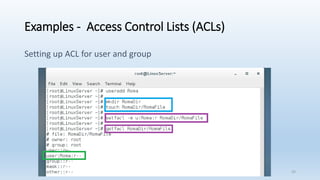
Examples - Access Control Lists (ACLs)
Setting up ACL for user and group
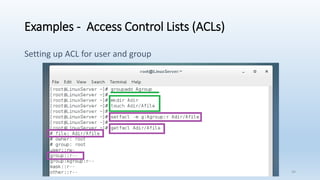
31
Examples - Access Control Lists (ACLs)
Setting up ACL for user and group
32
Examples - Access Control Lists (ACLs)
Setting up ACL for user and group
33
Examples - Access Control Lists (ACLs)
Setting up ACL for user and group
34
Examples - Access Control Lists (ACLs)
Setting up ACL for user and group
35
Working with Default ACLs
- One benefit of using ACLs is that you can give permissions
to more than one user or group at a directory
- Another benefit is that you can enable inheritance by
working with default ACLs
- By setting a default ACL, you’ll determine the permissions
that will be set for all new items that are created in the
directory
36
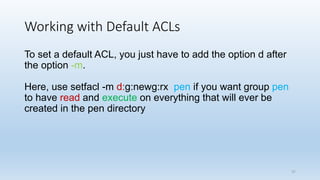
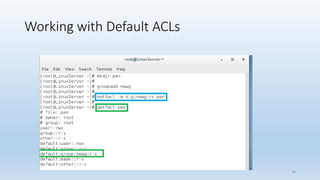
Working with Default ACLs
To set a default ACL, you just have to add the option d after
the option -m.
Here, use setfacl -m d:g:newg:rx pen if you want group pen
to have read and execute on everything that will ever be
created in the pen directory
37
Working with Default ACLs
38
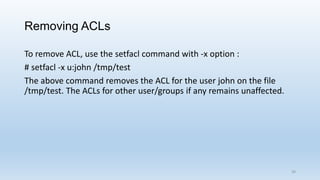
Removing ACLs
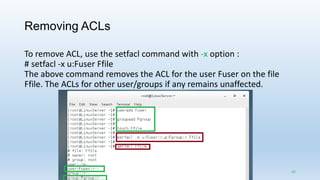
To remove ACL, use the setfacl command with -x option :
# setfacl -x u:john /tmp/test
The above command removes the ACL for the user john on the file
/tmp/test. The ACLs for other user/groups if any remains unaffected.
39
Removing ACLs
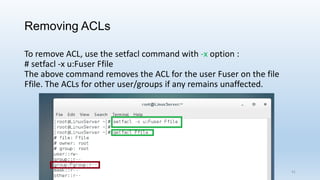
To remove ACL, use the setfacl command with -x option :
# setfacl -x u:Fuser Ffile
The above command removes the ACL for the user Fuser on the file
Ffile. The ACLs for other user/groups if any remains unaffected.
40
Removing ACLs
To remove ACL, use the setfacl command with -x option :
# setfacl -x u:Fuser Ffile
The above command removes the ACL for the user Fuser on the file
Ffile. The ACLs for other user/groups if any remains unaffected.
41
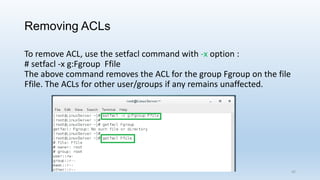
Removing ACLs
To remove ACL, use the setfacl command with -x option :
# setfacl -x g:Fgroup Ffile
The above command removes the ACL for the group Fgroup on the file
Ffile. The ACLs for other user/groups if any remains unaffected.
42
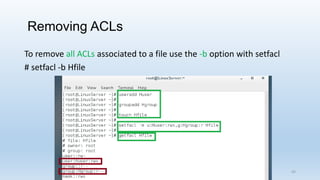
Removing ACLs
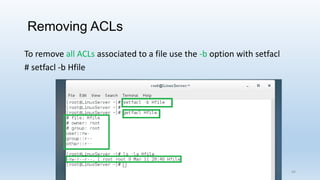
To remove all ACLs associated to a file use the -b option with setfacl
# setfacl -b Hfile
43
Removing ACLs
To remove all ACLs associated to a file use the -b option with setfacl
# setfacl -b Hfile
44
Resources
-Linux+ Guide to Linux Certification, 2e and PPT Slides
-Red Hat RHCSA/RHCE 7 Cert Guide
-Internet
- https://en.wikipedia.org
- https://en.wikipedia.org/wiki/CentOS
45

Usage of Access Control Lists (ACL) in Linux

  • 1.
  • 2.
    Managing ACLs inLinux Access Control Lists Linux Advanced Directory and File Permission Access Control List (ACL) provides an additional, more flexible permission mechanism for file systems. It is designed to assist with UNIX/Linux file permissions. 2
  • 3.
    Why Access ControlLists (ACL) ? - Linux advanced permissions does not allow to give permissions to more than one user or one group on the same file - Access control lists do offer this feature - It allows administrators to set default permissions in a sophisticated way where the permissions that are set can differ on different directories 3
  • 4.
    Understanding ACLs Although theACL subsystem adds great functionality to your server, there is one drawback - Not all utilities support it - Therefore, you might lose ACL settings when copying or moving files, and your backup software might not be able to back up ACL settings 4
  • 5.
    SETTING ACCESS ACLS Thereare two types of ACLs Access ACLs and Default ACLs Access ACL is the access control list for a specific file or directory. Default ACL can only be associated with a directory; if a file within the directory does not have an access ACL, it uses the rules of the default ACL for the directory Default ACLs are optional 5
  • 6.
    ACLs can beconfigured ACLs can be configured 1. Per user 2. Per group 3. Via the effective rights mask 4. For users not in the user group for the file 6
  • 7.
    ACLs can beconfigured The setfacl utility sets ACLs for files and directories. Use the -m option to add or modify the ACL of a file or directory # setfacl -m rules files 7
  • 8.
    ACLs can beconfigured Rules (rules) must be specified in the following formats. Multiple rules can be specified in the same command if they are separated by commas. u:uid:perms Sets the access ACL for a user. The user name or UID may be specified. The user may be any valid user on the system. 8
  • 9.
    ACLs can beconfigured g:gid:perms Sets the access ACL for a group. The group name or GID may be specified. The group may be any valid group on the system. m:perms Sets the effective rights mask. The mask is the union of all permissions of the owning group and all of the user and group entries. 9
  • 10.
    ACLs can beconfigured o:perms Sets the access ACL for users other than the ones in the group for the file. Permissions (perms) must be a combination of the characters r, w, and x for read, write, and execute. 10
  • 11.
    ACLs can beconfigured If a file or directory already has an ACL, and the setfacl command is used the additional rules are added to the existing ACL or the existing rule is modified. 11
  • 12.
    Changing and ViewingACL Settings Changing and Viewing ACL Settings with setfacl and getfacl To set ACLs, you need the setfacl command To see current ACL settings, you need getfacl command 12
  • 13.
    Changing and ViewingACL Settings The ls -l command does not show any existing ACLs It just shows a + after the listing of the permissions which indicates that ACLs apply to the file as well Before setting ACLs It is always a good idea to show current ACL settings using getfacl 13
  • 14.
    Changing and ViewingACL Settings ls -l and also as shown with getfacl . If you look closely enough, you can see that the information shown is exactly the same. 14
  • 15.
    Changing and ViewingACL Settings Checking Permissions with ls -l and getfacl -d, --directory list directories themselves, not their contents -l use a long listing format 15
  • 16.
    Changing and ViewingACL Settings Checking Permissions with ls -l and getfacl 16
  • 17.
    Changing and ViewingACL Settings Checking Permissions with ls -l and getfacl 17
  • 18.
    Examples - AccessControl Lists (ACLs) For example, to give read and write permissions to user Nila 18
  • 19.
    Examples - AccessControl Lists (ACLs) For example, to give read, write and execute permissions to user Nila 19
  • 20.
    Examples - AccessControl Lists (ACLs) For example, to give read and execute permissions to user Rovi 20
  • 21.
    Examples - AccessControl Lists (ACLs) For example, to give read, write, and execute permissions to user Rovi - Using user ID 21
  • 22.
    Examples - AccessControl Lists (ACLs) Changing Group ACLs Using setfacl For example, add an ACL to give read and write permissions to the group Engineer 22
  • 23.
    Examples - AccessControl Lists (ACLs) Changing Group ACLs Using setfacl For example, add an ACL to give read, write, and execute permissions to the group networking 23
  • 24.
    Examples - AccessControl Lists (ACLs) After permissions + sign indicates that ACLs applied 24
  • 25.
    Examples - AccessControl Lists (ACLs) Acl for multiple users 25
  • 26.
    Examples - AccessControl Lists (ACLs) Acl for multiple users 26
  • 27.
    Examples - AccessControl Lists (ACLs) Acl for multiple users using userid 27
  • 28.
    Examples - AccessControl Lists (ACLs) Acl for multiple users using userid 28
  • 29.
    Examples - AccessControl Lists (ACLs) Setting up ACL for user and group 29
  • 30.
    Examples - AccessControl Lists (ACLs) Setting up ACL for user and group 30
  • 31.
    Examples - AccessControl Lists (ACLs) Setting up ACL for user and group 31
  • 32.
    Examples - AccessControl Lists (ACLs) Setting up ACL for user and group 32
  • 33.
    Examples - AccessControl Lists (ACLs) Setting up ACL for user and group 33
  • 34.
    Examples - AccessControl Lists (ACLs) Setting up ACL for user and group 34
  • 35.
    Examples - AccessControl Lists (ACLs) Setting up ACL for user and group 35
  • 36.
    Working with DefaultACLs - One benefit of using ACLs is that you can give permissions to more than one user or group at a directory - Another benefit is that you can enable inheritance by working with default ACLs - By setting a default ACL, you’ll determine the permissions that will be set for all new items that are created in the directory 36
  • 37.
    Working with DefaultACLs To set a default ACL, you just have to add the option d after the option -m. Here, use setfacl -m d:g:newg:rx pen if you want group pen to have read and execute on everything that will ever be created in the pen directory 37
  • 38.
  • 39.
    Removing ACLs To removeACL, use the setfacl command with -x option : # setfacl -x u:john /tmp/test The above command removes the ACL for the user john on the file /tmp/test. The ACLs for other user/groups if any remains unaffected. 39
  • 40.
    Removing ACLs To removeACL, use the setfacl command with -x option : # setfacl -x u:Fuser Ffile The above command removes the ACL for the user Fuser on the file Ffile. The ACLs for other user/groups if any remains unaffected. 40
  • 41.
    Removing ACLs To removeACL, use the setfacl command with -x option : # setfacl -x u:Fuser Ffile The above command removes the ACL for the user Fuser on the file Ffile. The ACLs for other user/groups if any remains unaffected. 41
  • 42.
    Removing ACLs To removeACL, use the setfacl command with -x option : # setfacl -x g:Fgroup Ffile The above command removes the ACL for the group Fgroup on the file Ffile. The ACLs for other user/groups if any remains unaffected. 42
  • 43.
    Removing ACLs To removeall ACLs associated to a file use the -b option with setfacl # setfacl -b Hfile 43
  • 44.
    Removing ACLs To removeall ACLs associated to a file use the -b option with setfacl # setfacl -b Hfile 44
  • 45.
    Resources -Linux+ Guide toLinux Certification, 2e and PPT Slides -Red Hat RHCSA/RHCE 7 Cert Guide -Internet - https://en.wikipedia.org - https://en.wikipedia.org/wiki/CentOS 45