Controlling Access to Files
with ACL
ACL
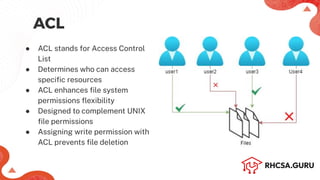
● ACL stands for Access Control
List
● Determines who can access
specific resources
● ACL enhances file system
permissions flexibility
● Designed to complement UNIX
file permissions
● Assigning write permission with
ACL prevents file deletion
Remove and assign ACL permissions
● setfacl: To set or modify the Access Control List (ACL) of a file or
directory
● getfacl: To display the current Access Control List (ACL) of a file
or directory
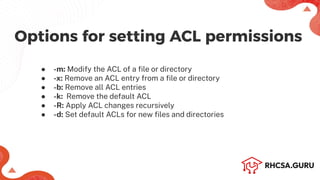
● -m: Modify the ACL of a file or directory
● -x: Remove an ACL entry from a file or directory
● -b: Remove all ACL entries
● -k: Remove the default ACL
● -R: Apply ACL changes recursively
● -d: Set default ACLs for new files and directories
Options for setting ACL permissions
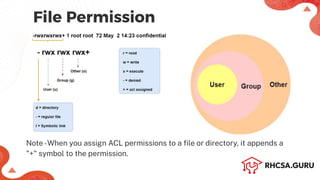
File Permission
Note-When you assign ACL permissions to a file or directory, it appends a
"+" symbol to the permission.
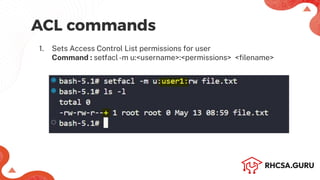
ACL commands
1. Sets Access Control List permissions for user
Command : setfacl-m u:<username>:<permissions> <filename>
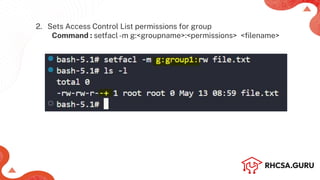
2. Sets Access Control List permissions for group
Command : setfacl-m g:<groupname>:<permissions> <filename>
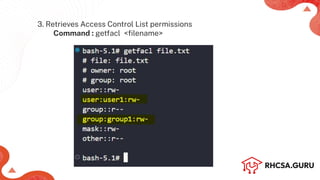
3. Retrieves Access Control List permissions
Command : getfacl <filename>
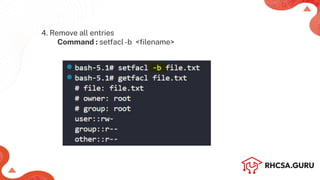
4. Remove all entries
Command : setfacl-b <filename>
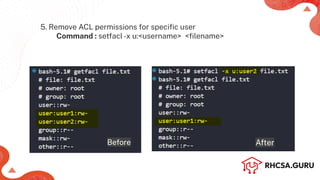
5. Remove ACL permissions for specific user
Command : setfacl-x u:<username> <filename>
Before After

Control Access to Files with ACL - RHCSA (RH134).pdf

  • 1.
    Controlling Access toFiles with ACL
  • 2.
    ACL ● ACL standsfor Access Control List ● Determines who can access specific resources ● ACL enhances file system permissions flexibility ● Designed to complement UNIX file permissions ● Assigning write permission with ACL prevents file deletion
  • 3.
    Remove and assignACL permissions ● setfacl: To set or modify the Access Control List (ACL) of a file or directory ● getfacl: To display the current Access Control List (ACL) of a file or directory
  • 4.
    ● -m: Modifythe ACL of a file or directory ● -x: Remove an ACL entry from a file or directory ● -b: Remove all ACL entries ● -k: Remove the default ACL ● -R: Apply ACL changes recursively ● -d: Set default ACLs for new files and directories Options for setting ACL permissions
  • 5.
    File Permission Note-When youassign ACL permissions to a file or directory, it appends a "+" symbol to the permission.
  • 6.
    ACL commands 1. SetsAccess Control List permissions for user Command : setfacl-m u:<username>:<permissions> <filename>
  • 7.
    2. Sets AccessControl List permissions for group Command : setfacl-m g:<groupname>:<permissions> <filename>
  • 8.
    3. Retrieves AccessControl List permissions Command : getfacl <filename>
  • 9.
    4. Remove allentries Command : setfacl-b <filename>
  • 10.
    5. Remove ACLpermissions for specific user Command : setfacl-x u:<username> <filename> Before After