Page 2
Defining Usability
TheISO defines usability as “the extent to which a
product can be used by specified users to achieve
specified goals with effectiveness, efficiency and
satisfaction in a specified context of use.”
3.
Page 3
Indikator Usability
Effectiveness:accuracy and completeness with which users
achieve specified goals.
Efficiency: resources expended in relation to the accuracy and
completeness with which users achieve goals.
Satisfaction: freedom from discomfort, and positive attitudes
towards the use of the product.
4.
Page 4
Atribut Usability
Amodel of the attributes of system acceptability, based on Figure 1
of Nielsen [1993b, page 25].
5.
Page 5
Six UsabilityAttributes
Combining the three ISO usability attributes with Nielsen’s five
usability attributes, leads to the following six usability attributes:
1. Efectiveness: completeness with which users achieve their
goal.
2. Learnability: ease of learning for novice users.
3. Effeciency: steady-state performance of expert users.
4. Memorability: ease of using system intermittently for casual
users.
5. Errors: error rate for minor and catastrophic errors.
6. Satisfaction: how satisfying a system is to use, from user’s point
of view.
6.
Page 6
Measuring UsabilityAttributes
1. Efectiveness: decide on definition of success. For example, number of
substitution words spotted in a text, or binary measure of success (order
completed or not)
2. Learnability: pick novice users of system, measure time to perform certain
tasks. Distinguish between no/some general computer experience..
3. Effeciency: decide definition of expertise, get sample expert users (difficult),
measure time to perform typical tasks..
4. Memorability: get sample casual users (away from system for certain time),
measure time to perform typical tasks..
5. Errors: count minor and catastrophic errors made by users while performing
some specified task. For example, number of deviations from optimal click path.
6. Satisfaction: ask users’ subjective opinion (questionnaire), after trying system
for real task.
7.
Page 7
Usability Evaluation
•Exploratory - how is it (or will it be) used?
• Predictive - estimating how good it will be.
• Formative - how can it be made better?
• Summative - how good is it?
Definitions [Andrews, 2008] are adapted from those of several authors [Stone et
al., 2005; Rubin, 1994; Lockee et al., 2002; Ellis and Dix, 2006].
There are four types of evaluation, according to
the purpose of the evaluation:
8.
Page 8
Exploratory Evaluation
•Explores current usage and the potential
design space for new designs.
– Done before interface development.
– Learn which software is used, how often, and
what for.
– Collect usage data – statistical summaries
and observations of usage.
9.
Page 9
Predictive Evaluation
•Estimates the overall quality of an
interface (like a summative evaluation, but
a prediction made in advance).
– Done once a design has been done, but
before implementation proceeds.
10.
Page 10
Formative Evaluation
•Informs the design process and helps
improve an interface during design.
– Done during interface development.
– Learn why something went wrong, not just
that it went wrong.
– Collect process data – qualitative
observations of what happened and why.
11.
Page 11
Summative Evaluation
•Assesses the overall quality of an
interface.
– Done once an interface is (more or less)
finished.
– Either compare alternative designs, or test
definite performance requirements.
– Collect bottom-line data – quantitative
measurements of performance: how long
did users take, were they successful, how
many errors did they make.
12.
Page 12
Modified SoupAnalogy
• Extending Robert Stake’s soup analogy
[Stake, 1976; Lockee et al., 2002]:
“When the cook tastes other cooks’ soups, that’s exploratory.
When the cook assesses a certain recipe, that’s predictive.
When the cook tastes the soup while making it, that’s formative.
When the guests (or food critics) taste the soup, that’s
summative.”
13.
Page 13
Usability EvaluationMethods
• Usability Inspection Methods
Inspection of interface design by usability
specialists using heuristics and judgement (no
test users).
• Usability Testing Methods
Empirical testing of interface design with real
users.
Page 17
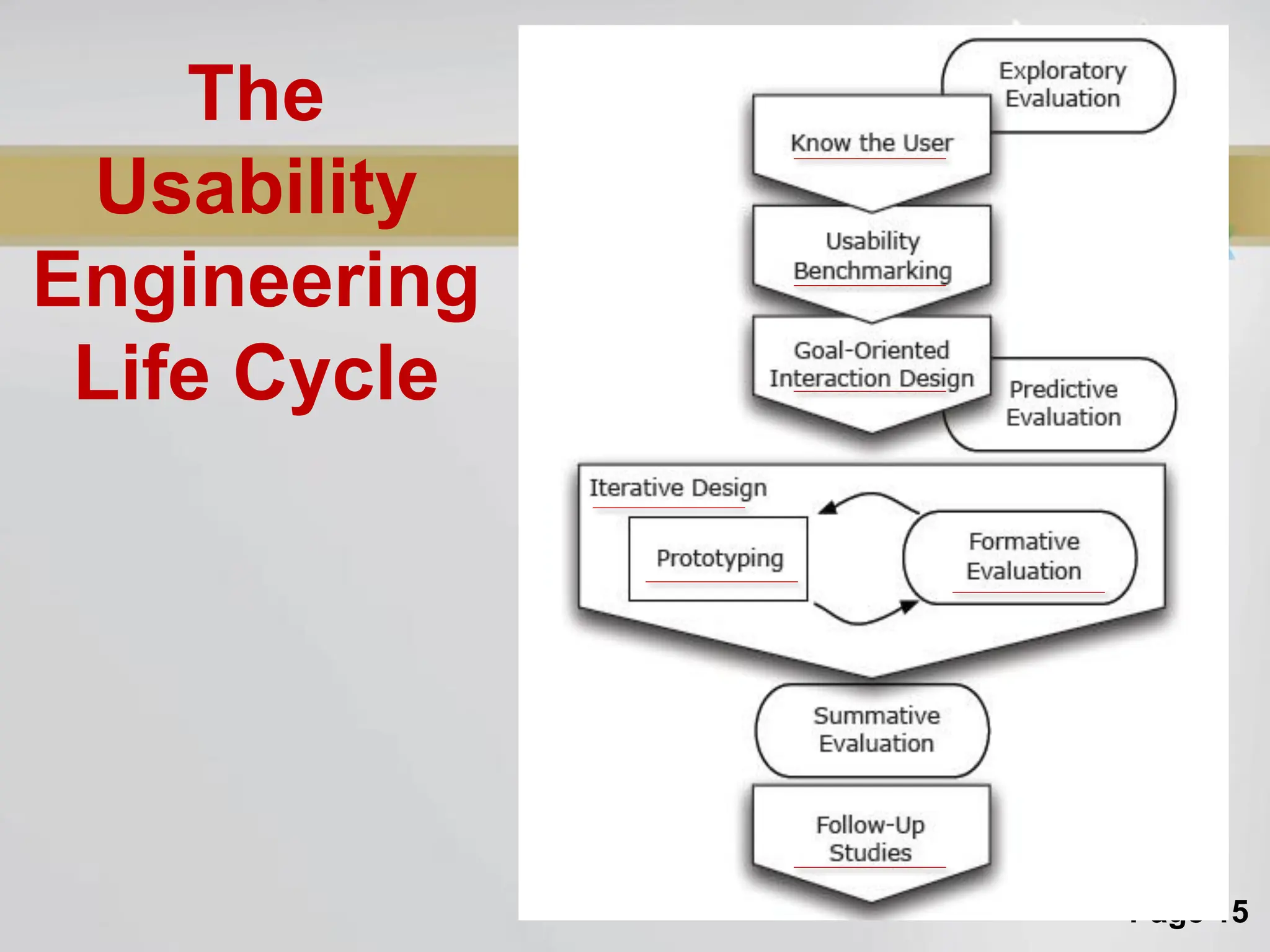
Know TheUser
• Qualitative research: observation of users
and interviews.
• Exploratory evaluation: which software is
used, how is it used, and what is it used for.
• Draw up a user profile for each (potential)
class of user, based on behavioural and
demographic variables.
• Identify user goals and attitudes.
• Analyse workflow and context of work.
• Draw up a set of typical user scenarios
Back
18.
Page 18
Usability Benchmarking
•Analyse competing products or
interfaces heuristically and empirically.
• Set measurable usability targets for your
own interface.
Back
Page 20
Iterative Design
“Design,Test, Redesign.”
Build and evaluate prototype interface, then:
• Severity ratings of usability problems
discovered.
• Fix problems!new version of interface.
• Capture design rationale: record reasons why
changes were made.
• Evaluate new version of interface.
until time and/or money runs out.
A cycle of continuous improvement.
Back
21.
Page 21
Building Prototypes
•Verbal description.
• Paper prototype.
• Working prototype.
• Implementation of final design.
Back
22.
Page 22
Formative andSummative
Usability Evaluation
• The usability evaluation methods are
described according to who performs
them:
– Usability inspection methods: Chapter 8.
– Usability testing methods: Chapter 9.
Back
23.
Page 23
Follow-Up Studies
Importantusability data can be gathered after the
release of a product for the next version:
• Specific field studies (interviews, questionnaires,
observation).
• Standard marketing studies (what people are
saying in the newsgroups and mailing lists,
reviews and tests in magazines, etc.).
• Instrumented versions of software →log data.
• Analyse user complaints to hotline, modification
requests, bug reports.
Back
24.
Page 24
Planning UsabilityActivities
1. Prioritise activities.
2. Write down explicit plan for each
activity.
3. Subject plan to independent review
(e.g. colleague from different project).
4. Perform pilot activity with about 10% of
total resources, then revise plan for
remaining 90%.
[Always perform a pilot study!]
25.
Page 25
TUGAS KELOMPOK
•Kelompok Terdiri dari 2 Orang
• Pilih salah satu aplikasi E-government (contoh:
imigrasi.go.id).
• Buatlah evaluasi terhadap atribut usability
26.
Page 26
Contoh PengukuranAtribut
Usability
• Aplikasi BNI SMS Banking
• Efectiveness:
– Tujuan aplikasi ini adalah memudahkan pengguna agar tidak perlu menghapal format SMS ketika
ingin bertransaksi.
• Learnability:
– Pengamatan dengan Mr. ABC yang baru pertama kali melihat aplikasi BNI SMS Banking, hasilnya
Mr. ABC bisa menggunakan BNI SMS Banking dalam waktu 10 menit
– Pengamatan dengan Mr. XYZ yang sudah terbiasa bertransaksi menggunakan SMS Banking.
Hasilnya Mr. XYZ bisa menggunakan seluruh menu dalam waktu 5 menit.
• Effeciency:
– Pengukuran hampir sama dengan learnability tapi lebih mendetail pada tiap fungsi aplikasi (menu)
• Memorability:
– get sample casual users (away from system for certain time), measure time to perform typical
tasks..
• Errors:
– Hitung tingkat kesalahan yang terjadi ketika menggunakan aplikasi, bedakan antara kesalahan
dari sistem dengan kesalahan diluar sistem (human error).
• Satisfaction:
– Pendapat pribadi dari pengguna


![Page 4
Atribut Usability
A model of the attributes of system acceptability, based on Figure 1
of Nielsen [1993b, page 25].](https://image.slidesharecdn.com/w3usabilityengineering2021-250410043823-f842c4fb/75/USABILITY-ENGINEERING-LIFE-CYCLE-IN-HCI-pdf-4-2048.jpg)


![Page 7
Usability Evaluation
• Exploratory - how is it (or will it be) used?
• Predictive - estimating how good it will be.
• Formative - how can it be made better?
• Summative - how good is it?
Definitions [Andrews, 2008] are adapted from those of several authors [Stone et
al., 2005; Rubin, 1994; Lockee et al., 2002; Ellis and Dix, 2006].
There are four types of evaluation, according to
the purpose of the evaluation:](https://image.slidesharecdn.com/w3usabilityengineering2021-250410043823-f842c4fb/75/USABILITY-ENGINEERING-LIFE-CYCLE-IN-HCI-pdf-7-2048.jpg)


![Page 12
Modified Soup Analogy
• Extending Robert Stake’s soup analogy
[Stake, 1976; Lockee et al., 2002]:
“When the cook tastes other cooks’ soups, that’s exploratory.
When the cook assesses a certain recipe, that’s predictive.
When the cook tastes the soup while making it, that’s formative.
When the guests (or food critics) taste the soup, that’s
summative.”](https://image.slidesharecdn.com/w3usabilityengineering2021-250410043823-f842c4fb/75/USABILITY-ENGINEERING-LIFE-CYCLE-IN-HCI-pdf-12-2048.jpg)




![Page 24
Planning Usability Activities
1. Prioritise activities.
2. Write down explicit plan for each
activity.
3. Subject plan to independent review
(e.g. colleague from different project).
4. Perform pilot activity with about 10% of
total resources, then revise plan for
remaining 90%.
[Always perform a pilot study!]](https://image.slidesharecdn.com/w3usabilityengineering2021-250410043823-f842c4fb/75/USABILITY-ENGINEERING-LIFE-CYCLE-IN-HCI-pdf-24-2048.jpg)


