Calling All Modularity Solutions:
A Comparative Study from eBay
JavaOne 2011


 Sangjin Lee, Tony Ng
 eBay Inc.
Agenda

•  What is modularity?
•  Why modularity?
•  Evaluation criteria
•  Scorecard
•  Summary


2
What is modularity?

Dictionary says...
   modular: employing or involving a module or modules as the basis of design
   or construction: modular housing units.
Then what is a “module”?
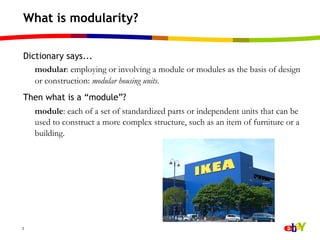
    module: each of a set of standardized parts or independent units that can be
    used to construct a more complex structure, such as an item of furniture or a
    building.


3
What is Modularity?

According to Wikipedia*:
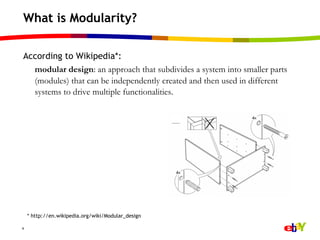
  modular design: an approach that subdivides a system into smaller parts
  (modules) that can be independently created and then used in different
  systems to drive multiple functionalities.


    * http://en.wikipedia.org/wiki/Modular_design

4
Key modularity concepts for software

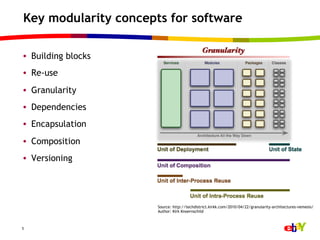
•  Building blocks
•  Re-use
•  Granularity
•  Dependencies
•  Encapsulation
•  Composition
•  Versioning


                      Source: http://techdistrict.kirkk.com/2010/04/22/granularity-architectures-nemesis/
                      Author: Kirk Knoernschild


5
Challenges for large enterprises

•  Some stats on the eBay code base
    –    ~ 44 million of lines of code and growing
    –    Hundreds of thousands of classes
    –    Tens of thousands of packages
    –    ~ 4,000+ jars

•  We have too many dependencies and tight coupling in our code
    –  Everyone sees everyone else
    –  Everyone affects everyone else


6
Challenges for large enterprises

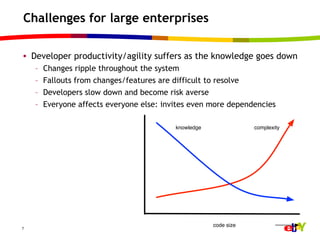
•  Developer productivity/agility suffers as the knowledge goes down
    –    Changes ripple throughout the system
    –    Fallouts from changes/features are difficult to resolve
    –    Developers slow down and become risk averse
    –    Everyone affects everyone else: invites even more dependencies

                                            knowledge               complexity


                                                        code size
7
Our goals with modularity efforts

•  Tame complexity
•  Organize our code base in loose coupling fashion
    –  Coarse-grained modules: number matters!
    –  Declarative coupling contract
    –  Ability to hide internals

•  Establish clear code ownership, boundaries and dependencies
•  Allow different components (and teams) evolve at different speeds
•  Increase development agility


8
Considerations on any modularity solutions

•  Scalability: enterprise software tends to be large scale
•  We need to consider a large group of developers with varying skill
   levels
•  End-to-end development lifecycle is crucial
•  Conversion/migration of existing code base is crucial
    –  We rarely start from vacuum
    –  We want to move over and modularize bulk of existing code
    –  It is imperative that we chart a realistic migration course that can be
       achieved within a reasonable amount of time
    –  We cannot afford disruption to business meanwhile: “change parts
       while the car is running”


9
Evaluation criteria

•  Modularity concerns
     –    Hide internals (“reduce the surface area”)
     –    Enforce modularity
     –    Provision/assemble application easily
     –    Isolate and run two versions of the same class


10
Evaluation criteria

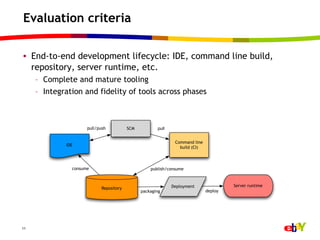
•  End-to-end development lifecycle: IDE, command line build,
   repository, server runtime, etc.
     –  Complete and mature tooling
     –  Integration and fidelity of tools across phases


                      pull/push           SCM          pull


                                                               Command line
              IDE
                                                                 build (CI)


                consume                             publish/consume


                                                              Deployment               Server runtime
                             Repository
                                                packaging                     deploy


11
Evaluation criteria

•  Migration concerns
     –  Ease of conversion
     –  Learning curve

•  Adoption: user communities and knowledge


12
Evaluation candidates

•  OSGi
•  Maven
•  Jigsaw
•  JBoss modules


 Disclaimer: this is not a comprehensive discussion of these technologies. We will
 focus only on modularity aspects and it will not be an exhaustive evaluation.


13
OSGi

•  Observations
     –    “The only game in town” (?)
     –    Strong modularity framework
     –    Focuses more on runtime than build time
     –    “All or nothing”: everything needs to be pretty much in an OSGi bundle
     –    Bundles and services are dynamic at runtime


14
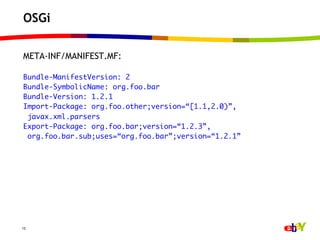
OSGi

META-INF/MANIFEST.MF:
	
Bundle-ManifestVersion: 2	
Bundle-SymbolicName: org.foo.bar	
Bundle-Version: 1.2.1	
Import-Package: org.foo.other;version=“[1.1,2.0)”,	
  javax.xml.parsers	
Export-Package: org.foo.bar;version=“1.2.3”,	
  org.foo.bar.sub;uses=“org.foo.bar”;version=“1.2.1”	


15
OSGi

•  Pros
     –  Enforces modularity strongly: it will let you know if you violate it
     –  Mature and comprehensive: covers pretty much all use cases regarding
        modularity
     –  Open standard
     –  Services: the ultimate decoupling force
     –  Can run two versions of the same class easily


16
OSGi

•  Cons
     –  Can run two versions of the same class easily, and run into trouble
     –  Some problems are nasty to troubleshoot (uses conflict anyone?)
     –  Still not many well-integrated tools across all phases: impedance
        mismatches
     –  Compared to strong runtime model, build side story is weak
     –  Migration can be quite painful
     –  Learning curve is still fairly steep


17
OSGi

•  Hide internals: A
     –  Declarative way to exclude module-private
        packages
     –  It’s strictly enforced: won’t resolve if it is
        violated

•  Enforce modularity: A
     –  Requirements and capabilities declared in the
        manifest are strongly enforced: runtime will
        fail if violated


18
OSGi

•  Assemble application easily: A
     –  Supported through subsystem provisioning (Karaf features, OSGi
        application model, etc.)
     –  Works quite well because the underlying dependency metadata is high
        quality

•  Run two versions of the same class: B+
     –  Works great if consumers are well-separated
     –  Supports version range dependencies
     –  However, has a chance of introducing nasty problems if one is not
        careful: uses conflicts, accidental wiring, and ClassCastExceptions
     –  Be careful what you wish for


19
OSGi

•  Complete and mature tooling: B+
     –  IDE: PDE, bndtools, sigil, ...
     –  Command line build: maven + bundle plug-in, ant, tycho, ...
     –  Repository: OBR, target platform, maven repository

•  Integration of tools: D
     –  Tools at different phases do not integrate too well
     –  Left to deal with a lot of little impedance mismatches


20
OSGi

•  Ease of migration: D
     –  Binaries can be “wrapped” into OSGi bundles
     –  All bad practices must be addressed before they can be used, however:
        split packages, Class.forName, thread context classloader, etc.
     –  Not all third-party libraries are available as OSGi bundles
     –  Need to take a continuous refactoring approach

•  Learning curve: C
     –  The learning curve is fairly steep mainly because modularity is not
        always easy to master
     –  Dynamic behavior of bundles/services introduces complexity

•  Adoption: B-
     –  Fairly wide adoption, but less so in enterprise applications


21
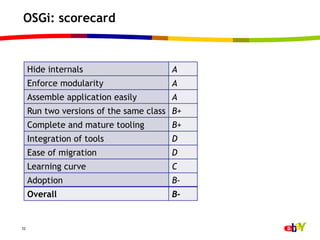
OSGi: scorecard


     Hide internals                    A
     Enforce modularity                A
     Assemble application easily       A
     Run two versions of the same class B+
     Complete and mature tooling       B+
     Integration of tools              D
     Ease of migration                 D
     Learning curve                    C
     Adoption                          B-
     Overall                           B-


22
Maven

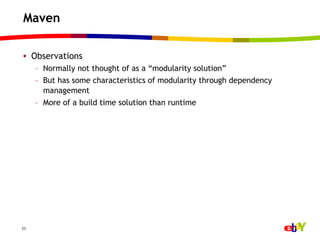
•  Observations
     –  Normally not thought of as a “modularity solution”
     –  But has some characteristics of modularity through dependency
        management
     –  More of a build time solution than runtime


23
Maven

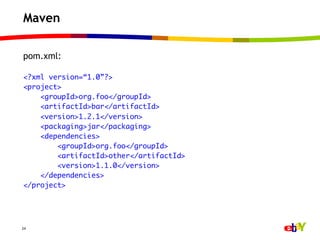
pom.xml:
	
<?xml version=“1.0”?>	
<project>	
    <groupId>org.foo</groupId>	
    <artifactId>bar</artifactId>	
    <version>1.2.1</version>	
    <packaging>jar</packaging>	
    <dependencies>	
        <groupId>org.foo</groupId>	
        <artifactId>other</artifactId>	
        <version>1.1.0</version>	
    </dependencies>	
</project>	


24
Maven

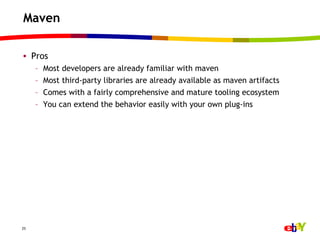
•  Pros
     –    Most developers are already familiar with maven
     –    Most third-party libraries are already available as maven artifacts
     –    Comes with a fairly comprehensive and mature tooling ecosystem
     –    You can extend the behavior easily with your own plug-ins


25
Maven

•  Cons: it’s not really meant as a modularity framework
     –  It does not enforce modularity (either at build time or runtime)
     –  You cannot hide internals
     –  At runtime, the global classpath still rules


26
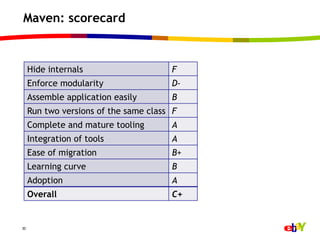
Maven

•  Hide internals: F
     –  Nothing there
     –  Still the global classpath rules

•  Enforce modularity: D-
     –    More of a build time concern than runtime
     –    No enforcement of dependencies: transitive build classpath!
     –    Not even an option of strict dependency build
     –    There is a dependency plugin that analyzes your dependencies


27
Maven

•  Assemble application easily: B
     –  Definitely possible
     –  But it’s only as good as your POM dependencies

•  Run two versions of the same class: F
     –  Nothing there
     –  Still the global classpath rules
     –  When there are version collisions, maven picks one for you J


28
Maven

•  Complete and mature tooling: A
     –  Command line build, IDE (m2eclipse), and maven repo

•  Integration of tools: A
•  Ease of migration: B+
     –  Boils down to creating POMs for existing non-maven projects
     –  Third-party libs are pretty much maven artifacts these days

•  Learning curve: B
     –  Most developers are already familiar with maven
     –  Maven has its own quirks

•  Adoption: A


29
Maven: scorecard


     Hide internals                    F
     Enforce modularity                D-
     Assemble application easily       B
     Run two versions of the same class F
     Complete and mature tooling       A
     Integration of tools              A
     Ease of migration                 B+
     Learning curve                    B
     Adoption                          A
     Overall                           C+


30
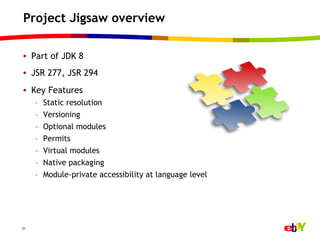
Project Jigsaw overview

•  Part of JDK 8
•  JSR 277, JSR 294
•  Key Features
     –    Static resolution
     –    Versioning
     –    Optional modules
     –    Permits
     –    Virtual modules
     –    Native packaging
     –    Module-private accessibility at language level


31
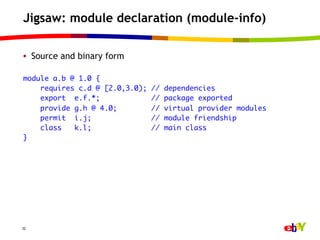
Jigsaw: module declaration (module-info)

•  Source and binary form

module a.b @ 1.0 {	
    requires c.d @ [2.0,3.0);   //   dependencies	
    export e.f.*;               //   package exported	
    provide g.h @ 4.0;          //   virtual provider modules	
    permit i.j;                 //   module friendship	
    class   k.l;                //   main class	
}	


32
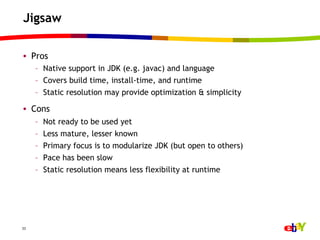
Jigsaw

•  Pros
     –  Native support in JDK (e.g. javac) and language
     –  Covers build time, install-time, and runtime
     –  Static resolution may provide optimization & simplicity

•  Cons
     –    Not ready to be used yet
     –    Less mature, lesser known
     –    Primary focus is to modularize JDK (but open to others)
     –    Pace has been slow
     –    Static resolution means less flexibility at runtime


33
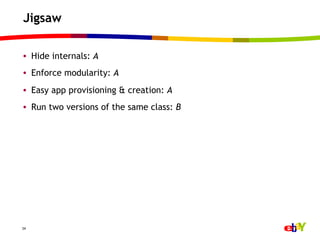
Jigsaw

•  Hide internals: A
•  Enforce modularity: A
•  Easy app provisioning & creation: A
•  Run two versions of the same class: B


34
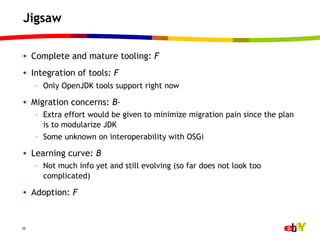
Jigsaw

•  Complete and mature tooling: F
•  Integration of tools: F
     –  Only OpenJDK tools support right now

•  Migration concerns: B-
     –  Extra effort would be given to minimize migration pain since the plan
        is to modularize JDK
     –  Some unknown on interoperability with OSGi

•  Learning curve: B
     –  Not much info yet and still evolving (so far does not look too
        complicated)

•  Adoption: F


35
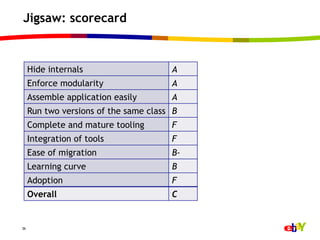
Jigsaw: scorecard


     Hide internals                    A
     Enforce modularity                A
     Assemble application easily       A
     Run two versions of the same class B
     Complete and mature tooling       F
     Integration of tools              F
     Ease of migration                 B-
     Learning curve                    B
     Adoption                          F
     Overall                           C


36
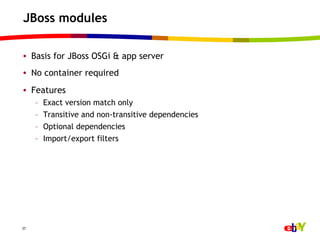
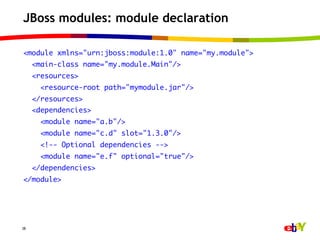
JBoss modules

•  Basis for JBoss OSGi & app server
•  No container required
•  Features
     –    Exact version match only
     –    Transitive and non-transitive dependencies
     –    Optional dependencies
     –    Import/export filters


37
JBoss modules: module declaration

<module xmlns="urn:jboss:module:1.0" name="my.module">	
     <main-class name="my.module.Main"/>	
     <resources>	
       <resource-root path="mymodule.jar"/>	
     </resources>	
     <dependencies>	
       <module name="a.b"/>	
       <module name="c.d" slot="1.3.0"/>	
       <!-- Optional dependencies -->	
       <module name="e.f" optional="true"/>	
     </dependencies>	
</module>	


38
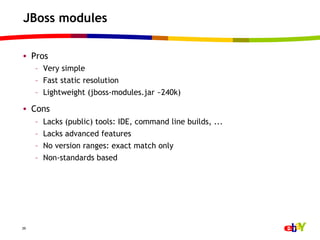
JBoss modules

•  Pros
     –  Very simple
     –  Fast static resolution
     –  Lightweight (jboss-modules.jar ~240k)

•  Cons
     –    Lacks (public) tools: IDE, command line builds, ...
     –    Lacks advanced features
     –    No version ranges: exact match only
     –    Non-standards based


39
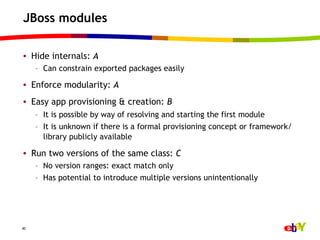
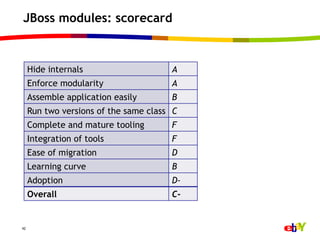
JBoss modules

•  Hide internals: A
     –  Can constrain exported packages easily

•  Enforce modularity: A
•  Easy app provisioning & creation: B
     –  It is possible by way of resolving and starting the first module
     –  It is unknown if there is a formal provisioning concept or framework/
        library publicly available

•  Run two versions of the same class: C
     –  No version ranges: exact match only
     –  Has potential to introduce multiple versions unintentionally


40
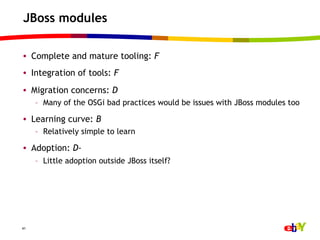
JBoss modules

•  Complete and mature tooling: F
•  Integration of tools: F
•  Migration concerns: D
     –  Many of the OSGi bad practices would be issues with JBoss modules too

•  Learning curve: B
     –  Relatively simple to learn

•  Adoption: D-
     –  Little adoption outside JBoss itself?


41
JBoss modules: scorecard


     Hide internals                    A
     Enforce modularity                A
     Assemble application easily       B
     Run two versions of the same class C
     Complete and mature tooling       F
     Integration of tools              F
     Ease of migration                 D
     Learning curve                    B
     Adoption                          D-
     Overall                           C-


42
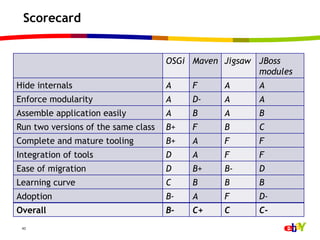
Scorecard


                                     OSGi Maven Jigsaw JBoss
                                                       modules
Hide internals                       A    F     A      A
Enforce modularity                   A    D-    A      A
Assemble application easily          A    B     A      B
Run two versions of the same class   B+   F     B      C
Complete and mature tooling          B+   A     F      F
Integration of tools                 D    A     F      F
Ease of migration                    D    B+    B-     D
Learning curve                       C    B     B      B
Adoption                             B-   A     F      D-
Overall                              B-   C+    C      C-
 43
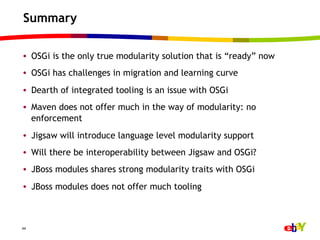
Summary

•  OSGi is the only true modularity solution that is “ready” now
•  OSGi has challenges in migration and learning curve
•  Dearth of integrated tooling is an issue with OSGi
•  Maven does not offer much in the way of modularity: no
   enforcement
•  Jigsaw will introduce language level modularity support
•  Will there be interoperability between Jigsaw and OSGi?
•  JBoss modules shares strong modularity traits with OSGi
•  JBoss modules does not offer much tooling


44
Thank you!


Sangjin Lee: sangjin.lee@ebay.com, twitter @sjlee
Tony Ng: tonyng@ebay.com


45

Calling all modularity solutions

  • 1.
    Calling All ModularitySolutions: A Comparative Study from eBay JavaOne 2011 Sangjin Lee, Tony Ng eBay Inc.
  • 2.
    Agenda •  What ismodularity? •  Why modularity? •  Evaluation criteria •  Scorecard •  Summary 2
  • 3.
    What is modularity? Dictionarysays... modular: employing or involving a module or modules as the basis of design or construction: modular housing units. Then what is a “module”? module: each of a set of standardized parts or independent units that can be used to construct a more complex structure, such as an item of furniture or a building. 3
  • 4.
    What is Modularity? Accordingto Wikipedia*: modular design: an approach that subdivides a system into smaller parts (modules) that can be independently created and then used in different systems to drive multiple functionalities. * http://en.wikipedia.org/wiki/Modular_design 4
  • 5.
    Key modularity conceptsfor software •  Building blocks •  Re-use •  Granularity •  Dependencies •  Encapsulation •  Composition •  Versioning Source: http://techdistrict.kirkk.com/2010/04/22/granularity-architectures-nemesis/ Author: Kirk Knoernschild 5
  • 6.
    Challenges for largeenterprises •  Some stats on the eBay code base –  ~ 44 million of lines of code and growing –  Hundreds of thousands of classes –  Tens of thousands of packages –  ~ 4,000+ jars •  We have too many dependencies and tight coupling in our code –  Everyone sees everyone else –  Everyone affects everyone else 6
  • 7.
    Challenges for largeenterprises •  Developer productivity/agility suffers as the knowledge goes down –  Changes ripple throughout the system –  Fallouts from changes/features are difficult to resolve –  Developers slow down and become risk averse –  Everyone affects everyone else: invites even more dependencies knowledge complexity code size 7
  • 8.
    Our goals withmodularity efforts •  Tame complexity •  Organize our code base in loose coupling fashion –  Coarse-grained modules: number matters! –  Declarative coupling contract –  Ability to hide internals •  Establish clear code ownership, boundaries and dependencies •  Allow different components (and teams) evolve at different speeds •  Increase development agility 8
  • 9.
    Considerations on anymodularity solutions •  Scalability: enterprise software tends to be large scale •  We need to consider a large group of developers with varying skill levels •  End-to-end development lifecycle is crucial •  Conversion/migration of existing code base is crucial –  We rarely start from vacuum –  We want to move over and modularize bulk of existing code –  It is imperative that we chart a realistic migration course that can be achieved within a reasonable amount of time –  We cannot afford disruption to business meanwhile: “change parts while the car is running” 9
  • 10.
    Evaluation criteria •  Modularityconcerns –  Hide internals (“reduce the surface area”) –  Enforce modularity –  Provision/assemble application easily –  Isolate and run two versions of the same class 10
  • 11.
    Evaluation criteria •  End-to-enddevelopment lifecycle: IDE, command line build, repository, server runtime, etc. –  Complete and mature tooling –  Integration and fidelity of tools across phases pull/push SCM pull Command line IDE build (CI) consume publish/consume Deployment Server runtime Repository packaging deploy 11
  • 12.
    Evaluation criteria •  Migrationconcerns –  Ease of conversion –  Learning curve •  Adoption: user communities and knowledge 12
  • 13.
    Evaluation candidates •  OSGi • Maven •  Jigsaw •  JBoss modules Disclaimer: this is not a comprehensive discussion of these technologies. We will focus only on modularity aspects and it will not be an exhaustive evaluation. 13
  • 14.
    OSGi •  Observations –  “The only game in town” (?) –  Strong modularity framework –  Focuses more on runtime than build time –  “All or nothing”: everything needs to be pretty much in an OSGi bundle –  Bundles and services are dynamic at runtime 14
  • 15.
    OSGi META-INF/MANIFEST.MF: Bundle-ManifestVersion: 2 Bundle-SymbolicName: org.foo.bar Bundle-Version:1.2.1 Import-Package: org.foo.other;version=“[1.1,2.0)”, javax.xml.parsers Export-Package: org.foo.bar;version=“1.2.3”, org.foo.bar.sub;uses=“org.foo.bar”;version=“1.2.1” 15
  • 16.
    OSGi •  Pros –  Enforces modularity strongly: it will let you know if you violate it –  Mature and comprehensive: covers pretty much all use cases regarding modularity –  Open standard –  Services: the ultimate decoupling force –  Can run two versions of the same class easily 16
  • 17.
    OSGi •  Cons –  Can run two versions of the same class easily, and run into trouble –  Some problems are nasty to troubleshoot (uses conflict anyone?) –  Still not many well-integrated tools across all phases: impedance mismatches –  Compared to strong runtime model, build side story is weak –  Migration can be quite painful –  Learning curve is still fairly steep 17
  • 18.
    OSGi •  Hide internals:A –  Declarative way to exclude module-private packages –  It’s strictly enforced: won’t resolve if it is violated •  Enforce modularity: A –  Requirements and capabilities declared in the manifest are strongly enforced: runtime will fail if violated 18
  • 19.
    OSGi •  Assemble applicationeasily: A –  Supported through subsystem provisioning (Karaf features, OSGi application model, etc.) –  Works quite well because the underlying dependency metadata is high quality •  Run two versions of the same class: B+ –  Works great if consumers are well-separated –  Supports version range dependencies –  However, has a chance of introducing nasty problems if one is not careful: uses conflicts, accidental wiring, and ClassCastExceptions –  Be careful what you wish for 19
  • 20.
    OSGi •  Complete andmature tooling: B+ –  IDE: PDE, bndtools, sigil, ... –  Command line build: maven + bundle plug-in, ant, tycho, ... –  Repository: OBR, target platform, maven repository •  Integration of tools: D –  Tools at different phases do not integrate too well –  Left to deal with a lot of little impedance mismatches 20
  • 21.
    OSGi •  Ease ofmigration: D –  Binaries can be “wrapped” into OSGi bundles –  All bad practices must be addressed before they can be used, however: split packages, Class.forName, thread context classloader, etc. –  Not all third-party libraries are available as OSGi bundles –  Need to take a continuous refactoring approach •  Learning curve: C –  The learning curve is fairly steep mainly because modularity is not always easy to master –  Dynamic behavior of bundles/services introduces complexity •  Adoption: B- –  Fairly wide adoption, but less so in enterprise applications 21
  • 22.
    OSGi: scorecard Hide internals A Enforce modularity A Assemble application easily A Run two versions of the same class B+ Complete and mature tooling B+ Integration of tools D Ease of migration D Learning curve C Adoption B- Overall B- 22
  • 23.
    Maven •  Observations –  Normally not thought of as a “modularity solution” –  But has some characteristics of modularity through dependency management –  More of a build time solution than runtime 23
  • 24.
    Maven pom.xml: <?xml version=“1.0”?> <project> <groupId>org.foo</groupId> <artifactId>bar</artifactId> <version>1.2.1</version> <packaging>jar</packaging> <dependencies> <groupId>org.foo</groupId> <artifactId>other</artifactId> <version>1.1.0</version> </dependencies> </project> 24
  • 25.
    Maven •  Pros –  Most developers are already familiar with maven –  Most third-party libraries are already available as maven artifacts –  Comes with a fairly comprehensive and mature tooling ecosystem –  You can extend the behavior easily with your own plug-ins 25
  • 26.
    Maven •  Cons: it’snot really meant as a modularity framework –  It does not enforce modularity (either at build time or runtime) –  You cannot hide internals –  At runtime, the global classpath still rules 26
  • 27.
    Maven •  Hide internals:F –  Nothing there –  Still the global classpath rules •  Enforce modularity: D- –  More of a build time concern than runtime –  No enforcement of dependencies: transitive build classpath! –  Not even an option of strict dependency build –  There is a dependency plugin that analyzes your dependencies 27
  • 28.
    Maven •  Assemble applicationeasily: B –  Definitely possible –  But it’s only as good as your POM dependencies •  Run two versions of the same class: F –  Nothing there –  Still the global classpath rules –  When there are version collisions, maven picks one for you J 28
  • 29.
    Maven •  Complete andmature tooling: A –  Command line build, IDE (m2eclipse), and maven repo •  Integration of tools: A •  Ease of migration: B+ –  Boils down to creating POMs for existing non-maven projects –  Third-party libs are pretty much maven artifacts these days •  Learning curve: B –  Most developers are already familiar with maven –  Maven has its own quirks •  Adoption: A 29
  • 30.
    Maven: scorecard Hide internals F Enforce modularity D- Assemble application easily B Run two versions of the same class F Complete and mature tooling A Integration of tools A Ease of migration B+ Learning curve B Adoption A Overall C+ 30
  • 31.
    Project Jigsaw overview • Part of JDK 8 •  JSR 277, JSR 294 •  Key Features –  Static resolution –  Versioning –  Optional modules –  Permits –  Virtual modules –  Native packaging –  Module-private accessibility at language level 31
  • 32.
    Jigsaw: module declaration(module-info) •  Source and binary form module a.b @ 1.0 { requires c.d @ [2.0,3.0); // dependencies export e.f.*; // package exported provide g.h @ 4.0; // virtual provider modules permit i.j; // module friendship class k.l; // main class } 32
  • 33.
    Jigsaw •  Pros –  Native support in JDK (e.g. javac) and language –  Covers build time, install-time, and runtime –  Static resolution may provide optimization & simplicity •  Cons –  Not ready to be used yet –  Less mature, lesser known –  Primary focus is to modularize JDK (but open to others) –  Pace has been slow –  Static resolution means less flexibility at runtime 33
  • 34.
    Jigsaw •  Hide internals:A •  Enforce modularity: A •  Easy app provisioning & creation: A •  Run two versions of the same class: B 34
  • 35.
    Jigsaw •  Complete andmature tooling: F •  Integration of tools: F –  Only OpenJDK tools support right now •  Migration concerns: B- –  Extra effort would be given to minimize migration pain since the plan is to modularize JDK –  Some unknown on interoperability with OSGi •  Learning curve: B –  Not much info yet and still evolving (so far does not look too complicated) •  Adoption: F 35
  • 36.
    Jigsaw: scorecard Hide internals A Enforce modularity A Assemble application easily A Run two versions of the same class B Complete and mature tooling F Integration of tools F Ease of migration B- Learning curve B Adoption F Overall C 36
  • 37.
    JBoss modules •  Basisfor JBoss OSGi & app server •  No container required •  Features –  Exact version match only –  Transitive and non-transitive dependencies –  Optional dependencies –  Import/export filters 37
  • 38.
    JBoss modules: moduledeclaration <module xmlns="urn:jboss:module:1.0" name="my.module"> <main-class name="my.module.Main"/> <resources> <resource-root path="mymodule.jar"/> </resources> <dependencies> <module name="a.b"/> <module name="c.d" slot="1.3.0"/> <!-- Optional dependencies --> <module name="e.f" optional="true"/> </dependencies> </module> 38
  • 39.
    JBoss modules •  Pros –  Very simple –  Fast static resolution –  Lightweight (jboss-modules.jar ~240k) •  Cons –  Lacks (public) tools: IDE, command line builds, ... –  Lacks advanced features –  No version ranges: exact match only –  Non-standards based 39
  • 40.
    JBoss modules •  Hideinternals: A –  Can constrain exported packages easily •  Enforce modularity: A •  Easy app provisioning & creation: B –  It is possible by way of resolving and starting the first module –  It is unknown if there is a formal provisioning concept or framework/ library publicly available •  Run two versions of the same class: C –  No version ranges: exact match only –  Has potential to introduce multiple versions unintentionally 40
  • 41.
    JBoss modules •  Completeand mature tooling: F •  Integration of tools: F •  Migration concerns: D –  Many of the OSGi bad practices would be issues with JBoss modules too •  Learning curve: B –  Relatively simple to learn •  Adoption: D- –  Little adoption outside JBoss itself? 41
  • 42.
    JBoss modules: scorecard Hide internals A Enforce modularity A Assemble application easily B Run two versions of the same class C Complete and mature tooling F Integration of tools F Ease of migration D Learning curve B Adoption D- Overall C- 42
  • 43.
    Scorecard OSGi Maven Jigsaw JBoss modules Hide internals A F A A Enforce modularity A D- A A Assemble application easily A B A B Run two versions of the same class B+ F B C Complete and mature tooling B+ A F F Integration of tools D A F F Ease of migration D B+ B- D Learning curve C B B B Adoption B- A F D- Overall B- C+ C C- 43
  • 44.
    Summary •  OSGi isthe only true modularity solution that is “ready” now •  OSGi has challenges in migration and learning curve •  Dearth of integrated tooling is an issue with OSGi •  Maven does not offer much in the way of modularity: no enforcement •  Jigsaw will introduce language level modularity support •  Will there be interoperability between Jigsaw and OSGi? •  JBoss modules shares strong modularity traits with OSGi •  JBoss modules does not offer much tooling 44
  • 45.
    Thank you! Sangjin Lee:sangjin.lee@ebay.com, twitter @sjlee Tony Ng: tonyng@ebay.com 45