Unit III
Operation and Management
Client/Server Database
• In client-server architecture many clients
connected with one server.
• The server is center lines it provides services
to all clients.
• All clients request to the server for different
Service.
• The server displays the results according to
the client’s request.
• Client/server architecture is a computing
model in which the server hosts (computer),
send and manages most of the resources and
works to be required by the client.
• In this type of architecture has one or more
client computers attached to a central server
over a network.
• This system shares different resources.
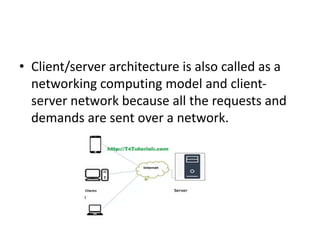
• Client/server architecture is also called as a
networking computing model and client-
server network because all the requests and
demands are sent over a network.
Working of Client-server Database
Architecture
• Basically client-server model defines how the
server provides services to clients Server is a
centralized computer that provides services to all
attach clients.
• For example file server, web server, etc. each the
basic work of server to provide services to each
client. The client can be a laptop computer,
tablets, and smartphones, etc.
• The server has many types of relationship with
clients.
• Many servers have one too many
relationships with clients in one too many
relationships many clients connected with one
server.
• When one client wants to communicate with the
server. The server may be accepted or rejects the
request of clients.
• When the server computer accepts the request
of clients than server maintains a connection
according to a defined protocol. The protocol
rules over the network.
• That must be followed for any network
connection. If the one client wants to send an
email over the network.
• It requests the server, the SMTP (the protocol
that is SMPT is standing for simple mail
transfer protocol that used to transfer a mail
over the network.
• .
• SMTP is a set of commands or commands that
check authentication and the transfer of email.
• When configuring the settings for your e-mail
program, you usually need to set the SMTP server
to your local Internet Service Provider’s SMTP
settings. After all process, the server will transfer
e-mail to the desired client.
• Another example of a client-server model is
online gaming
Structure of Client-server Database
Architecture
By using this architecture structure this software
is divided into three different tiers:
• Presentation tier
• Logic tier
• Data-tier
Each tier type builds and maintains
independently.
1-Presentation tier
• This is the first and topmost level of the application .
The basic work of this layer provides user interface the
interface is a graphical user interface.
• The graphical user interface is an interface that consists
of menus, buttons, and icons, etc.
• The presentation tier presents information related to
such work as browsing, sales purchasing, and shopping
cart contents.
• It attaches with other tiers by computing results to the
browser/client tier and all other tiers in the network.
2-Logic tier
• The logical tier is also known as data access tier and
middle tier. It lies between the presentation tier and
the data tier.
• It basically controls the application’s functions by
performing processing.
• The components that build this layer exist on the
server, assist the resources sharing these components
also define the business rules like different government
legal rules, data rules, and different business algorithm
.which are designed to keep data structure consistent.
3-Data tier
• This is basically the DBMS (database
management system) layer. This layer consist of
database.it can be used through the business
services layer.in this layer, data is stored and
retrieved .the responsibility of this layer to keep
data consistent and independent.
• Providing data its own tier also improves
scalability and performance. This layer consists of
data access components.
Advantages of Client-server Database
Architecture in DBMS
• All the data and resources are controlled by server .im
this way all data and resources are very consistent.
• You can easily increase the number of client in this
architecture at any time. This all increases the
scalability of the network.
• This is very easy to maintain you can easily repair,
replace or add clients in this network. the
independence of the changes also known as
encapsulation.
• This network is very easy to use and it is not
complicated.
Disadvantages of Client-server
Database Architecture in DBMS
• Traffic is a big problem in this network.
• When you add large numbers of the client with server
this network will be more complicated.
• When the server goes down all the clients are not able
to send their request. The whole work will be stopped
• The hardware and software are very expensive.
• The client does not have resources for each resource
they need to request the server. Because of all
resources exit on server
•
DATA WAREHOUSING
• A Database Management System (DBMS)
stores data in the form of tables, uses ER
model and the goal is ACID properties. For
example, a DBMS of college has tables for
students, faculty, etc.
• A Data Warehouse is separate from DBMS, it
stores a huge amount of data, which is typically
collected from multiple heterogeneous sources
like files, DBMS, etc.
• The goal is to produce statistical results that may
help in decision makings.
• For example, a college might want to see quick
different results, like how the placement of CS
students has improved over the last 10 years, in
terms of salaries, counts, etc.
• Need for Data Warehouse
An ordinary Database can store MBs to GBs of data and
that too for a specific purpose.
• For storing data of TB size, the storage shifted to Data
Warehouse.
• Besides this, a transactional database doesn’t offer
itself to analytics.
• To effectively perform analytics, an organization keeps
a central Data Warehouse to closely study its business
by organizing, understanding, and using its historic
data for taking strategic decisions and analyzing
trends.
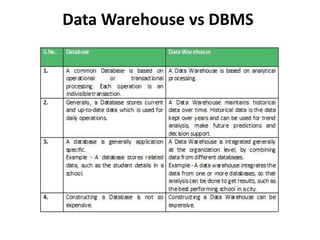
Data Warehouse vs DBMS
Example Applications of Data
Warehousing
• Data Warehousing can be applied anywhere where we
have a huge amount of data and we want to see
statistical results that help in decision making.
• Social Media Websites: The social networking websites
like Facebook, Twitter, Linkedin, etc. are based on
analyzing large data sets.
• These sites gather data related to members, groups,
locations, etc., and store it in a single central
repository. Being a large amount of data, Data
Warehouse is needed for implementing the same.
• Banking: Most of the banks these days use warehouses
to see the spending patterns of account/cardholders.
They use this to provide them with special offers,
deals, etc.
• Government: Government uses a data warehouse to
store and analyze tax payments which are used to
detect tax thefts.
There can be many more applications in
different sectors like E-Commerce,
telecommunications, Transportation Services,
Marketing and Distribution, Healthcare, and Retail.
What are the steps of SQL Query
processing in DBMS?
• Query Processing is a translation of high-level queries
into low-level expression. It is a step wise process that
can be used at the physical level of the file system,
query optimization and actual execution of the query
to get the result.
• It requires the basic concepts of relational algebra and
file structure. It refers to the range of activities that are
involved in extracting data from the database. It
includes translation of queries in high-level database
languages into expressions that can be implemented at
the physical level of the file system.
• Given below is the diagram that shows the
steps of the structured query language (SQL)
query processing −
• Steps for SQL processing in database
management system (DBMS) are as follows −
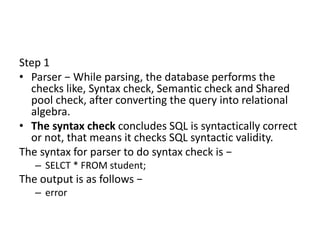
Step 1
• Parser − While parsing, the database performs the
checks like, Syntax check, Semantic check and Shared
pool check, after converting the query into relational
algebra.
• The syntax check concludes SQL is syntactically correct
or not, that means it checks SQL syntactic validity.
The syntax for parser to do syntax check is −
– SELCT * FROM student;
The output is as follows −
– error
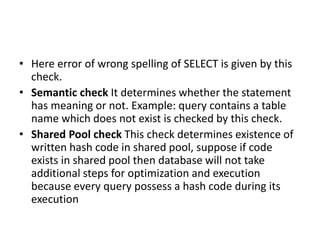
• Here error of wrong spelling of SELECT is given by this
check.
• Semantic check It determines whether the statement
has meaning or not. Example: query contains a table
name which does not exist is checked by this check.
• Shared Pool check This check determines existence of
written hash code in shared pool, suppose if code
exists in shared pool then database will not take
additional steps for optimization and execution
because every query possess a hash code during its
execution
Step 1
• Optimizer − In this stage, the database has to perform
a hard parse at least for one unique DML statement
and it has to do optimization during this parse. This
database never optimizes DDL unless it includes a DML
component.
• It is a process where multiple query execution plans for
satisfying a query are examined and the most efficient
query plan is satisfied for execution.
• Database catalogue stores the execution plans and
then optimizer passes the lowest cost plan for
execution.
Step 2
• Row Source Generation − The Row Source
Generation is software which receives an optimal
execution plan from the optimizer and produces
an iterative execution plan which is used by the
rest of the database. The iterative plan is the
binary program that when executed by the sql
engine produces the result set.
Step 3
• Execution Engine − Execution engine is helpful to
run the query and display the required result.
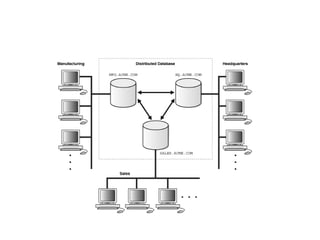
Distributed Database System
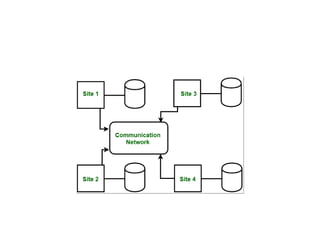
• A distributed database is basically a database that
is not limited to one system, it is spread over
different sites, i.e, on multiple computers or over
a network of computers.
• A distributed database system is located on
various sites that don’t share physical
components.
• This may be required when a particular database
needs to be accessed by various users globally.
• It needs to be managed such that for the users it
looks like one single database.
Types:
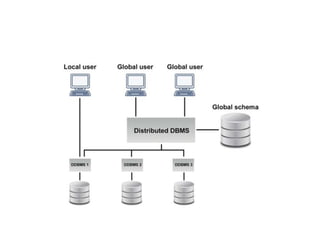
• 1. Homogeneous Database:
In a homogeneous database, all different sites
store database identically.
• The operating system, database management
system, and the data structures used – all are
the same at all sites. Hence, they’re easy to
manage.
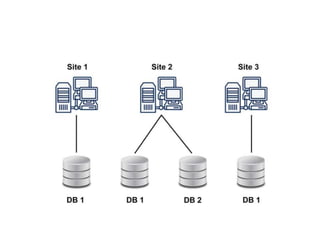
• 2. Heterogeneous Database:
In a heterogeneous distributed database, different sites
can use different schema and software that can lead to
problems in query processing and transactions.
• Also, a particular site might be completely unaware of
the other sites. Different computers may use a
different operating system, different database
application. They may even use different data models
for the database.
• Hence, translations are required for different sites to
communicate.
• Distributed Data Storage :
There are 2 ways in which data can be stored
on different sites. These are:
• 1. Replication –
In this approach, the entire relationship is
stored redundantly at 2 or more sites. If the
entire database is available at all sites, it is a
fully redundant database. Hence, in
replication, systems maintain copies of data.
• This is advantageous as it increases the availability of
data at different sites.
• Also, now query requests can be processed in parallel.
However, it has certain disadvantages as well.
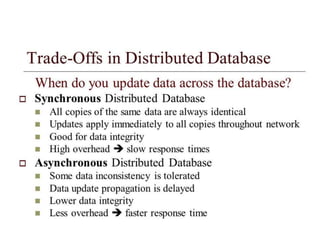
• Data needs to be constantly updated. Any change
made at one site needs to be recorded at every site
that relation is stored or else it may lead to
inconsistency.
• This is a lot of overhead. Also, concurrency control
becomes way more complex as concurrent access now
needs to be checked over a number of sites.
2. Fragmentation –
• In this approach, the relations are fragmented
(i.e., they’re divided into smaller parts) and each
of the fragments is stored in different sites where
they’re required.
• It must be made sure that the fragments are such
that they can be used to reconstruct the original
relation (i.e, there isn’t any loss of data).
• Fragmentation is advantageous as it doesn’t
create copies of data, consistency is not a
problem.
Fragmentation of relations can be done in two ways:
• Horizontal fragmentation – Splitting by rows –
The relation is fragmented into groups of tuples so that
each tuple is assigned to at least one fragment.
• Vertical fragmentation – Splitting by columns –
The schema of the relation is divided into smaller
schemas. Each fragment must contain a common
candidate key so as to ensure a lossless join.
In certain cases, an approach that is hybrid of
fragmentation and replication is used
Applications of Distributed Database
• It is used in Corporate Management
Information System.
• It is used in multimedia applications.
• Used in Military’s control system, Hotel chains
etc.
• It is also used in manufacturing control
system.
Difference between Client /Server
and Distributed DBMS
• Client/Server :
Client/server is developed to deal with various
computing environments that have a large
number of computers and servers connected
together via a network.
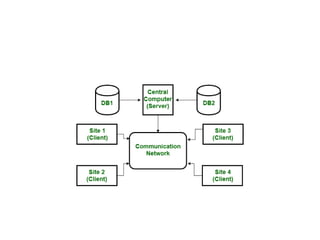
In this architecture, a Client is a user machine
which provides the user interface and local
processing capabilities.
• When any client requires additional
functionality like database access, it can
connect to Server that is capable of providing
the functionality needed by the client.
• Basically Server is a machine that provides
services to the Client i.e user machine.
• Distributed DBMS :
In Distributed DBMS, data is distributed over the
geographical site.
Each site is a complete database system site on
its end but the different sites have to work
together .
Because if any user wants to access the data it
can easily access data anywhere in the network
as the data is stored at the user’s own computer.
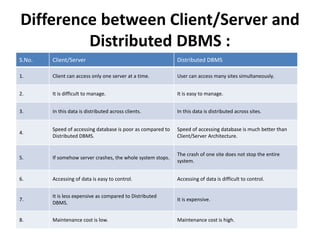
Difference between Client/Server and
Distributed DBMS :
S.No. Client/Server Distributed DBMS
1. Client can access only one server at a time. User can access many sites simultaneously.
2. It is difficult to manage. It is easy to manage.
3. In this data is distributed across clients. In this data is distributed across sites.
4.
Speed of accessing database is poor as compared to
Distributed DBMS.
Speed of accessing database is much better than
Client/Server Architecture.
5. If somehow server crashes, the whole system stops.
The crash of one site does not stop the entire
system.
6. Accessing of data is easy to control. Accessing of data is difficult to control.
7.
It is less expensive as compared to Distributed
DBMS.
It is expensive.
8. Maintenance cost is low. Maintenance cost is high.
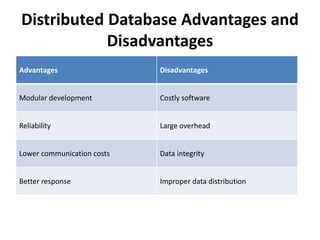
Distributed Database Advantages and
Disadvantages
Advantages Disadvantages
Modular development Costly software
Reliability Large overhead
Lower communication costs Data integrity
Better response Improper data distribution
Advantages
• Modular Development. Modular development of a
distributed database implies that a system can be expanded
to new locations or units by adding new servers and data to
the existing setup and connecting them to the distributed
system without interruption. This type of expansion causes
no interruptions in the functioning of distributed
databases.
• Reliability. Distributed databases offer greater reliability in
contrast to centralized databases. In case of a database
failure in a centralized database, the system comes to a
complete stop. In a distributed database, the system
functions even when failures occur, only delivering reduced
performance until the issue is resolved.
• Lower Communication Cost. Locally storing data
reduces communication costs for data
manipulation in distributed databases. Local data
storage is not possible in centralized databases.
• Better Response. Efficient data distribution in a
distributed database system provides a faster
response when user requests are met locally. In
centralized databases, user requests pass through
the central machine, which processes all
requests. The result is an increase in response
time, especially with a lot of queries.
Disadvantages
• Costly Software. Ensuring data transparency
and coordination across multiple sites often
requires using expensive software in a
distributed database system.
• Large Overhead. Many operations on multiple
sites requires numerous calculations and
constant synchronization when database
replication is used, causing a lot of processing
overhead.
• Data Integrity. A possible issue when using
database replication is data integrity, which is
compromised by updating data at multiple
sites.
• Improper Data Distribution. Responsiveness
to user requests largely depends on proper
data distribution. That means responsiveness
can be reduced if data is not correctly
distributed across multiple sites.
UNIT3 DBMS.pptx operation nd management of data base

UNIT3 DBMS.pptx operation nd management of data base

  • 1.
  • 2.
    Client/Server Database • Inclient-server architecture many clients connected with one server. • The server is center lines it provides services to all clients. • All clients request to the server for different Service. • The server displays the results according to the client’s request.
  • 3.
    • Client/server architectureis a computing model in which the server hosts (computer), send and manages most of the resources and works to be required by the client. • In this type of architecture has one or more client computers attached to a central server over a network. • This system shares different resources.
  • 4.
    • Client/server architectureis also called as a networking computing model and client- server network because all the requests and demands are sent over a network.
  • 5.
    Working of Client-serverDatabase Architecture • Basically client-server model defines how the server provides services to clients Server is a centralized computer that provides services to all attach clients. • For example file server, web server, etc. each the basic work of server to provide services to each client. The client can be a laptop computer, tablets, and smartphones, etc. • The server has many types of relationship with clients.
  • 6.
    • Many servershave one too many relationships with clients in one too many relationships many clients connected with one server. • When one client wants to communicate with the server. The server may be accepted or rejects the request of clients. • When the server computer accepts the request of clients than server maintains a connection according to a defined protocol. The protocol rules over the network.
  • 7.
    • That mustbe followed for any network connection. If the one client wants to send an email over the network. • It requests the server, the SMTP (the protocol that is SMPT is standing for simple mail transfer protocol that used to transfer a mail over the network. • .
  • 8.
    • SMTP isa set of commands or commands that check authentication and the transfer of email. • When configuring the settings for your e-mail program, you usually need to set the SMTP server to your local Internet Service Provider’s SMTP settings. After all process, the server will transfer e-mail to the desired client. • Another example of a client-server model is online gaming
  • 9.
    Structure of Client-serverDatabase Architecture By using this architecture structure this software is divided into three different tiers: • Presentation tier • Logic tier • Data-tier Each tier type builds and maintains independently.
  • 10.
    1-Presentation tier • Thisis the first and topmost level of the application . The basic work of this layer provides user interface the interface is a graphical user interface. • The graphical user interface is an interface that consists of menus, buttons, and icons, etc. • The presentation tier presents information related to such work as browsing, sales purchasing, and shopping cart contents. • It attaches with other tiers by computing results to the browser/client tier and all other tiers in the network.
  • 11.
    2-Logic tier • Thelogical tier is also known as data access tier and middle tier. It lies between the presentation tier and the data tier. • It basically controls the application’s functions by performing processing. • The components that build this layer exist on the server, assist the resources sharing these components also define the business rules like different government legal rules, data rules, and different business algorithm .which are designed to keep data structure consistent.
  • 12.
    3-Data tier • Thisis basically the DBMS (database management system) layer. This layer consist of database.it can be used through the business services layer.in this layer, data is stored and retrieved .the responsibility of this layer to keep data consistent and independent. • Providing data its own tier also improves scalability and performance. This layer consists of data access components.
  • 13.
    Advantages of Client-serverDatabase Architecture in DBMS • All the data and resources are controlled by server .im this way all data and resources are very consistent. • You can easily increase the number of client in this architecture at any time. This all increases the scalability of the network. • This is very easy to maintain you can easily repair, replace or add clients in this network. the independence of the changes also known as encapsulation. • This network is very easy to use and it is not complicated.
  • 14.
    Disadvantages of Client-server DatabaseArchitecture in DBMS • Traffic is a big problem in this network. • When you add large numbers of the client with server this network will be more complicated. • When the server goes down all the clients are not able to send their request. The whole work will be stopped • The hardware and software are very expensive. • The client does not have resources for each resource they need to request the server. Because of all resources exit on server •
  • 15.
    DATA WAREHOUSING • ADatabase Management System (DBMS) stores data in the form of tables, uses ER model and the goal is ACID properties. For example, a DBMS of college has tables for students, faculty, etc.
  • 16.
    • A DataWarehouse is separate from DBMS, it stores a huge amount of data, which is typically collected from multiple heterogeneous sources like files, DBMS, etc. • The goal is to produce statistical results that may help in decision makings. • For example, a college might want to see quick different results, like how the placement of CS students has improved over the last 10 years, in terms of salaries, counts, etc.
  • 17.
    • Need forData Warehouse An ordinary Database can store MBs to GBs of data and that too for a specific purpose. • For storing data of TB size, the storage shifted to Data Warehouse. • Besides this, a transactional database doesn’t offer itself to analytics. • To effectively perform analytics, an organization keeps a central Data Warehouse to closely study its business by organizing, understanding, and using its historic data for taking strategic decisions and analyzing trends.
  • 18.
  • 19.
    Example Applications ofData Warehousing • Data Warehousing can be applied anywhere where we have a huge amount of data and we want to see statistical results that help in decision making. • Social Media Websites: The social networking websites like Facebook, Twitter, Linkedin, etc. are based on analyzing large data sets. • These sites gather data related to members, groups, locations, etc., and store it in a single central repository. Being a large amount of data, Data Warehouse is needed for implementing the same.
  • 20.
    • Banking: Mostof the banks these days use warehouses to see the spending patterns of account/cardholders. They use this to provide them with special offers, deals, etc. • Government: Government uses a data warehouse to store and analyze tax payments which are used to detect tax thefts. There can be many more applications in different sectors like E-Commerce, telecommunications, Transportation Services, Marketing and Distribution, Healthcare, and Retail.
  • 21.
    What are thesteps of SQL Query processing in DBMS? • Query Processing is a translation of high-level queries into low-level expression. It is a step wise process that can be used at the physical level of the file system, query optimization and actual execution of the query to get the result. • It requires the basic concepts of relational algebra and file structure. It refers to the range of activities that are involved in extracting data from the database. It includes translation of queries in high-level database languages into expressions that can be implemented at the physical level of the file system.
  • 22.
    • Given belowis the diagram that shows the steps of the structured query language (SQL) query processing − • Steps for SQL processing in database management system (DBMS) are as follows −
  • 23.
    Step 1 • Parser− While parsing, the database performs the checks like, Syntax check, Semantic check and Shared pool check, after converting the query into relational algebra. • The syntax check concludes SQL is syntactically correct or not, that means it checks SQL syntactic validity. The syntax for parser to do syntax check is − – SELCT * FROM student; The output is as follows − – error
  • 24.
    • Here errorof wrong spelling of SELECT is given by this check. • Semantic check It determines whether the statement has meaning or not. Example: query contains a table name which does not exist is checked by this check. • Shared Pool check This check determines existence of written hash code in shared pool, suppose if code exists in shared pool then database will not take additional steps for optimization and execution because every query possess a hash code during its execution
  • 25.
    Step 1 • Optimizer− In this stage, the database has to perform a hard parse at least for one unique DML statement and it has to do optimization during this parse. This database never optimizes DDL unless it includes a DML component. • It is a process where multiple query execution plans for satisfying a query are examined and the most efficient query plan is satisfied for execution. • Database catalogue stores the execution plans and then optimizer passes the lowest cost plan for execution.
  • 26.
    Step 2 • RowSource Generation − The Row Source Generation is software which receives an optimal execution plan from the optimizer and produces an iterative execution plan which is used by the rest of the database. The iterative plan is the binary program that when executed by the sql engine produces the result set. Step 3 • Execution Engine − Execution engine is helpful to run the query and display the required result.
  • 27.
    Distributed Database System •A distributed database is basically a database that is not limited to one system, it is spread over different sites, i.e, on multiple computers or over a network of computers. • A distributed database system is located on various sites that don’t share physical components. • This may be required when a particular database needs to be accessed by various users globally. • It needs to be managed such that for the users it looks like one single database.
  • 29.
    Types: • 1. HomogeneousDatabase: In a homogeneous database, all different sites store database identically. • The operating system, database management system, and the data structures used – all are the same at all sites. Hence, they’re easy to manage.
  • 31.
    • 2. HeterogeneousDatabase: In a heterogeneous distributed database, different sites can use different schema and software that can lead to problems in query processing and transactions. • Also, a particular site might be completely unaware of the other sites. Different computers may use a different operating system, different database application. They may even use different data models for the database. • Hence, translations are required for different sites to communicate.
  • 33.
    • Distributed DataStorage : There are 2 ways in which data can be stored on different sites. These are: • 1. Replication – In this approach, the entire relationship is stored redundantly at 2 or more sites. If the entire database is available at all sites, it is a fully redundant database. Hence, in replication, systems maintain copies of data.
  • 34.
    • This isadvantageous as it increases the availability of data at different sites. • Also, now query requests can be processed in parallel. However, it has certain disadvantages as well. • Data needs to be constantly updated. Any change made at one site needs to be recorded at every site that relation is stored or else it may lead to inconsistency. • This is a lot of overhead. Also, concurrency control becomes way more complex as concurrent access now needs to be checked over a number of sites.
  • 35.
    2. Fragmentation – •In this approach, the relations are fragmented (i.e., they’re divided into smaller parts) and each of the fragments is stored in different sites where they’re required. • It must be made sure that the fragments are such that they can be used to reconstruct the original relation (i.e, there isn’t any loss of data). • Fragmentation is advantageous as it doesn’t create copies of data, consistency is not a problem.
  • 36.
    Fragmentation of relationscan be done in two ways: • Horizontal fragmentation – Splitting by rows – The relation is fragmented into groups of tuples so that each tuple is assigned to at least one fragment. • Vertical fragmentation – Splitting by columns – The schema of the relation is divided into smaller schemas. Each fragment must contain a common candidate key so as to ensure a lossless join. In certain cases, an approach that is hybrid of fragmentation and replication is used
  • 37.
    Applications of DistributedDatabase • It is used in Corporate Management Information System. • It is used in multimedia applications. • Used in Military’s control system, Hotel chains etc. • It is also used in manufacturing control system.
  • 38.
    Difference between Client/Server and Distributed DBMS • Client/Server : Client/server is developed to deal with various computing environments that have a large number of computers and servers connected together via a network. In this architecture, a Client is a user machine which provides the user interface and local processing capabilities.
  • 39.
    • When anyclient requires additional functionality like database access, it can connect to Server that is capable of providing the functionality needed by the client. • Basically Server is a machine that provides services to the Client i.e user machine.
  • 41.
    • Distributed DBMS: In Distributed DBMS, data is distributed over the geographical site. Each site is a complete database system site on its end but the different sites have to work together . Because if any user wants to access the data it can easily access data anywhere in the network as the data is stored at the user’s own computer.
  • 43.
    Difference between Client/Serverand Distributed DBMS : S.No. Client/Server Distributed DBMS 1. Client can access only one server at a time. User can access many sites simultaneously. 2. It is difficult to manage. It is easy to manage. 3. In this data is distributed across clients. In this data is distributed across sites. 4. Speed of accessing database is poor as compared to Distributed DBMS. Speed of accessing database is much better than Client/Server Architecture. 5. If somehow server crashes, the whole system stops. The crash of one site does not stop the entire system. 6. Accessing of data is easy to control. Accessing of data is difficult to control. 7. It is less expensive as compared to Distributed DBMS. It is expensive. 8. Maintenance cost is low. Maintenance cost is high.
  • 44.
    Distributed Database Advantagesand Disadvantages Advantages Disadvantages Modular development Costly software Reliability Large overhead Lower communication costs Data integrity Better response Improper data distribution
  • 45.
    Advantages • Modular Development.Modular development of a distributed database implies that a system can be expanded to new locations or units by adding new servers and data to the existing setup and connecting them to the distributed system without interruption. This type of expansion causes no interruptions in the functioning of distributed databases. • Reliability. Distributed databases offer greater reliability in contrast to centralized databases. In case of a database failure in a centralized database, the system comes to a complete stop. In a distributed database, the system functions even when failures occur, only delivering reduced performance until the issue is resolved.
  • 46.
    • Lower CommunicationCost. Locally storing data reduces communication costs for data manipulation in distributed databases. Local data storage is not possible in centralized databases. • Better Response. Efficient data distribution in a distributed database system provides a faster response when user requests are met locally. In centralized databases, user requests pass through the central machine, which processes all requests. The result is an increase in response time, especially with a lot of queries.
  • 47.
    Disadvantages • Costly Software.Ensuring data transparency and coordination across multiple sites often requires using expensive software in a distributed database system. • Large Overhead. Many operations on multiple sites requires numerous calculations and constant synchronization when database replication is used, causing a lot of processing overhead.
  • 48.
    • Data Integrity.A possible issue when using database replication is data integrity, which is compromised by updating data at multiple sites. • Improper Data Distribution. Responsiveness to user requests largely depends on proper data distribution. That means responsiveness can be reduced if data is not correctly distributed across multiple sites.